This article has been revised and updated from its original version published in 2022 to reflect the latest Apache Iceberg developments, including V3 features, the REST Catalog specification, and the rise of Apache Polaris.
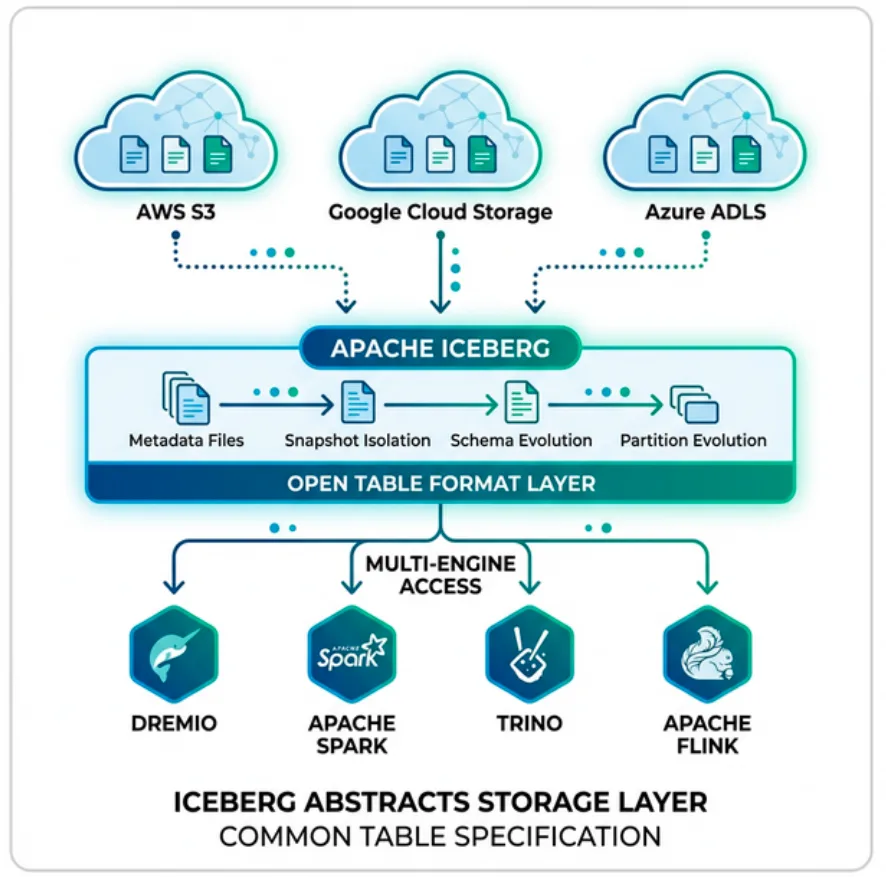
Apache Iceberg is an open table format for large-scale analytic datasets. It sits between your query engine (Spark, Flink, Dremio, Trino, DuckDB) and your data files (Parquet, ORC, Avro) on object storage. Iceberg adds the transactional guarantees, performance optimizations, and management capabilities that raw file formats lack.
If you're hearing terms like "data lakehouse," "open table format," or "REST Catalog" and want to understand what they mean in practice, this guide covers everything from architecture to hands-on tutorials.
Why Apache Iceberg Exists
Traditional data lakes store files in directories on object storage. To run a query, the engine lists those directories to find the right files, a process that becomes painfully slow as tables grow to thousands or millions of files.
Hive tables improved on this by tracking partitions in a metastore, but they still had major limitations:
No ACID transactions: Concurrent writes could corrupt data
No schema evolution: Adding a column required rewriting the entire table
Partition awareness required: Users had to know the partition scheme and include partition columns in every query
No time travel: Once data was overwritten, the previous version was gone
Single-engine lock-in: Tight coupling to Hive and Spark
Apache Iceberg was created at Netflix to solve all of these problems. It was donated to the Apache Software Foundation in 2018 and has since become the most widely adopted open table format, supported by more engines than any competitor.
Try Dremio’s Interactive Demo
Explore this interactive demo and see how Dremio's Intelligent Lakehouse enables Agentic AI
How Apache Iceberg Works: The Metadata Tree
Iceberg replaces directory listings with a structured metadata tree. Understanding this tree is the key to understanding how Iceberg delivers performance and reliability.
The Five Layers
Catalog → Metadata File → Manifest List → Manifest Files → Data Files
Catalog: A pointer to the current metadata file. This is the single source of truth for where the table's metadata lives. One HTTP GET or object storage read.
Metadata File (JSON): Contains the table's complete definition: schema history, partition specs, sort orders, snapshot list, and table properties. Each commit writes a new metadata file.
Manifest List (Avro): One per snapshot. Groups manifest files with partition-level summary statistics, enabling the first level of query pruning.
Manifest Files (Avro): Each manifest tracks a set of data files with per-file column statistics (min/max values, null counts, row counts). This enables the second level of pruning.
Data Files (Parquet/ORC): The actual rows of data. With Parquet, row group statistics enable a third level of pruning.
This layered metadata structure gives Iceberg its signature performance advantage:
Pruning Level
What It Uses
What It Skips
Manifest list
Partition summaries
Entire manifest files whose partitions don't match the query
Manifest file
Column min/max stats
Individual data files that can't contain matching rows
Parquet row group
Row group statistics
Row groups within a file that don't match
A query that might scan 10,000 files in a traditional data lake might scan only 50 files after Iceberg's three-level pruning. For a detailed look on how this works, see How Apache Iceberg Is Built for Performance.
Core Features of Apache Iceberg
ACID Transactions
Every write to an Iceberg table creates a new snapshot atomically. Readers always see a consistent view of the table, either the old snapshot or the new one, never a partial write. This is possible because commits are atomic metadata pointer swaps via optimistic concurrency control.
Schema Evolution
Iceberg tracks columns by unique ID, not by position or name. This means you can:
Add new columns
Drop existing columns
Rename columns
Reorder columns
Widen types (e.g., int → long)
All without rewriting data files. Existing data files remain valid. The engine simply maps the old schema to the new one at read time.
Hidden Partitioning
In traditional Hive-style partitioning, users must include partition columns in their queries. Iceberg eliminates this with hidden partitioning: you define partition transforms (like month(order_date)), and Iceberg automatically maps query predicates to the right partitions. Users write WHERE order_date = '2024-03-15' and Iceberg handles the rest.
Partition Evolution
Need to change your partition scheme as data grows? Iceberg supports partition evolution, letting you change from month(ts) to day(ts) without rewriting existing data. Old data stays in monthly partitions, new data goes into daily partitions, and queries spanning both work correctly.
Time Travel
Every snapshot is immutable. You can query any previous version of your table by snapshot ID or timestamp:
SELECT * FROM orders FOR SYSTEM_TIME AS OF '2024-01-15';
This is essential for auditing, debugging, and reproducible analytics.
Rollback
When a bad data ingestion corrupts your table, rollback reverts to a previous snapshot instantly. It's a metadata-only operation: no data files are deleted or rewritten.
Row-Level Operations (UPDATE, DELETE, MERGE)
Iceberg supports row-level changes through two strategies: copy-on-write (rewrites entire files) and merge-on-read (writes small delete files). V3 introduces deletion vectors for even faster merge-on-read writes.
V3's deletion vectors are a significant performance improvement. They replace separate delete files with bitmap-based markers stored in Puffin files, giving you fast writes and fast reads. For the full V2-to-V3 comparison, see the table format architecture detailed look and the official Iceberg specification.
The Apache Iceberg Ecosystem
Catalogs
The catalog is the single source of truth for table metadata location. Iceberg supports multiple catalog implementations:
Python developers have three ways to work with Iceberg: PyIceberg (pure Python, no JVM), PySpark (distributed processing), and Arrow Flight (SQL via Dremio).
The Apache Iceberg 101 Video Series
This 12-part video series walks through every core concept. Watch them in order for the best experience:
Introduction to the course: What you'll learn and why it matters
The Problem and the Solution: Why existing formats fell short
Iceberg and the Data Lakehouse: How Iceberg fits the lakehouse pattern
Architecture Overview: Metadata files, manifests, and the catalog pointer
Transactions Step by Step: How writes create new snapshots atomically
Iceberg Catalogs: The role of the catalog and the REST Catalog specification
Copy-on-Write and Merge-on-Read: Two strategies for row-level changes
Table Tuning with Table Properties: Configuring compaction, sort order, and more
Migrating to Iceberg: Moving from Hive tables without rewriting data
Table Maintenance: Keeping Your Iceberg Tables Healthy
Iceberg tables need periodic maintenance to stay performant. Three operations matter:
Compaction
Small files accumulate from streaming ingestion or frequent small writes. Compaction rewrites them into larger, optimally sized files (256-512MB target).
Snapshot Expiry
Every commit creates a new snapshot. Over time, hundreds of snapshots accumulate. Expiring old snapshots reclaims metadata space.
Orphan File Cleanup
Failed writes or expired snapshots can leave unreferenced data files on storage. Orphan cleanup removes them.
Dremio automates all three operations for tables managed by its catalog, so you don't need to schedule them manually.
Data Ingestion into Iceberg Tables
There are multiple paths to get data into Iceberg:
Apache Iceberg is one of three major open table formats, alongside Delta Lake and Apache Hudi. The architecture comparison and feature comparison cover the differences in detail. Key differentiators for the current spec version:
The fastest path to hands-on experience is through Dremio Cloud. Sign up for a free trial, connect to your object storage, and create your first Iceberg table with a simple CREATE TABLE statement. Dremio handles all the catalog management, compaction, and query optimization automatically. For local development, use Docker with Spark and a REST catalog like Nessie or Apache Polaris.
Does Apache Iceberg lock me into one query engine?
No. Iceberg is engine-agnostic by design. Any engine that implements the Iceberg library or connects via the REST Catalog API can read and write the same tables. You can write data with Spark, query it with Dremio, and analyze it with DuckDB, all against the same table.
How does Iceberg handle schema changes without breaking queries?
Iceberg tracks every column by a unique integer ID rather than by name or position. When you add, drop, rename, or reorder columns, existing data files remain untouched. The engine maps old schemas to new schemas at read time using those IDs, so queries against historical snapshots still return correct results.
When should I use V3 instead of V2?
Upgrade to V3 when your tables have frequent row-level updates or deletes. V3's deletion vectors provide significantly faster write and read performance for those operations compared to V2's positional delete files. If your tables are append-only, V2 is sufficient.
After watching the series of videos above, you should have a pretty good understanding of Apache Iceberg and its concepts.
Below is a list of additional resources to continue learning more about Apache Iceberg, including hands-on exercises, articles from companies detailing their usage of Apache Iceberg and more.
Apache Iceberg Core Concepts
Below are several resources for understanding what Apache Iceberg is and how it fundamentally works at a high-level conceptual level.
Companies Sharing Their Production Apache Iceberg Usage
Below are articles from companies that have documented their deployment of Apache Iceberg into production. You can read about their experiences and lessons learned.
Once you have Apache Iceberg tables in place you’ll want to optimize and maintain them, below are articles that walk through different features for engineering tables for best performance.
Object storage has become the standard for storing data in a data lakehouse and the resources below highlight Apache Iceberg in the context of cloud object storage.
Streaming data can require lots of considerations that don’t exist in batch processing. Below are resources that deal with using Apache Iceberg in streaming data.
Take your Apache Iceberg tables to the next level with Project Nessie/Dremio Arctic catalog, which allows you to create catalog-level branches for isolating ETL, catalog rollback, multi-table transactions, and more. Here are some talks and blogs on the subject.
Intro to Dremio, Nessie, and Apache Iceberg on Your Laptop
We're always looking for ways to better handle and save money on our data. That's why the "data lakehouse" is becoming so popular. It offers a mix of the flexibility of data lakes and the ease of use and performance of data warehouses. The goal? Make data handling easier and cheaper. So, how do we […]
Aug 16, 2023·Dremio Blog: News Highlights
5 Use Cases for the Dremio Lakehouse
With its capabilities in on-prem to cloud migration, data warehouse offload, data virtualization, upgrading data lakes and lakehouses, and building customer-facing analytics applications, Dremio provides the tools and functionalities to streamline operations and unlock the full potential of data assets.
Aug 31, 2023·Dremio Blog: News Highlights
Dremio Arctic is Now Your Data Lakehouse Catalog in Dremio Cloud
Dremio Arctic bring new features to Dremio Cloud, including Apache Iceberg table optimization and Data as Code.