This article has been revised and updated from its original version published in 2022 to reflect the latest Apache Iceberg developments, including V3 deletion vectors and modern query optimization techniques.
Apache Iceberg delivers warehouse-grade query performance on object storage through a layered architecture of metadata, statistics, and file organization. Unlike traditional data lakes where performance depends on directory layout conventions and user discipline, Iceberg embeds performance optimization directly into the table format specification.
This guide covers every performance mechanism in Iceberg, from three-level query pruning to sort orders to Puffin statistics files, and explains how to configure them for your workloads.
The Performance Problem Iceberg Solves
Traditional data lakes have a fundamental performance problem: query planning requires listing files from object storage. On a table with 100,000 files across 10,000 directories: For official documentation, refer to the Iceberg scan planning spec.
Approach
Planning Cost
Typical Latency
Hive (directory listing)
~10,000 LIST requests to S3
30-60 seconds
Iceberg (metadata tree)
1 GET + few Avro file reads
0.5-2 seconds
Iceberg replaces directory listing with a structured metadata tree where every level carries statistics for pruning. The difference is dramatic, and it grows with table size. A table with 1 million files under Hive-style directory listing might take minutes just to plan. With Iceberg, planning takes seconds regardless of file count because the metadata tree eliminates the need to enumerate storage directories.
This architectural difference is why organizations like Netflix, Apple, and LinkedIn adopted Iceberg for their largest tables, some exceeding petabytes with billions of rows.
The Three Levels of Query Pruning
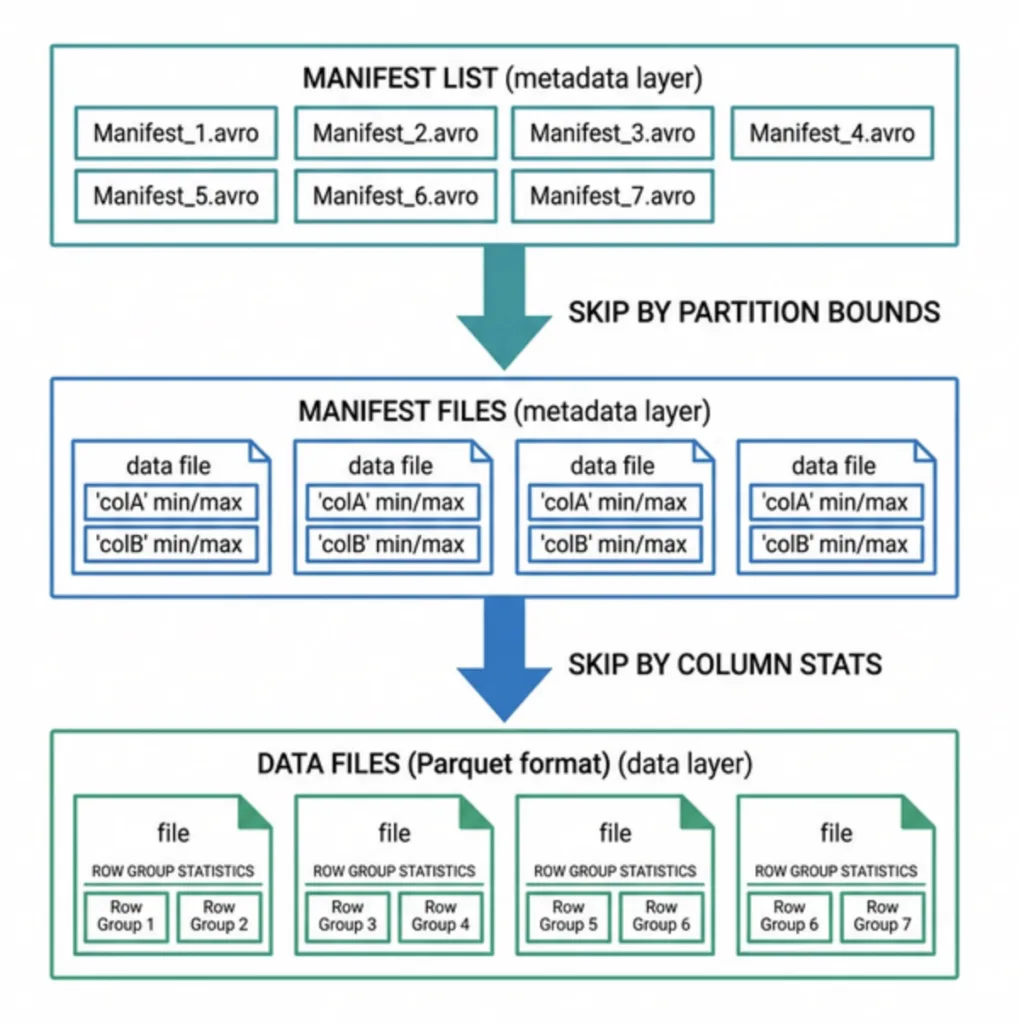
Iceberg's metadata tree enables progressive file elimination. Each level reads a small metadata file, evaluates the query predicates against embedded statistics, and skips everything that can't possibly match. For a complete walkthrough of how a query uses these levels, see The Life of a Read Query for Apache Iceberg Tables.
Level 1: Manifest List Pruning (Partition Bounds)
The manifest list contains one entry per manifest file, with partition summary statistics for each. For a query with partition-aligned predicates, entire manifests are skipped without reading them.
Query: WHERE order_date > '2024-06-01'

Manifest-001: order_month max = 2024-03 → SKIP (entirely before June)
Manifest-002: order_month max = 2024-09 → READ (might contain matches)
Manifest-003: order_month max = 2024-12 → READ (has data after June)
This is the coarsest and cheapest pruning level. It works automatically with hidden partitioning, users don't need to filter on partition columns explicitly. The partition transform (e.g., month(order_date)) is evaluated automatically by the planner.
On a well-partitioned table, this step alone can eliminate 80-95% of manifests. The cost is reading a single Avro file, typically a few kilobytes.
Surviving manifests are read in full. Each entry describes one data file with per-column min/max values, null counts, and row counts. The engine evaluates query predicates against these statistics:
File-042: region min="APAC"  max="US"    → KEEP (range includes target 'US')
File-043: region min="APAC"  max="EMEA"  → SKIP ('US' outside range)
File-044: region min="US"    max="US"    → KEEP (exact match possible)
The effectiveness of this level depends heavily on data clustering. If all regions are mixed randomly within every file, every file shows min="APAC" and max="US", and nothing gets pruned. But if files are sorted by region, each file covers a narrow range, and most files can be skipped.
This is why sort order is the most impactful performance knob after partitioning. When data files are sorted by the columns used in query filters, the min/max statistics become narrow and precise. Unsorted data produces wide, overlapping ranges that defeat statistical pruning.
Level 3: Row Group Pruning (Parquet Footer)
Parquet files are internally divided into row groups (typically 64-128MB each). Each row group has its own column statistics in the Parquet footer. The engine reads just the footer, a small metadata section at the end of the file, and evaluates the same predicates one more time:
This third level enables sub-file pruning, which is especially valuable for large data files (256MB+) that contain multiple row groups.
Pruning Pipeline Example
Here's the complete pruning funnel for a realistic query on a partitioned, sorted orders table:
Stage
Files Evaluated
Files Surviving
Cumulative Reduction
Start
10,000 data files
,
0%
Manifest list pruning
50 manifests
8 manifests
84% manifests pruned
Manifest file pruning
3,200 data files
420 data files
87% files pruned
Row group pruning
1,680 row groups
320 row groups
81% row groups pruned
Column projection
All columns
3 columns
85% less data read
Net effect: The engine reads 320 row groups from 420 files and only 3 columns, instead of scanning all 10,000 files and every column. This routinely produces 10-50x query speedups compared to an unpartitioned, unsorted table.
Sort Orders and Data Clustering
Sort order is the single most impactful performance knob after partitioning. It determines how tightly clustered values are within each data file, which directly controls how effective Level 2 pruning will be.
Linear Sort Order
Sorting by one or two columns creates tight min/max bounds for those columns in every file:
ALTER TABLE orders WRITE ORDERED BY (region ASC, order_date ASC);
File-001: region = "APAC" only, dates Jan-Mar → Queries for region='US' skip entirely
File-002: region = "EMEA" only, dates Jan-Jun → Same
File-003: region = "US", dates Jan-Feb → Only this file for US queries in Q1
Without sorting, every file contains a mix of all regions and dates, and no files get pruned at Level 2.
Z-Ordering for Multi-Column Filters
When queries frequently filter on multiple columns simultaneously (e.g., WHERE region = 'US' AND product_category = 'Electronics'), linear sort only helps the first column in the sort key. The second column within each first-column group may still have wide ranges.
Z-ordering solves this by interleaving bits from both sort dimensions, creating a space-filling curve that clusters data across all specified columns simultaneously:
Z-ordered files have tight min/max ranges across all Z-ordered columns, enabling effective pruning for any combination of filter predicates.
File Organization: Compaction and Target Sizes
The Small File Problem
Streaming writes, micro-batch ingestion, and frequent small commits all produce small data files. A Flink job with 1-minute checkpoints creates ~1,440 small files per day. These hurt performance because:
More manifest entries to scan during query planning
More S3 GET requests (each with ~100ms first-byte latency)
Less effective column statistics (small files from different time periods have overlapping ranges)
Compaction
Compaction rewrites small files into larger, optimally sized ones. Target file size is configurable, the default of 512MB works for batch, while 256MB is often better for interactive query engines like Dremio with Reflections.
Manifest Rewriting
Manifests accumulate similarly to data files. Periodically rewrite them to consolidate:
Puffin files store advanced table-level statistics beyond column min/max. They enable cost-based query optimization features that traditional data lakes lack entirely:
Statistic Type
What It Provides
Query Planning Benefit
NDV Sketches (theta sketch)
Estimated number of distinct values per column
Better join ordering and parallelism decisions
Column Histograms
Value distribution across configurable buckets
Accurate filter selectivity estimation
Table Statistics
Total row counts, column sizes, bloom filter hashes
Overall cost estimation
Engines like Dremio use these statistics to choose between hash joins and sort-merge joins, to estimate output cardinality for multi-stage plans, and to set parallelism levels. For details on how Puffin files work, see Puffins and Icebergs.
Copy-on-Write vs. Merge-on-Read Performance Tradeoffs
V3 deletion vectors represent a significant performance breakthrough. They store row deletion marks as compact bitmaps referenced directly from manifest entries, giving near-COW read performance with near-MOR write speed. This eliminates the traditional tradeoff between read and write performance for row-level operations.
Partition Evolution and Performance
Partition evolution lets you change the partition scheme without rewriting data. From a performance perspective:
Old data retains old partition statistics and pruning still works
New data uses new partition statistics
The planner evaluates both partition specs, there is a small planning overhead, but it is negligible compared to the cost of a full table rewrite
Over time, as old data is compacted under the new spec, the dual-spec overhead disappears entirely
Engine-Specific Optimizations
Dremio
Dremio layers additional performance features on top of Iceberg's built-in optimizations:
Columnar Cloud Cache (C3): Hot Parquet column chunks cached on local SSD, eliminating repeated object storage reads for frequently queried tables
Reflections: Pre-computed, sorted, partitioned materialized views stored as Iceberg tables, dashboard queries hit the Reflection and return in milliseconds
Vectorized Parquet reader: SIMD-optimized columnar processing that can decode millions of rows per second per core
Automatic statistics: NDV and histogram collection for cost-based optimization, no manual ANALYZE TABLE needed
Predictive pipelining: Prefetches data files during planning to overlap I/O with computation
Apache Spark
Adaptive Query Execution (AQE): Runtime balancing of shuffle partitions based on actual data sizes
Dynamic partition pruning: Removes partitions at runtime based on the build side of broadcast hash joins
Vectorized Parquet reader: Columnar batch processing with Arrow-compatible memory format
Trino
Dynamic filtering: Runtime pruning based on join build-side values
Worker-level file caching: Local SSD cache for frequently accessed Parquet files
Lazy materialization: Only materializes columns and rows that pass all predicates
Performance Benchmarks
Real-world improvements from applying Iceberg's performance features to production tables:
Optimization
Typical Improvement
Prerequisites
Hidden partitioning (from unpartitioned)
10-100x faster
Choose right partition column
Sort order on filter columns
3-10x faster
Run compaction with sort
Z-ordering on multi-column filters
2-5x faster
Run Z-order compaction
Compaction (small to optimally sized files)
2-5x faster
Schedule regular compaction
Manifest rewriting
1.5-3x faster planning
Run when manifest count > 1000
Dremio Reflections on dashboards
10-100x faster
Define Reflections on key datasets
V3 deletion vectors (from V2 MOR)
2-3x faster reads after deletes
Upgrade to format version 3
Performance Tuning Checklist
Use this checklist to optimize any Iceberg table for query performance:
Partition strategy: Match your most common WHERE clauses. Use hidden partitioning transforms. Avoid over-partitioning (each partition should be at least 128MB).
Sort order: Sort by columns used in WHERE and JOIN clauses. This tightens min/max statistics and dramatically improves Level 2 pruning.
Compaction: Target 256-512MB files. Run compaction regularly for streaming tables (daily or more often).
Column statistics: Ensure they're enabled (on by default for Parquet). Verify with SELECT * FROM table.files to inspect per-file stats.
Manifest count: If you have more than 1,000 manifests, run rewrite_manifests. Each manifest read adds planning latency.
Snapshot expiry: Remove old snapshots to reduce the size of the metadata file and speed up planning.
Format version: Upgrade to V3 for deletion vectors if your workload includes row-level updates or deletes.
Reflections (Dremio): For dashboard and BI workloads, define Reflections to serve queries from pre-computed, optimally sorted data.
Frequently Asked Questions
How does Iceberg's performance compare to querying raw Parquet directories?
For small datasets, the performance difference is minimal because directory listing is fast. As table size grows beyond a few thousand files, Iceberg's metadata-driven planning becomes dramatically faster. A table with 100,000 files might take 30+ seconds to plan with directory listing but under 1 second with Iceberg's manifest-driven approach, because Iceberg skips irrelevant files without listing them.
Do all query engines get the same performance benefits from Iceberg?
All engines benefit from Iceberg's metadata-driven pruning (manifest list, manifest file, and column statistics). However, each engine implements its own execution optimizations on top of that. Dremio adds Reflections and Columnar Cloud Cache (C3) for additional acceleration. Spark distributes scan planning across executors. The pruning layer is universal, the execution layer varies by engine.
Does Z-ordering improve all query patterns?
No. Z-ordering benefits multi-column filter queries by co-locating related values across multiple dimensions. If your queries filter on a single column, standard sort ordering on that column is more effective. Z-ordering works best when queries frequently filter on 2-4 columns simultaneously, such as queries filtering on both date and region.
Apache Iceberg is a table format designed for data lakehouses. While many people focus on how table formats enable database-like ACID transactions on data lakes—allowing them to function like data warehouses, or "data lakehouses"—there is another equally powerful aspect: the metadata provided by these formats. This metadata can be used to execute transactions with optimal performance. Apache Iceberg includes several mechanisms that enable query engines, such as Dremio, to query data with enhanced performance. In this article, I will cover several of these mechanisms to explore the open and robust performance capabilities of Apache Iceberg.
Before the advent of Apache Iceberg, managing statistics in Hive tables presented significant challenges. One of the primary issues was the need to manually run the ANALYZE command periodically to collect and update statistics. This cumbersome process often led to stale statistics, which could significantly degrade query performance. Users had to constantly ensure up-to-date statistics, which could become quite onerous, especially in large and dynamically changing data environments.
Apache Iceberg's Approach to Statistics
Apache Iceberg revolutionizes this aspect by generating and storing statistics as part of the metadata during write operations to a table. This means that statistics are always current, eliminating the need for manual interventions to update them. The statistics collected in Iceberg's metadata include essential information like record count, file size, value counts, null value counts, lower and upper bounds for each column, and more.
Types of Statistics Collected
Iceberg collects a variety of statistics that are instrumental in optimizing query performance. These include:
Record Count: The number of records in each file.
File Size: The total size of each file in bytes.
Value Counts: The number of values present in each column, including null and NaN values.
Null Value Counts: The number of null values in each column.
NaN Value Counts: The number of NaN values in each column.
Lower and Upper Bounds: The minimum and maximum values in each column.
Query Optimization with Iceberg
Query engines leverage these statistics in several ways to enhance query performance:
File Pruning: Based on the collected statistics, query engines can prune files that do not match the query predicates. For instance, if a query is looking for records within a certain range, files whose bounds fall entirely outside this range can be skipped.
Cost-Based Optimization: Statistics like record count and file size help query engines in making more informed decisions about query planning and execution strategies. For example, knowing the size and distribution of data can help in choosing the most efficient join strategies or in optimizing resource allocation for query execution.
Dynamic Partition Pruning: Statistics enable dynamic partition pruning where only the necessary partitions are read based on the query filters, leading to more efficient data access and reduced I/O operations.
Partitioning Features
Apache Iceberg's hidden partitioning and partition evolution capabilities are game-changers in optimizing data management and performance in data lakehouses. These features significantly reduce the overhead and complexity traditionally associated with changing partition strategies, enhancing performance and efficiency.
Hidden Partitioning: The ability to track partitioning strategy as the transformed value of a column eliminating the need to persist “partition columns,” which complete ingestion and querying of the data.
Partition Evolution: Because the metadata handles most of the partition tracking, changing your partition strategy for future writes without having to rewrite all previous data becomes possible.
Advantages of Hidden Partitioning and Partition Evolution
1. Cost-Effective Partitioning Strategy Changes
Changing the partitioning strategy in a traditional data lake setup often involves extensive and expensive operations, including full table scans and re-writing large volumes of data. With Apache Iceberg, partitioning strategies can be modified with minimal cost. This is because Iceberg uses hidden partitioning, where partition transforms are applied dynamically during query planning rather than being physically persisted in the data files. This flexibility allows partition evolution, where quick adjustments to partitioning strategies can be made without the need to reprocess and rewrite existing data.
2. Reduced Full Table Scans
Before Apache Iceberg, tables regularly needed special “partition columns” to exist within the data, and analysts would have to explicitly filter on these columns for the query engine to make use of the table's partitioning. With Apache Iceberg, the metadata structure makes this unnecessary. It eliminates accidental full table scans and the delays and costs they’d introduce when analysts forget to query on an additional partition column (for example: filtering on a timestamp but forgetting to filter on a “month” or “day” field created for partitioning purposes).
3. Smaller Data Files
By not requiring partition transforms to be physically persisted in the data files, Apache Iceberg allows for smaller and more efficient data files. The partition information is stored in the metadata, making the data files leaner and reducing storage costs. This also speeds up data access since smaller files can be transferred over the wire faster when having multi-node clusters processing the data.
Partition Transforms and Their Uses
Apache Iceberg supports a variety of partition transforms, each suited to different data scenarios. Here are some common transforms and their ideal use cases:
Bucket Transform
Description: Hashes the column value and then applies a modulus operation to distribute the values into a specified number of buckets.
Use Case: Useful for evenly distributing high-cardinality columns across a fixed number of partitions, such as user IDs or session IDs.
Truncate Transform
Description: Truncates the column value to a specified width.
Use Case: Effective for string columns or columns with long numeric values where only a prefix or a subset of the value is needed, such as product codes or URLs.
Year/Month/Day Transforms
Description: Extracts the year, month, or day from a timestamp column.
Use Case: Best for time-series data where queries are often filtered by specific time periods, such as logs, sensor data, or transaction records.
Hour Transform
Description: Extracts the hour from a timestamp column.
Use Case: Useful for data that needs to be analyzed on an hourly basis, such as clickstream data or event logs.
Partitioning Stats Files
The partition statistics file in Apache Iceberg is for tracking detailed statistics about partitions in a table. This file aids query engines in optimizing queries by providing comprehensive insights into the distribution and characteristics of data across partitions. By leveraging this information, query engines can make informed decisions that enhance query performance and efficiency.
Structure and Information Tracked
The partition statistics file is structured to store detailed metrics for each partition. The key fields tracked in this file include:
Partition Data Tuple: The specific partition values based on the partition specification.
Partition Spec ID: The unique identifier for the partition specification used.
Data Record Count: The total number of records in the data files within the partition.
Data File Count: The number of data files in the partition.
Total Data File Size: The cumulative size of all data files in the partition, measured in bytes.
Position Delete Record Count: The number of records marked for deletion by position delete files.
Position Delete File Count: The number of position delete files in the partition.
Equality Delete Record Count: The number of records marked for deletion by equality delete files.
Equality Delete File Count: The number of equality delete files in the partition.
Total Record Count: The accurate count of records in the partition after applying delete files.
Last Updated At: The timestamp of the last update to the partition, in milliseconds from the Unix epoch.
Last Updated Snapshot ID: The ID of the snapshot that last updated the partition.
Using Partition Statistics to Optimize Queries
Query engines can utilize the information stored in partition statistics files to optimize query performance in several significant ways:
Cost-Based Optimization:
The metadata in partition statistics files aids in cost-based query optimization. Information such as the number of records, data file count, and file sizes helps the query planner choose the most efficient execution strategies, such as selecting the best join algorithms or deciding on parallel query execution.
Dynamic Partition Pruning:
With accurate and up-to-date partition statistics, query engines can dynamically prune partitions based on the query predicates. This reduces I/O operations and enhances query performance by focusing only on the relevant partitions.
Improved Query Planning:
The partition statistics file provides a comprehensive view of the data distribution, allowing query engines to plan queries more effectively. For example, knowing the exact size and record count of partitions helps in allocating resources appropriately and optimizing scan operations.
By leveraging the detailed information stored in partition statistics files, Apache Iceberg enables query engines to perform more efficient and optimized queries. This not only enhances overall performance but also reduces resource usage, making data processing more effective and scalable.
Puffin Files
Puffin files are a specialized file format in Apache Iceberg designed to store auxiliary information such as indexes and statistics about data managed in an Iceberg table. This information, which cannot be directly stored within Iceberg manifests, helps enhance the efficiency and performance of query execution. By leveraging Puffin files, query engines can access detailed metadata, allowing them to optimize query planning and execution.
Puffin File Structure
A Puffin file is composed of several key components:
Magic: Four bytes (0x50, 0x46, 0x41, 0x31) indicating the Puffin file format version.
Blobs: Arbitrary pieces of information stored sequentially within the file.
Footer: Contains metadata necessary to interpret the blobs and consists of:
Magic: Same as the beginning of the file.
FooterPayload: UTF-8 encoded JSON payload, optionally compressed, describing the blobs.
FooterPayloadSize: The length of the FooterPayload in bytes.
Flags: Boolean flags indicating if the FooterPayload is compressed.
The structure ensures that the information stored in the blobs can be efficiently accessed and interpreted by query engines.
Footer Payload and Blob Metadata
The footer payload, either uncompressed or LZ4-compressed, contains a JSON object representing the file's metadata. This FileMetadata object includes:
Blobs: A list of BlobMetadata objects.
Properties: Optional storage for arbitrary meta-information, like writer identification/version.
Each BlobMetadata object provides detailed information about individual blobs, including:
Type: The type of blob (e.g., "apache-datasketches-theta-v1").
Fields: A list of field IDs the blob was computed for.
Snapshot ID: The snapshot ID of the Iceberg table when the blob was computed.
Sequence Number: The sequence number of the snapshot.
Offset and Length: Location and size of the blob in the file.
Compression Codec: If the blob is compressed, the codec used.
Blob Types and Compression Codecs
The blobs stored in Puffin files can be of various types, such as:
apache-datasketches-theta-v1: A serialized Theta sketch produced by the Apache DataSketches library, providing an estimate of the number of distinct values.
The supported compression codecs include:
lz4: Single LZ4 compression frame with content size.
zstd: Single Zstandard compression frame with content size.
How Query Engines Use Puffin Files to Optimize Queries
Query engines can utilize the detailed metadata in Puffin files to significantly enhance query performance in several ways:
Improved Predicate Pushdown:
Puffin files store detailed statistics and indexes, enabling query engines to push down predicates more effectively. By accessing precise statistics, the engine can filter out irrelevant data early in the query process, reducing the amount of data scanned.
Efficient File Pruning:
The metadata in Puffin files allows query engines to prune unnecessary files from the query plan. For instance, using the apache-datasketches-theta-v1 blobs, engines can quickly determine which files do not contain the queried data, thus avoiding scanning these files.
Cost-Based Optimization:
Puffin files provide additional metadata that aids in cost-based query optimization. Information such as the number of distinct values (NDV) and data distribution helps the query planner make more informed decisions, optimizing join strategies, and resource allocation.
Dynamic Partition Pruning:
With accurate and up-to-date statistics, query engines can dynamically prune partitions, reading only the necessary partitions based on the query predicates. This reduces I/O operations and enhances query performance.
Enhanced Indexing:
Puffin files can store various types of indexes, such as bloom filters or Theta sketches, which help in fast data lookups and reduce the need for full table scans.
Example Use Cases for Puffin Files
Distinct Count Queries:
Using apache-datasketches-theta-v1 blobs, query engines can quickly estimate the number of distinct values in a column without scanning the entire dataset, making distinct count queries much faster.
Range Queries:
Puffin files with detailed column statistics can help efficiently execute range queries by filtering out data files that do not fall within the specified range.
Join Operations:
Cost-based optimization using Puffin file metadata can lead to more efficient join operations by choosing the best join strategy based on data distribution and statistics.
By leveraging the rich metadata stored in Puffin files, Apache Iceberg enables query engines to perform more efficient and optimized queries, enhancing overall performance and reducing resource usage.
Conclusion
Apache Iceberg's value lies in its robust support for ACID transactions and seamless data lakehouse capabilities and its comprehensive and open specification that facilitates optimized performance across any query engine. The detailed metrics and metadata collected by Iceberg, such as statistics, partition information, and Puffin files, are all part of this open standard. This ensures that users can reap the benefits of enhanced query performance without being tied to a specific query engine.
Query engines can leverage Iceberg's metadata to implement advanced optimization techniques, such as predicate pushdown, dynamic partition pruning, and cost-based optimization. The ability to collect and store detailed statistics during write operations, automatically maintain up-to-date metadata, and use advanced partitioning strategies significantly improves query efficiency and reduces operational overhead.
Apache Iceberg's open and extensible design empowers users to achieve optimized query performance while maintaining flexibility and compatibility with a wide range of tools and platforms. Iceberg is indispensable in modern data architectures, driving efficiency, scalability, and cost-effectiveness for data-driven organizations.
For a deeper treatment of the topics in this post, download Apache Iceberg: The Definitive Guide by Tomer Shiran, Jason Hughes, and Alex Merced, free from Dremio.
Intro to Dremio, Nessie, and Apache Iceberg on Your Laptop
Editor’s note, September 2026. This post was published in September 2023 and some product details have changed since. Nessie is still available and self-deployable under the Apache-2.0 licence, and it remains the clearest implementation of catalog-level branching. It is not an Apache Software Foundation project, and its development has slowed considerably. For how the current […]
Aug 16, 2023·Dremio Blog: News Highlights
5 Use Cases for the Dremio Lakehouse
With its capabilities in on-prem to cloud migration, data warehouse offload, data virtualization, upgrading data lakes and lakehouses, and building customer-facing analytics applications, Dremio provides the tools and functionalities to streamline operations and unlock the full potential of data assets.
Aug 24, 2026·Dremio Blog: Open Data Insights
Migrating to Apache Iceberg: Strategies for Every Source System
This is Part 15, the final article of a 15-part Apache Iceberg Masterclass. Part 14 covered hands-on Dremio Cloud. This article covers the three migration strategies and how to execute a zero-downtime migration using the view swap pattern. Most organizations do not start with Iceberg. They have years of data in Hive tables, data warehouses, CSV files, databases, […]