This article has been revised and updated from its original version published in 2022 to reflect the latest migration tools and techniques.
As Apache Iceberg becomes the industry-standard table format for open data lakehouses, many organizations are migrating their existing Delta Lake tables to Iceberg to gain broader multi-engine support, hidden partitioning, partition evolution, and engine-independent access to their data.
The migration from Delta Lake to Iceberg is a common transition in the data lakehouse ecosystem. Whether you're looking to reduce Databricks dependency, enable multi-engine analytics with Dremio, or simply align with the format that major cloud providers and query engines have standardized on, this guide provides all the paths from Delta to Iceberg.
This guide covers multiple migration approaches, from Dremio CTAS (simplest) to Apache XTable (metadata-only) to full Spark pipelines, with guidance on when to use each approach.
The Industry Shift Toward Iceberg
The migration from Delta Lake to Iceberg is accelerating across the industry for several reasons: For official documentation, refer to the Iceberg Spark procedures.
Multi-engine freedom. Delta Lake was designed with Spark as the primary engine. While connectors exist for other engines, write support and full feature compatibility remain Spark-centric. Iceberg's open specification ensures any engine (Dremio, Trino, Flink, StarRocks, DuckDB) can read and write tables with full fidelity.
Cloud provider adoption. AWS made Iceberg the default format for Athena, Glue, and EMR. Snowflake built native Iceberg Tables. Google Cloud's BigLake supports Iceberg natively. This industry convergence means organizations on Delta are increasingly swimming against the current of ecosystem support.
Partition management. Delta's Liquid Clustering requires data rewrites to reorganize. Iceberg's partition evolution changes partition strategy as a metadata-only operation, no data movement, no compute cost, no downtime.
Approach 1: Dremio CTAS (Recommended for Simplicity)
Dremio can read Delta Lake tables natively and write them as Iceberg tables in a single SQL statement:
-- Connect both Delta source and Iceberg catalog to Dremio
-- Then convert with a single CTAS statement

CREATE TABLE nessie_catalog.db.customers
PARTITION BY (month(created_date))
AS
SELECT * FROM delta_source.db.customers;
Data optimization: Dremio writes optimally-sized Parquet files
No Spark cluster: Runs entirely within Dremio
Post-Migration with Dremio
-- Optimize the new Iceberg table
OPTIMIZE TABLE nessie_catalog.db.customers;

-- Create Reflections for sub-second queries
ALTER DATASET nessie_catalog.db.customers
CREATE RAW REFLECTION "customers_raw"
USING DISPLAY (customer_id, name, email, region, created_date);
Approach 2: Apache XTable (Metadata-Only)
Apache XTable (formerly OneTable) synchronizes metadata between formats without copying data:
When you need custom transformations during migration
When converting very large tables (100TB+) that benefit from Spark's distributed processing
When you need to rewrite data with different encoding or compression settings
Post-Migration Optimization
After migrating from Delta to Iceberg:
1. Verify Data Integrity
-- Compare row counts
SELECT 'delta' as source, COUNT(*) FROM delta_source.db.customers
UNION ALL
SELECT 'iceberg' as source, COUNT(*) FROM nessie_catalog.db.customers;

-- Compare checksums on a sample
SELECT SUM(HASH(customer_id, name, email))
FROM delta_source.db.customers;
2. Apply Iceberg-Specific Optimizations
-- Evolve partitions to Iceberg's hidden partitioning
ALTER TABLE nessie_catalog.db.customers
SET PARTITION SPEC (month(created_date), bucket(16, region));

-- Optimize file layout with Z-ordering
-- (handled through compaction via Dremio's OPTIMIZE TABLE)
OPTIMIZE TABLE nessie_catalog.db.customers;
3. Enable Dremio Accelerations
-- Create Reflections for dashboard queries
ALTER DATASET nessie_catalog.db.customers
CREATE AGGREGATE REFLECTION "customers_by_region"
USING DIMENSIONS (region, month(created_date))
MEASURES (COUNT(*), SUM(lifetime_value));
Real-World Migration: FinTech Analytics Platform
A fintech company migrated 50 Delta tables (15TB) from a Databricks-centric stack to Iceberg + Dremio:
Migration timeline: 2 weeks
Week 1: CTAS migration of all tables through Dremio
Week 2: Validation, optimization, and Reflection creation
Compute costs: 60% reduction (Dremio engine efficiency vs. Databricks SQL)
Multi-engine access: BI tools, Python notebooks, and AI/ML pipelines all read from the same Iceberg tables
Partition management: Zero-downtime partition evolution replaced quarterly clustering jobs
Frequently Asked Questions
Can I use Delta Lake UniForm instead of migrating?
UniForm generates Iceberg-compatible metadata from Delta tables, allowing Iceberg-compatible engines to read Delta data. However, it's read-only (writes must go through Delta), adds latency to the ingestion pipeline, and doesn't support Iceberg-specific features like partition evolution or Puffin statistics. For full Iceberg capabilities, a complete migration is recommended.
How do I handle Delta-specific features that don't exist in Iceberg?
Delta's Change Data Feed (CDF) doesn't have a direct Iceberg equivalent, but Iceberg's snapshot history provides similar change tracking. Delta's Auto-Optimize maps to Dremio's OPTIMIZE TABLE scheduled jobs.
What about tables used by both Databricks and other engines?
During a transition period, use Apache XTable to maintain dual-format access. Both Databricks (via Delta) and Dremio (via Iceberg) read the same physical data files. Once all workloads are migrated to the Iceberg path, decommission the Delta metadata sync.
Delta-to-Iceberg Feature Mapping
Understanding how Delta-specific features translate to Iceberg equivalents helps plan the migration:
For teams moving their entire analytics stack from Databricks + Delta to Dremio + Iceberg:
SQL Compatibility
Most Databricks SQL translates directly to Dremio SQL:
-- Databricks (Delta)
SELECT * FROM delta.`s3://bucket/delta_table` VERSION AS OF 5;

-- Dremio (Iceberg)
SELECT * FROM nessie_catalog.db.table AT SNAPSHOT '12345';
-- Or by timestamp:
SELECT * FROM nessie_catalog.db.table AT TIMESTAMP '2024-03-15 10:00:00';
Notebook to Dremio Migration
Replace Databricks notebook cells with Dremio SQL queries:
Dashboard queries → Dremio + BI tool (Tableau, Power BI, Superset)
Cost Comparison
Workload
Databricks (Delta)
Dremio (Iceberg)
Interactive queries
$0.22/DBU × 200 DBU = $44/hr
Included in Dremio license
BI dashboards
SQL Warehouse: $22-88/hr
Reflections: sub-second, fixed cost
Table maintenance
Auto-Optimize (compute cost)
OPTIMIZE TABLE (included)
Data sharing
Delta Sharing protocol
Iceberg + any engine
Organizations typically report 40-70% cost reduction when migrating from Databricks to Dremio for analytics workloads, primarily due to Dremio's C3 caching, Reflection-based acceleration, and efficient Apache Arrow execution engine.
Batch Migration Script
For automated migration of multiple Delta tables:
-- Migration script for Dremio SQL
-- Step 1: Create Iceberg tables from Delta sources
CREATE TABLE nessie.db.customers AS SELECT * FROM delta_source.db.customers;
CREATE TABLE nessie.db.orders AS SELECT * FROM delta_source.db.orders;
CREATE TABLE nessie.db.products AS SELECT * FROM delta_source.db.products;

-- Step 2: Optimize all migrated tables
OPTIMIZE TABLE nessie.db.customers;
OPTIMIZE TABLE nessie.db.orders;
OPTIMIZE TABLE nessie.db.products;

-- Step 3: Create Reflections for dashboard acceleration
ALTER DATASET nessie.db.orders
CREATE AGGREGATE REFLECTION "orders_daily"
USING DIMENSIONS (region, product_category, day(order_date))
MEASURES (SUM(amount), COUNT(*));
Should I maintain both Delta and Iceberg formats during migration?
Yes, during the transition period. Run both formats in parallel for 2-4 weeks to validate query results match. Configure your BI tools and downstream consumers to read from the new Iceberg tables, and only decommission the Delta tables after all consumers have been migrated and validated. Iceberg's broader multi-engine support (Dremio, Spark, Trino, Flink, Snowflake, DuckDB) means you can connect more tools directly to your data after migration, a key benefit that justifies the one-time migration effort.
Does the conversion process require downtime?
No. The Iceberg add_files procedure and Spark CTAS approaches both create a new Iceberg table alongside the existing Delta table. Writers continue updating the Delta table during conversion. Once the Iceberg table is validated, switch readers to the new table and then configure writers to target Iceberg instead. This zero-downtime approach minimizes risk and allows a smooth transition.
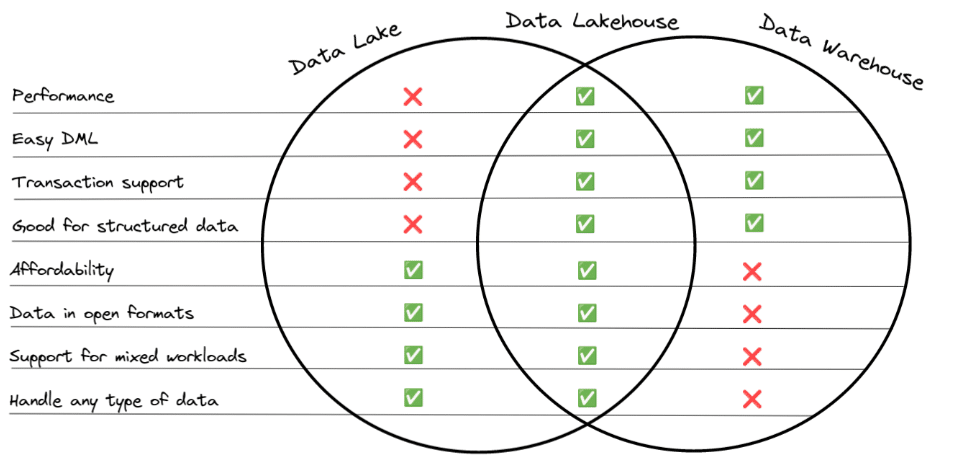
One of the significant trends in data architecture is the idea of the data lakehouse, which combines the benefits of the data lake and the data warehouse, as exemplified by the following image:
The most significant benefits of Delta Lake often stem from the support for the format on the Databricks platform, so if you are not using Databricks a lot of the platform benefits like auto-optimize are no longer available. Outside the Databricks platform, several platforms give Apache Iceberg first-class support, making it a compelling option when Databricks is not part of your architecture. Keep in mind, it is possible to use Apache Iceberg when using Databricks which can help to prevent migration friction if you leave the platform in the future.
Despite being “open source,” the core Delta Lake format, for better or for worse, is still under the primary influence of Databricks. This doesn’t say anything about the performance or functionality of the format but does present an ecosystem risk that you may not want to expose the majority of your data to. Apache Iceberg has broad and transparent community development and adoption and is a great format to serve as the base for your data infrastructure, even if you may want some of your data in Delta Lake to enjoy Databricks’ ML tools.
Two Migration Paradigms
When it comes to migration from any source to Iceberg there are essentially two main approaches:
In-place migration
The goal of this approach is to repurpose the files from the previous format into the new format to reduce the amount of data that needs to be rewritten. This approach results in taking the existing Parquet files from a Hive, Hudi, or Delta Lake table and registering them with a new or existing Iceberg table. The end result is that you only write new metadata that includes the existing files.
PROS
CONS
Fewer files have to be written
The new table schema must match the previous (can’t change schema during migration)
Faster (less writing means less time)
Cheaper (less writing means less compute time/costs)
Shadow migration
In this approach you rewrite the table often using a CTAS (CREATE TABLE AS) statement. This works for migrating data from any source such as Hive, Hudi, Delta Lake, relational databases, or any other source an engine can read from while simultaneously writing to an Iceberg table. The CTAS statement can be written to modify the data’s schema, partitioning, and more during the rewrite.
PROS
CONS
Can be done with most engines
Rewriting all files
Allows you to transform the data during the migration process
Takes longer (write more files, take more time)
More expensive (write more files, more compute costs)
Migration Method #1 – Using Dremio
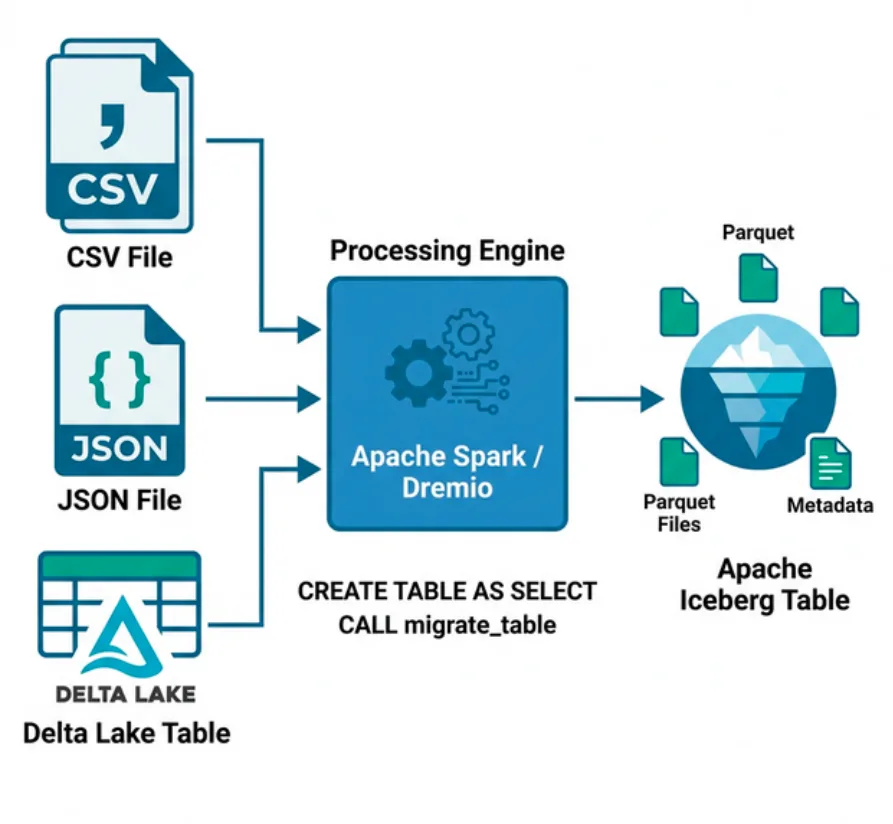
With Dremio you can easily migrate any source compatible with Dremio (Hive tables, databases, JSON files, CSV files, Delta Lake tables, etc.) into an Iceberg table using a CTAS statement.
Let’s do an example that uses S3 as our data source and Iceberg catalog. For this exercise, you need to have an AWS S3 account and Docker installed.
Creating a Delta Lake Table in Our S3
In this exercise, we will open up a Docker container with Spark, and use it to write a small Delta Lake table to our S3 bucket. You’ll need your AWS access key, secret key, and the address of where you want to store your table in the format of s3a://…/folderForTable.
CREATE TABLE default.example_table (name string)
  USING DELTA LOCATION 's3a://.../example-table';
5. Insert a few records into the table.
INSERT into default.example_table (name)
  VALUES ('Alex Merced'),('Dipankar Mizumdar'),('Jason Hughes');
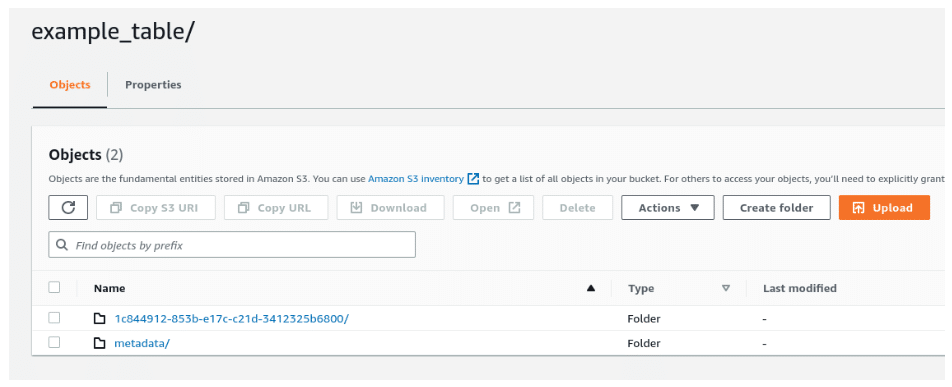
6. Head over to your S3 dashboard and double-check the write was successful.
7. Exit Spark-SQL with command exit;.
8. Exit the Docker container with the command exit.
9. Log in or sign up for Dremio and add your S3 as a source. If you don’t have an existing Dremio account, use the videos below to guide you in opening your free account.
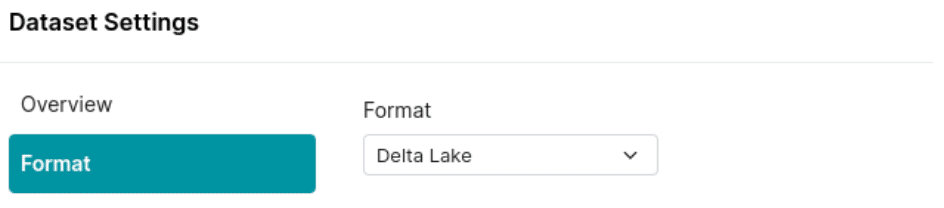
10. Find the folder with your Delta Lake table and select “format folder” and then select Delta Lake to have the folder treated as a table in Dremio.
Dremio Approach A – Using a CTAS Statement (Shadow Migration)
11. Navigate to the SQLRunner and run a query to create a new table somewhere in your S3 bucket (it creates Iceberg tables by default) based on your Delta Lake table.
CREATE TABLE s3.delta.example_table
  AS (SELECT * FROM s3.iceberg.example_table);
Make sure that the path reflects your S3 source settings regarding the location of your table and the location where you want the new table to be created.
12. Check your S3 dashboard to confirm a new folder with your Iceberg data and meta exists where you meant to create it. You did it!
Conducting a Shadow/CTAS migration with Dremio is quite straightforward, and you can expect even more tools from Dremio in the future to help with in-place Apache Iceberg migrations. S3 isn’t the only Iceberg catalog that works with Dremio. Check out the following tutorial regarding the use of Dremio Arctic and AWS Glue catalogs with Apache Iceberg.
Dremio Approach B – Using the COPY INTO Statement (Shadow Migration)
COPY INTO arctic.myTable
  FROM '@SOURCE/bucket/path/folder/deltatable/'
  FILE FORMAT 'parquet'
Migration Method #2 – Using Apache Spark
The Apache Iceberg project comes with many Spark libraries and extensions out of the box. In this section, we’ll see how we can use these with Delta Lake migration. First, we’ll see another example of shadow migration and then an example of in-place migration using Spark.
2. We need to export our AWS credentials into environmental variables, including a variable with the S3 location we’d like to store our Iceberg tables in. Make sure to prefix it with s3a://.
3. Start up Spark-SQL with the following command which configures the default catalog to use Delta Lake and configures another catalog called Iceberg to use Apache Iceberg.
CREATE TABLE default.example_table2 (name string) USING DELTA LOCATION 's3a://am-demo-cloud/nov2022/delta/112122/example_table2'
5. Let’s add some records to our Delta Lake table.
INSERT into default.example_table3 (name) VALUES ('Alex Merced'),('Dipankar Mizumdar'), ('Jason Hughes');
6. Check your S3 dashboard to confirm the table was written.
7. Let’s then use a CTAS to convert that Delta Lake table over to Iceberg.
CREATE TABLE iceberg.example_table2 USING iceberg AS SELECT * FROM default.example_table2;
It’s that simple. You can now go to the location you specified for your Iceberg tables and find your table in your S3 storage. The process would be pretty much the same with any other Iceberg catalog (AWS Glue, Dremio Arctic, etc.). The only difference is the catalog implementation would be different when you start Spark, for example:
That Delta Lake table we just created could also be used to do an in-place migration. In this case, we will use the built-in add_files Spark procedure, which takes a target file/files and adds them to an existing Iceberg table.
Since our Delta Lake table only has one snapshot we can assume all the Parquet files in its directory on S3 should be added to our table, but if it was an older table with many snapshots that wouldn’t be the case. In that case, you would use a VACUUM SQL query to clean data only related to snapshots earlier than so many hours like so:
VACUUM default.example_table RETAIN 100 HOURS
This removes all data files that aren’t related to snapshots from within the last 100 hours. Keep in mind that you may need to change the following setting to VACUUM files for values less than 168 hours:
3. Query the table to see that your Iceberg table should now have the data inside of it, without needing to rewrite any data files.
SELECT * FROM iceberg.example_table3;
Migration Method #3 – Using an Iceberg Action
New modules for converting Delta Lake and Apache Hudi tables to Apache Iceberg have been added to the Iceberg repository. The Delta Lake module has been merged into Apache Iceberg’s codebase and is now part of the 1.2.0 release, while the Apache Hudi module is still a work in progress.
Essentially, the method that handles the conversion takes the Spark session, new table identifier, along with the location of the tables files, and creates a new Iceberg table from them.
SnapshotDeltaLakeTable.Result result =         DeltaLakeToIcebergMigrationSparkIntegration.snapshotDeltaLakeTable(
  	sparkSession,
  	newTableIdentifier,
  	partitionedLocation
  ).execute();
The Apache Hudi version of this method is yet to be merged into the main Apache Iceberg codebase but follows the same API.
SnapshotHudiTable.Result result =         HudiToIcebergMigrationSparkIntegration.snapshotHudiTable(
  	sparkSession,
  	newTableIdentifier,
  	partitionedLocation
  ).execute();
While the documentation does not yet include details on how to use these modules, reading over the integration tests for both the Delta Lake module and Hudi module helps illuminate the nuances of the above code snippets.
Best Practices
Whether you restate the data with a shadow migration or avoid restating the data with an in-place migration, the actual migration process needs careful attention to the architecture.
In general, it should go through a four-phase process:
As the process begins, the new Iceberg table is not yet created or in sync with the source. User-facing read and write operations remain operating on the source table.
The table is created but not fully in sync. Read operations are applied on the source table and write operations are applied to the source and new table.
Once the new table is in sync, you can switch to read operations on the new table. Until you are certain the migration is successful, continue to apply write operations to the source and new table.
When everything is tested, synced, and works properly, you can apply all read and write operations to the new Iceberg table and retire the source table.
As you progress through these phases, be sure to check for consistency, logging errors, and logging progress. These checks can help you manage quality, troubleshoot, and measure the length of the migration.
Conclusion
Apache Iceberg, with its ever-expanding features, ecosystem, and support, is quickly becoming the standard format data lakehouse table. When adopting Apache Iceberg there are several paths of migration no matter where your data architecture currently resides.
Try Dremio Cloud free for 30 days
Deploy agentic analytics directly on Apache Iceberg data with no pipelines and no added overhead.
Intro to Dremio, Nessie, and Apache Iceberg on Your Laptop
We're always looking for ways to better handle and save money on our data. That's why the "data lakehouse" is becoming so popular. It offers a mix of the flexibility of data lakes and the ease of use and performance of data warehouses. The goal? Make data handling easier and cheaper. So, how do we […]
Aug 16, 2023·Dremio Blog: News Highlights
5 Use Cases for the Dremio Lakehouse
With its capabilities in on-prem to cloud migration, data warehouse offload, data virtualization, upgrading data lakes and lakehouses, and building customer-facing analytics applications, Dremio provides the tools and functionalities to streamline operations and unlock the full potential of data assets.
Aug 31, 2023·Dremio Blog: News Highlights
Dremio Arctic is Now Your Data Lakehouse Catalog in Dremio Cloud
Dremio Arctic bring new features to Dremio Cloud, including Apache Iceberg table optimization and Data as Code.