This article has been revised and updated from its original version published in 2022 to reflect the latest Apache Iceberg developments, including V3 features and modern incident response patterns.
When a faulty ETL job overwrites good data, a misconfigured pipeline writes incorrect values, or a bulk delete removes rows it shouldn't, Apache Iceberg's rollback feature lets you restore the table to any previous snapshot in seconds, without rewriting data, running recovery scripts, or restoring from backups.
Data incidents are inevitable, even the most disciplined engineering teams experience pipeline failures, schema migration errors, and human mistakes. The cost of these incidents in traditional data lakes is measured in hours of downtime, lost data, and engineer time spent on manual recovery. Industry surveys consistently show that data incidents cost organizations an average of several hours of engineer time per incident, not counting the downstream impact on reports, dashboards, and ML models.
Rollback is the flip side of time travel. While time travel lets you query historical states, rollback lets you restore a historical state as the current table state. Combined with Iceberg's immutable snapshots and atomic commits, rollback provides a data incident recovery capability that traditional data lakes simply cannot match.
How Rollback Works
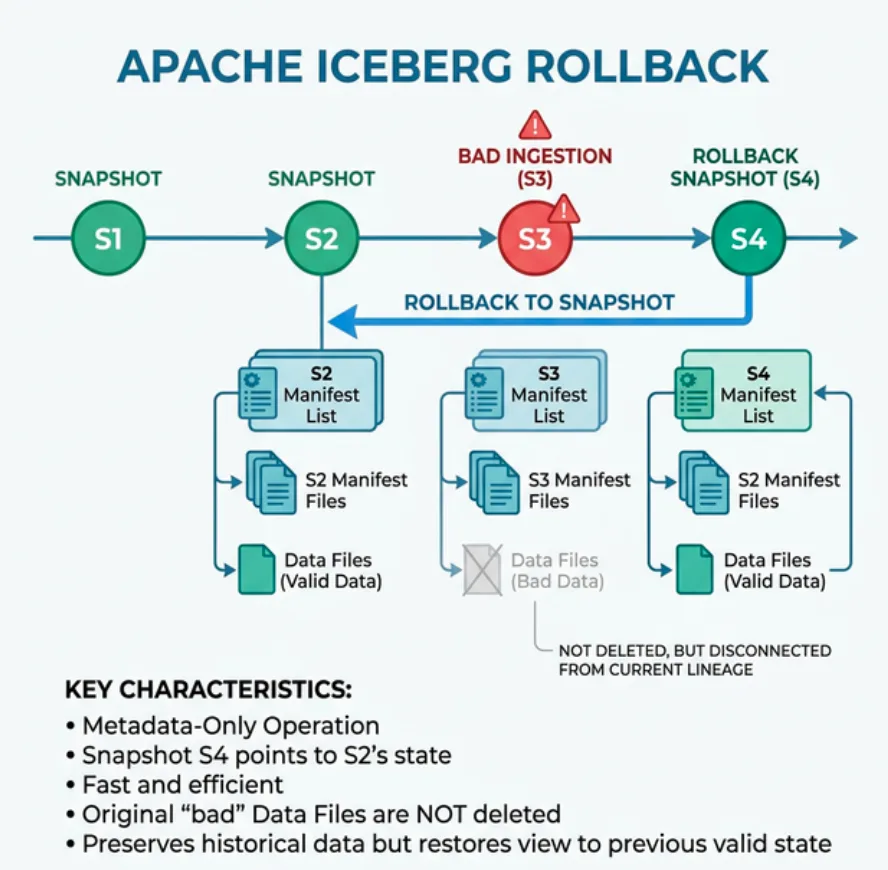
Iceberg rollback is a metadata-only operation. It does not rewrite, copy, or move any data files. Instead, it creates a new snapshot that points to the same manifest list as the target historical snapshot: For official documentation, refer to the Iceberg rollback procedures.
Snapshot 1 (Jan 1) → Manifest List A → [file-001, file-002, file-003]
Snapshot 2 (Jan 15) → Manifest List B → [file-001, file-002, file-004]  (bug introduced)
Snapshot 3 (Feb 1) → Manifest List C → [file-001, file-005, file-006]  (more bad data)
Rollback to Snapshot 1 → Manifest List A → [file-001, file-002, file-003]  ← INSTANT
The rollback creates Snapshot 4, which references the same manifest list as Snapshot 1. All data files from Snapshot 1 are still present on storage (they've been shared across snapshots), so no data needs to be re-ingested.
Try Dremio’s Interactive Demo
Explore this interactive demo and see how Dremio's Intelligent Lakehouse enables Agentic AI
Why This Is Instant
Because rollback is metadata-only:
No data files are read or written: The operation simply creates a new metadata pointer
Execution time is constant: Whether the table has 10 files or 10 million files, rollback takes the same amount of time
Storage cost is zero: No data duplication occurs
Atomicity is guaranteed: The rollback commits through the same atomic commit mechanism as any other write
Rollback SQL Syntax
Rollback by Snapshot ID
-- Using Spark
CALL catalog.system.rollback_to_snapshot('db.orders', 987654321);

-- Using Dremio
ROLLBACK TABLE db.orders TO SNAPSHOT '987654321';
Rollback by Timestamp
-- Using Spark
CALL catalog.system.rollback_to_timestamp(
  'db.orders',
  TIMESTAMP '2024-03-14 06:00:00'
);

-- Using Dremio
ROLLBACK TABLE db.orders TO TIMESTAMP '2024-03-14 06:00:00';
This finds the snapshot that was current at the specified timestamp and rolls back to it. Useful when you know approximately when the incident occurred but don't know the exact snapshot ID.
Finding the Right Snapshot
Before rolling back, identify the correct target:
-- List all snapshots with timestamps and operations
SELECT snapshot_id, committed_at, operation, summary
FROM orders.snapshots
ORDER BY committed_at DESC;
The summary column shows what each snapshot changed (rows added, rows deleted, files replaced), helping you identify the problematic commit.
Data Incident Response Playbook
Here's a step-by-step process for handling data incidents using Iceberg's rollback and time travel:
Step 1: Detect the Issue
Data quality monitors, downstream alerts, or user reports indicate something is wrong. The table's current state contains incorrect data.
Step 2: Assess the Impact
Use time travel to query the table at known-good and known-bad states:
-- Check current (bad) state
SELECT COUNT(*) FROM orders WHERE amount < 0;

-- Check state before the incident
SELECT COUNT(*) FROM orders
FOR SYSTEM_TIME AS OF TIMESTAMP '2024-03-14 06:00:00'
WHERE amount < 0;  -- Should be zero if this was the good state
Step 3: Identify the Root Cause
Review the snapshot log to find the commit that introduced the problem:
SELECT snapshot_id, committed_at, operation, summary
FROM orders.snapshots
WHERE committed_at > TIMESTAMP '2024-03-14 06:00:00'
ORDER BY committed_at ASC;
Step 4: Roll Back
Once you've identified the last known-good snapshot:
-- Using Spark
CALL catalog.system.rollback_to_snapshot('db.orders', 987654321);

-- Using Dremio
ROLLBACK TABLE db.orders TO SNAPSHOT '987654321';
The table is immediately restored. All downstream queries and dashboards now see the correct data.
Step 5: Fix the Root Cause
While the table is restored to a good state, fix the faulty pipeline. Then re-run it to apply the changes correctly.
Step 6: Clean Up
After confirming the fix is correct, expire the bad snapshots to reclaim storage:
Iceberg rollback is unambiguously the safest and fastest option. It's also the only one that guarantees atomic recovery, the table transitions from bad state to good state in a single operation, with no intermediate inconsistent state.
Real-World Scenarios
Scenario 1: Faulty ETL Overwrites Production Data
A nightly ETL job has a bug that duplicates rows in the orders table. Downstream dashboards show double the expected revenue.
Without Iceberg: The team must write a deduplication script, test it, run it, and verify the results. This takes 4-8 hours, during which dashboards show incorrect data.
With rollback: Roll back to the pre-ETL snapshot (30 seconds). Fix the ETL job. Re-run it. Total downtime: under 2 minutes.
Scenario 2: Accidental DELETE
An analyst runs DELETE FROM orders WHERE region = 'US' instead of SELECT ... WHERE region = 'US'. Half the production data is gone.
Without Iceberg: Restore from backup. Losing several hours of data since the last backup. Multi-hour recovery process.
With rollback: Roll back to the snapshot before the DELETE (30 seconds). All data is restored. The analyst's DELETE is effectively undone.
Scenario 3: Schema Migration Goes Wrong
A schema migration changes a column type from STRING to INT, but some values can't be converted. The table becomes partially unreadable.
Without Iceberg: Must reverse the migration manually, which may require complex data recovery.
With rollback: Roll back to the pre-migration snapshot. The old schema and all its data are immediately restored.
Rollback and Other Iceberg Features
Rollback interacts cleanly with other Iceberg features:
Hidden partitioning: Rolling back to a snapshot with a different partition spec is valid. Queries use the historical spec for the restored data.
COW and MOR: Rolling back a MOR commit effectively removes the delete files, restoring "deleted" rows.
Compaction: After rolling back, you may want to run compaction on the restored state to optimize file layout.
Rollback requires that the target snapshot still exists. If snapshots are expired aggressively, you lose the ability to roll back to those states.
Best Practices for Snapshot Retention
Keep at least 7 days of snapshots for operational tables, most data incidents are detected within a few days
Keep compliance-critical snapshots indefinitely by tagging them before expiry
Set retain_last to at least 5 when running expire_snapshots, this ensures you can always roll back a few commits
Document your retention policy so the team knows how far back rollback is available
Tagged Snapshots
In Spark, you can create table references to specific snapshots:
-- Create a named reference to an important snapshot
ALTER TABLE orders CREATE TAG `pre_migration` AS OF VERSION 987654321;

-- Roll back using a tag
CALL catalog.system.rollback_to_snapshot(
  'db.orders',
  (SELECT snapshot_id FROM orders.refs WHERE name = 'pre_migration')
);
Tags protect snapshots from expiry, ensuring critical recovery points are always available.
Engine Support for Rollback
Engine
Rollback by Snapshot ID
Rollback by Timestamp
Multi-Table Rollback
Apache Spark
CALL catalog.system.rollback_to_snapshot()
CALL catalog.system.rollback_to_timestamp()
Via Nessie
Dremio
ROLLBACK TABLE ... TO SNAPSHOT
ROLLBACK TABLE ... TO TIMESTAMP
Via Nessie
Trino
Via Spark/Java API
Via Spark/Java API
Via Nessie
Apache Flink
Via Iceberg API
Via Iceberg API
Via Nessie
Spark uses stored procedures (CALL catalog.system.rollback_to_snapshot). Dremio provides a native ROLLBACK TABLE SQL command. For engines without native rollback support, the Iceberg Java and Python APIs provide programmatic rollback.
Rollback with Dremio
Dremio provides a native ROLLBACK TABLE SQL command. Users with ADMIN, INSERT, UPDATE, or DELETE privileges on the table can execute rollback.
-- Rollback to a specific snapshot ID
ROLLBACK TABLE db.orders TO SNAPSHOT '2489484212521283189';

-- Rollback to a specific timestamp
ROLLBACK TABLE db.orders TO TIMESTAMP '2024-03-14 06:00:00';
Additional Dremio rollback capabilities:
Integrated time travel UI: Browse snapshots visually, inspect changes, and initiate rollback
OPTIMIZE TABLE after rollback: Recompact the restored table state for optimal query performance
Reflection refresh: After rollback, Dremio's Reflections are automatically refreshed to match the restored table state
Implementation Best Practices
Build Rollback into Your Incident Response Plan
Don't wait for an incident to discover that rollback is available. Include Iceberg rollback in your runbook:
Train the team: Everyone who runs ETL jobs should know how to find snapshots and execute rollback
Set up monitoring: Alert when table row counts change by more than a threshold percentage
Test rollback regularly: Include rollback tests in your disaster recovery drills
Document snapshot retention: Make it clear how far back rollback can reach
Automate Pre-ETL Snapshots
Before critical ETL runs, ensure a snapshot exists that you can roll back to. This is automatic in Iceberg (every commit creates a snapshot), but verify that your retention policy preserves these snapshots long enough:
-- Verify recent snapshots exist before running a risky operation
SELECT snapshot_id, committed_at
FROM orders.snapshots
ORDER BY committed_at DESC
LIMIT 5;
Combine with Nessie for Multi-Table Rollback
For star schemas or normalized data models where multiple tables must be consistent, use Project Nessie for branch-level rollback. Nessie treats the entire catalog like a Git repository, you can roll back all tables to a consistent point simultaneously:
-- Roll back the entire branch (all tables) to a specific commit
ALTER BRANCH main
SET REFERENCE TO commit_hash
IN nessie;
This atomic multi-table rollback is essential when an ETL pipeline updates multiple tables in sequence and you need to undo all of them consistently.
Rollback Checklist
Use this checklist when executing a rollback in production:
☐ Confirm the incident, verify that the current data is actually incorrect
☐ Stop the faulty pipeline, prevent more bad data from being written
☐ Identify the target snapshot using SELECT * FROM table.snapshots
☐ Verify the target snapshot data using time travel (FOR SYSTEM_TIME AS OF)
☐ Execute rollback via rollback_to_snapshot or rollback_to_timestamp
☐ Verify the restored data matches expectations
☐ Notify downstream consumers (dashboards, ML models) that data has been restored
☐ Fix the root cause of the incident
☐ Re-run the corrected pipeline
☐ Expire the bad snapshots to reclaim storage
How quickly can I rollback a production table?
Iceberg rollback is nearly instantaneous regardless of table size because it only updates the metadata pointer to reference a previous snapshot. A 10 TB table rolls back in seconds, not hours. The key requirement is that the target snapshot must still exist and its data files must not have been removed by a previous expire_snapshots or VACUUM TABLE operation.
Frequently Asked Questions
Does rollback delete the bad data files from storage?
No. Rollback is a metadata-only operation that changes the current snapshot pointer back to a previous valid snapshot. The data files from the bad ingestion remain on storage until you run orphan file cleanup or snapshot expiry. This is a safety feature, since the data remains available if you need to investigate the incident.
Can I rollback to any snapshot in the table's history?
You can roll back to any snapshot that has not been expired. Once a snapshot is expired through the expire_snapshots procedure, its metadata is removed and it is no longer a valid rollback target. Maintain a snapshot retention window that covers your incident response SLA.
Is there a way to preview what a rollback would show before committing it?
Yes. Use time travel queries (SELECT * FROM table FOR SYSTEM_TIME AS OF timestamp) to query the historical snapshot before performing the rollback. This lets you confirm the target snapshot contains the expected data.
Imagine you are a data engineer working for the platform engineering team of your company’s analytics team. Your responsibilities include building data pipelines and infrastructure to make data available and support analytical workflows such as business intelligence (BI) and machine learning (ML) across your organization. In the past, your analytical workloads used to run on top of a cloud data warehouse that presented limitations in running advanced analytics such as machine learning, and the cost factor associated with such a platform was super high. Not to mention, your data was locked into the specific warehouse’s storage, which the warehouse’s processing engine could only access.
Having dealt with these challenges, your team decides to adopt a new form of data architecture that can specifically target the shortfalls of your existing platform. Cloud data lakes are a usual first choice as they can store any type of data, i.e., structured and unstructured. However, the problem with data lakes is that there is no support for ACID transactions, and if the lake isn’t managed properly, it can become a data swamp, which would make it extremely difficult to derive insights. Data lakehouse is a new form of data architecture that caters to these caveats by combining the best of a data warehouse with a data lake.
In short, a lakehouse brings the following benefits to your organization:
Stores data in open formats so it can be used by multiple engines
Uses cost-effective cloud object stores for storing data
Delivers transactional support with atomicity guarantees and consistency
Support multiple analytical workloads such as BI and machine learning
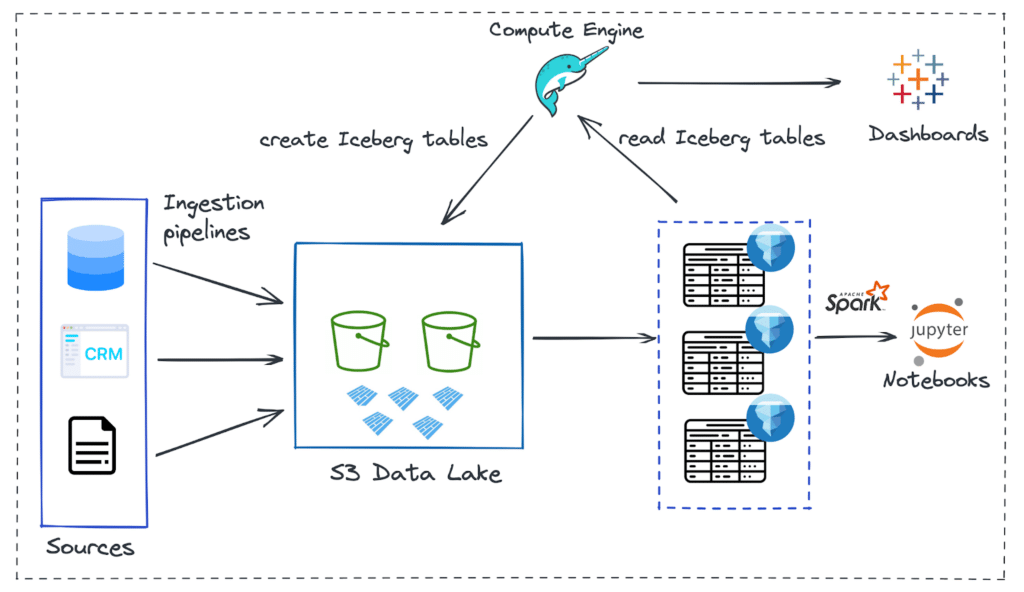
As of today, let’s say your architecture looks something like this at a high level:
And, the usual way of making data available across the organization for various analytical purposes is captured in these steps:
First, the data engineering team ingests data from a multitude of sources via different ETL pipelines into a cloud data lake. In this case, it is Amazon S3buckets.
Then the raw data files, i.e., Parquet files, are converted into a specific data lake table format. Table formats help abstract the physical complexity of the data structure and bring in the ability to perform data warehouse-level transactions. Apache Iceberg is the suitable table format used in this architecture.
To deal with reading and writing Iceberg tables on the data lake and to run ad hoc queries, there is the need for a compute engine. Dremio, an end-to-end lakehouse platform, is used for this specific purpose. It brings in capabilities such as a compute engine, metastore, and semantic layer and, most importantly, provides native connectivity with BI tools. The data engineering team usually manages the preparation of Iceberg tables and supplies them to data analysts/scientists.
Finally, the Iceberg tables (datasets) are made available for consumption by applications for various analytical purposes. In this workflow, data analysts develop Tableau dashboards directly on the data lake via Dremio’s platform without the need for data copies. For ML workloads, data scientists can use other engines (such as Apache Spark) directly on the Iceberg datasets.
An important thing to note in this lakehouse architecture is the data lake table format used, i.e., Apache Iceberg. Iceberg is a high-performance, open table format for large-scale analytics. It brings capabilities such as ACID compliance, full schema evolution (using SQL), partition evolution, time travel, etc., that address some of the critical problems within data lakes and allow you to do all the things you would typically expect from a data warehouse.
One of the best things about the Iceberg table format is that it enables you to work simultaneously with various compute engines (such as Spark, Dremio, Flink, etc.) on the same data. So, depending on the use case, you can decide which engine to use. For the following demo, we will use Dremio Sonar as the query engine to deal with Iceberg tables.
Data Request for Building Dashboard
Now imagine a data analyst in your organization wants to build a new dashboard to do some customer churn analysis. To start their analysis, they need access to the relevant datasets. So, they log a new ticket for your data engineering team to get the data.
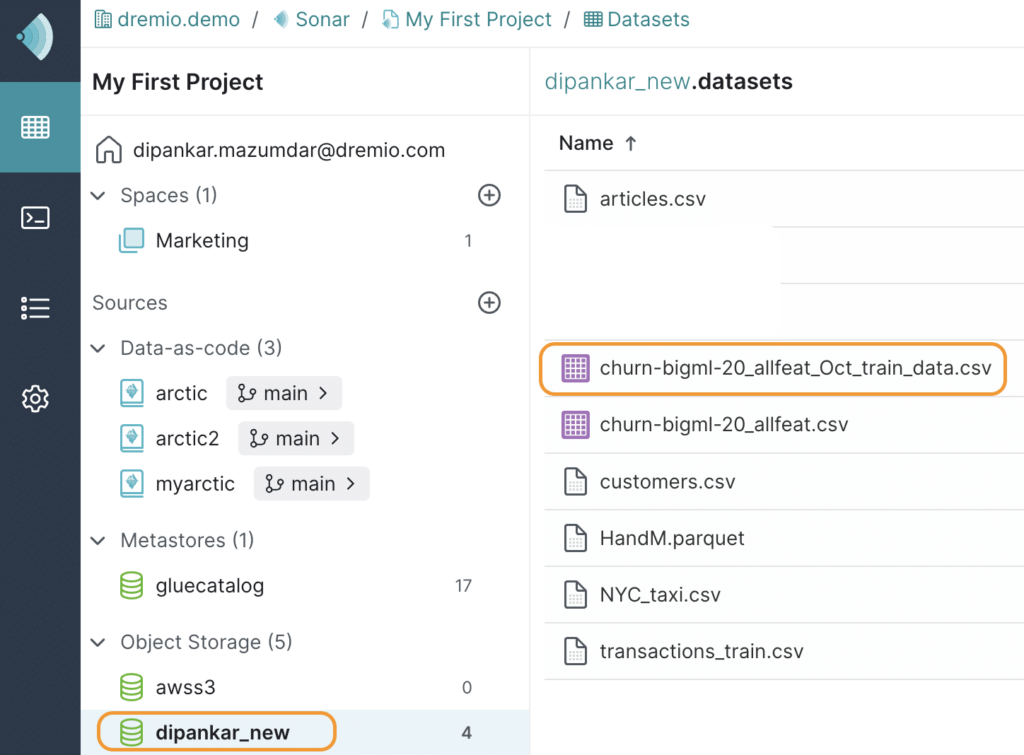
For this demonstration, assume that the relevant data files are already ETL'd into a data lake called dipankar_new and ready to be converted into Apache Iceberg tables. Upon accessing the dataset from Dremio UI, this is how it looks.
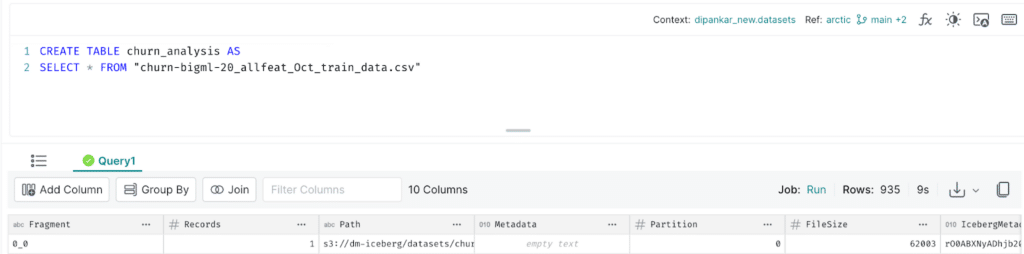
Now, to convert the churn-bigml-20-allfeat_Oct_train_data.csv dataset into an Iceberg table, you write a CTAS statement as shown below in Dremio:
CREATE TABLE churn_analysis AS
SELECT * FROM "churn-bigml-20_allfeat_Oct_train_data.csv"
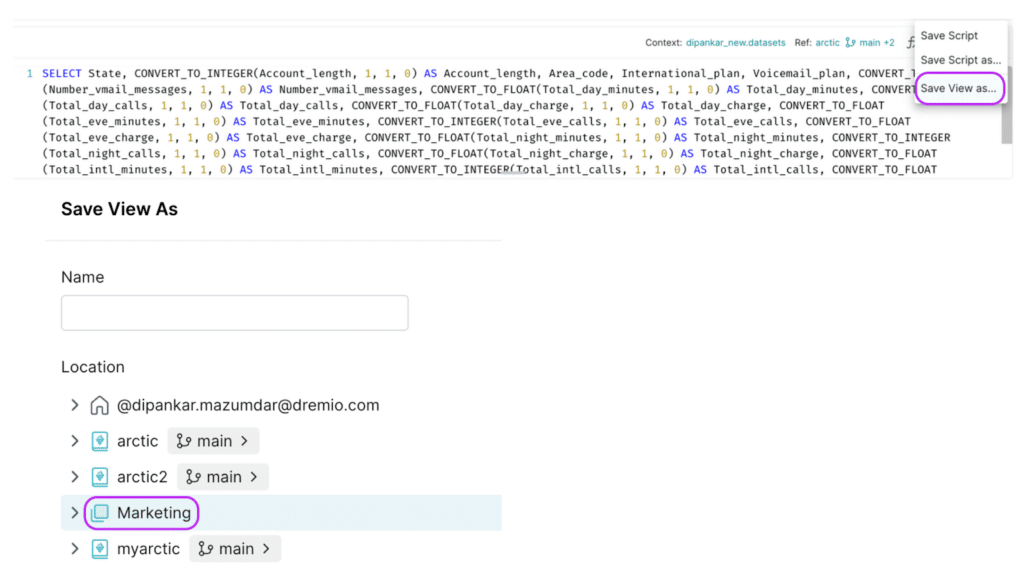
After the statement executes, you will have successfully created the first Iceberg table named churn_analysis. Next, you need to share this dataset with the analyst. Dremio allows you to quickly share datasets in a number of ways. However, the best approach is to create a virtual dataset (aka VDS) and save it to a specific space, i.e., a semantic layer that the analyst has access to. This is also when you can apply any transformation on the dataset. For this demo, we will just change the datatypes of a few columns and save it to a space called Marketing as shown below.
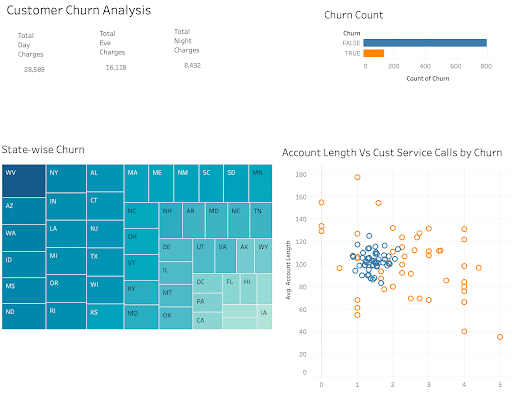
Finally, the analyst starts working on the dashboard and publishes it for their stakeholder’s analysis. This is what the dashboard looks like currently.
Data Write Mistakes
Now, let’s say you are working on a different ticket the next day, and it involves ingesting some new data to a couple of Iceberg tables in your data lake. You write the code and run a job. The job runs successfully, but upon verifying the job details, you realize that you have made a mistake and updated tables in the production environment instead of staging — that’s a horror story!
To add to that, another thing that you observe is that you have also updated the churn_analysis table based on this SQL statement.
INSERT INTO churn_analysis SELECT * FROM "churn-bigml-20_allfeat.csv"
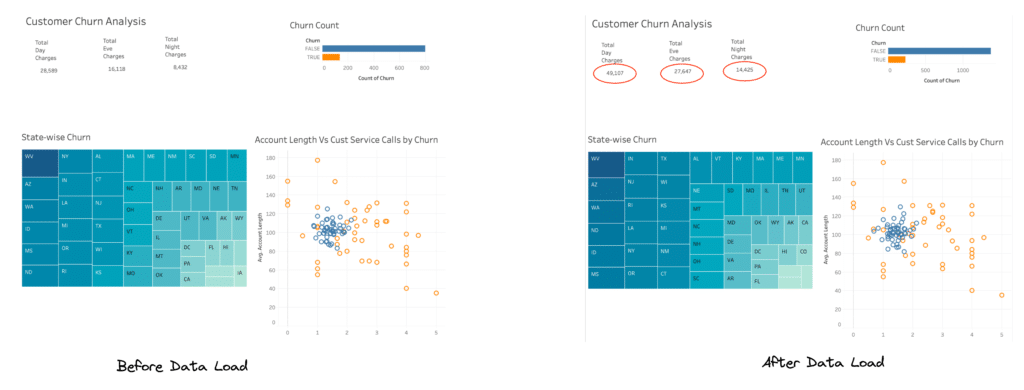
This is the same table the analyst used to develop the “Churn analysis” dashboard. Although it is not an uncommon scenario, the impact of this mistake is huge, especially for the stakeholders who make decisions based on this data. While you dig more into how this happened and what to do, you get a Severity-1 ticket from the same analyst who says the obvious: “The dashboard has completely different data now. Can you please investigate before I can present this to stakeholders?”. They also attached a screenshot of the dashboard with the unexpected numbers, as shown below.
On the brighter side, you know this was a mistake on your part, and exactly what tables were impacted in the data lake because of the job that you ran. This saves a lot of time in terms of debugging and figuring out the root cause. However, you are worried about the next steps to fix this situation. In your previous architecture, which was based on a cloud data warehouse, you could simply roll back the tables. So, the question now is, do you have similar capabilities with a data lakehouse?
The good news is that Apache Iceberg specifically brings these features to a lakehouse architecture and allows you to roll back tables to quickly correct problems by resetting tables to a previous good state. Note that Iceberg as a table format provides APIs to achieve this functionality; however, the responsibility of actually rolling back the tables lies in the hands of the compute engine. Therefore, the choice of engine is critical. In your case, Dremio is the engine, and it supports the operation of rolling back tables. There are precisely two ways to roll back tables: 1. Using the timestamp, or 2. Using the snapshot ID.
To start this operation, you need to first understand the history of the table churn_analysis and look at what happened. Iceberg provides access to these system tables for metadata querying and is super helpful in these types of scenarios. To do so, you run the following query in Dremio UI.
SELECT * FROM TABLE (table_history('churn_analysis'))
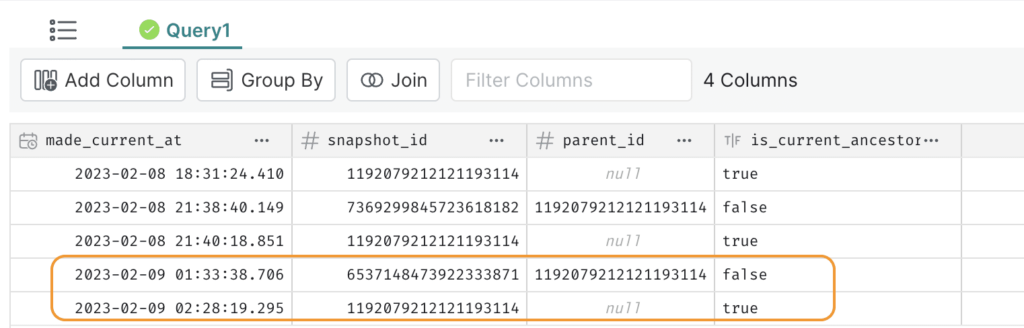
This is what you see.
Based on the timestamp 2023-02-09 01:33:38.706, you identify that the last row led to the unintended INSERT operation in this production table. And the one above that with the timestamp 2023-02-08 21:40:18.851 is the correct state during which the analyst developed the dashboard.
You now run the following command in Dremio to roll back the Iceberg table to its previous state.
ROLLBACK TABLE churn_analysis TO TIMESTAMP '2023-02-08 21:40:18.851'
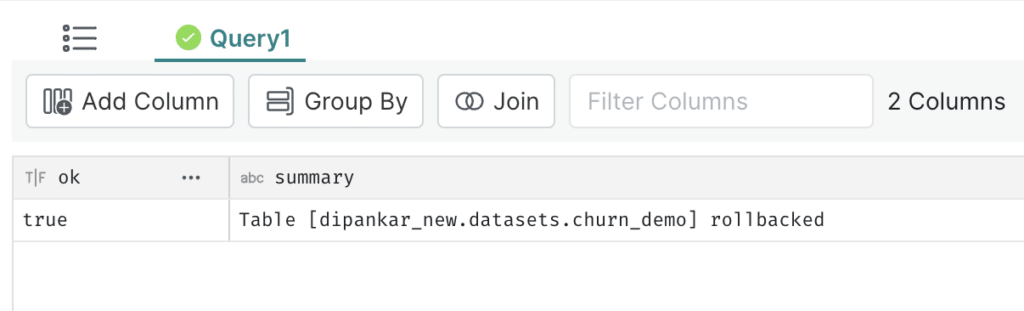
The message shows that the table was rolled back. Upon running the table_history command again, you now see the following.
The is_current_ancestor column is set to false for the snapshot that was created after the specified timestamp for rollback, i.e., 2023-02-08 21:40:18.851.
A new snapshot is created that makes it an ancestor.
You also run some count checks to verify the number of records. Finally, you ask the analyst to refresh the data source in Tableau to validate things on their end. The analyst confirms that the dashboard is now in a previously expected state and has no impact.
Conclusion
Data incidents like the one described in this blog are inevitable when multiple pipelines run in a data platform to make data available to the stakeholders. Table formats like Apache Iceberg deliver capabilities such as version rollback and time travel to efficiently handle these situations, ensuring no downstream impact. Ultimately, a data lakehouse brings all the advantages of open data architecture, allowing multiple analytical workloads to run in conjunction with significantly reduced costs. Check out these resources to learn more about the architecture of Apache Iceberg and its various capabilities:
Intro to Dremio, Nessie, and Apache Iceberg on Your Laptop
We're always looking for ways to better handle and save money on our data. That's why the "data lakehouse" is becoming so popular. It offers a mix of the flexibility of data lakes and the ease of use and performance of data warehouses. The goal? Make data handling easier and cheaper. So, how do we […]
Aug 16, 2023·Dremio Blog: News Highlights
5 Use Cases for the Dremio Lakehouse
With its capabilities in on-prem to cloud migration, data warehouse offload, data virtualization, upgrading data lakes and lakehouses, and building customer-facing analytics applications, Dremio provides the tools and functionalities to streamline operations and unlock the full potential of data assets.
Aug 31, 2023·Dremio Blog: News Highlights
Dremio Arctic is Now Your Data Lakehouse Catalog in Dremio Cloud
Dremio Arctic bring new features to Dremio Cloud, including Apache Iceberg table optimization and Data as Code.