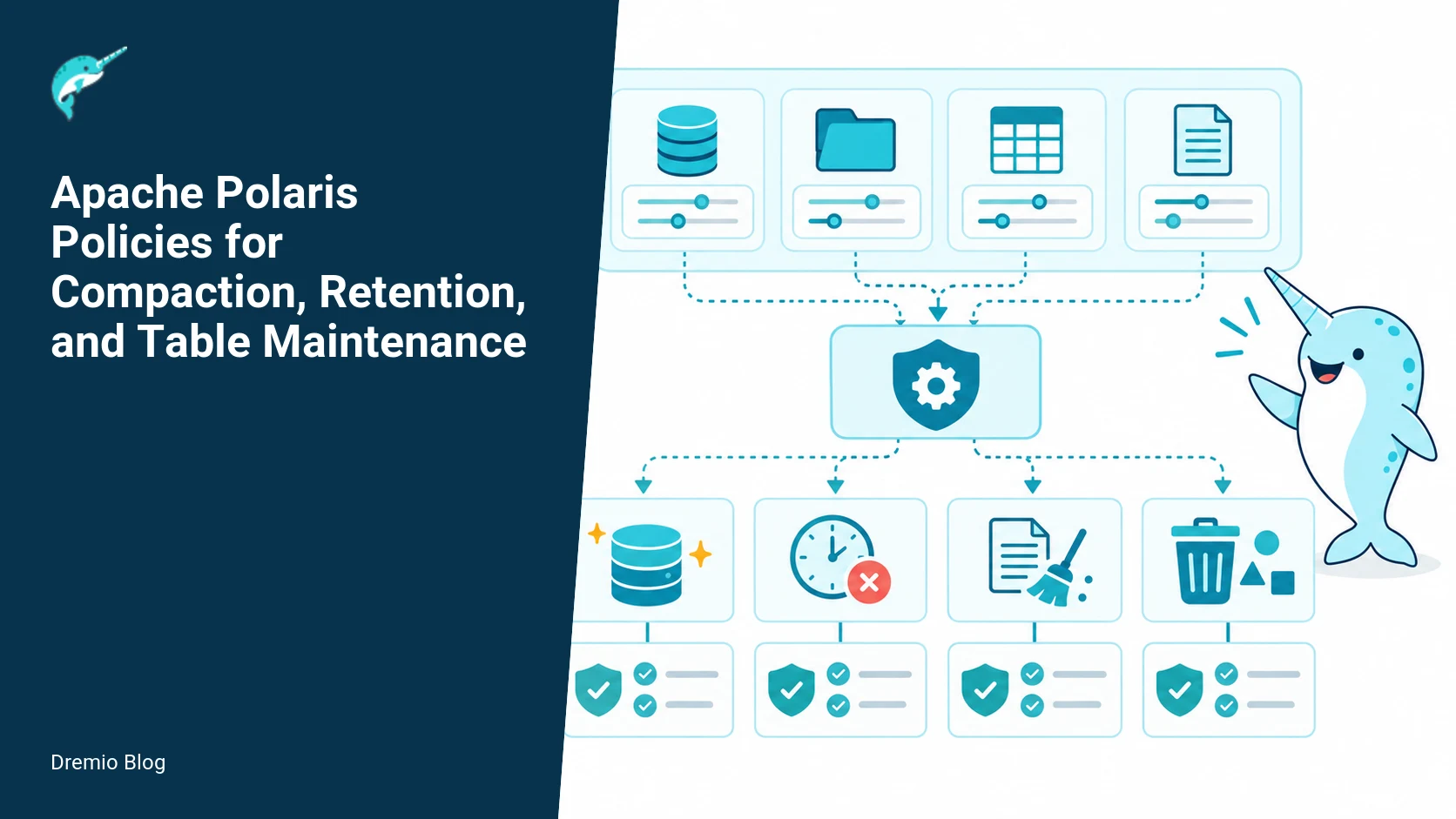
How Polaris policies separate intent from execution
Short answer: Polaris policies are declarative records attached to catalog resources that specify maintenance intent, such as compaction, orphan-file removal, and snapshot expiry. They do not run themselves. You must pair policy storage with a separate execution service that discovers, schedules, runs, and reports maintenance work. This article explains how to design policy inheritance, how to operate an execution service safely, and how to validate and roll out policies in production.
What a Polaris policy actually is, and what it is not
Polaris policy objects, as documented in the Polaris 1.5.0 policy reference, attach configuration and inheritance rules to catalog resources such as tables and namespaces. They express maintenance intent: requirements for compaction frequency, snapshot expiry windows, or orphan-file deletion. The important operational point is this, a stored policy is inert. It neither schedules jobs nor executes compaction. That responsibility belongs to a scheduler or runner that reads policies from the catalog and performs the actions. Treat the policy store and the execution service as two distinct production components.
Polaris supports built-in policy types for data compaction, metadata compaction, orphan-file removal, and snapshot expiry. Refer to the Polaris policy documentation for field-level semantics and inheritance behavior. When you design operations, remember policies declare what should happen. The how, when, and by whom are separate concerns implemented outside Polaris.
Policy model and inheritance
Polaris stores policies at multiple scope levels: global, catalog, namespace, and object. Inheritance is useful for defaulting behaviors, but it introduces ambiguity unless you fix an auditable precedence rule. Practical operations require a deterministic merge and a recorded source for each effective configuration value. At a minimum, implement three rules in your system: a clear precedence order, an override marker, and an audit trail that shows which policy provided each effective setting.
Precedence rule (recommended): object-level policy overrides namespace-level, which overrides catalog-level, which overrides global defaults. That matches the behavior described in the Polaris release documentation for policy scopes. For every effective policy applied by your runner, log the provenance: which policy ID and which scope supplied each parameter. This makes troubleshooting possible when a compaction did or did not run as expected.
Inheritance edge cases to plan for:
Partial overrides. If a child policy sets a single field, the rest should be inherited from the parent, not zeroed. Your merge must be deep, field-by-field, not a blind replacement.
Disabled policies. Define a clear toggle that means disabled at a given scope. If a namespace policy disables compaction, confirm whether that prevents an object-level enable or whether object-level can re-enable. Pick one and document it.
Conflicting schedules. If two policies result in overlapping schedules, the runner should deconflict according to precedence and, where possible, coalesce work to avoid redundant compaction on the same table.
Policy inheritance tree. Each stage has a result that can be checked before the next stage begins.
Label and store policy version metadata. When a runner reads an effective configuration, record the policy IDs and their etags or versions. That makes audits and forensic queries practical. This requirement is especially important for retention policies, because improper deletion can break readers or violate legal holds.
Execution service design: discovery, scheduling, running, and reporting
Because Polaris does not execute policies, you need an execution service that performs four functions: discovery (find applicable policies), scheduling (pick a safe time to run), execution (run compaction, metadata rewrite, or cleanup), and reporting (emit success, failure, and provenance). Keep these responsibilities modular so you can evolve schedulers without changing policy storage.
Design notes:
Discovery: The runner must read policy objects and compute effective configuration using your chosen inheritance precedence. Use change notifications if Polaris can emit them, otherwise poll the policy store at a conservative interval and use etags to detect updates.
Scheduling loop: Convert the effective policy into a scheduled job with rate limits, retry rules, and blackout windows. Keep the scheduler stateless where possible; store schedule leases in a central coordination system to avoid duplicate runs.
Execution: Use idempotent tasks. For compaction and metadata rewrite, run idempotent operations or record a claim that a run is in-progress so other workers skip it.
Reporting: Emit structured events that include policy provenance, runtime metrics, and error details. Persist run history with references to snapshot IDs, file lists involved, and deleted objects.
Policy store versus execution service. Each technical risk needs a matching test, boundary, or operating signal.
When making a choice about running compaction versus snapshot expiry, build safety checks into the runner. For example, always verify the active snapshot pointer and the set of readers before pruning snapshots. Use the table format documentation for maintenance semantics. Apache Iceberg documents snapshot and file-level maintenance operations, which you should read to understand the atomic guarantees your runner can rely on.
Maintenance scheduling loop
The scheduling loop turns policies into safe actions. At a high level the loop is: discover policy, compute effective configuration, evaluate readiness, claim lock, run maintenance, report, and release claim. Implement a conservative backoff between retries and add metrics at each step. The loop must be reliable to partial failure, worker restarts, and long-running compactions.
Maintenance scheduling loop. The loop turns table or catalog signals into controlled operational changes.
Practical implementation checklist for the loop:
Read only policies that changed since last run, using stored etags or versions.
Compute effective config and show a diff against last applied config. If diffs are only policy metadata, consider skipping execution.
Perform readiness checks: verify the table is not currently undergoing user DDL, check that current readers are below a configured threshold, inspect a legal-hold flag, and consult your catalog for any locks.
Obtain a distributed lease for the table and the planned operation. Leases should expire and support takeover so a stuck worker does not block maintenance indefinitely.
Execute maintenance actions in idempotent steps with checkpoints. For compaction, write the new manifest or snapshot but do not delete files until the commit succeeds and the operation is durable.
On success, update run history with the exact snapshot IDs and file lists removed. On failure, emit structured error with retryable and non-retryable markers.
Worked example: compaction policy
Example intent: compact small data files in hourly partitions when a partition has more than 100 files older than six hours. Polaris supports compaction policy objects; see the Polaris policy reference for the field semantics. Here we show how to translate intent into operational checks and execution steps. The following is a representative sequence, not an exact command set.
Policy fields you will use: a per-partition threshold for small-file count, an age cutoff for eligible files, a target file size, and a blackout window for peak hours. Store the policy at namespace level for consistency, override per-table when a table needs different compaction behavior, and record policy versions.
Runner logic outline for compaction:
Discover: Find tables with an effective compaction policy that is enabled.
Assess: For each table, list files per partition and count files older than the policy cutoff. If the count is below threshold, skip and record that the policy had no-op effect.
Readiness: Ensure no large DML operations are in flight and ensure reader count is below the configured threshold. This prevents compaction from interfering with interactive workloads.
Claim: Take a lease for the table+partition for the duration of compaction, with a safe maximum time limit.
Compact: Create a new file set by rewriting small files into target-size files. Use Iceberg-compatible commit semantics so you produce an atomic snapshot that replaces the old file list.
Finalize: Commit the new manifest or snapshot. Only after commit succeeds, mark the old files for orphan cleanup. Do not delete old files before the new snapshot is durable.
Report: Emit a run record with the number of files compacted, bytes rewritten, duration, and the snapshot ID created. Include policy provenance (policy ID and version).
Failure modes and mitigations for compaction:
Partial commit failure. Mitigate by ensuring commits follow atomic semantics. If your storage system or table format provides atomic snapshot commits, rely on them. If a commit fails, leave the temporary files and let the orphan-file cleanup policy remove them later, or implement immediate cleanup from the runner if safe.
Long-running compaction causing reader latency. Mitigate by enforcing blackout windows, running compaction at low cluster priority, or throttling IO per-compaction.
Duplicate work by concurrent runners. Mitigate with distributed leases and idempotent work markers in the table metadata.
Worked example: snapshot expiry policy
Intent: expire snapshots older than 14 days, but protect snapshots referenced by active readers or legal holds. Polaris policy objects can express snapshot expiry; consult the Polaris policy reference for exact fields. Apache Iceberg documents the snapshot expiry maintenance operations that your runner will call, and those docs describe the guarantees around snapshot deletion. Read them to understand the atomicity and file deletion semantics.
Runner steps for snapshot expiry:
Discover: Query effective snapshot expiry policy for each table.
Candidate selection: List all snapshots older than the cutoff. Exclude snapshots that are referenced by table-level pointers, by long-running queries discovered through your query engine, or by an explicit legal-hold flag in the catalog.
Safety checks: Verify the table's current snapshot is not among the candidates. Confirm no ongoing compaction or rewrite operation will be invalidated by snapshot removal.
Claim: Acquire a lease for snapshot expiry to avoid concurrent pruning.
Expire: Call the Iceberg maintenance API to expire selected snapshots, or perform equivalent commits that remove the snapshot entries. Do not delete files immediately unless you have confirmed the expired snapshots are not referenced by any snapshot or manifest.
Orphan cleanup: Schedule a separate orphan-file cleanup job, because file deletion can be slow and must be decoupled from snapshot expiry for safety.
Report: Record which snapshots were removed, the snapshot IDs, and any manifest files that became unreferenced.
Important caution: retention policies must protect active readers and legal holds. Do not delete files or snapshots that a running query might still reference. If your query engine exposes active snapshot or file references, consult it before deleting. For background on snapshot expiry and why you must separate expiration from file deletion, see the Dremio discussion on Apache Iceberg snapshot expiration.
CLI inspection and debugging
Polaris offers a command-line interface for inspection and management. Use the CLI to read stored policies, view inheritance, and verify policy versions. Inspecting the stored JSON is the first troubleshooting tool when a runner does or does not act on a table. The Polaris CLI reference describes the commands and the output formats you will see; use that as the source of truth for exact CLI flags and subcommands.
Practical steps using the CLI (representative, verify exact flags from the Polaris CLI docs):
List policies at namespace scope to confirm a default compaction policy exists for a tenant. Use the CLI command to show policy JSON and the etag or version.
Inspect a table-level policy to check overrides and to see which fields are set versus inherited. Your runner should be able to produce the same effective config from the recorded policy IDs.
Check policy history to determine who changed a policy and when. Use the CLI to obtain the change log and correlate it with maintenance runs.
If you use Dremio for queries, you can cross-check snapshot and file information against Dremio diagnostic outputs. Dremio has published guidance on orphan-file cleanup and snapshot expiration that explain the operational consequences and how query engines interact with the table format; those posts are good practical complements to Polaris docs. See the Dremio articles on orphan-file cleanup and Apache Iceberg snapshot expiration for concrete examples and cautionary tales.
Safe rollout rings. A reversible canary keeps an unsupported client or unsafe policy from becoming a fleet-wide incident.
Rollout plan and schedule
Rolling out policy-driven maintenance in production requires staged ringed deployments and careful measurement. Use canary rings, gradual percentage rollouts, and a rollback plan. Here is a practical rollout schedule you can adapt. This schedule assumes you already have an execution runner implementation that reads Polaris policies and acts on them.
Stage 0, lab: Run the runner against a snapshot of production metadata in an offline environment. Validate that compaction creates correct snapshots, and that snapshot expiry marks snapshots for removal without deleting live files.
Stage 1, canary 1: Enable policies on a single low-risk namespace, for example a development tenant. Run for one week. Measure runtime, conflict rate with user jobs, and any commit failures.
Stage 2, canary 2: Expand to 5 to 10 namespaces, including one moderate-production workload. Run for two weeks and monitor closely.
Stage 3, wider rollout: Gradually increase to 25 percent of namespaces over four weeks. Automate metric collection and alerting for the rollout thresholds described below.
Stage 4, full rollout: After stable operation with low error rates and acceptable performance impact, enable policies globally.
During rollout, enforce a safe rollback plan. For immediate rollback, disable the policy at higher precedence (namespace or catalog) and let the runner detect the policy change and stop scheduling new runs. Because some operations are long-running, you may need to cancel in-flight compactions in a controlled way. Leases should support cooperative cancellation so a rollback does not leave partial commits behind.
Worked example schedule: for compaction run a daily low-priority window from 02:00 to 06:00 UTC, with per-table rate limit of 1 compaction per 6 hours, and a partition-level concurrency of 2. For snapshot expiry run daily at 03:00 UTC with a safety check that active reader count is zero for the past 60 minutes. These numbers are starting points. Measure and tune for your workload.
What to measure after deployment
Collect these metrics to evaluate correctness and operational impact. Instrument both the runner and the underlying storage operations.
Action metrics: counts of compactions, snapshot expiries, and orphan-file cleanups initiated and completed, per policy ID.
Success/failure rates: percent of runs that fail, including breakdown by error type and whether failures are retryable.
Duration and IO: average wall-clock time and bytes read/written per operation, per table and per partition.
Concurrency impacts: query latency and throughput during compaction windows, measured against a baseline.
Staleness: time between a policy change and the next successful application (latency from intent to action).
Garbage: bytes of orphaned files removed and time they remained orphaned before cleanup.
Provenance audit logs: ability to reconstruct which policy and which runner performed each action, checked against stored policy versions.
Measure these for 30 to 90 days. Watch for trends such as increasing failure rates or growing orphaned storage, which indicate either policy misconfiguration or runner bugs.
Failure modes and operational guidance
Common failure modes and mitigations:
Stuck lease or zombie runner. Recover by expiring leases after a conservative timeout and providing a takeover path for other workers. Instrument lease holder heartbeats.
Policy drift. When effective behavior differs from intent, provide a tooling command that shows the effective configuration and the source policies that contributed each value. Use the Polaris CLI to inspect stored policies and prove the source.
Unsafe deletions. Prevent by adding pre-delete checks: query engine reader list, legal-hold flags, and recent snapshots that may be referenced. Do not delete without explicit confirmation from these checks.
Scale failures. If the runner cannot keep up, reduce per-table frequency, increase worker count, or shard by namespace to parallelize work without causing hotspots in metadata services.
Operational checklist to reduce risk:
Require policy reviews and approvals before enabling production policies. Record approver IDs in the policy metadata.
Run a pre-flight validation step for policy changes that simulates the operations and reports the expected impact.
Keep rollback toggles at a scope higher than the one changed by the policy, so disabling at namespace level prevents object-level overrides from re-enabling maintenance.
Monitor storage usage trends to spot increasing orphaned bytes, which can indicate a bug in commit handling or delayed cleanup.
Cross-links to further reading and Dremio resources
Polaris policy design interacts closely with table format maintenance practices. Read the Apache Iceberg maintenance documentation to understand snapshot expiry and manifest handling; the Iceberg docs explain which operations are atomic and how file references are tracked. For Polaris policy semantics and CLI usage, consult the Polaris 1.5.0 policy and CLI pages. The Dremio posts below provide practical, engine-specific context: the Apache Iceberg snapshot expiration article explains why expiry must be conservative before file deletion, and the orphan-file cleanup post shows cleaning patterns and pitfalls encountered in real deployments. Also see the Dremio discussion of Polaris architecture for an example of how a catalog and services separate responsibilities, and the Dremio open catalog page for platform integration notes. Use these resources when you design your runner and your operational playbooks.
Why these links help: the Polaris pages give exact field names and CLI flags you must use. The Iceberg maintenance docs describe the guarantees you can depend on for snapshot and file operations. The Dremio posts give concrete examples of failure modes that happened in production and how teams recovered. Together they form the practical body of knowledge required to operate policy-driven maintenance safely.
Practical implementation and evaluation sequence
Follow this sequence when implementing a runner and rolling it into production. Each step includes checks and measurable success criteria.
Build a local runner prototype: implement discovery, effective-config computation, and a no-op scheduler that logs planned actions. Success criteria: the runner can list tables with effective policies and emit planned actions without modifying tables.
Add locking and claim semantics: implement distributed leases and idempotent markers. Success criteria: two concurrent runners do not schedule the same table and the log shows correct lease handoffs.
Implement compaction and snapshot expiry calls using a test bucket and Iceberg-compatible operations. Success criteria: commits create new snapshots atomically, and old snapshots are visible until expiry runs.
Connect to Polaris: use the Polaris CLI and API to read real policies and confirm effective config matches expectations. Success criteria: the runner applies the same policy values you see in the Polaris CLI output.
Run offline validation on production metadata: simulate runs for a sample of tables and report expected file and snapshot deletions, without performing them. Success criteria: no unexpected deletions are predicted and the simulation output is reviewed and approved.
Canary rollout: follow the rollout plan above with explicit gating criteria per stage, including failure thresholds and rollback triggers. Success criteria: metrics remain within expected ranges and no data loss occurs.
Practical implementation: end-to-end compaction plus expiry pipeline
This section gives a runnable sequence you can follow to implement a Polaris compaction policy and a snapshot expiry policy together, using the Polaris CLI for inspection and verification. The steps assume Polaris release 1.5.0 policy primitives and the Polaris CLI documented for that release. Verify on your target cluster that the Polaris server and the CLI match the 1.5.0 behavior before you run these steps.
Summary sequence, then details:
Plan: choose scope, frequency, target thresholds for compaction and expiry, and audit precedence for inheritance.
Create a compaction policy document, and a snapshot expiry policy document, store them in Polaris for the appropriate resource level.
Deploy an execution service that reads policies, schedules runs, and invokes the maintenance runner. Confirm the execution service is separate from Polaris server.
Run a dry run compaction and dry run expiry. Inspect logs and Polaris policy versions via the CLI.
Produce a small controlled workload, run maintenance, verify query stability and retention protections.
Roll forward to production schedule using the rollout schedule described below, and set alerts for the key metrics.
Detailed steps
1) Plan configuration. Choose the smallest unit of policy assignment that matches your operational boundaries. For example, assign compaction and expiry policies at the dataset level for heavy update streams, and at the namespace level for read-mostly data. Decide frequency. For compaction I recommend starting with a once-daily window for background compaction, and a once-weekly window for aggressive level compaction that rewrites files older than your hot window. For snapshot expiry, start conservatively: keep a minimum of 48 hours of snapshots and protect snapshots explicitly used by ongoing queries and legal holds. Record the inheritance precedence rule you will use, and store that rule in your operational runbook. The rule must be auditable, see the audit section below.
2) Author policy documents. Use Polaris policy primitives documented in Polaris 1.5.0. For compaction configure thresholds such as small-file threshold, target file size, and age window for hot versus cold files. For expiry configure min_snapshots_to_keep and max_snapshot_age, and ensure you include a setting or annotation that ties to external legal hold metadata if applicable. If Polaris 1.5.0 does not provide a built-in legal hold hook for your system, add a required external check step in the execution service before a delete.
3) Persist policies in Polaris. Store the compaction and expiry policies at the chosen levels. Remember, storing a policy in Polaris does not cause execution by itself. The execution service must discover and evaluate those policies and then run the maintenance actions.
4) Implement or configure the execution service. The service should periodically query Polaris for applicable policies, resolve inheritance using your precedence rule, compute what actions are required, and then invoke Iceberg maintenance commands or your in-cluster maintenance runner. Keep the execution path logically separate from the Polaris server process. The separation avoids accidental execution from configuration changes alone.
5) Dry runs. Both compaction and expiry should support a dry run mode. For compaction, the dry run returns which files would be rewritten and the expected new file sizes. For expiry, the dry run lists snapshot ids that would be deleted. Inspect these with the Polaris CLI. If the CLI output format or command names differ in your environment, consult the Polaris 1.5.0 CLI docs to match the commands. Run these dry runs every time you change a policy.
6) Controlled workload test. Pick a nonproduction dataset with similar characteristics to production. Produce a workload that keeps snapshots, runs queries that hold long-running readers, and creates small files. Run the execution service to perform compaction and expiry under load. Observe query latency, snapshot visibility, and file counts before and after. Verify no query fails due to missing snapshots or missing data files.
7) Promote to staged production using the rollout schedule in the next section, and instrument the key metrics described later. Keep the staged group small, and widen only after validating all checks.
Failure injection tests and failure modes to exercise
You should treat compaction and expiry as potentially dangerous operations. Below are concrete failure injections to run, what to expect, and how to detect incorrect behavior. Run these tests in staging before any wide rollout.
Failure injection 1, execution service crash mid-operation. Method: during a compaction job, kill the execution service process after it creates rewrite files but before it commits the Iceberg replace-manifest or commit operation. Expected correct behavior: Iceberg semantics should preserve snapshot atomicity, so partial outcomes are either visible as the pre-commit state or the post-commit state. No data loss should occur. What to check: review Iceberg table history for incomplete commits, confirm no manifest lists reference missing files, and verify queries either use the old snapshot or the new snapshot. Detectable bad behavior: queries seeing missing files, or commit records with references to objects that do not exist. If you see that, inspect your execution service implementation for improper pre-commit cleanup actions.
Failure injection 2, expiry deletes a snapshot still referenced by an active query. Method: open a long-running query that scans a snapshot, then run the expiry job that would remove that snapshot if not protected. Expected correct behavior: expiry must either skip snapshots currently referenced by readers, or a pre-check must detect and postpone the delete. What to measure: whether any query returns file not found errors, and whether your execution service logs show a skip decision. If your environment uses a separate coordination service for active readers, verify the expiry implementation consults that service before deleting. If Polaris 1.5.0 does not offer an integrated reader-protection mechanism for your cluster, build an explicit pre-delete hook.
Failure injection 3, simultaneous compaction plus orphan file cleanup. Method: run a compaction and a file-reaper job targeting the same table simultaneously. Expected correct behavior: the compaction should not create files that the reaper immediately deletes. Coordination options: have the reaper consult a compaction job lock or use commit timestamps to ensure safe deletion. What to check: file footprints before and after, count of files created and deleted, and whether any manifest references point to deleted files.
Failure injection 4, policy inheritance surprises. Method: create a namespace policy with a permissive expiry, and a dataset policy with a more aggressive expiry. Apply an auditable precedence rule where dataset-level policies override namespace-level policies. Then simulate a policy change by updating the namespace policy. Expected behavior: dataset-level explicit policy should continue to apply to that dataset. What to log: the effective policy resolution for each table including version ids. Ensure every resolution decision is persisted with who changed which policy and which precedence rule was used.
Failure detection tooling. Automate checks that parse the Iceberg table history and compare it with the maintenance job logs. Fail the test if any of the following occur: a snapshot referenced by a running query is removed, a manifest references a missing file, or more files are deleted than were listed in the dry run. Include a postmortem checklist that captures policy artifact versions, execution service logs, and Polaris CLI inspection outputs.
Rollout schedule, checkpoints, and gating rules
Use a staged rollout that protects readers and legal holds. I suggest a four-stage rollout with objective gates. Each stage has timeboxed checkpoints and required metric checks before advancing.
Stage 0, Canary deploy to a single nonproduction dataset. Duration 48 hours. Gates: no query errors referencing missing files, compaction job success rate 100 percent, expiry dry run matches expected deletions. Instrumentation: Polaris CLI policy version listing, execution service logs, Iceberg table history.
Stage 1, Small production subset, for example 5 percent of datasets chosen by high churn rather than alphabetical selection. Duration 72 hours. Gates: query tail latency increase less than 10 percent, no snapshot-not-found incidents, compaction throughput within expected bounds, and stakeholder review of audit logs showing correct precedence resolutions.
Stage 2, Broad production, 50 percent of datasets. Duration one week. Gates: alert-free for the defined critical metrics for 48 hours, automated snapshot protection validation passes, legal-hold reported snapshots remain untouched. Prepare rollback scripts in case manual intervention is needed.
Stage 3, Global. Duration two weeks. Gates: baseline metrics stable, retention cost savings realized, and post-deploy security audit for policy metadata changes completed.
Gating details. Each gate requires explicit signoff from the data platform owner and from legal when expiry rules touch regulated data. The rollout record must include the Polaris policy ids and versions used at every stage. If you change precedence behavior during rollout, stop and re-run the Stage 1 tests.
Rollback plan. Keep previous policy versions available, and ensure the execution service can be told to stop executing for selected namespaces. For immediate rollback, push the prior policy version and halt scheduled runs for the affected tables. For emergency halt, stop the execution service and trigger manual verification of the meta store state before resuming.
What to measure after deployment, with thresholds and alerting
Measure these metrics continuously and alert on the thresholds listed. The values below are starting points. Adjust to your environment and table characteristics.
Compaction success rate, target 99 percent in production rolling window of 24 hours. Alert if success rate drops below 95 percent for an hour. A failed compaction typically shows as an incomplete commit or as an error in the execution service. Track both exit codes and commit-authoring entries in Iceberg history.
Snapshot deletion rate, should match planned deletions. Alert if actual deletions exceed dry-run predictions by more than 5 percent over 24 hours. Excess deletions indicate a logic bug or an incorrect policy resolution.
Snapshot-not-found errors returned by query engines. Alert on any nonzero occurrence for 15 minutes. These errors are the most critical user-impacting signals for incorrect expiry handling.
Query tail latency percentiles for affected datasets, measure 95th and 99th. Alert if 95th percentile increases more than 20 percent compared to baseline during maintenance windows. Compaction can increase CPU and IO pressure, so monitor node load and IO queue depth.
File churn and object store PUT/DELETE counts. Alert if object storage delete counts spike unexpectedly. A sudden spike can indicate runaway expiry or reaper logic that missed locks.
Policy resolution audit rate. Ensure every execution has an audit entry showing the policy ids, versions, and the resolved effective policy. Alert if any execution lacks an audit entry. This is a compliance requirement when you use inheritance rules.
Alert routing. Send snapshot-not-found and blob-store delete spikes to on-call storage engineers. Route policy resolution audit failures to platform owners and legal. Send compaction failures to the scheduler on-call with automatic repro commands included from the execution logs.
What to log for post-incident analysis. For each maintenance run, persist: execution id, policy ids and versions, effective resolved policy JSON, dry-run outputs, list of candidate snapshots and files to be deleted, actual commit ids created, and the Iceberg table history entries before and after the run.
Label of freshness. The policy behavior and CLI commands discussed above are based on Polaris release 1.5.0 documentation, checked on September 22, 2026.
FAQ
1. Does storing a policy in Polaris cause maintenance to run automatically?
No. A stored Polaris policy is declarative configuration and does not execute itself. An external execution service must discover policies, schedule runs, and perform maintenance.
2. How do I ensure retention does not delete snapshots still used by queries?
Protect active readers and legal holds by checking the query engine for active snapshot references and honoring explicit legal-hold flags before deleting snapshots or files. Separate snapshot expiry from file deletion so you can verify safety before removing data.
3. What precedence rule should I use for inheritance?
Use object-level overrides first, then namespace, then catalog, then global defaults. Record the policy ID and version that supplied each effective field to keep precedence auditable.
4. How do I inspect policies and their versions?
Use the Polaris command-line interface to list policies, view JSON, and check etags or versions. The CLI is the canonical tool to confirm what is stored in the catalog.
5. Should compaction and orphan-file cleanup run in the same job?
No. Decouple compaction, snapshot expiry, and orphan-file cleanup. That separation reduces blast radius, allows different schedules and priorities, and simplifies failure recovery.
6. Which metrics should I alert on after rollout?
Alert on elevated failure rates, increasing orphaned bytes, long-running operations beyond configured limits, and a sudden drop in compaction throughput versus expected. Also alert on policy application lag, the time between policy change and first successful run.
Related Dremio guides
These guides cover adjacent implementation details that are outside this article's main scope.
Intro to Dremio, Nessie, and Apache Iceberg on Your Laptop
Editor’s note, September 2026. This post was published in September 2023 and some product details have changed since. Nessie is still available and self-deployable under the Apache-2.0 licence, and it remains the clearest implementation of catalog-level branching. It is not an Apache Software Foundation project, and its development has slowed considerably. For how the current […]
Aug 16, 2023·Dremio Blog: News Highlights
5 Use Cases for the Dremio Lakehouse
With its capabilities in on-prem to cloud migration, data warehouse offload, data virtualization, upgrading data lakes and lakehouses, and building customer-facing analytics applications, Dremio provides the tools and functionalities to streamline operations and unlock the full potential of data assets.
Sep 30, 2026·Dremio Blog: Open Data Insights
Apache Iceberg 1.12.0: What’s New, Breaking Changes, and Upgrade Guide
Apache Iceberg 1.12.0 expands v3 engine support, REST catalog operations, streaming reliability, and v4 groundwork. Learn how to upgrade safely.