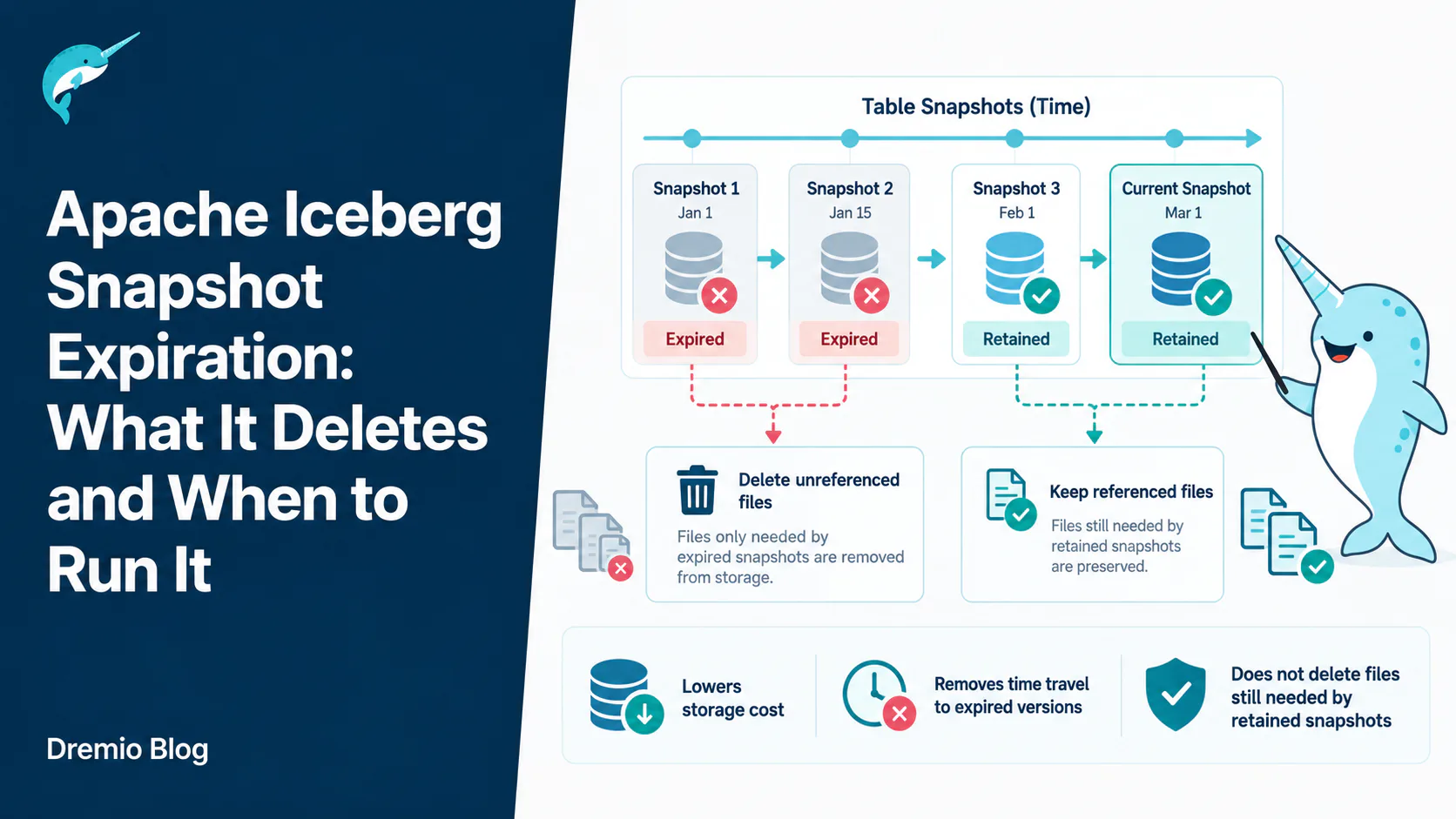
Snapshot expiration is the Apache Iceberg maintenance operation that removes old table versions from metadata and deletes the data files only those versions referenced. It is the reason a delete statement eventually reduces your storage bill. It does not delete anything a retained snapshot still needs, and it costs you the ability to time travel to whatever it removed.
A team deletes two years of rows from a large Iceberg table, the query returns in a few seconds, and the storage bill does not move. Weeks later it still has not moved. Somebody opens a ticket about the cloud provider overcharging them.
Nothing is broken. Iceberg deleted the rows from the current version of the table and kept every file the older versions still point at, because those older versions are what make time travel and rollback work. The files leave storage when you expire the snapshots that reference them, and not before.
This article covers what expiration removes, what it refuses to remove and why, the properties that control it, how to run it on Spark and through the Java API, how to read the output, and the specific ways it goes wrong.
Every commit to an Iceberg table produces a snapshot. A snapshot is not a copy of your data. It is a pointer to a manifest list, which points at manifest files, which point at data files. The whole structure is immutable, which is what makes a commit an atomic pointer swap rather than a mutation.
If you want the layer below this one, the manifest files are where the file-level detail lives.
An update that rewrites one partition of a thousand-partition table produces a snapshot that shares 999 partitions worth of data files with the previous snapshot. Only the rewritten files are new. That sharing is why snapshots are cheap to keep and why deleting one rarely frees as much as people expect.
It also explains the shape of the problem. A table with 40,000 snapshots is not storing 40,000 copies of anything. It is storing a long chain of small deltas, plus every file any link in that chain ever referenced, plus 40,000 manifest lists.
What Expiration Removes, in Order
Expiry is what lets deleted data actually leave your storage bill.
The operation runs in two logical stages, and understanding the split explains most surprising results.
Stage one: choose snapshots to drop
Iceberg builds the set of snapshots that are eligible to go. Eligibility means older than the cutoff, not within the retained count, not the current snapshot, and not referenced by a branch or tag. Those snapshots are removed from table metadata. Time travel to them stops working from that moment.
Stage two: delete the files nothing needs any more
Iceberg then computes which files were referenced only by the dropped snapshots. A data file referenced by any surviving snapshot stays. So do the manifests, manifest lists, delete files, and statistics files under the same rule.
The Apache Iceberg documentation is explicit about this guarantee: the procedure will never remove files still required by a non-expired snapshot. That is a correctness property, not a best effort.
The practical consequence is the one that trips people up. If you expire 500 snapshots on a table whose recent commits keep touching the same partitions, you may delete a handful of files. If you expire 500 snapshots after a compaction rewrote the whole table, you may delete most of what is in storage. Same operation, wildly different outcomes, and the difference is entirely about what the surviving snapshots still reference.
The Five Things That Keep a Snapshot Alive
Five separate things can keep a snapshot alive. Expiry only removes a snapshot when none of them apply.
Expiration is deliberately conservative. Any one of these keeps a snapshot, and the conservatism is why a run that reports zero deletions is far more often correct than broken.
The current snapshot
A table always has a current state. The snapshot the table currently points at is never eligible, regardless of age. On a table nobody has written to in a year, expiry removes nothing and that is right.
Age
Snapshots newer than the cutoff survive. The cutoff comes from the older_than argument, or from history.expire.max-snapshot-age-ms if you omit it, which defaults to five days.
Retained count
retain_last puts a floor under the number of ancestor snapshots kept, applied after the age filter. It defaults to 1, or to history.expire.min-snapshots-to-keep when set on the table. If you ask to expire everything older than an hour on a table that only commits nightly, this is what stops you from losing your rollback target.
Branch and tag references
A snapshot with a ref pointing at it is pinned. Tags are the intended mechanism for retention that outlives your normal window: tag the month end snapshot and it survives daily expiry indefinitely.
A retained snapshot needing the files
This one is about files rather than snapshots, and it is the reason storage does not always fall when snapshot count does. Dropping a snapshot from metadata does not entitle Iceberg to delete its files if anything else still points at them.
The Table Properties That Govern It
These are set on the table, so they apply no matter which engine runs the maintenance. Setting them once beats remembering the right arguments at every call site.
Read them together rather than one at a time. max-snapshot-age-ms sets the age filter and min-snapshots-to-keep sets the floor, so a table configured with a one hour age and a floor of 20 will always keep at least 20 ancestors even during a quiet week.
max-ref-age-ms applies to branches and tags other than main, and defaults to keeping them forever. The main branch never expires under any setting.
Set them in SQL like this:
ALTER TABLE catalog.db.events SET TBLPROPERTIES (
  'history.expire.max-snapshot-age-ms' = '86400000',
  'history.expire.min-snapshots-to-keep' = '10'
);
One day of history with a floor of ten ancestors is a reasonable starting point for a table taking frequent commits. It bounds metadata growth without leaving you unable to roll back a bad load from this morning.
Running It
Spark SQL procedure
The procedure is the common path because most maintenance runs on Spark:
-- use the table's own properties
CALL catalog.system.expire_snapshots(table => 'db.events');

-- explicit cutoff, keep the last 100 ancestors
CALL catalog.system.expire_snapshots(
  'db.events', TIMESTAMP '2026-08-01 00:00:00.000', 100);

-- large table: parallel deletes and streamed results
CALL catalog.system.expire_snapshots(
  table => 'db.events',
  older_than => TIMESTAMP '2026-08-01 00:00:00.000',
  retain_last => 100,
  max_concurrent_deletes => 20,
  stream_results => true);
Two arguments matter on tables of any size. max_concurrent_deletes sets the thread pool for delete calls, and without it deletes are serial, which on object storage means one network round trip per file. stream_results sends the deletion list to the driver by partition instead of collecting all of it, which is what stops the driver running out of memory on a table with millions of files.
There is also clean_expired_metadata, which cleans up partition specs and schemas no surviving snapshot references. Worth enabling on tables that have been through several schema or partition evolutions.
The Java API
Useful when maintenance lives in an application rather than a SQL job:
Table table = catalog.loadTable(TableIdentifier.of("db", "events"));
long cutoff = System.currentTimeMillis() - TimeUnit.DAYS.toMillis(7);

// single threaded, fine for small tables
table.expireSnapshots()
     .expireOlderThan(cutoff)
     .retainLast(50)
     .commit();

// distributed, for large tables
SparkActions.get()
     .expireSnapshots(table)
     .expireOlderThan(cutoff)
     .retainLast(50)
     .execute();
The difference is where the file deletion happens. The table API deletes from the calling process. The Spark action distributes it. On a table with a million files to remove, that is the difference between an afternoon and a few minutes.
Expiring specific snapshots
You can target snapshot IDs directly, which is the right tool after an accidental write you want gone rather than just aged out:
A high manifest list count with a near zero data file count is the signature of a table whose commits keep touching the same files. You are reclaiming metadata, not storage, and that is still worth doing because manifest lists are read during planning.
The reverse, a large data file count, usually means a compaction or a large delete recently changed which files are live. That is the run that shows up on the storage bill.
Before running anything destructive, look at the metadata tables:
SELECT count(*) FROM catalog.db.events.snapshots;
SELECT count(*) FROM catalog.db.events.files;
SELECT * FROM catalog.db.events.refs;
Those three queries tell you how many snapshots you have, how many files the current state references, and which branches and tags are pinning things. Run them before and after and you have your own before and after picture without trusting any single count.
Branches, Tags, and Why main Never Expires
Refs are the mechanism for retention that does not follow your normal window, and they are underused.
A tag pins one snapshot. If you tag the last snapshot of each month, those snapshots survive daily expiry forever, and you can query them by name:
ALTER TABLE catalog.db.events CREATE TAG `month-end-2026-08`
  AS OF VERSION 3821553639163471111;

SELECT * FROM catalog.db.events VERSION AS OF 'month-end-2026-08';
That is a far better answer to a regulatory retention requirement than raising max-snapshot-age-ms to seven years, because it keeps exactly the twelve versions you actually need rather than every commit in between.
Branches work the same way for retention, with the addition that they move. max-ref-age-ms lets non-main refs age out on their own schedule. The main branch is exempt, which is why there is always a table to read.
The failure mode here is a tag somebody created during an incident two years ago and forgot. It quietly pins a snapshot and every file that snapshot uniquely references. Check .refs when expiry keeps deleting less than you expect.
gc.enabled and the One Case for Turning It Off
gc.enabled defaults to true and controls whether garbage collection operations, including expiry and orphan cleanup, are permitted to delete files at all.
Set it to false and expiry still drops snapshots from metadata, it just deletes nothing from storage. That combination is worse than not running expiry, because you lose time travel and keep paying for the files.
The legitimate reason to set it false is a table whose files are referenced from outside Iceberg's view, most often because two table definitions point at overlapping storage, or because an external process reads the files directly. In that situation Iceberg cannot see all the references, so it must not be trusted to delete. Fix the overlap if you can. Leaving gc.enabled=false in place permanently means that table grows forever.
Where It Goes Wrong
Most reports of expiry not working are one of four things, and they are quick to tell apart.
Expiring too aggressively and losing your rollback
The worst outcome is not a large bill. It is a bad load discovered on Tuesday after expiry removed Monday's snapshot on Monday night. Recovery goes from a one line rollback to restoring from backup, if a backup exists.
Set min-snapshots-to-keep deliberately, and make the retention window longer than the time it takes your team to notice a data quality problem. If that is two days, a five day window is right and a two hour window is reckless.
Running it on a table with a long-running read
Iceberg readers resolve a snapshot at plan time and then read those files. A long query that started before expiry and reads files after they were deleted will fail. On most warehouses the window is small enough not to matter. On a table feeding hour long training jobs, schedule expiry away from them.
Assuming expiry cleans everything
Expiry only deletes files it can reach through the metadata tree. Files that were never committed, left by a failed task or an aborted write, are invisible to it. Those need orphan file cleanup, which is a different operation with a different risk profile.
Never running it at all
The slow failure. Metadata grows, planning gets slower because there are more manifest lists to consider, storage costs climb, and the table gets harder to maintain the longer you leave it. A table with 100,000 snapshots is a genuinely awkward thing to fix, and every fix starts with the expiry you should have been running all along.
Where It Sits in the Maintenance Sequence
Order matters. Cleanup before expiry finds almost nothing worth deleting.
Compaction first, then expiry, then orphan cleanup. The order is not a style preference.
Compaction rewrites small files into larger ones, which creates new files and leaves the old ones referenced only by older snapshots. Expiry drops those older snapshots, which is what releases the pre-compaction files for deletion. Orphan cleanup runs last because only then is the set of genuinely unreferenced files complete.
Reverse the first two and you get the classic complaint: compaction ran, storage went up rather than down. Of course it did. You now have both the small files and the large ones, and nothing has released the small ones yet.
Metadata Files Are a Separate Problem
Snapshot expiry does not clean up the JSON metadata files that each commit produces. Those are governed by two different properties:
Enable the first and Iceberg deletes the oldest tracked metadata file each time it writes a new one, keeping up to previous-versions-max in the log. On a streaming table committing every minute, that is the difference between a hundred metadata files and half a million.
The catch is in the word tracked. This only removes files listed in the metadata log. A metadata file that fell out of the log, or that was never in it, stays until orphan cleanup finds it.
How Often to Run It
How often to expire is a function of how often you commit. Size barely enters into it.
Cadence follows commit rate. A ten terabyte table written once a night accumulates 365 snapshots a year and needs expiry about as often as you change the oil in a car. A two gigabyte table taking a commit every minute accumulates half a million a year and needs it hourly.
A workable default for a batch warehouse is nightly expiry with a seven day window and a floor of ten snapshots, running after compaction, with orphan cleanup weekly. Start there, then watch two numbers: the snapshot count and the planning time. If either climbs steadily, run more often.
Resist the urge to tune this per table before you have a problem. The default five day window is sensible for most tables, and the tables that need something different will tell you by growing.
Where Dremio Fits
Dremio reads and writes Iceberg tables natively and runs table maintenance, including snapshot expiration and compaction, against tables it manages. Because the operations are defined by the Iceberg specification rather than by any engine, a table Dremio expires is the same table Spark or Trino sees afterwards, with the same snapshot history and the same files.
That is the point of the format. Maintenance is a property of the table, not of whichever engine happens to run it, so you can schedule it wherever it is convenient without splitting your tables into engine-specific silos.
The Check Worth Running Now
Pick your largest Iceberg table and run three queries: count the rows in .snapshots, count the rows in .files, and list .refs.
If the snapshot count is in the tens of thousands, or if .refs contains a tag nobody remembers creating, you have found the reason your storage bill is not tracking your data volume. Neither takes more than a minute to check, and both are cheaper to fix today than after another year of commits.
Frequently Asked Questions
Does expiring snapshots delete my data?
It deletes data files that no retained snapshot references. The rows visible in the current version of the table are never affected. What you lose is the ability to see versions of the table as they existed before the expiry window.
How do I get time travel back after expiring a snapshot?
You do not. Expiry is not reversible. If you need a specific point in time to survive, create a tag on that snapshot before it ages out, or lengthen the retention window.
Why did expire_snapshots delete zero files?
Almost always because the retained snapshots still reference every file. Check whether a branch or tag is pinning old snapshots, whether retain_last is higher than you think, and whether gc.enabled is still true. Zero deleted files with a nonzero manifest list count is a normal, healthy result.
Can I expire snapshots while a job is writing to the table?
Yes. Expiry is itself a commit and goes through the same atomic swap as any other write, so concurrent writers are safe. The risk is on the read side: a long query planned before expiry can fail if it reaches for a file that has since been deleted.
What is the difference between expire_snapshots and remove_orphan_files?
Expiry works from the metadata tree outwards and removes files it knows are no longer needed. Orphan cleanup works from a storage listing inwards and removes files the metadata has never heard of. Expiry is safe to run often. Orphan cleanup needs a retention interval longer than your longest write, because a file belonging to an in-flight commit looks exactly like an orphan.
Does snapshot expiration reduce query planning time?
Usually yes, though indirectly. Fewer snapshots means fewer manifest lists and fewer manifests to consider, and on tables with tens of thousands of snapshots that is measurable. If planning is slow on a table with few snapshots, the problem is manifest count or file count, and compaction is the fix rather than expiry.
What happens to a table if I never expire snapshots?
It keeps working and it keeps growing. Storage holds every file any commit ever wrote, metadata accumulates a manifest list per commit, and planning slows gradually. Nothing fails outright, which is precisely why this gets ignored until the bill arrives.
For a full treatment of the table format, download Apache Iceberg: The Definitive Guide by Tomer Shiran, Jason Hughes, and Alex Merced, free from Dremio.
Ingesting Data Into Apache Iceberg Tables with Dremio: A Unified Path to Iceberg
By unifying data from diverse sources, simplifying data operations, and providing powerful tools for data management, Dremio stands out as a comprehensive solution for modern data needs. Whether you are a data engineer, business analyst, or data scientist, harnessing the combined power of Dremio and Apache Iceberg will undoubtedly be a valuable asset in your data management toolkit.
Sep 22, 2023·Dremio Blog: Open Data Insights
Intro to Dremio, Nessie, and Apache Iceberg on Your Laptop
Editor’s note, September 2026. This post was published in September 2023 and some product details have changed since. Nessie is still available and self-deployable under the Apache-2.0 licence, and it remains the clearest implementation of catalog-level branching. It is not an Apache Software Foundation project, and its development has slowed considerably. For how the current […]
Oct 12, 2023·Product Insights from the Dremio Blog
Table-Driven Access Policies Using Subqueries
This blog helps you learn about table-driven access policies in Dremio Cloud and Dremio Software v24.1+.