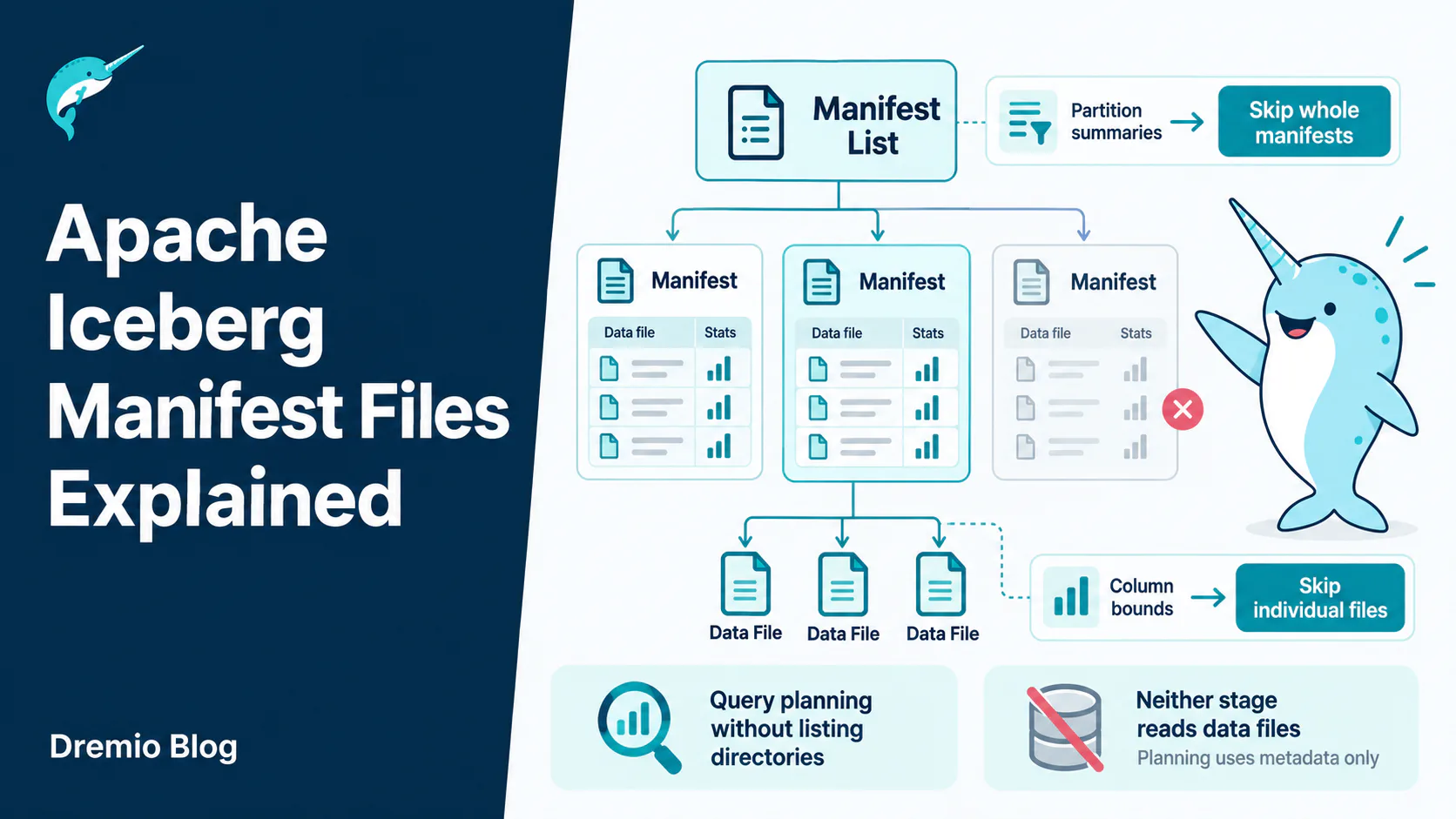
A manifest file is an Avro file listing data files that belong to an Apache Iceberg table, along with per-column statistics for each one. Manifests are why Iceberg can plan a query without listing directories: the engine reads partition summaries in the manifest list to skip whole manifests, then reads column bounds inside the survivors to skip individual files. Neither stage touches your data.
Ask why Iceberg is faster than Hive and you will usually hear “it tracks files in metadata instead of listing directories.” True, and not useful. It does not tell you why a badly partitioned table is still slow, or why your query planning time grew after a month of streaming writes.
Manifests are where that answer lives.
What This Covers
Where manifests sit in the metadata tree, what a manifest entry actually contains, the two stages of pruning they enable, why manifests get merged and what the settings controlling that do, and how to read a manifest yourself when something is slow.
Where Manifests Sit
Four levels: catalog pointer, metadata file, manifest list, manifests. Pruning happens at each one.
The tree has four levels and each one exists for a reason.
The catalog holds a pointer to the current metadata file. That pointer is the only thing a catalog is strictly required to manage, and swapping it atomically is what makes commits safe.
The metadata file holds the schema, the partition specs, the sort orders, and the list of snapshots. It is JSON, it is human-readable, and opening one is the fastest way to understand a table you did not create.
Each snapshot points at one manifest list. The manifest list is an Avro file with one row per manifest, and those rows carry partition summaries.
Each manifest is an Avro file listing data files, one entry per file, with statistics about the contents of that file.
A query walks down this tree. What makes it fast is that at every level there is enough information to skip the level below.
What Is Actually in a Manifest Entry
Each entry describes one data file. The fields that matter for performance are the statistics, and the specification defines them precisely:
file_path            where the file lives
file_format          PARQUET, ORC or AVRO
partition            the partition tuple for this file
record_count         rows in the file
file_size_in_bytes   size on disk
column_sizes         map from column id to size in bytes
value_counts         map from column id to value count
null_value_counts    map from column id to null count
nan_value_counts     map from column id to NaN count
lower_bounds         map from column id to lower bound
upper_bounds         map from column id to upper bound
The bounds are the important pair. The spec is exact about what they guarantee: each value in lower_bounds must be less than or equal to all non-null, non-NaN values in that column for that file, and each value in upper_bounds must be greater than or equal to all of them.
That guarantee is what makes file skipping sound. If a query asks for WHERE amount > 5000 and a file's upper bound for amount is 900, the engine can skip that file and be certain it lost nothing.
Note that bounds are keyed by column id, not column name. That is why renaming a column in Iceberg is free and does not invalidate statistics. The id never changes.
An entry also carries status
Manifest entries track whether a file was added, already existed, or was deleted in the snapshot that wrote the manifest. That is how Iceberg expresses a delete without rewriting the manifest history, and it is why a table's manifest count grows over time even when the number of live data files is stable.
Why Avro, and Why It Matters
Manifests are Avro files. That looks odd on a project whose data files are usually Parquet, and the reason is a good one.
Avro is row-oriented. A manifest gets read start to finish, every entry, every time it is opened. There is no query that wants column three of a manifest without wanting the rest of the row. Columnar layout would add decode overhead for a benefit nobody uses.
Avro also carries its schema in the file, which means a manifest written by an older writer stays readable when the format adds fields. That property is doing quiet work every time you upgrade an engine without rewriting your tables.
Your data is columnar because queries read a few columns from millions of rows. Your metadata is row-oriented because queries read every field from thousands of rows. Same project, opposite access patterns, different formats.
The Two Stages of Pruning
Manifests are skipped first, then files inside the survivors. Neither stage touches your data.
Scan planning happens in two passes, and understanding the split explains most performance surprises.
Stage one works on the manifest list. Each row carries partition summaries for the manifest it describes. The engine converts the query's predicates into partition predicates and checks them against those summaries. Manifests that cannot possibly contain matching partitions are never opened.
The spec describes this conversion as an inclusive projection: if a scan predicate matches a row, the partition predicate must match that row's partition. Inclusive means it errs toward including files, never toward excluding a file that might match. Correctness first, pruning second.
One detail with real consequences: the conversion uses the partition spec that was used to write each manifest, regardless of the table's current spec. That is how partition evolution works without rewriting history. Old manifests are still interpreted under the rules they were written with.
Stage two works inside surviving manifests. Now the engine has entries with column bounds, and it eliminates individual data files. A query for one day against a table partitioned by day might skip 364 manifests in stage one, then skip most files in the remaining one during stage two.
Delete Files Live in Manifests Too
Manifests do not only list data files. In format version 2 and later they also track delete files, and version 3 adds deletion vectors. Both are entries in the same structure, marked with different content.
This is why a table with heavy updates can plan slowly even after compaction. The engine has to reconcile data files against the delete files that apply to them, and that reconciliation happens during planning.
If your table takes frequent updates and plans slowly, count delete files as well as data files. A compaction that rewrites data without resolving deletes leaves the harder half of the problem in place.
Why Manifests Get Merged
Every commit writes at least one new manifest. On a table taking streaming writes, that adds up fast, and a manifest list with ten thousand rows is slow to read even though none of the data has been touched.
Iceberg merges manifests automatically, controlled by three table properties:
commit.manifest-merge.enabled         true       merge on write
commit.manifest.min-count-to-merge    100        wait for this many first
commit.manifest.target-size-bytes     8388608    8 MB target per manifest
The defaults are sensible for most tables. Where they bite is high-frequency streaming, because merging on the write path costs latency on a commit that just wanted to land quickly.
If your streaming writes are slow and the table has thousands of manifests, this is the first place to look. Turning merging off moves the work to a scheduled rewrite instead of paying it on every commit, which is often the right trade for an ingestion path.
What Hive Did Instead
The comparison makes the design obvious.
Hive tracked tables as directories. Finding the files in a partition meant listing a prefix in object storage. That listing got slower as the table grew, cost money per request, and gave no information about file contents, so every file in a matching partition had to be read.
There was also no atomic way to change what a table contained. A writer added files to a directory and readers saw them appear one by one, which is why concurrent reads during a write returned inconsistent results often enough to become folklore.
Manifests fix all three. File membership is explicit rather than inferred from a path. Statistics travel with the listing. And the whole set changes atomically when the catalog swaps one metadata pointer for another.
The cost is that metadata is now a thing you maintain. Hive had no manifests to merge and no snapshots to expire, because it had no metadata worth the name.
How Manifest Count Actually Grows
Manifests accumulate in ways that surprise people, and the causes are worth separating.
Every commit adds at least one
A streaming job committing every minute produces 1,440 manifests a day before any merging. That is the baseline, and it is why merge settings exist.
Deletes add manifests without removing data
A delete writes a manifest recording the deletion. The data file it refers to stays until compaction rewrites it and expiry releases the old snapshot. So a table can gain manifests while its live file count falls.
Compaction adds before it subtracts
Rewriting small files into large ones writes new manifests describing the new files. The old manifests stay reachable until the snapshots referencing them expire. Compaction makes manifest count worse before it makes it better, which alarms people watching a dashboard mid-job.
The pattern in all three is the same: Iceberg never mutates, it appends and then releases. Growth is expected, and the release step is maintenance you have to actually run.
Reading a Manifest Yourself
The fastest way to understand a slow table is to look. Iceberg exposes metadata tables that make this a SQL question rather than a file-format exercise:
SELECT * FROM db.table.manifests;        -- one row per manifest
SELECT * FROM db.table.files;            -- one row per data file, with stats
SELECT * FROM db.table.partitions;       -- per-partition file counts and sizes
SELECT * FROM db.table.snapshots;        -- snapshot history
Three questions worth asking of any table that plans slowly.
How many manifests are there? Thousands on a table with modest data volume means merging is not keeping up, or was turned off and never scheduled.
How many files per partition? Hundreds of small files in one partition is a compaction problem, not a manifest problem, and it shows up here first.
Are the bounds useful? If a column's lower and upper bounds are nearly identical across every file, that column cannot prune anything. Data arriving in random order produces exactly this, and sorting on write fixes it.
Diagnosing a Slow Plan
Query planning time that grows while data volume stays flat is almost always a metadata problem. Here is the order to check things in.
Count the manifests first
A few hundred is normal. Several thousand on a table of modest size means merging is off or is not keeping up. This is a one-line query and it eliminates the most common cause.
Then check average manifest size
The target is 8 MB by default. Manifests far below that are the signature of frequent small commits with merging disabled.
Then look at partition summaries
If most manifests span the full range of your partition column, stage one pruning does nothing and every query opens every manifest. That happens when writes interleave partitions, and it is fixed by writing partition-aligned rather than by changing the partition spec.
Then look at column bounds
Bounds that span the whole column range in every file mean stage two prunes nothing. Sorting on write fixes it. Adding a partition usually does not, and adds a spec you will live with for years.
Four checks, all SQL, all against metadata tables. None of them require reading a data file.
The Thing Most People Get Wrong
Partitioning and file pruning are different mechanisms and people conflate them constantly.
Partitioning determines which manifests get opened. It is coarse, it is decided when you design the table, and getting it wrong is expensive to undo.
Column bounds determine which files get read inside those manifests. They are free, they exist for every column automatically, and their usefulness depends entirely on whether related rows landed in the same files.
So a table partitioned by day, with rows arriving in random order within each day, will prune well on date and terribly on everything else. Sorting the data on write is what makes the second mechanism work, and it costs nothing at query time.
That is the practical lesson. If your queries filter on a column you did not partition by, do not add a partition. Sort by it instead.
Manifests Are Only One Third of Maintenance
Order matters. Cleanup before expiry finds almost nothing worth deleting.
Manifest merging keeps the metadata tree readable. It does not reclaim storage and it does not fix small data files. Those are separate operations, and they have an order.
Compaction rewrites small data files into larger ones. Snapshot expiry drops old snapshots so the files only they referenced become deletable. Orphan cleanup removes files nothing references at all.
Run them in that order. Cleanup before expiry finds almost nothing, because the files you want gone are still referenced by snapshots you have not expired.
A partition spec change does not rewrite old manifests
When you evolve a partition spec, existing manifests keep the spec they were written with. The spec is explicit that predicate conversion uses the writing spec, not the current one.
So a table partitioned by month for two years and then by day will have manifests under both specs, and queries prune correctly against each. Nothing is rewritten and nothing breaks.
The practical consequence is that partition evolution is cheap in Iceberg in a way it never was in Hive, where changing partitioning meant rewriting the table. That single property is worth more than most of the feature list.
Where Dremio Fits
Dremio is a significant contributor to Apache Iceberg and reads this metadata directly rather than through a translation layer.
Above it, Reflections keep query-optimized representations of your data that the planner substitutes automatically, which can accelerate queries by up to 100x without anyone rewriting them. That matters here because it changes what you have to solve with physical layout. You do not have to sort a table three different ways to serve three access patterns.
Dremio also runs table maintenance autonomously, so manifest merging and compaction happen without a scheduled job someone has to remember to write.
Open One
Run SELECT * FROM db.table.manifests against your largest table right now. Look at the count, then look at the partition summaries.
Most people who think they have a partitioning problem have a file count problem, and most people who think they have a file count problem have never looked at their bounds. The metadata tables answer both questions in about a minute.
There is a reason this file format detail is worth an afternoon of your time. Manifests are the layer where Iceberg's promises get kept or broken. Fast planning, safe concurrent writes, free schema evolution and cheap partition evolution all reduce to how manifests are structured and maintained.
Everything above them is convenience. Everything below them is Parquet.
Frequently Asked Questions
What is a manifest file in Apache Iceberg?
An Avro file that lists data files belonging to a snapshot, with one entry per data file. Each entry carries the file path, format, partition values, record count, file size, and per-column null counts and lower and upper bounds. Those statistics are what let an engine skip files without opening them.
What is the difference between a manifest list and a manifest file?
A manifest list is one file per snapshot that points at the manifests making up that snapshot, with partition ranges for each. A manifest file sits one level below and points at the actual data files. The manifest list prunes whole manifests, the manifests prune individual files.
Why does Iceberg use Avro for manifests?
Manifests are read whole during planning rather than filtered by column, so a row-oriented format with a compact binary encoding and an embedded schema is the better fit. Parquet earns its place on the data files, where column pruning and predicate pushdown matter.
How many manifest files should a table have?
Few enough that planning stays fast. Iceberg merges manifests automatically once a snapshot accumulates more than commit.manifest.min-count-to-merge, which defaults to 100, targeting commit.manifest.target-size-bytes of 8 MB. A table with thousands of manifests per snapshot is usually a streaming table that needs its commit rate or its maintenance revisited.
Do delete files appear in manifests?
Yes. Position and equality delete files are tracked in manifests alongside data files, distinguished by their content type. That is how an engine knows which deletes to apply to which data files at read time.
Can I read a manifest file directly?
Yes, and it is worth doing once. Query the .manifests and .files metadata tables from Spark, Dremio or PyIceberg, or read the Avro file with any Avro reader. The structure stops feeling abstract as soon as you have looked at one.
Why is my query planning slow when the table is small?
Almost always manifest count rather than data volume. Frequent small commits produce a manifest per commit, and planning has to read all of them. Compaction and manifest rewriting fix it, and snapshot expiry keeps the accumulated ones from lingering.
Keep learning
For a full treatment of the table format, download Apache Iceberg: The Definitive Guide by Tomer Shiran, Jason Hughes, and Alex Merced, free from Dremio.
Intro to Dremio, Nessie, and Apache Iceberg on Your Laptop
Editor’s note, September 2026. This post was published in September 2023 and some product details have changed since. Nessie is still available and self-deployable under the Apache-2.0 licence, and it remains the clearest implementation of catalog-level branching. It is not an Apache Software Foundation project, and its development has slowed considerably. For how the current […]
Aug 16, 2023·Dremio Blog: News Highlights
5 Use Cases for the Dremio Lakehouse
With its capabilities in on-prem to cloud migration, data warehouse offload, data virtualization, upgrading data lakes and lakehouses, and building customer-facing analytics applications, Dremio provides the tools and functionalities to streamline operations and unlock the full potential of data assets.
Sep 30, 2026·Dremio Blog: Open Data Insights
Apache Iceberg 1.12.0: What’s New, Breaking Changes, and Upgrade Guide
Apache Iceberg 1.12.0 expands v3 engine support, REST catalog operations, streaming reliability, and v4 groundwork. Learn how to upgrade safely.