In previous blogs, we've discussed understanding Polaris Catalog's architecture and getting hands-on with Polaris Catalog self-managed OSS; in this article, I hope to show you how to get hands-on with the Snowflake Managed version of Polaris Catalog, which is currently in public preview.
Getting Started
To get started, you'll need a Snowflake account; if you don't already have one, you can create a trial account for free at snowflake.com.
Once you have an account, head over to the "Admin" section, and you can add another account and you'll see the option "Create Polaris Account".
The account will be added to the list of accounts, and you'll want to copy your locator ID (the URL associated with this account) somewhere so you can access it when you need it. You'll find this under the "locator" column in the list of accounts.
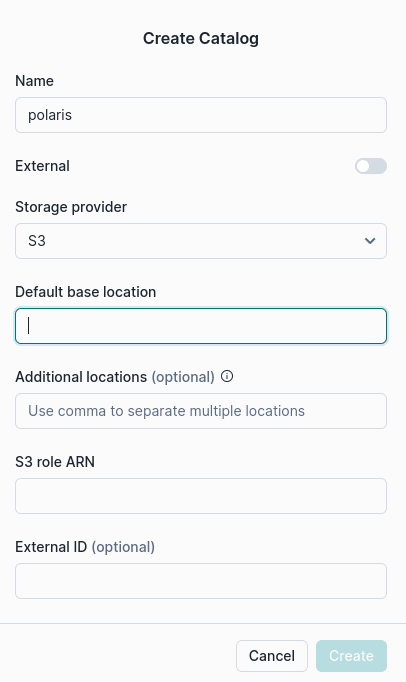
Take that URL and open it in another URL to access the Polaris management console logging with the credentials you created when you created the Polaris account. Then, you'll click on "catalogs" and create a new catalog, which will open a dialogue box that looks like this.
Then, fill out the fields with an S3 path where you want data stored under "default base location" and an ARN for a role with read/write access to that bucket.
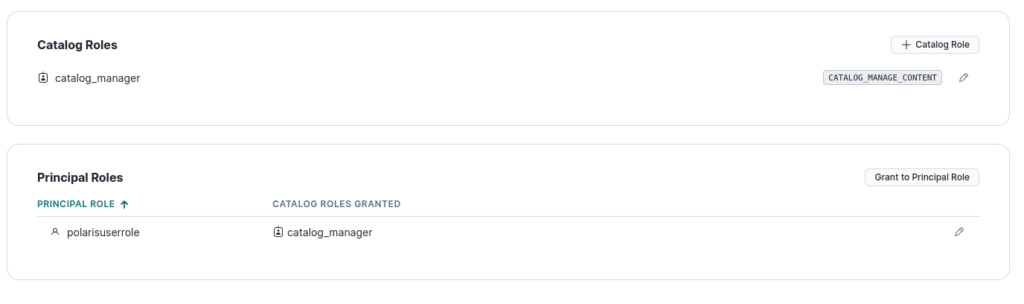
Then, you'll want to click on the catalog in the list of catalogs and create a catalog role and assign that role that CATALOG_MANAGE_CONTENT privilege. Then head over to the "roles" section under "connections" and create a principal role then head back to the catalog and assign the principal role the catalog role you created earlier.
Once this is created, create a new connection/principal and assign the principal role you created to the new connection (for this demo, not for production). Afterwards, you'll get the credentials for this user; Make sure to copy this over somewhere you can access it for later.
Keep in mind that Polaris is in the early stages of public preview, so there may be imperfections and troubleshooting as it gets refined. But hopefully, this will help you on your journey to getting started with Polaris at these early stages.
As mentioned in this Datanami article, some of the open-source Nessie catalog code may find its way into Polaris. Below are some exercises to get hands-on with Nessie and learn about what may be in store for Polaris's future.
Here are Some Exercises for you to See Nessie’s Features at Work on Your Laptop
Intro to Dremio, Nessie, and Apache Iceberg on Your Laptop
We're always looking for ways to better handle and save money on our data. That's why the "data lakehouse" is becoming so popular. It offers a mix of the flexibility of data lakes and the ease of use and performance of data warehouses. The goal? Make data handling easier and cheaper. So, how do we […]
Aug 16, 2023·Dremio Blog: News Highlights
5 Use Cases for the Dremio Lakehouse
With its capabilities in on-prem to cloud migration, data warehouse offload, data virtualization, upgrading data lakes and lakehouses, and building customer-facing analytics applications, Dremio provides the tools and functionalities to streamline operations and unlock the full potential of data assets.
Aug 31, 2023·Dremio Blog: News Highlights
Dremio Arctic is Now Your Data Lakehouse Catalog in Dremio Cloud
Dremio Arctic bring new features to Dremio Cloud, including Apache Iceberg table optimization and Data as Code.