This article has been revised and updated from its original version published in 2022 to reflect the latest Apache Iceberg developments, including V3 deletion vectors and modern catalog implementations.
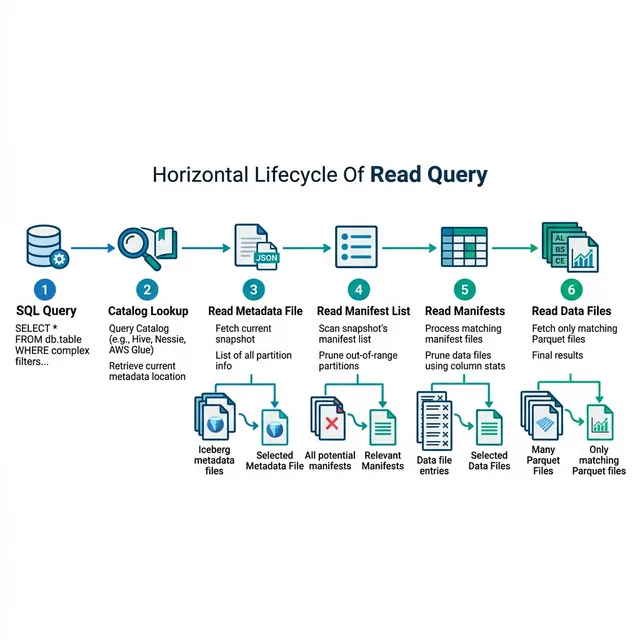
When you run SELECT * FROM orders WHERE region = 'US' AND order_date > '2024-01-01', what actually happens inside an Apache Iceberg table? This detailed look walks through every step of a read query's lifecycle, from the initial catalog lookup to the final Parquet row group scan, and explains why Iceberg delivers warehouse-grade performance on object storage.
Understanding the read path is essential for tuning query performance. Every optimization in Iceberg, from hidden partitioning to Z-ordering, works by reducing the number of files the engine needs to read.
Step 1: Catalog Lookup
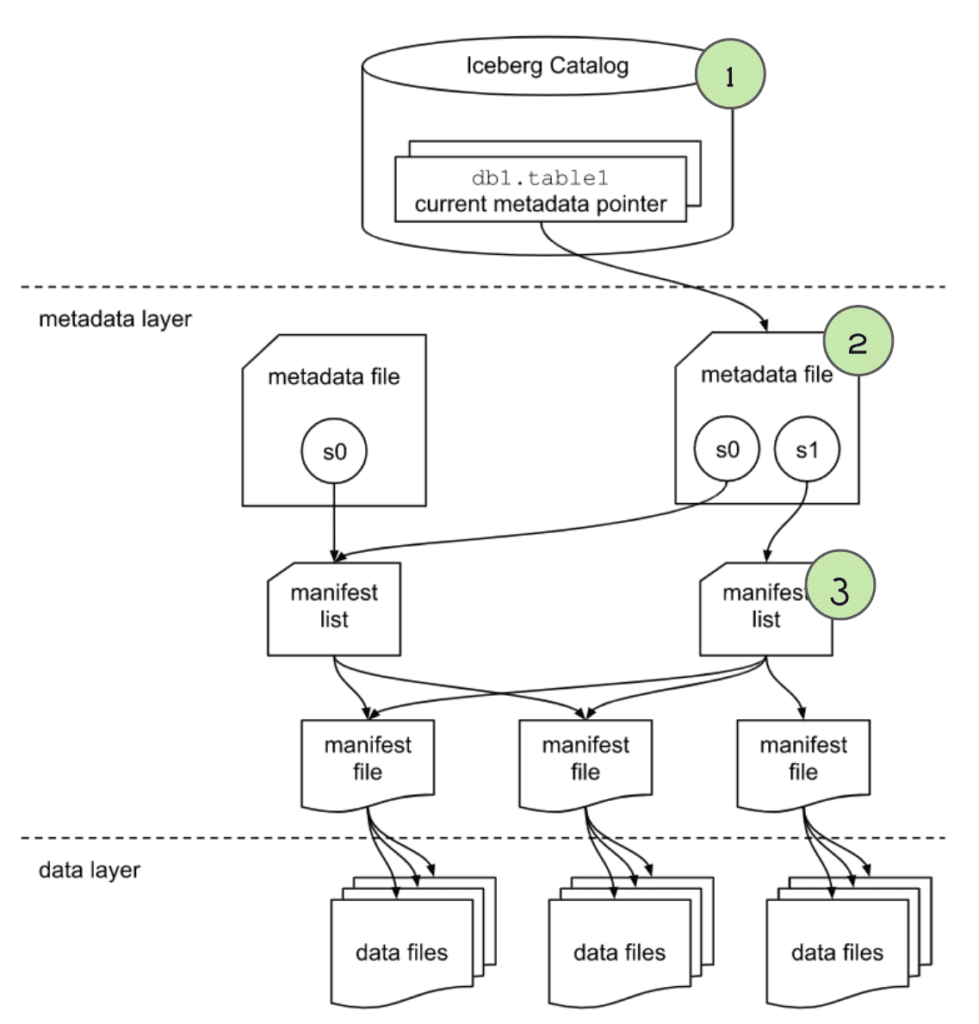
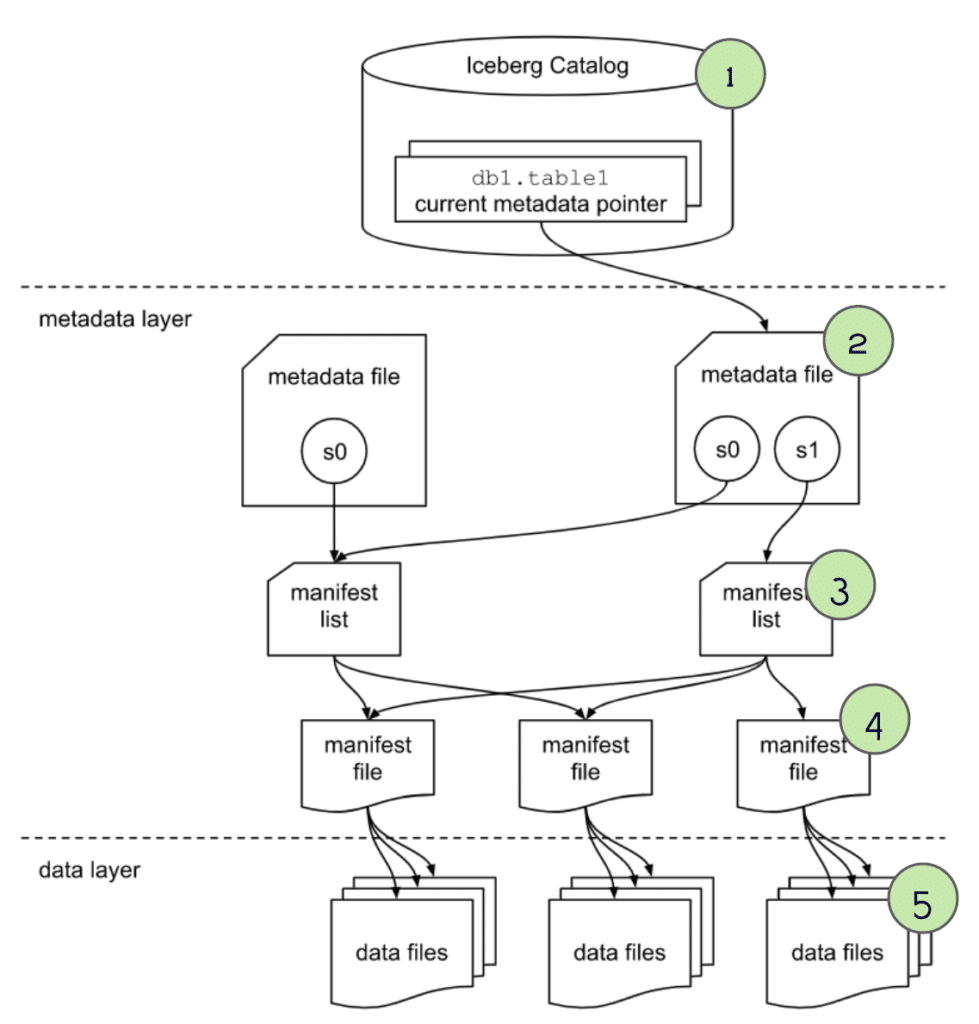
The query begins with a single metadata lookup. The catalog tells the engine where the table's current metadata file lives. For official documentation, refer to the Iceberg scan planning spec.
Engine: "Where is the metadata for table db.orders?"
Catalog: "s3://warehouse/db/orders/metadata/v42.metadata.json"
This is a single GET request (HTTP for REST catalogs, Thrift for Hive Metastore, API call for Glue). The simplicity of this operation is by design, the catalog stores only a pointer, not the full metadata.
How Different Catalogs Handle This
Catalog
Lookup Mechanism
Cost
REST Catalog
HTTP GET to /v1/namespaces/{ns}/tables/{table}
~50ms
Hive Metastore
Thrift RPC
~100ms
AWS Glue
AWS API call
~150ms
Nessie
HTTP GET with branch resolution
~60ms
REST catalogs like Apache Polaris can also vend short-lived storage credentials at this step, eliminating the need for the engine to have permanent S3 access keys.
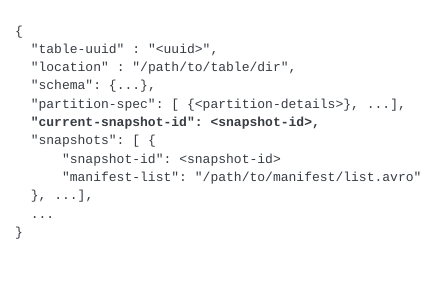
Current schema: Column names, types, and IDs (for schema evolution)
Partition spec: How data is physically organized
Current snapshot: Which manifest list represents the latest table state
Sort order: How data is sorted within files (for sorted merge optimization)
Table properties: Configuration like target file size, write mode, etc.
Time Travel Resolution
If the query includes FOR SYSTEM_TIME AS OF '2024-01-15', the engine finds the snapshot that was current at that timestamp from the snapshots list. This is how time travel works, each snapshot is a complete description of the table at a point in time.
Step 3: Read the Manifest List (First Pruning Level)
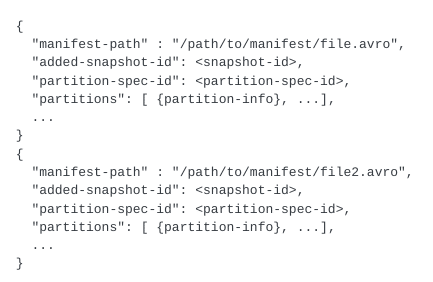
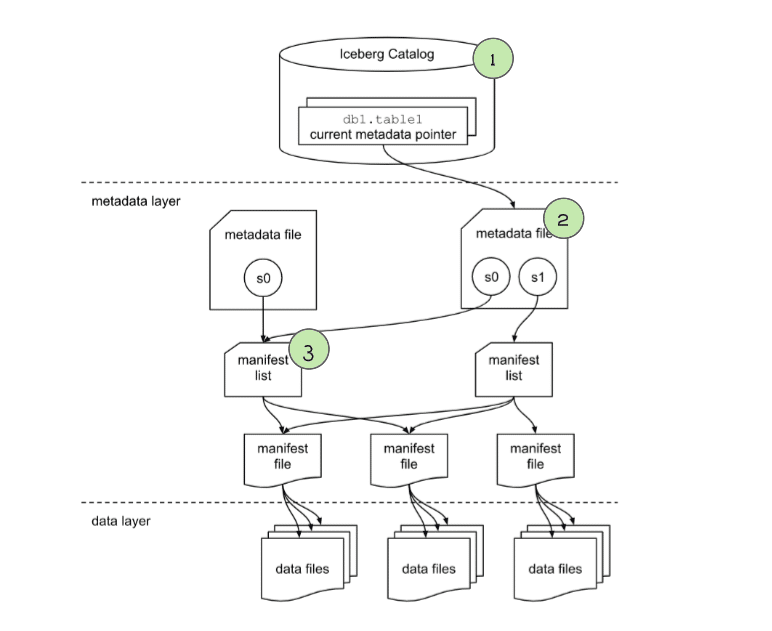
The engine downloads the manifest list (an Avro file) for the current snapshot. Each entry in the manifest list describes one manifest file with partition-level summary statistics:
Manifest List Entry:
  manifest_path: s3://warehouse/.../manifest-001.avro
  partition_summaries:
    order_month: contains values 2024-01 to 2024-03
  added_files_count: 150
  existing_files_count: 1200
  deleted_files_count: 5
Partition Pruning
For our query WHERE order_date > '2024-01-01', the engine evaluates each manifest entry's partition summary. If a manifest only contains data from 2023, it can be skipped entirely.
This is the first and coarsest level of pruning. On a well-partitioned table, it can eliminate 90%+ of manifests in a single check. This is why choosing the right partition strategy matters so much for performance.
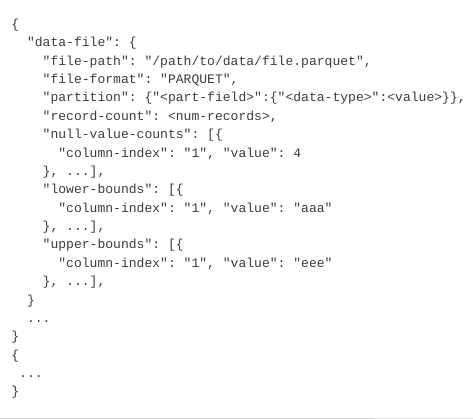
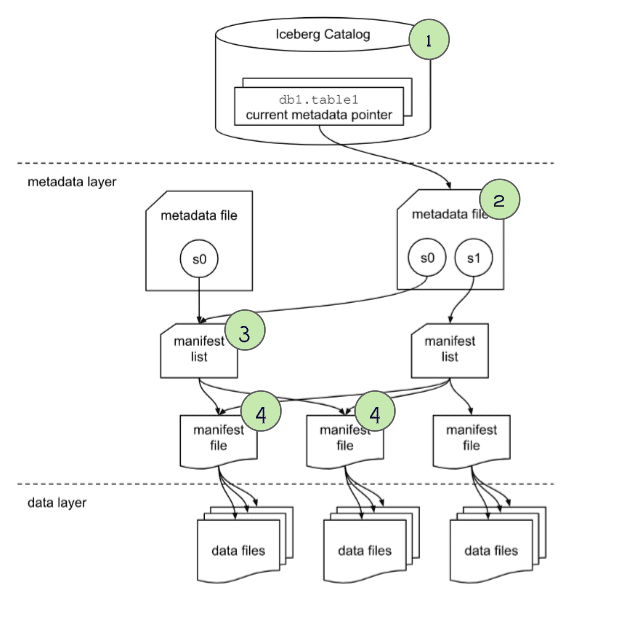
For each manifest that survived partition pruning, the engine downloads and reads the manifest file. Each entry describes one data file with column-level statistics:
The engine evaluates the query predicates against each file's column statistics:
region = 'US': File min="APAC", max="US" → Could contain 'US' → KEEP
order_date > '2024-01-01': File max="2024-01-31" → Has dates after Jan 1 → KEEP
A file where region min="APAC" and max="EMEA" would be skipped because 'US' falls outside that range.
This is where Z-ordering and sort order become critical. If data within files is sorted by query columns, the min/max ranges are tight, and pruning eliminates more files. If data is randomly distributed, min/max ranges span the entire domain, and no files can be pruned.
Handling Delete Files (V2)
In Merge-on-Read tables, manifests also track delete files. The engine identifies which delete files apply to the surviving data files. For understanding the tradeoffs between approaches, see Copy-on-Write vs. Merge-on-Read.
Handling Deletion Vectors (V3)
V3 tables use deletion vectors, bitmap-based markers stored alongside data file references. Instead of a separate delete file, each data file entry in the manifest includes a pointer to its deletion vector. The engine reads the bitmap and skips marked rows directly during the scan.
Step 5: Read Data Files (Third Pruning Level)
The engine now reads only the surviving data files from object storage. With Parquet files (the most common format), there's one more pruning opportunity.
Parquet Row Group Pruning
Parquet files are internally organized into row groups (typically 64-128MB each). Each row group has its own min/max column statistics in the Parquet footer. The engine reads the footer and skips row groups that can't contain matching rows, the same logic as manifest-level pruning, but at a finer granularity.
Projection Pruning
Parquet's columnar format lets the engine read only the columns needed for the query. A SELECT region, SUM(amount) query skips all other columns entirely, reading far less data from storage.
Predicate Pushdown
Modern engines push filter predicates directly into the Parquet reader. Rows that don't match are discarded during deserialization, before they enter the engine's processing pipeline.
The Complete Pruning Pipeline
Here's the full picture for our example query:
Stage
Files Considered
Files Surviving
Reduction
Manifest list
50 manifests
12 manifests
76% pruned
Manifest files
3,000 data files
450 data files
85% pruned
Parquet row groups
1,800 row groups
200 row groups
89% pruned
Column projection
All columns
2 columns
80% less data
Net result: Instead of scanning 3,000 files and all columns, the engine reads 200 row groups from 450 files and only 2 columns. This is how Iceberg achieves warehouse-grade performance on object storage.
How Iceberg Reads Compare to Traditional Data Lake Reads
To appreciate the difference, consider how a traditional Hive-style data lake handles the same query:
Step
Traditional Data Lake
Iceberg
Find files
LIST directories recursively on S3 (~10,000 requests)
Read 1 metadata file + manifest list (~3 reads)
Partition pruning
Check directory names (only if user filtered on partition columns)
The traditional data lake pays a heavy penalty at every step. Directory listing is O(number of partitions), and without column statistics, the engine must scan every file to find matching rows. Iceberg inverts this: the planner knows exactly which files to read before scanning anything.
This is especially impactful for dashboards and BI tools that run the same query patterns repeatedly. With Iceberg, the planner eliminates the same set of files every time, consistently fast, regardless of table size.
Common Read Path Anti-Patterns
Understanding the read path helps you avoid common mistakes that silently destroy query performance:
Anti-Pattern 1: No Partition Strategy
Without partitions, the manifest list can't prune any manifests. Every manifest is read, and every file's statistics must be evaluated. On a large table, this can take seconds just for planning.
Fix: Add partitions using hidden partition transforms that match your most common query filters. See partition evolution for how to add partitions to existing tables.
Anti-Pattern 2: Too Many Small Files
Thousands of small files from streaming writes produce overlapping column statistics, wide min/max ranges that prevent effective Level 2 pruning. A file with region from "APAC" to "US" can't be skipped for any region filter.
Fix: Run compaction with a sort order to consolidate files and tighten statistics.
Anti-Pattern 3: Unsorted Data
If data files contain randomly ordered rows, min/max column statistics span the full value range, defeating Level 2 pruning entirely. This is the most common hidden performance problem in production Iceberg tables.
Fix: Define a sort order that matches your query patterns. Run sorted compaction or Z-ordering for multi-column filters.
Anti-Pattern 4: Reading All Columns
SELECT * forces the engine to read every column from every surviving data file. Parquet's columnar format can skip unreferenced columns entirely, but only if the query specifies which columns it needs.
Fix: Always specify the columns you need. BI tools and Dremio's Reflections already do this automatically.
Anti-Pattern 5: Over-Partitioning
Too many partitions (e.g., partitioning by day AND hour AND minute) creates tiny partition groups with very few rows each. This increases manifest size, creates too many small files, and actually slows down planning.
Fix: Use the coarsest partition granularity that matches your queries. Evolve to finer granularity only when data volume warrants it.
Performance Tuning the Read Path
Optimize Partition Strategy
The most impactful optimization. Choose partitions that match your most common query filters. See hidden partitioning for details.
Run Compaction
Small files reduce pruning effectiveness because each file's column statistics span a wider range. Compaction consolidates small files into larger, well-organized ones.
Set Sort Order
Sort the data within files by columns used in WHERE clauses. This tightens min/max bounds and dramatically improves column statistics pruning.
Use Z-Ordering for Multi-Column Filters
If queries filter on multiple columns (e.g., region AND order_date), Z-ordering clusters data by both dimensions simultaneously.
use Reflections (Dremio)
Dremio's Reflections pre-compute sorted, partitioned subsets of your data. Dashboard queries hit the Reflection instead of the source table, returning in milliseconds instead of seconds.
Rewrite Manifests
Too many small manifests slow down planning. Periodically rewrite manifests to consolidate them:
What happens if a snapshot is expired while a query is reading it?
Iceberg guarantees snapshot isolation. Once a read begins, the reader holds a reference to the snapshot it started with. Even if that snapshot is expired concurrently, the reader continues to use the referenced metadata and data files until the query completes. Files are not physically deleted until no active readers reference them.
How much does Iceberg's three-level pruning actually reduce file scans?
The reduction depends on your data distribution and query patterns. For time-partitioned tables with date-range filters, it is common to see 95-99% of files pruned before any data is read. For queries without partition-aligned filters, manifest-level column statistics still prune files based on min/max ranges, typically eliminating 50-80% of files.
Does Iceberg read all metadata files for every query?
No. The catalog lookup provides a pointer to the current metadata file, which references the current manifest list. The manifest list contains partition summary statistics that enable the engine to skip entire manifest files without reading them. Only the manifests that could contain matching data are read in full.
Apache Iceberg is an open data lakehouse table format that provides your data lake with amazing features like time travel, ACID transaction, partition evolution, schema evolution, and more. You can read this article and watch this video to learn more about the architecture of Apache Iceberg. This current article aims to explain how read queries work for Apache Iceberg.
In order to understand how read queries work you first need to understand the metadata structure of Apache Iceberg, and then examine step by step how that structure is used by query engines to plan and execute the query.
Apache Iceberg 101
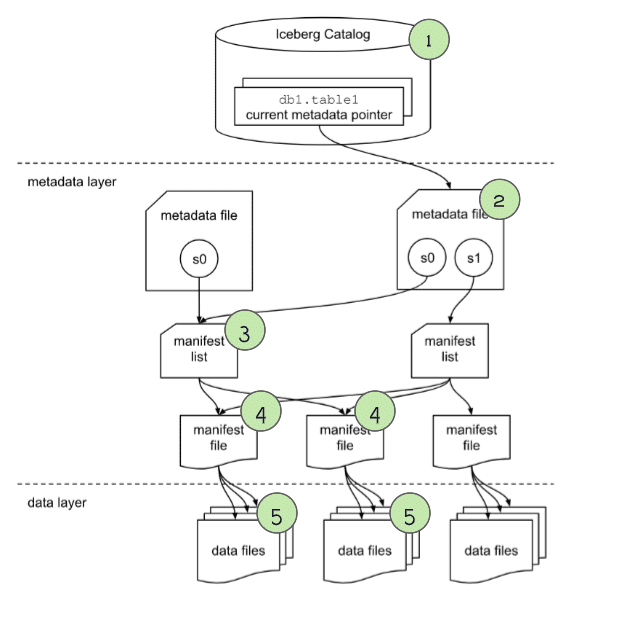
Apache Iceberg has a tiered metadata structure, which is key to how Iceberg provides high-speed queries for both reads and writes. Let’s summarize the structure of Apache Iceberg to see how this works. If you are already familiar with Iceberg’s architecture, you can skip ahead to the section titled "How a Query Engine Processes the Query."
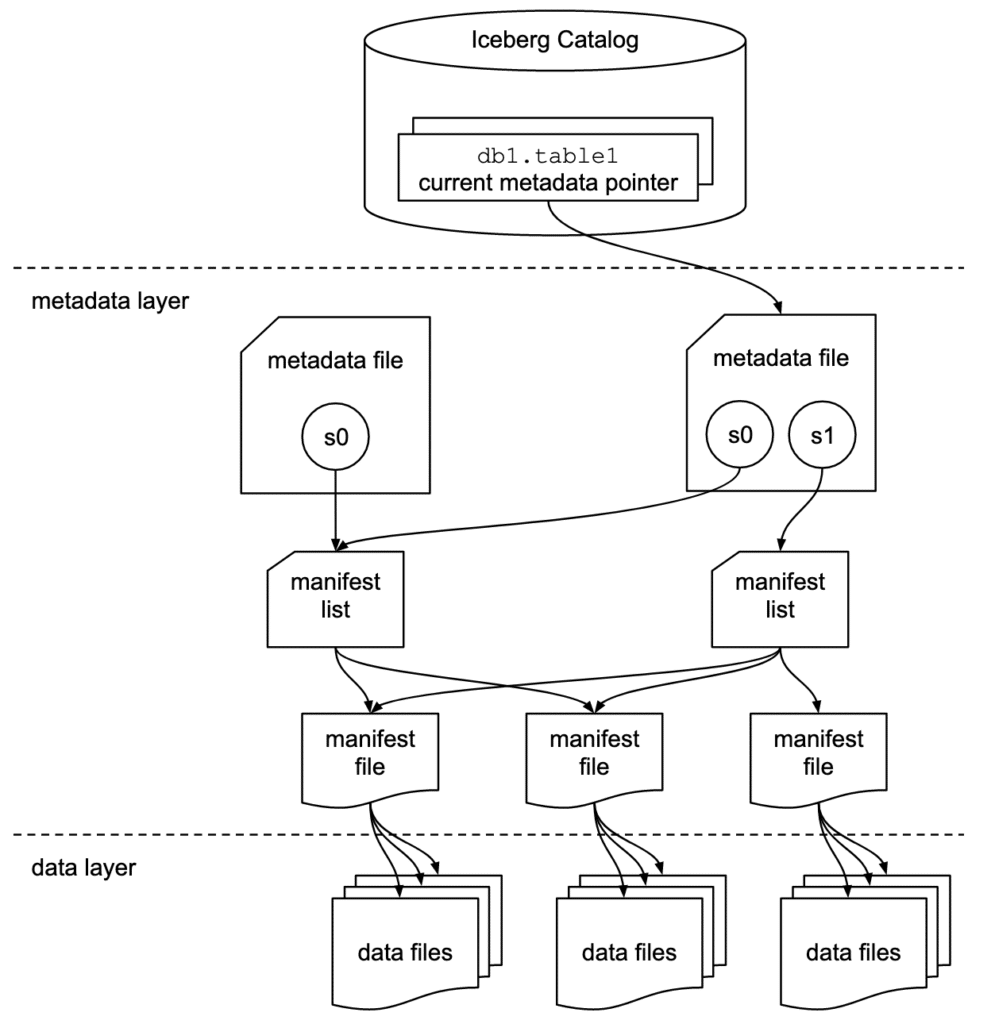
Data Layer
Starting from the bottom of the diagram, the data layer holds the actual data in the table. It’s made up of two types of files:
Data files – Stores the data in file formats such as Parquet or ORC
Delete files – Tracks records that still exist in the data files, but that should be considered as deleted
Metadata Layer
Apache Iceberg uses three tiers of metadata files which cover three different scopes:
Manifest files– A subset of the snapshot, these files track the individual files in the data layer in that subset along with metadata for further pruning
Manifest lists– Defines a snapshot of the table and lists all the manifest files that make up that snapshot with metadata on those manifest files for pruning
Metadata files– Defines the table, and tracks manifest lists, current and previous snapshots, schemas, and partition schemes.
The Catalog
Tracks a reference/pointer to the current metadata file. This is usually some store that can provide some transactional guarantees like a relational database (Postgres, etc.) or metastore (Hive, Project Nessie, Glue).
How a Query Engine Processes the Query
Running a SELECT on the table’s current state
We are working with a table called “orders” which is partitioned by the year of when the order occurred. If you want to understand how a table like the orders table was created and has data in it, read our post on the life of a write query for Iceberg tables.
CREATE TABLE orders (...)
PARTITIONED BY (year(order_ts));
Let’s run the following query:
SELECT *
FROM orders
WHERE order_ts
BETWEEN '2021-06-01 10:00:00' and '2021-06-30 10:00:00';
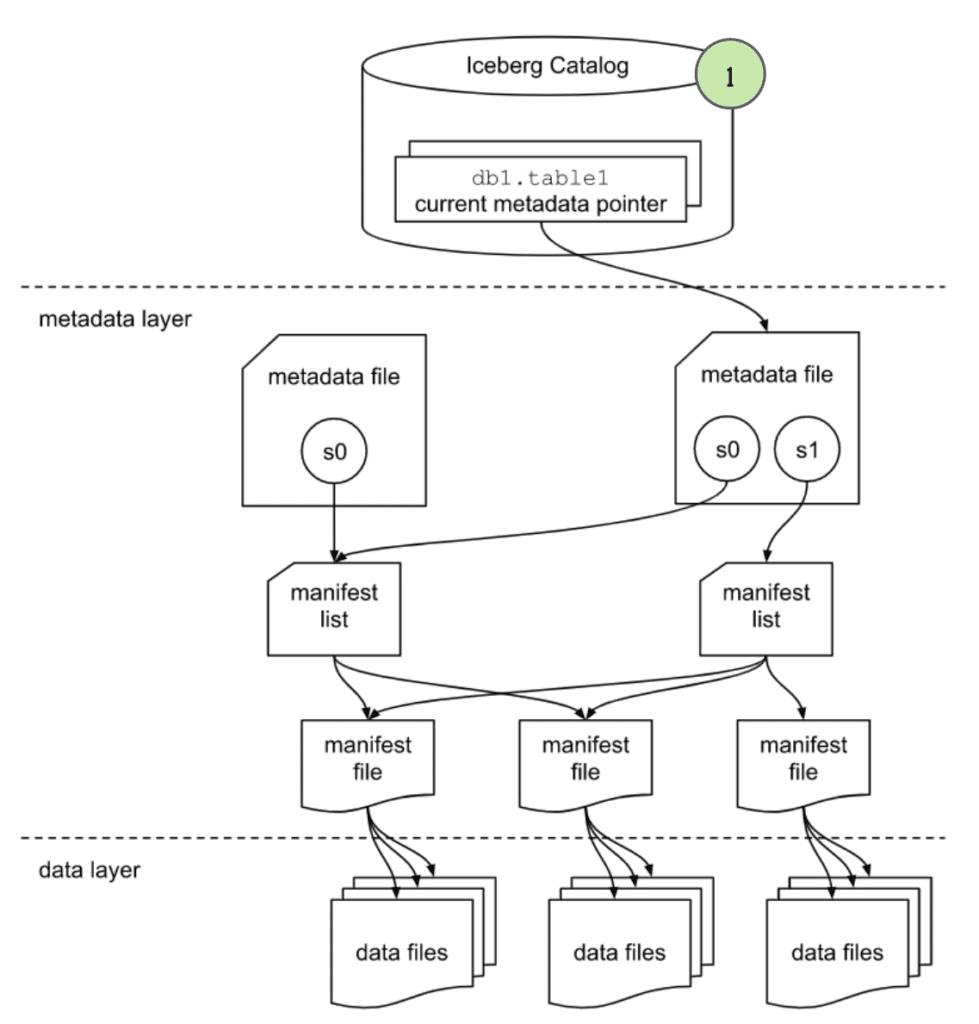
1. The query and the engine
The query is submitted to the query engine that parses the query. The engine now needs the table’s metadata to begin planning the query.
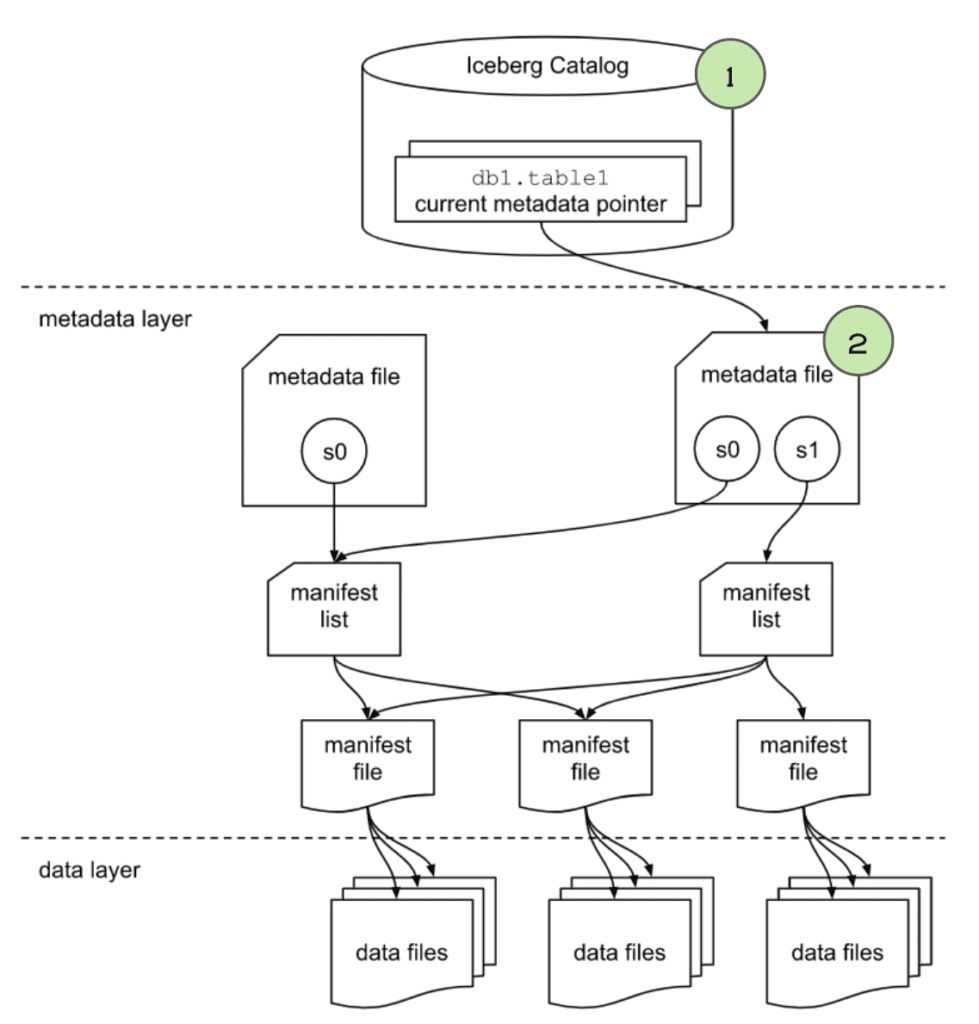
2. The engine gets info from the catalog
The engine first reaches out to the catalog and asks for the file path of the orders table’s current metadata file.
The partitioning of the table to determine how the data is organized so it can prune files later in query planning that aren’t relevant to our query.
The current snapshot’s “Manifest List” file so it can determine what file to scan.
4. The engine gets info from the manifest list file
The “manifest list” file lists several useful pieces of information we can use to begin planning what files should be scanned. Primarily, it lists several “manifest” files which each have a list of data files that make up the data in this snapshot. The engine will primarily look at:
The partition-spec-id, so it knows, together with partition spec info from the metadata file, what partition scheme was used for writing this snapshot. For this table, the partition-spec-id would be 0 since it only has one partition spec (Partitioned by year of order_ts).
The partition field summaries, which includes data on partition columns within each manifest which contain the upper and lower bounds of partition fields in the manifest. This can be used to determine whether a manifest can be skipped or scanned to evaluate the individual data files in it. So in our case, any manifest that doesn’t contain order_ts values in 2021 can be pruned. This process will be repeated more granularly against individual files when we analyze the individual manifests in the next step.
This is where we can see huge query planning and execution gains. Instead of pruning data files one by one, we can eliminate large groups of files by eliminating unneeded manifests.
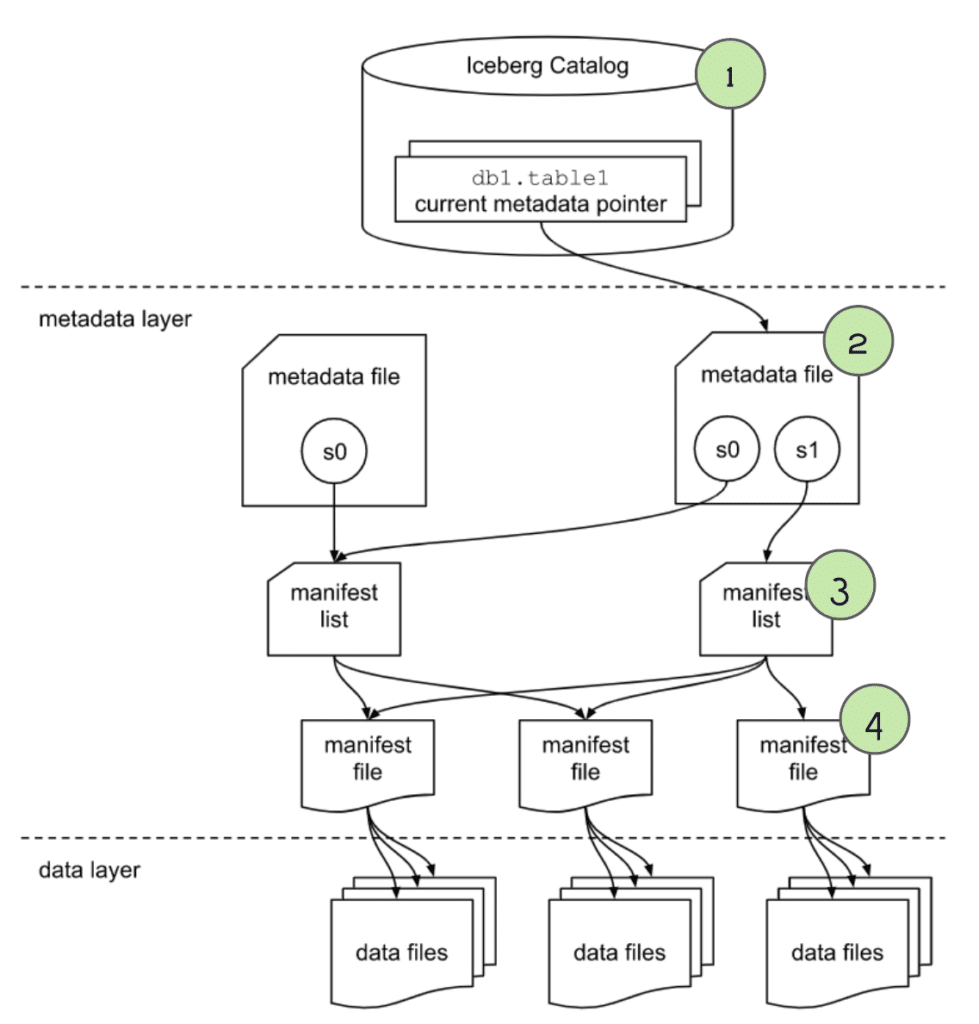
5. The engine gets info from the manifest files
For any manifest files that weren’t pruned when scanning the “manifest list” we then scan each of those manifest files to find a list of individual data files with useful metadata on each file:
The schema-id and partition-id for the data file.
The type of content, i.e., whether it is a data file with records or a delete file with a specification of records to be deleted/ignored.
Counts of values, unique values, and the upper and lower bounds for each column that is being tracked (stats tracking for individual columns can be adjusted in table settings). So in this case it can use the upper/lower bound values to eliminate any files that contain no records in June 2021, that way we only scan data files that have relevant data.
These column stats can be used to determine if a data file is relevant to this query, and prune it from scanning if it isn’t, which will speed up query execution.
Performing the Scan and Returning the Results
At this point, we have the narrowest possible list of data files that need to be scanned. The query engine now begins scanning the files and doing any remaining processing requested by the query to get the final result.
This query will be significantly faster than a full table scan because thanks to the partitioning and min/max filtering during query planning we can scan a much smaller subset of the full table.
If this were a Hive table we would’ve seen this play out differently in a few ways:
There would’ve been a lot more file operations without the pruning at the metadata level, making for a longer more expensive query.
We couldn’t have benefited from Iceberg’s Hidden Partitioning and would’ve needed to create a separate partition column (order_year) that would have also needed to be explicitly filtered to avoid a full table scan, which users often don’t do.
Running a Read on the Table’s Current State After the Partitioning Has Evolved
So let’s run another query against the orders table. Let’s assume the following:
The table was initially partitioned based on year (PARTITIONED BY (year(order_ts))) up until 2021, but starting January 1, 2022, the table was changed to partition by both year and day (ADD PARTITION FIELD day(order_ts)).
Let’s run the following query:
SELECT *
FROM orders
WHERE order_ts BETWEEN '2021-06-01 10:00:00' and '2022-05-3110:00:00';
1. The query and the engine
The query is submitted to the query engine that parses the query. The engine now needs the table’s metadata to begin planning the query.
2. The engine gets info from the catalog
The engine first reaches out to the catalog and asks for the file path of the orders table’s current metadata file.
The partitioning of the table to determine how the data is organized so it can prune files later in query planning that aren’t relevant to our query.
The current snapshot’s “Manifest List” file so it can determine what file to scan.
4. The engine gets info from the manifest list file
The “manifest list” file lists several useful pieces of information we can use to begin planning what files should be scanned. Primarily, it lists several “manifest” files which each have a list of data files that make up the data in this snapshot. The engine will primarily look at:
The partition-spec-id, so it knows, together with partition spec info from the metadata file, what partition scheme was used for writing this snapshot. For this table, the partition-spec was evolved so files written after the partitioning spec was changed would have a partition-spec-id of 1 (partitioned by year and day) versus files that were written before the partitioning spec was changed, which would have a partition-spec-id of 0 (partitioned by year only).
The partition field summaries, which includes data on partition columns within each manifest which contain the upper and lower bounds of partition fields in the manifest. This can be used to determine whether a manifest can be skipped or scanned to evaluate the individual data files in it. So in our case, any manifest that doesn’t contain data files that have order_ts values in 2021 or in the first 5 months of 2022 can be pruned. This process is split based on partitioning spec, so manifests based on partition-spec-id 0 will be pruned based on the original partitioning and the manifests based on partition-spec-id 1 will be pruned based on the newer partitioning scheme. This process will be repeated against individual files when we analyze the individual manifests in the next step.
This is where we can see huge query planning and execution gains. Instead of pruning data files one by one, we can eliminate large groups of files by eliminating unneeded manifests.
5. The engine gets info from the manifest files
For any manifest files that weren’t pruned when scanning the “manifest list” we then scan the manifest to find a list of individual data files with useful metadata on each file:
The schema-id and partition-id for the data file.
The type of content, whether it is a data file with records or a delete file with a specification of records to be deleted/ignored.
Counts of values, unique values, and the upper and lower bounds for each column being tracked (stats tracking for individual columns can be adjusted in table settings). So in this case it can use the upper/lower bound values to eliminate any files that contain no records between June 2021 and May 2022. That way we only scan data files that have relevant data.
These column stats can be used to determine if a data file is relevant to this query, and prune it from scanning if it isn’t, which will speed up query execution.
Performing the Scan and Returning the Results
Now we have the narrowest possible list of data files that need to be scanned. The query engine now begins scanning the files and doing any remaining processing requested by the query to get the final result.
This query will be significantly faster than a full table scan because thanks to partitioning and min/max filtering during query planning we can scan a much smaller subset of the full table.
Running a SELECT on a previous state of the table
Run the following query:
SELECT *
FROM orders TIMESTAMP AS OF '2022-06-01 10:00:00'
WHERE order_ts BETWEEN '2021-06-01 10:00:00' and '2022-05-31 10:00:00';
Notice, this TIMESTAMP AS OF specifies a desire to time travel using the AS OF clause, stating we want to query the table’s data as it existed on June 1, 2022 at 10 am.
The query and the engine
The query is submitted to the query engine that parses the query. The engine now needs the table data to begin planning the query.
Checking the catalog
The engine first reaches out to the catalog and asks for the file path of the orders table’s current metadata file.
The desired snapshot, starting with the current snapshot and comparing the snapshot ID or snapshot timestamp to the AS OF clause until the snapshot that was current at that point in time is found.
The table's schema.
The partitioning of the table to determine how the data is organized so it can later prune files that aren’t relevant to our query.
The target snapshot’s “Manifest List” file so it can begin to determine what file to scan.
Checking the snapshot
The “manifest list” file lists several useful pieces of information we can use to begin planning what files should be scanned. Primarily, it lists several “manifest” files which each have a list of data files that make up the data in this snapshot. The engine will primarily look at:
The partition-spec-id, so it knows what partition scheme was used for writing this snapshot.
The partition field summaries, which includes data on partition columns within each manifest which contain the upper and lower bounds of partition fields in the manifest. This can be used to determine whether a manifest can be skipped or scanned to evaluate the individual data files in it.
This is where we can see huge query planning and execution gains because instead of pruning data files one by one, we can eliminate groups of files by eliminating unneeded manifests.
Checking the manifests
For any manifest files that weren’t pruned when scanning the “manifest list” we then scan the manifest to find a list of individual data files with useful metadata on each file:
The schema-id and partition-id for the data file.
The type of content, i.e., whether a data file with records or a delete file with a specification of records to be deleted/ignored.
Counts of values, unique values, and the upper and lower bounds for each column that is being tracked (stats tracking for individual columns can be adjusted in table settings).
These column stats can be used to determine if a data file is relevant to this query, and prune it from scanning if it isn’t, which will speed up query execution.
Performing the scan and returning the results
Now we have the narrowest possible list of data files that need to be scanned. The query engine now begins scanning the files and applying any filters to get the final result. This query will be vastly faster than a full table scan because thanks to partitioning and min/max filtering during query planning we can scan a much smaller subset of the full table.
Conclusion
Apache Iceberg, using its metadata, can help engines execute queries quickly and efficiently on even the largest datasets. Beyond the partitioning and min/max filtering, we illustrated in this article, we also could have optimized the table even further by sorting, compacting, and other performance practices.
Apache Iceberg provides the flexibility, scalability, and performance your modern data lakehouse requires.
Keep learning
For a deeper treatment of the topics in this post, download Apache Iceberg: The Definitive Guide by Tomer Shiran, Jason Hughes, and Alex Merced, free from Dremio.
Ingesting Data Into Apache Iceberg Tables with Dremio: A Unified Path to Iceberg
By unifying data from diverse sources, simplifying data operations, and providing powerful tools for data management, Dremio stands out as a comprehensive solution for modern data needs. Whether you are a data engineer, business analyst, or data scientist, harnessing the combined power of Dremio and Apache Iceberg will undoubtedly be a valuable asset in your data management toolkit.
Sep 22, 2023·Dremio Blog: Open Data Insights
Intro to Dremio, Nessie, and Apache Iceberg on Your Laptop
Editor’s note, September 2026. This post was published in September 2023 and some product details have changed since. Nessie is still available and self-deployable under the Apache-2.0 licence, and it remains the clearest implementation of catalog-level branching. It is not an Apache Software Foundation project, and its development has slowed considerably. For how the current […]
Oct 12, 2023·Product Insights from the Dremio Blog
Table-Driven Access Policies Using Subqueries
This blog helps you learn about table-driven access policies in Dremio Cloud and Dremio Software v24.1+.