Businesses struggle with slow analytics as they grow; traditional data warehouses can be slow and expensive.
Dremio's Agentic Lakehouse provides a solution with AI-managed analytics, allowing users to ask questions in plain English.
Key features include integrating deep business context, universal data access, and interactive speed for fast responses.
Dremio's AI Agent offers conversational data exploration and programmatic automation for building a semantic layer easily.
AI functions within Dremio enable analysis of unstructured data, transforming the lakehouse into an interactive queryable data source.
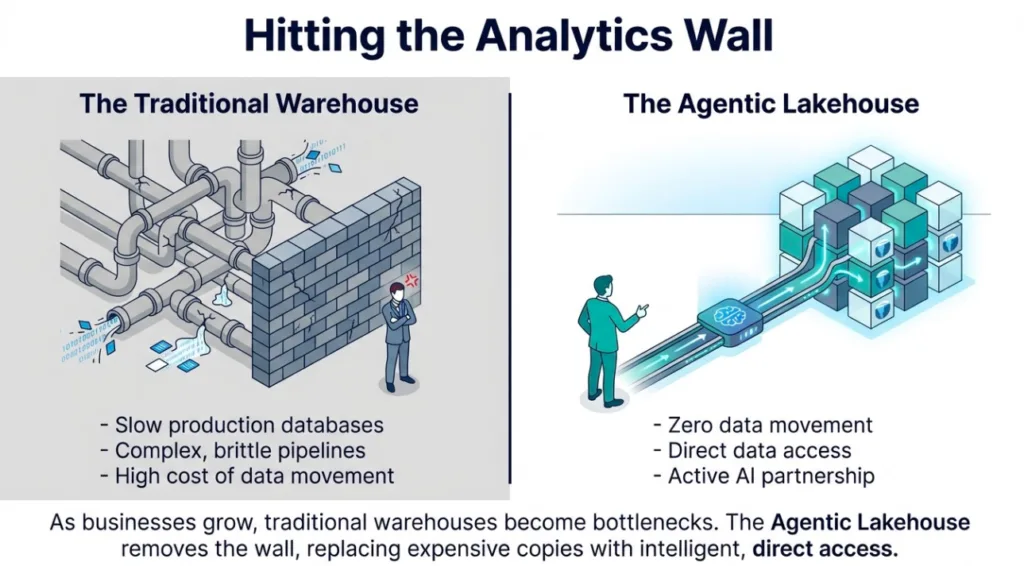
Many businesses hit an analytics wall as they grow. Production databases slow down under the weight of complex queries. Marketing teams wait for campaign data while order systems struggle to keep up. The traditional fix is building a data warehouse. This path is often slow and expensive. It requires moving and copying data through brittle pipelines.
Dremio offers a better alternative called the Agentic Lakehouse. It is the first platform built for AI agents and managed by AI agents. This architecture provides the foundation for agentic analytics. Users can ask questions in plain English and get instant answers.
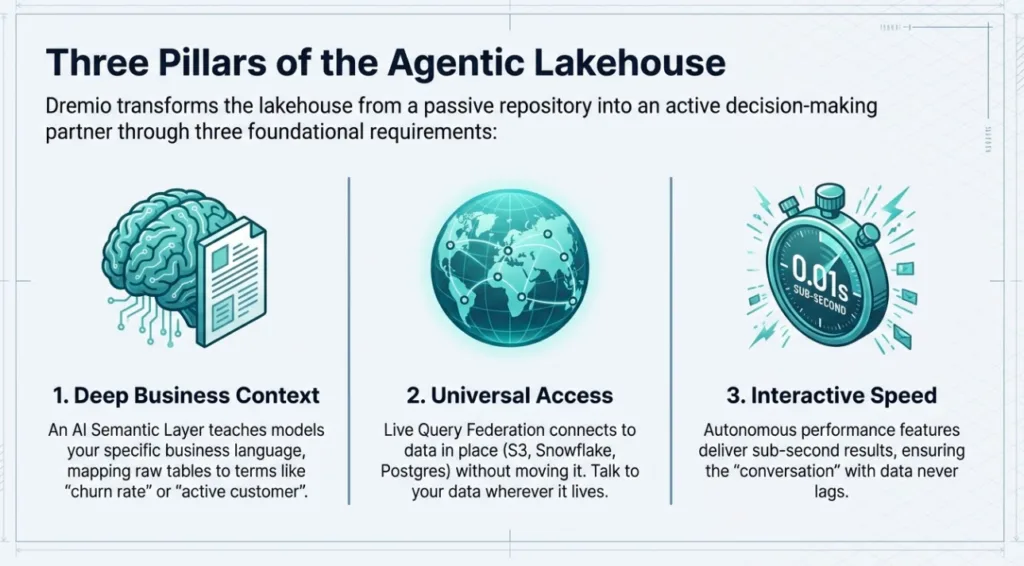
Success in this new era depends on three pillars:
Deep Business Context: An AI model does not know your specific business rules. Dremio uses an AI Semantic Layer to teach the AI your language. It maps raw tables to business terms such as "churn rate" and "active customer".
Universal Access: Data is usually scattered across object storage, databases, and warehouses. Dremio uses live Query Federation to connect to these sources in place. You can talk to your data wherever it lives without moving it.
Interactive Speed: Conversations require fast responses. Waiting minutes for an answer breaks the flow of analysis. Dremio uses autonomous performance features to deliver sub-second results even on massive datasets.
This foundation connects the power of AI to the reality of enterprise data. It transforms the lakehouse from a passive repository into an active decision-making partner.
Try Dremio’s Interactive Demo
Explore this interactive demo and see how Dremio's Intelligent Lakehouse enables Agentic AI
Part 2: Hands-On with the Native AI Agent
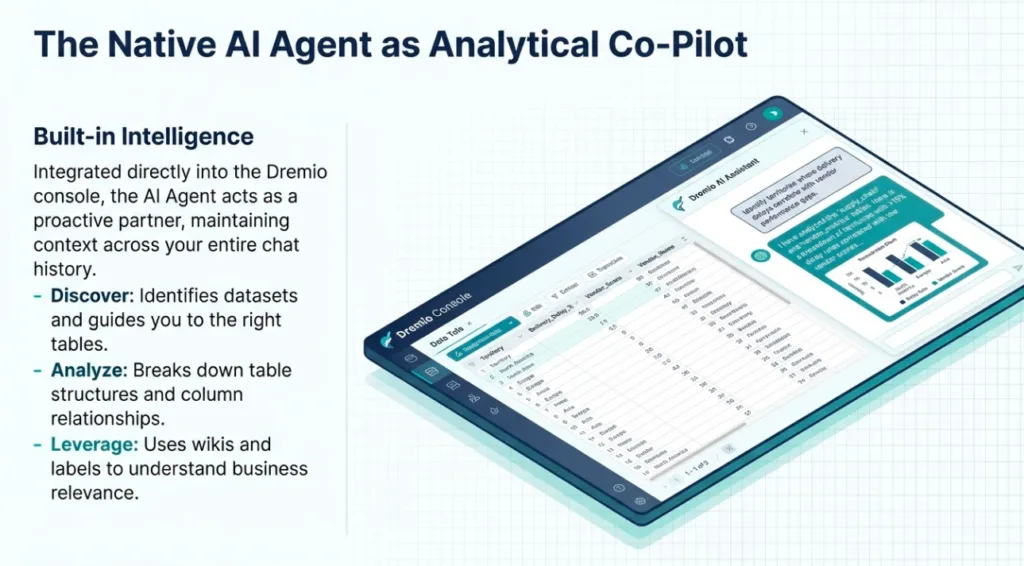
Dremio’s built-in AI Agent is more than a chatbot. It is a proactive analytical co-pilot integrated directly into the Dremio console.
Conversational Data Exploration
You can start a conversation with your data on the Dremio homepage or within the SQL Runner. The agent maintains context across your entire chat. This allows you to ask follow-up questions as you dig deeper into an investigation.
The agent helps you:
Discover and Explore: It identifies available datasets and offers guidance on which tables best answer your business questions.
Analyze Schema: It provides a detailed breakdown of table structures, including column types and relationships.
Leverage Metadata: The agent uses wikis and labels to understand the business relevance of your data, helping it suggest the right views for your needs.
Prompt Engineering for Analysts
The more detail you provide, the better the agent performs. Instead of vague requests, use specific business terms.
Example Prompts:
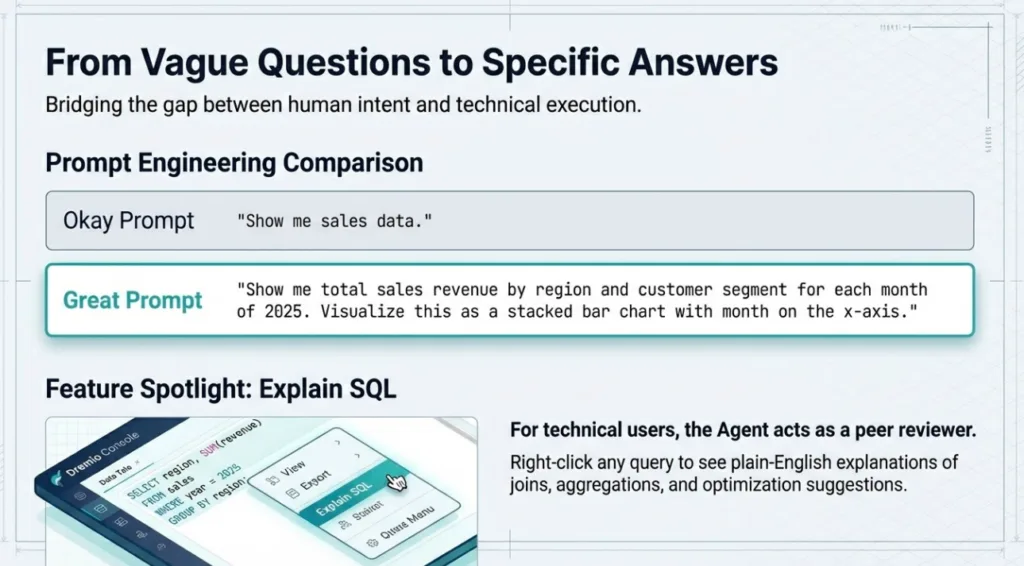
Okay Prompt: "Show me sales data."
Great Prompt: "Show me total sales revenue by region and customer segment for each month of 2025. Visualize this as a stacked bar chart with month on the x-axis."
Okay Prompt: "Check supply chain issues."
Great Prompt: "Identify territories where delivery delays in the Northeast region correlate with vendor performance gaps. Provide a trendline showing the last 90 days."
SQL Optimization and Debugging
For technical users, the AI Agent acts as an expert peer for code review. You can highlight any query in the SQL Runner, right-click, and select Explain SQL.
The agent provides:
Plain-English Explanations: A breakdown of the query logic, including joins and aggregations.
Optimization Suggestions: It identifies bottlenecks and proposes more efficient query formulations.
Job Performance Analysis: On the Job Details page, clicking Explain Job reveals why a query took longer than expected by analyzing data skew, memory usage, and resource distribution.
Example: Joining Disparate Sources
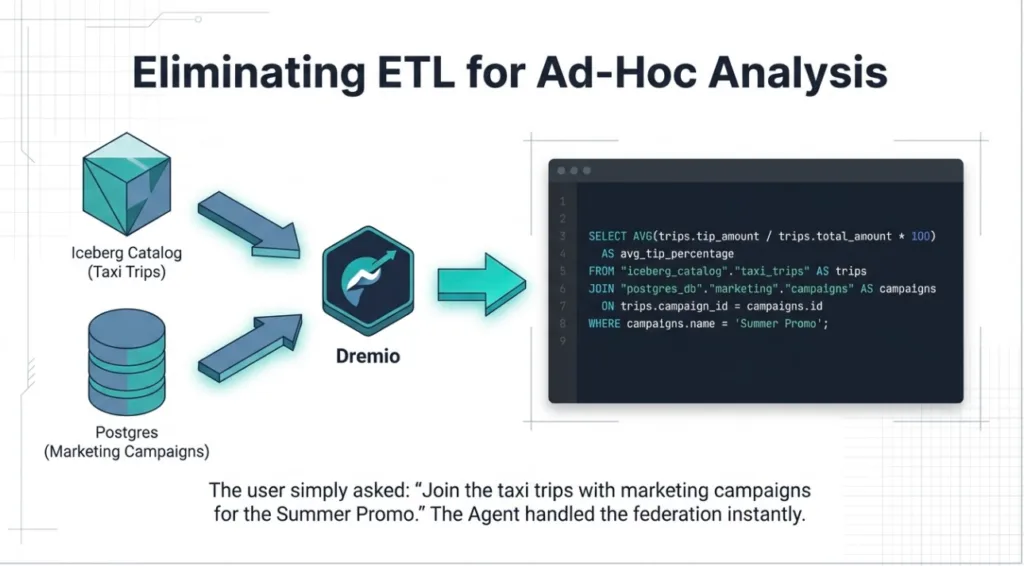
Imagine you need to correlate taxi trip data from your lakehouse with marketing campaign data stored in a relational database. You can simply ask:
"Join the taxi trips in my Iceberg catalog with the marketing campaigns table on campaign_id. Calculate the average tip percentage for trips that were part of the 'Summer Promo' campaign."
The agent generates the following SQL:
SELECT

    AVG(trips.tip_amount / trips.total_amount * 100) AS avg_tip_percentage

FROM

    "iceberg_catalog"."taxi_trips" AS trips

JOIN

    "postgres_db"."marketing"."campaigns" AS campaigns

ON

    trips.campaign_id = campaigns.id

WHERE

    campaigns.name = 'Summer Promo';
You can then ask the agent to visualize this result as a gauge or bar chart to share with your team.
Building Your Semantic Layer with the AI Agent
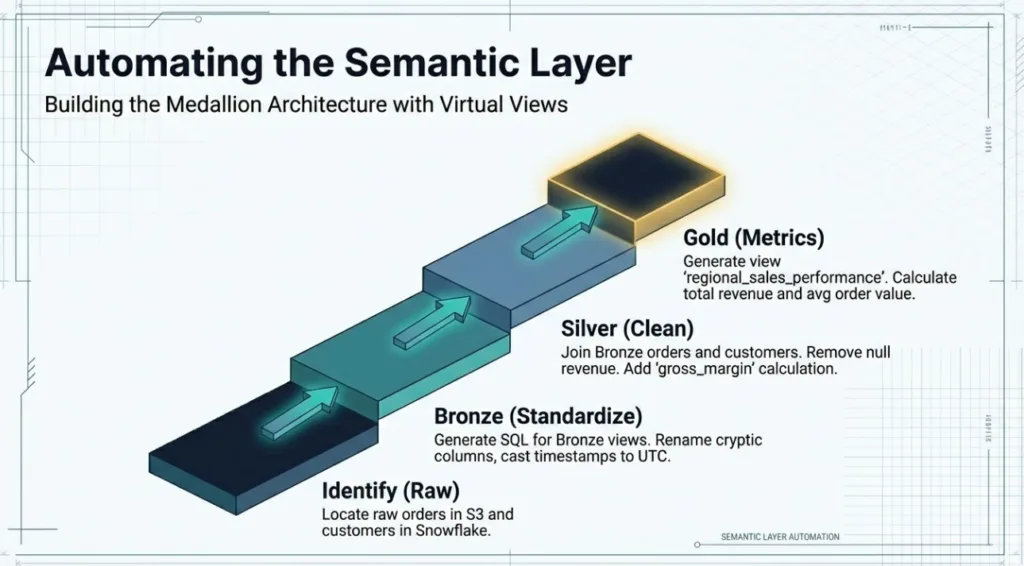
You can use the AI Agent to automate the creation of a medallion architecture (Bronze, Silver, Gold) within Dremio's semantic layer. Unlike traditional systems that require complex pipelines, Dremio allows you to build these layers logically using virtual views.
Step 1: Identifying Raw Tables
Start by asking the agent to locate your source data. For example, if you have raw sales and customer data in S3 and Snowflake, you might prompt:
"Locate the raw orders table in S3 and the customers table in Snowflake. Show me their schemas and how they relate."
Step 2: Generating Bronze Views
Once identified, ask the agent to create the Bronze layer. This layer maps 1-to-1 with physical tables to standardize technical metadata.
Prompt:
"Generate SQL for Bronze views of these two tables in the 'marketing.bronze' space. Rename cryptic columns to be more readable (e.g., 'CUST_ID' to 'customer_id') and cast all timestamps to UTC."
Step 3: Modeling the Silver Layer
In the Silver layer, you apply business logic, join datasets, and clean the data.
Prompt:
"Write the SQL for a Silver view named 'standardized_orders' that joins the Bronze orders and customers views on customer_id. Remove any rows where the revenue is null and add a calculated column for 'gross_margin' as revenue minus cost."
Step 4: Curating the Gold Layer for Metrics
The Gold layer is for consumption-ready data products and specific metrics.
Prompt:
"Using the standardized_orders view, generate a Gold view called 'regional_sales_performance'. This view should calculate total revenue, average order value, and gross margin percentage grouped by region and month for the last two years."
Resulting SQL Example (Gold View):
CREATE OR REPLACE VIEW "marketing"."gold"."regional_sales_performance" AS

SELECT

    region,

    DATE_TRUNC('month', order_date) AS report_month,

    SUM(revenue) AS total_revenue,

    AVG(revenue) AS avg_order_value,

    (SUM(gross_margin) / SUM(revenue)) * 100 AS gross_margin_pct

FROM

    "marketing"."silver"."standardized_orders"

WHERE

    order_date >= DATE_ADD(CURRENT_DATE, -730)

GROUP BY

    1, 2;
By building your semantic layer this way, you create a single source of truth. Dremio’s Autonomous Reflections will then observe how these views are queried and automatically materialize them for sub-second performance without any manual tuning.
Extending Intelligence with the Dremio MCP Server
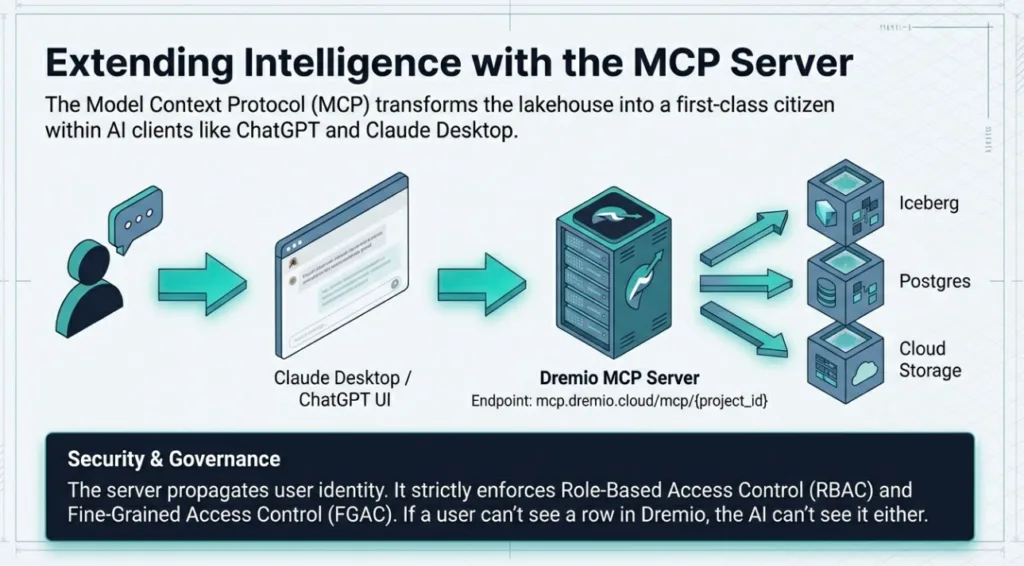
The Model Context Protocol (MCP) is an open standard that allows AI applications to connect to data and tools through a consistent interface. Dremio hosts its own MCP server, allowing you to use your Dremio project with external AI clients like ChatGPT and Claude Desktop.
This integration transforms your lakehouse into a first-class citizen in any AI workflow. Instead of copying data to a chat window, the AI agent connects directly to your Dremio environment to find, analyze, and retrieve data.
Connectivity and Setup
Dremio provides a hosted MCP server for both the US and European control planes. You can find your specific endpoint in the Project Overview page under Project Settings.
US Control Plane: mcp.dremio.cloud/mcp/{project_id}
European Control Plane: mcp.eu.dremio.cloud/mcp/{project_id}
To configure a connection, you first create a Native OAuth application in Dremio. This application provides the client ID and secret required by your AI chat client. Each provider has specific redirect URLs that must be entered during this setup:
Claude: Uses https://claude.ai/api/mcp/auth_callback and https://claude.com/api/mcp/auth_callback.
The Dremio MCP server is built for enterprise trust. It does not bypass your security rules. Instead, it propagates user identity. Every query an AI agent runs through the MCP server respects the Role-Based Access Control (RBAC) and Fine-Grained Access Control (FGAC) you have configured in Dremio.
If a user is restricted from seeing specific rows or masked columns in the Dremio UI, the MCP server will enforce those same restrictions for the AI agent. This ensures that sensitive data remains protected even when accessed via natural language.
The ChatGPT and Claude Experience
Once connected, your external AI agent can invoke Dremio tools to perform complex tasks. It understands your semantic layer, meaning it can use your business definitions and metric calculations to provide accurate answers.
Example Interaction in Claude:
User: "Based on our Dremio data, what was the average customer lifetime value for the 'Enterprise' segment last quarter?"
Claude (via MCP): Claude calls the run_sql_query tool. It generates a query that joins the customers and orders views in your Silver layer, filters by segment and date, and calculates the average. It then returns the formatted result directly in your chat.
Advanced Exploration Tools
The MCP server provides a three-pronged approach to connectivity:
Tools: These are the "hands" of the AI. They allow the model to execute SQL queries, list catalogs, or fetch table schemas.
Resources: These provide read-only context. An agent can read your wikis and documentation to learn about your data before writing a query.
Prompts: These are templates that guide users on the best way to ask questions, effectively putting an "expert" at your side.
By combining these tools, you can build cross-functional workflows. For example, an agent could query customer churn data from Dremio and then use a separate SendGrid MCP server to trigger a targeted email campaign.
Developer Tools: Agent Skills and Automation
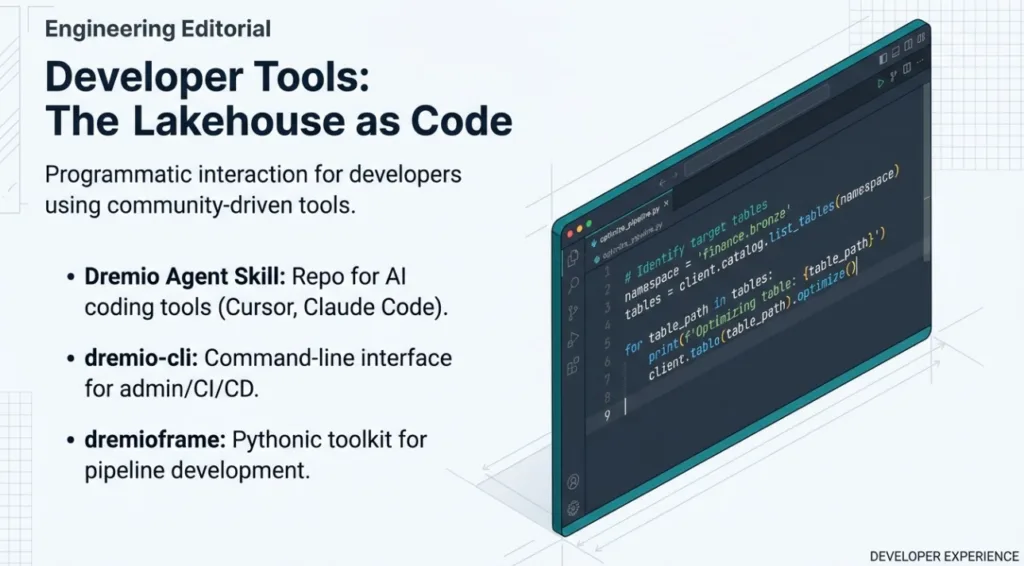
While the native agent and MCP server focus on conversational data analysis, developers often need to interact with the platform programmatically. The Dremio DevRel team with the community has created and maintain a suite of open-source community-driven tools, including the Dremio Agent Skill and several Python libraries. These tools are not officially supported by Dremio, but they provide a robust framework for automating complex data operations.
Teaching Your IDE about Dremio
The Dremio Agent Skill is a specialized repository designed for agentic coding tools like Cursor, Claude Code, and Google Antigravity. By cloning this skill into the root of your project, you provide your AI assistant with deep context on how to interact with Dremio’s lakehouse.
The skill includes comprehensive documentation for:
Dremio CLI: Commands for administration and promotion of datasets.
REST API: Low-level endpoints for direct platform interaction.
SQL Syntax: Guidance on Iceberg DML and metadata functions.
Python Automation with dremioframe and dremio-cli
The Dremio Agent Skill relies on two primary Python libraries to perform its tasks.
dremio-cli is a command-line interface for managing Dremio from your terminal. It is ideal for scripting administrative tasks, such as creating users, granting roles, or integrating Dremio operations into CI/CD pipelines.
dremioframe is the most feature-rich library in this ecosystem. It provides a Pythonic toolkit for advanced data engineering and pipeline development. One of its most powerful features is the DremioAgent, which allows you to build custom applications that use AI for tasks like generating code or Data Quality (DQ) recipes.
Example: Programmatic Table Optimization
Using dremioframe, a developer can ask their AI coding assistant to write a script that manages the health of their Iceberg tables.
Prompt for Cursor/Claude Code:
"Using the dremioframe library and my credentials in the .env file, write a Python script that finds all tables in the 'finance.bronze' namespace and runs an OPTIMIZE command on each to compact small files."
Resulting Python Script:
import os

from dremioframe.client import DremioClient

from dotenv import load_dotenv

# Load credentials securely from .env

load_dotenv()

client = DremioClient()

# Identify target tables

namespace = "finance.bronze"

tables = client.catalog.list_tables(namespace)

for table_path in tables:

    print(f"Optimizing table: {table_path}")

    # Run Iceberg optimization to improve performance

    client.table(table_path).optimize()
By leveraging these community tools, developers can move beyond simple queries and treat their lakehouse as code. This enables automated maintenance, repeatable data science experiments, and rapid development of AI-driven applications built on Dremio.
Mastering AI SQL Functions for Unstructured Data
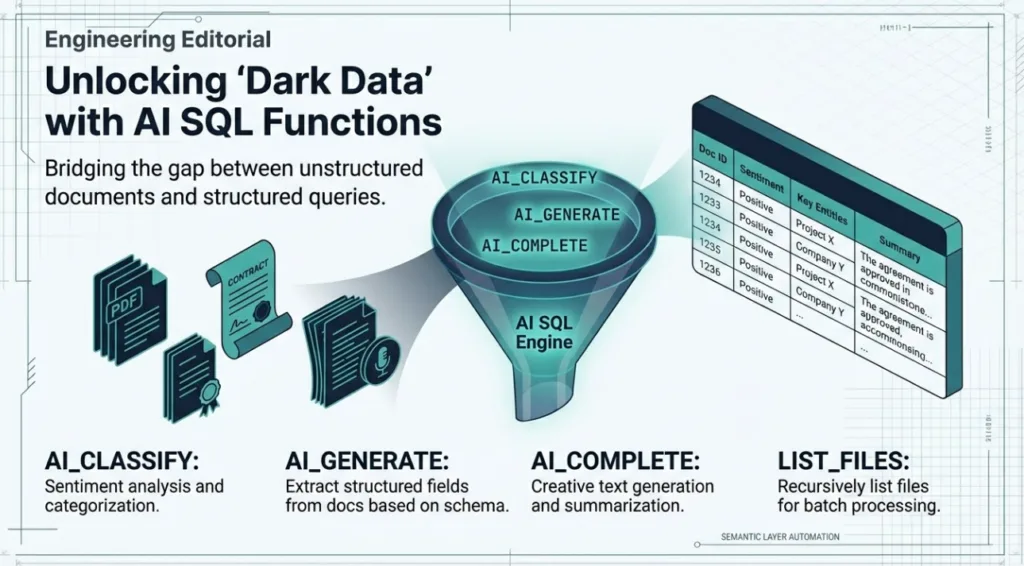
Enterprise data is not just rows and columns. Mountains of value are locked in "dark data"—unstructured files like PDFs, call transcripts, images, and research papers sitting idle in data lakes. Historically, extracting this value required complex OCR pipelines, specialized AI services, and costly data movement.
Dremio removes these barriers by embedding Large Language Models (LLMs) directly into the SQL engine. With native AI functions, anyone who knows SQL can analyze unstructured content where it lives.
Function Deep Dive
Dremio provides a suite of purpose-built functions for agentic analytics:
AI_CLASSIFY: This is designed for sentiment analysis and categorization at scale. You can ask the LLM to interpret text and assign a structured label from an array of categories you provide.
AI_GENERATE: Known as the "Swiss Army Knife" of AI functions, this tool excels at complex data extraction. It can transform unstructured documents into multiple structured fields based on a provided schema.
AI_COMPLETE: This function handles creative text generation and intelligent summarization. It is perfect for producing executive summaries or narrative descriptions of data patterns.
LIST_FILES: To enable batch processing, this table function recursively lists files from your source directories, passing file references directly to the AI functions for one-unified query.
Example: Turning Contracts into a Governed Data Product
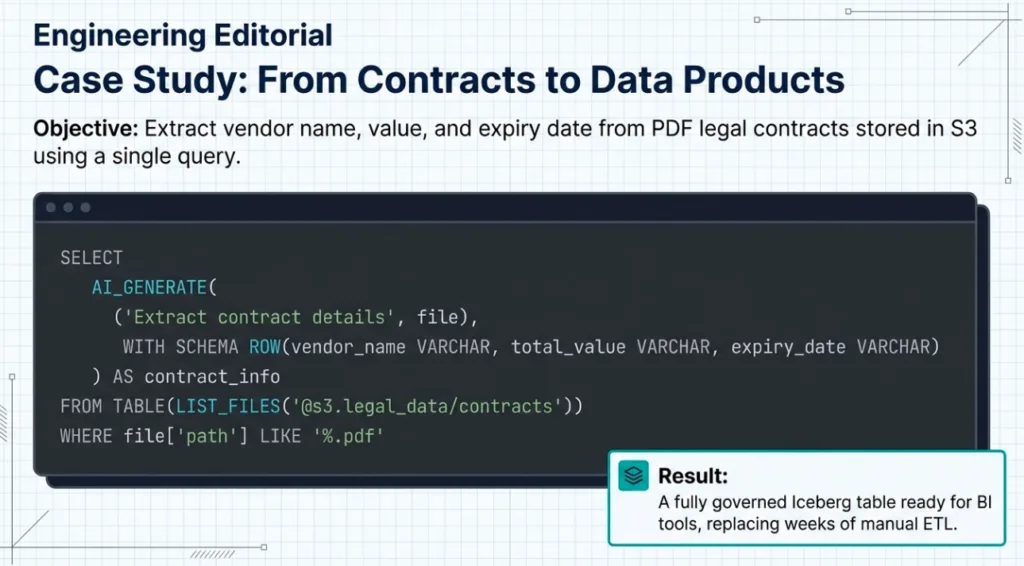
Imagine you have thousands of legal contracts in an Amazon S3 bucket. You need to extract the vendor name, contract value, and expiration date into a governed table. Instead of a multi-week engineering project, you can use a single CREATE TABLE AS SELECT (CTAS) statement.
Prompt for the AI Agent:
"Write a SQL query to list all PDF files in my 'legal_contracts' bucket. Use the AI_GENERATE function to extract the vendor name, total value, and expiry date from each file. Materialize the results into a new Iceberg table called 'contracts_managed' in the 'legal' namespace."
Resulting SQL Block:
CREATE TABLE legal.contracts_managed AS

SELECT

    contract_info['vendor_name'] AS vendor,

    CAST(contract_info['total_value'] AS DECIMAL(18,2)) AS value,

    CAST(contract_info['expiry_date'] AS DATE) AS expiry

FROM (

    SELECT

        AI_GENERATE(

            ('Extract contract details', file),

            WITH SCHEMA ROW(vendor_name VARCHAR, total_value VARCHAR, expiry_date VARCHAR)

        ) AS contract_info

    FROM TABLE(LIST_FILES('@s3.legal_data/contracts'))

    WHERE file['path'] LIKE '%.pdf'

);
This query replaces a document processing pipeline, OCR tools, and manual ETL jobs. The resulting Iceberg table is a first-class data product, optimized for performance, governed with fine-grained access controls, and ready for your BI tools.
By bringing LLMs to the data, Dremio turns your data lake into an interactive database where every document is queryable.
Automating the Lakehouse with Semantic Context
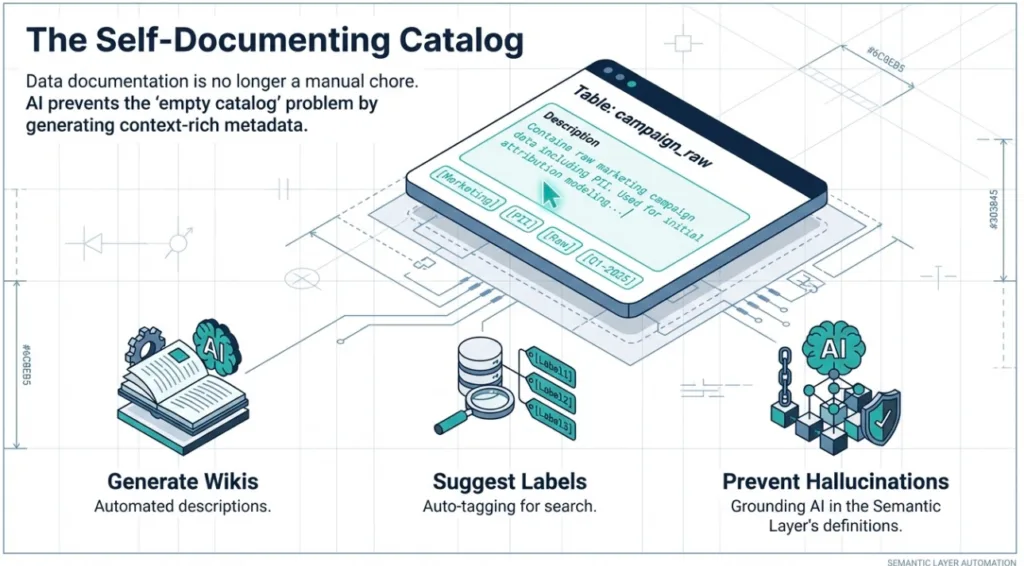
Data documentation is critical for governance and discoverability, but it is often a manual, tedious task that falls behind. Dremio addresses this by using generative AI to automate the creation of metadata in its AI Semantic Layer. This transforms your data catalog from a passive repository into a living, self-documenting asset.
The Evolution of the Semantic Layer
The semantic layer has evolved from a simple data dictionary into an active AI co-pilot. It serves as a business-friendly map that translates complex table and column names into understandable terms like "monthly revenue". In an agentic lakehouse, this layer is the primary differentiator because it teaches the AI your business language.
AI-Generated Metadata
Dremio uses generative AI to practically document the lakehouse itself. By understanding the schema and sampling the data, the platform can:
Generate Wikis: The AI creates context-rich descriptions for tables and views. This helps users understand the purpose of a dataset without hunting down a subject matter expert.
Suggest Labels: It identifies relevant tags for datasets, improving searchability and organization.
Enrich with Context: Descriptions and classifications are stored with the data, guiding both human exploration and AI-driven analysis.
Ensuring Trust and Accuracy
A major challenge for AI data assistants is hallucinations. Generic models often fail because they lack business context. Dremio's AI Semantic Layer prevents this by providing a foundational layer of trust.
When a user asks a question in natural language, the built-in AI Agent leverages the definitions and documentation in the semantic layer to understand intent. This ensures that every query is accurate and context-aware. By encoding your logic once in the semantic layer, you provide a consistent set of metrics for every user and AI agent in your organization.
Example Prompt for AI-Generated Metadata:
"I just added several raw Parquet files from our marketing campaigns to the lakehouse. Use the AI Semantic Layer to inspect the 'campaign_raw' table and generate a detailed wiki description and suggested labels for 'PII' and 'Marketing' where appropriate."
Performance on Autopilot
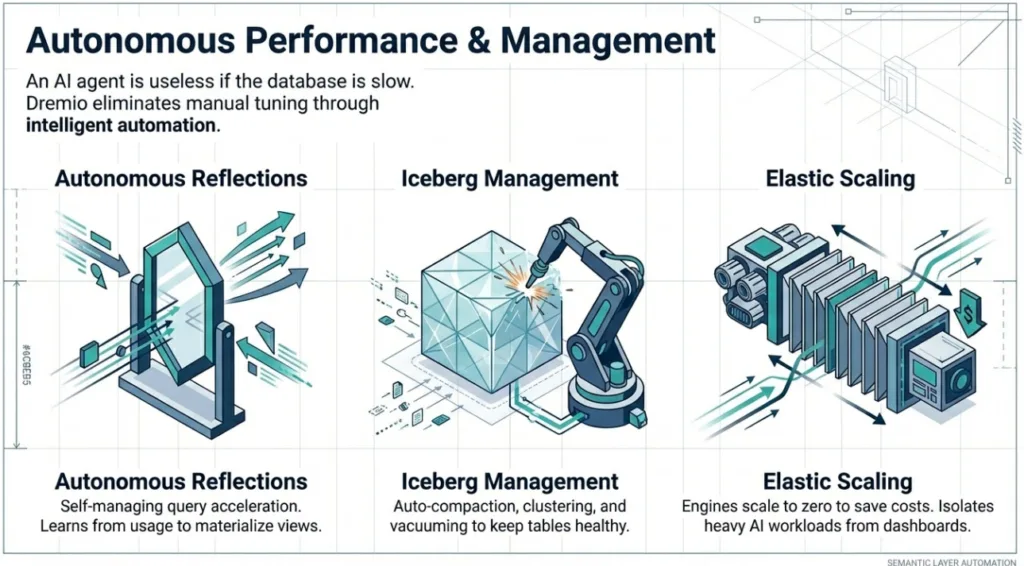
For an agentic analytics experience to be effective, it must be fast. An AI co-pilot loses its value if a user has to wait minutes for a response. Dremio eliminates manual performance tuning through an intelligent engine that autonomously manages resources and acceleration.
Autonomous Reflections
Dremio’s query acceleration technology, Reflections, uses physically optimized copies of source data to provide sub-second results. Traditionally, data teams manually create and schedule these materializations. Autonomous Reflections remove this burden by having the Dremio engine learn from actual usage patterns over time.
The platform analyzes your query workload to:
Self-Manage: Automatically create, update, and drop Reflections to optimize performance where it is most needed.
Ensure Freshness: Reflections built on modern table formats like Apache Iceberg refresh automatically whenever source data changes.
Transparently Rewrite: Dremio’s query planner rewrites incoming requests to use these Reflections without the user or the AI agent ever knowing they exist.
Automatic Iceberg Management
Operating an Iceberg lakehouse at scale requires continuous maintenance to prevent performance degradation. Dremio automates this process through background jobs that keep the lakehouse healthy.
This automation includes:
Compaction: Intelligently merging thousands of small files into larger, more optimal ones to reduce metadata overhead.
Clustering: Reorganizing data layouts based on query patterns to eliminate the need for manual partitioning.
Vacuuming: Automatically removing obsolete snapshots and expired data files to lower storage costs.
Elastic Compute Scaling
One of the largest cost centers in data analytics is idle compute resources. Dremio solves this with managed query engines that scale automatically based on demand.
Engines spin up instantly when a query arrives and scale down to zero when the system is idle. You can configure specific routing rules to isolate AI workloads, ensuring that resource-heavy text classification jobs do not slow down critical executive dashboards.
Conclusion: Starting the Conversation
The era of passive data repositories is over. Building an agentic lakehouse with Dremio moves your organization beyond the "phone book" catalog of the past and into a future where the catalog is a dynamic knowledge base. By unifying access, providing deep business context, and automating performance, Dremio turns the dream of natural language analytics into a day-one reality.
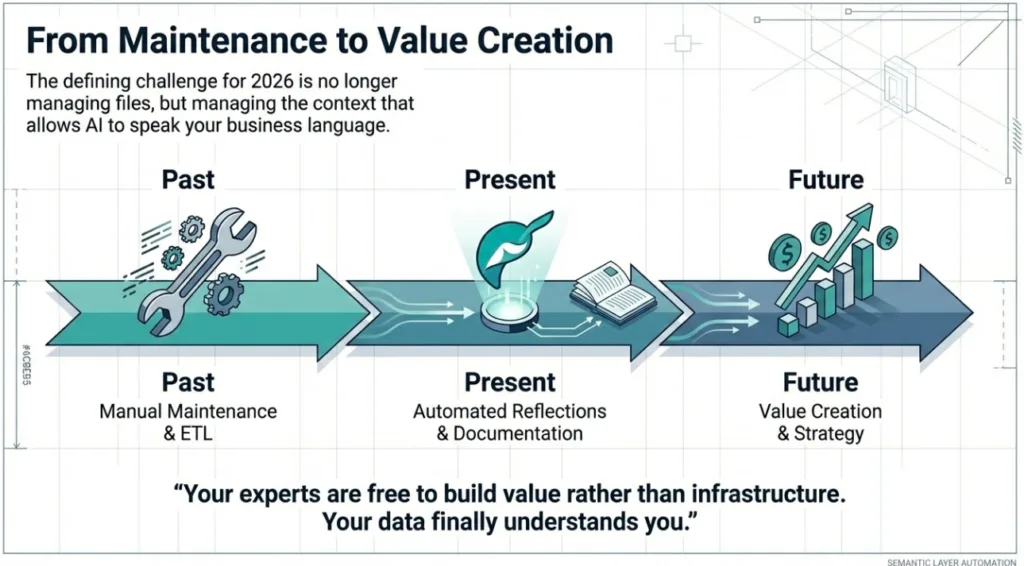
The shift is fundamental: data teams are no longer stuck in a cycle of manual maintenance and systems integration. When the platform manages its own reflections, optimizes its own tables, and documents its own metadata, your experts are free to build value rather than infrastructure. The defining challenge for data leaders in 2026 is no longer about managing files; it is about managing the context that allows AI to speak your business language.
Dremio’s integrated approach removes the technical barriers that once required months of effort. It creates a single source of truth that humans and AI agents can trust equally. Now that your data can finally understand you, what is the first question you will ask?
Try Dremio Cloud free for 30 days
Deploy agentic analytics directly on Apache Iceberg data with no pipelines and no added overhead.
Ingesting Data Into Apache Iceberg Tables with Dremio: A Unified Path to Iceberg
By unifying data from diverse sources, simplifying data operations, and providing powerful tools for data management, Dremio stands out as a comprehensive solution for modern data needs. Whether you are a data engineer, business analyst, or data scientist, harnessing the combined power of Dremio and Apache Iceberg will undoubtedly be a valuable asset in your data management toolkit.
Oct 12, 2023·Product Insights from the Dremio Blog
Table-Driven Access Policies Using Subqueries
This blog helps you learn about table-driven access policies in Dremio Cloud and Dremio Software v24.1+.
Aug 31, 2023·Dremio Blog: News Highlights
Dremio Arctic is Now Your Data Lakehouse Catalog in Dremio Cloud
Dremio Arctic bring new features to Dremio Cloud, including Apache Iceberg table optimization and Data as Code.