Nessie is an open-source lakehouse catalog that enables git-like workflows and cross-table transactions on the lakehouse. Today, we’re excited to announce that companies can now use Dremio to connect and work with Nessie as a source.
Note: This feature is available for Dremio Software version 24.1 and above.
What is (and Why) Nessie?
Today, data teams still need multiple expensive environments for development, testing, and production, it’s difficult to undo changes when something goes wrong, and it's difficult for data scientists to experiment with data.
Nessie is a lakehouse catalog that makes data engineering and experimentation easy by enabling git-like workflows on data:
- Support development, test, and production workloads all on one lakehouse environment
- Safely experiment with data in temporary branches
- Ensure data quality in ETL branches before exposing new data to production users
- Immediately rollback changes and recover from mistakes
- Reproduce models and analyses with catalog-level time travel
With Nessie, data architects can eliminate infrastructure costs associated with duplicated environments and pipelines, give line of business users immediate access to fresh data, and immediately rollback from mistakes without data downtime. Data analysts and data scientists can run experiments and models on their entire lakehouse without disturbing production workloads.
Under the hood, Nessie is implemented as a custom Iceberg catalog, and therefore supports all features available to any Iceberg client.
Getting Started with Nessie Server
You can download the latest Nessie release from GitHub. This feature requires a minimum Nessie version of 0.59. There are a few paths to deploy Nessie, including:
- Docker image*
- JAR file
- Helm chart**
You also need to select and deploy a backend database for Nessie. See here for a list of supported databases and configuration settings.
*The Docker image includes OpenJDK 11. The Docker container does not include the Pynessie CLI (docs) or a backend database.
**Nessie Docker containers can be run in the same k8s namespace with Dremio, but need to be installed separately.
Connecting Dremio to Your Nessie Server
Note: Ensure you are using Dremio version 24.1 and above.
Once you’ve set up your Nessie server, you can connect to it using the Dremio UI just like you would with any other data source.
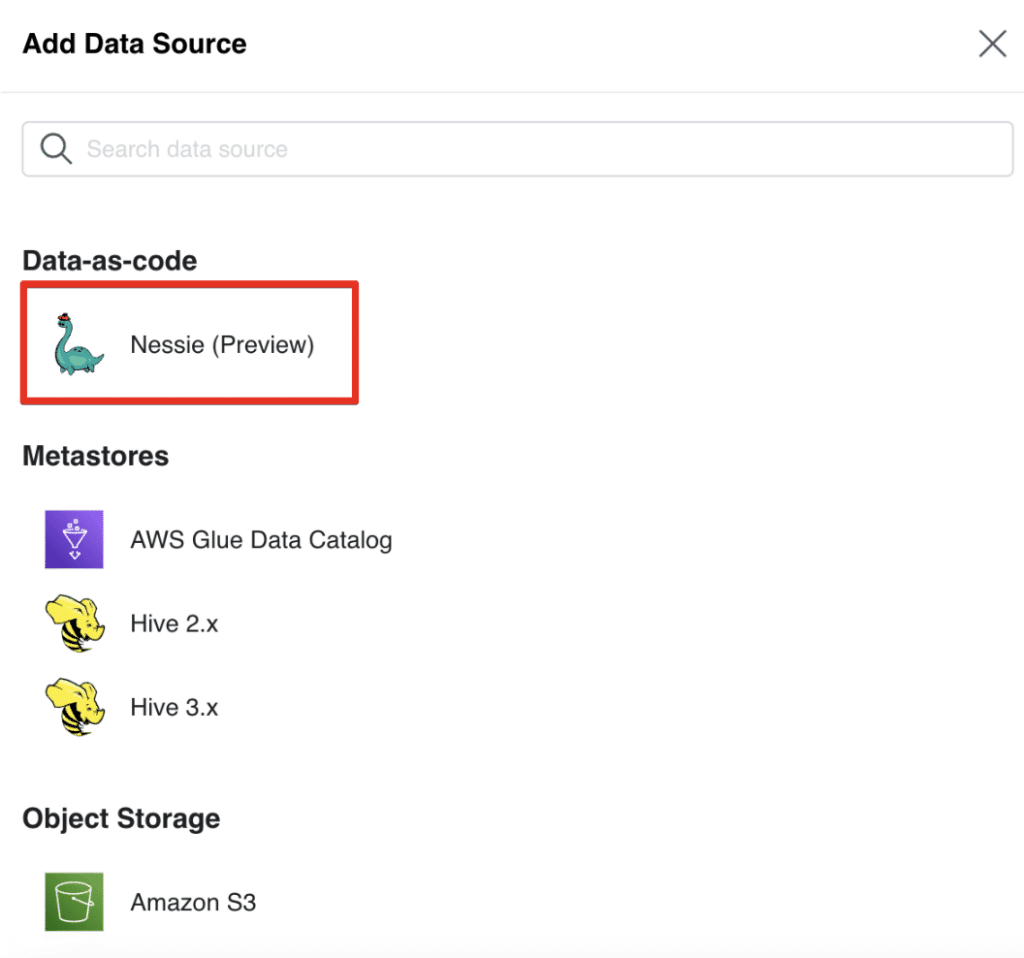
- On the left hand side of the Dremio UI, click the “Add Source” button
- Click “Nessie (Preview)”
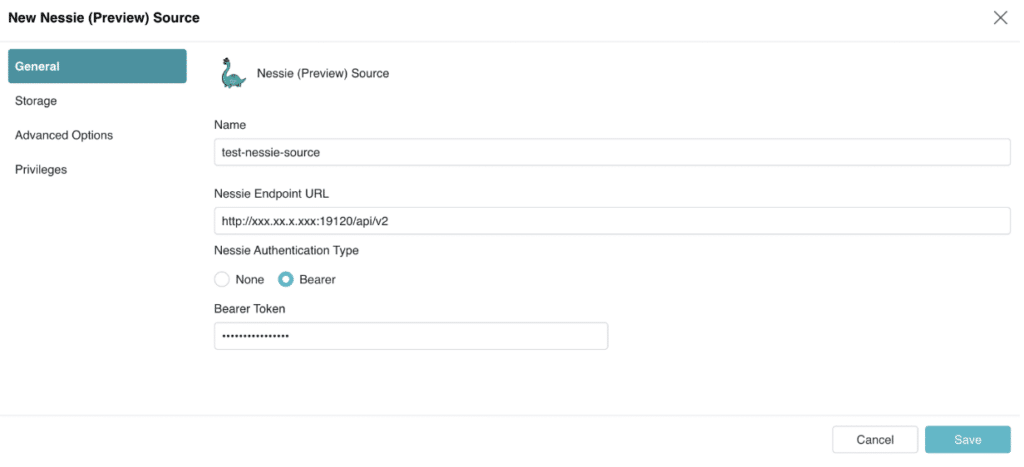
- In the “General” tab, add the Nessie REST endpoint URL and the credentials for your Nessie server
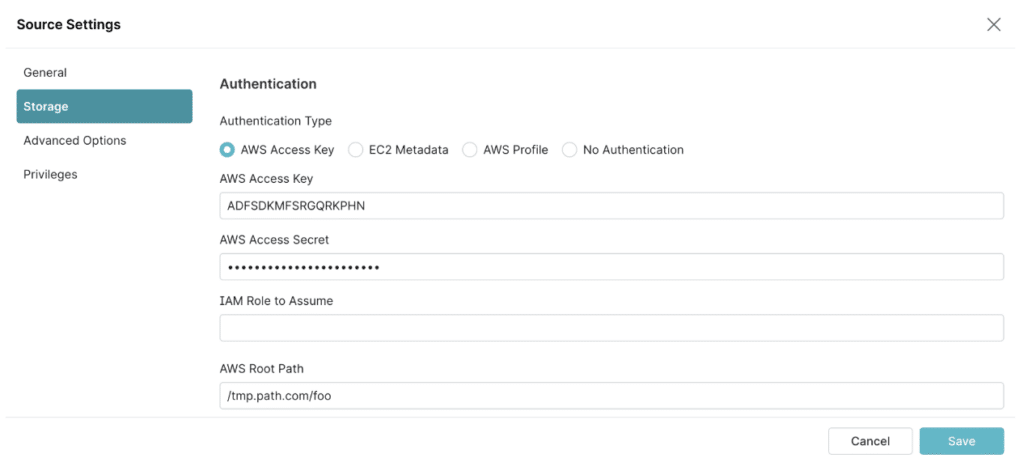
- In the “Storage” tab, add your storage credentials. Optional: In the “Advanced Options” tab, configure cache options
- Once you’ve added your Nessie Server and storage credentials, click “Save”. You’ll see your Nessie source listed in the “Sources” section of the Dremio UI, alongside the other sources added for your Dremio instance
Using Dremio to Work With Nessie
Once you’ve connected to your Nessie server, you can use Dremio to create and work with Iceberg tables. In the example code below, we’ll demonstrate how you can use simple SQL commands to create branches for experimentation, run queries against different branches to compare results, merge branches, and rollback changes:
1. Let’s query a table in our lakehouse. Note the "AT BRANCH” syntax, which specifies that we’re querying the table as it is on the main (production) branch:
SELECT * FROM "Cars and Prices" AT BRANCH "main";

--> 1, 'Model X', 120000
--> 2, 'Model Y', 60000
--> 3, 'Model 3', 45000
--> 4, 'Model S', 95000
2. Suppose we want to make some changes to this data. Let’s create an ETL branch so we can update data without disturbing production:
CREATE BRANCH "etl_06092023";

--> Branch etl_06092023 has been created at branch main in source nessie-test-source.
3a. In our ETL branch, let’s insert some new data into our table:
INSERT INTO "Cars and Prices" VALUES (5, 'Cybertruck', 100000) AT BRANCH "etl_06092023";

--> Rows Inserted: 1
3b. See that the new data is available immediately in our ETL branch:
SELECT * FROM "Cars and Prices" AT BRANCH "etl_06092023";

--> 1, 'Model X', 120000
--> 2, 'Model Y', 60000
--> 3, 'Model 3', 45000
--> 4, 'Model S', 95000
--> 5, 'Cybertruck', 100000
3c. Note that users on the main branch are completely unaware of changes, and continue to see their production version of data:
SELECT * FROM "Cars and Prices" AT BRANCH "main";

--> 1, 'Model X', 120000
--> 2, 'Model Y', 60000
--> 3, 'Model 3', 45000
--> 4, 'Model S', 95000
4a. Now that we've loaded our new data into our ETL branch, let's merge the changes back into the main branch for others to use:
MERGE BRANCH "etl_06092023" INTO "main";

--> Branch etl_06092023 has been merged into main in source nessie-test-source.
4b. Merges happen instantaneously with Nessie, so end users can see the new data immediately without needing to worry about cutover windows and data downtime:
SELECT * FROM "Cars and Prices" AT BRANCH "main";

--> 1, 'Model X', 120000
--> 2, 'Model Y', 60000
--> 3, 'Model 3', 45000
--> 4, 'Model S', 95000
--> 5, 'Cybertruck', 100000
5a. If we’re unhappy with the changes, we can immediately roll back changes by assigning the branch head to a prior commit point. Rollback happens immediately, since Nessie simply moves its commit pointer to refer to a prior state of the lakehouse:
ALTER BRANCH "main" ASSIGN COMMIT "9b24dc..."

--> Assigned commit 9b24dc... to branch main in source nessie-test-source.
5b. Phew. Mistakes are undone immediately!
SELECT * FROM "Cars and Prices" AT BRANCH "main";

--> 1, 'Model X', 120000
--> 2, 'Model Y', 60000
--> 3, 'Model 3', 45000
--> 4, 'Model S', 95000
Conclusion
Nessie makes it easy for companies to experiment with data and manage data workflows using git-like semantics. We’re excited about all the new use cases that the Nessie connector enables!
While this feature is still in public preview, we’re encouraged by the feedback we’ve already gotten from users. A large government entity in Europe noted:
“Nessie makes it possible to expose data and schema changes to end users instantly. This is a huge leap. Performance is also snappy, even with thousands of tables and hundreds of branches.”
If you’d like to start using Nessie as a source with Dremio, you can get started today by following the steps in our documentation.
Feel free to reach out to our team anytime — we’d love to hear your feedback or requests!
Interested in learning more about Nessie?
Already using Iceberg and want to test out Nessie?
Interested in a fully-managed Nessie experience?
- Check out Dremio Arctic, a fully-managed lakehouse management service built on Project Nessie
Keep learning
For a deeper treatment of the topics in this post, download Apache Polaris: The Definitive Guide by Alex Merced, Andrew Madson, and Tomer Shiran, free from Dremio.
To see these ideas applied in practice, explore Dremio’s Open Catalog, built on Apache Polaris.
Try Dremio Cloud free for 30 days
Deploy agentic analytics directly on Apache Iceberg data with no pipelines and no added overhead.