Technical review: Last verified September 29, 2026 by Alex Merced. This guide was checked against current Apache project documentation. Apache Polaris 1.8.0 is the latest documented release; examples that name an earlier release retain that version scope. Validate configuration in a non-production environment before rollout. For the broader context, see what Apache Polaris is and how it governs Iceberg tables.
Overview: Polaris with external OIDC providers
Apache Polaris can accept OpenID Connect tokens from an external identity provider, instead of issuing every identity itself. In practice this means Polaris validates a signed OAuth 2.0 access token that carries user and group claims, then maps those claims to Polaris roles and grants. The technical work is aligning issuer and audience matching, JWKS key verification, claim mapping, and token lifetime so your authorization decisions remain correct and auditable.
This guide gives a vendor-neutral flow, a worked generic OIDC configuration, two concrete examples for Keycloak and Okta, troubleshooting commands, and operational guidance you need to run Polaris with external authentication in production. I will call out where Keycloak and Okta differ in admin patterns, and what you must verify in Polaris configuration. Facts checked on September 22, 2026 where freshness matters.
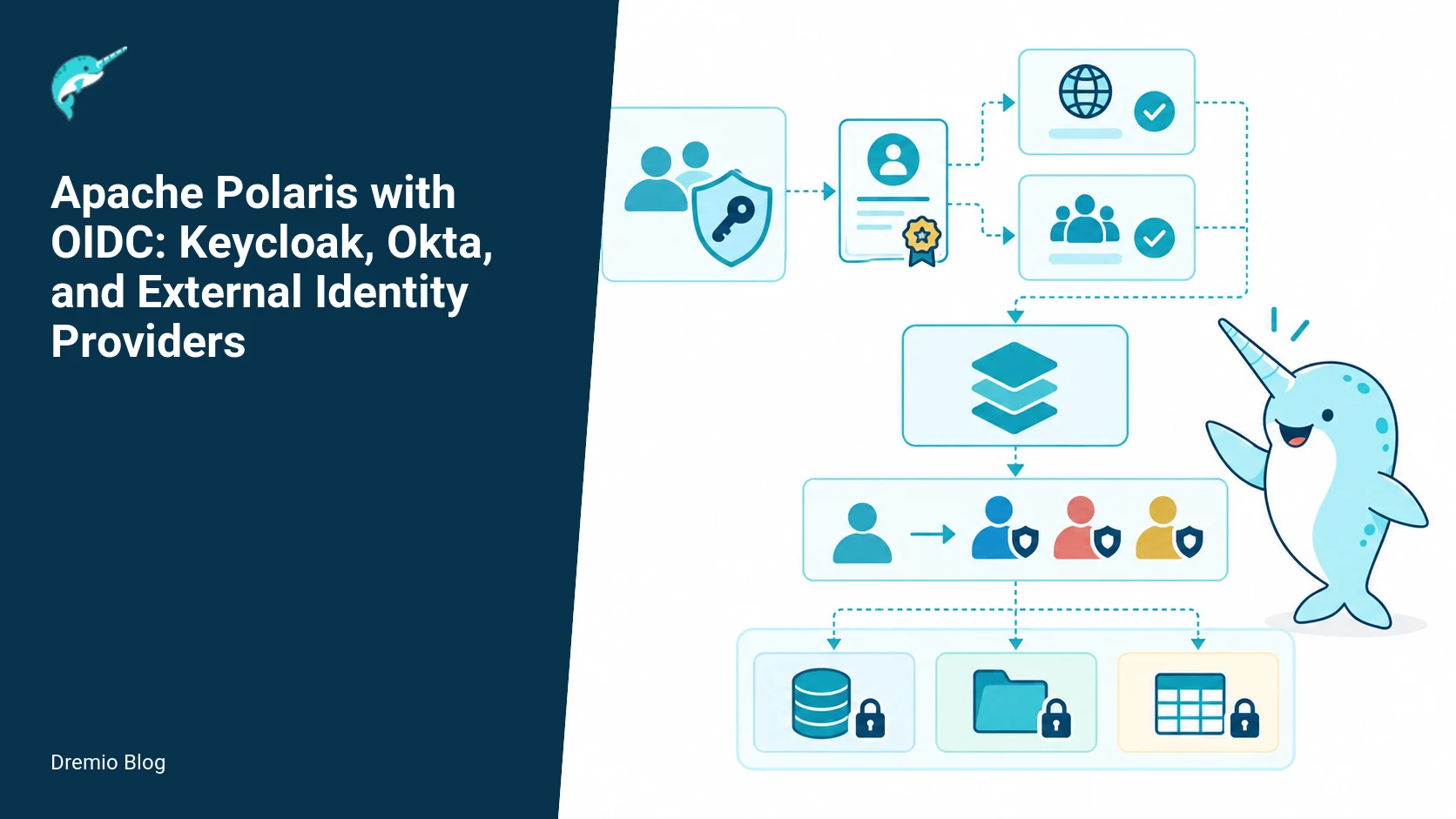
OIDC token flow. Each stage has a result that can be checked before the next stage begins.
How Polaris and OIDC fit together
Two distinct concerns are at work. OIDC authenticates users, producing tokens that assert identity and group membership. Polaris authorizes, using roles and grants to permit catalog operations. Confusing the two is a common failure mode: an identity provider can vouch that a user is Alice, but if Polaris maps Alice to an overly permissive role, you get a policy failure. Always treat authentication and authorization separately.
Polaris supports validating a signed JWT issued by an external OIDC provider. That means you must configure Polaris to trust the provider's issuer URL, expected audience, and JWKS (JSON Web Key Set) endpoint. The OIDC provider is responsible for authentication flows, token issuance, refresh tokens, and session lifetime. Polaris is responsible for validating token signatures, checking standard claims such as exp, nbf, aud, iss, and doing claim-to-role mapping.
If you need background on how Polaris components interact with control plane and engines, see the Polaris architecture explainer for context on where token validation sits in request processing. That article helps when you are instrumenting latency, because validating remote JWKS or a slow introspection call can affect request path timing.
Polaris also integrates with catalog and engine calls. See the piece about the Polaris REST API to understand how engines present credentials to the catalog and which calls will carry the subject token you configure here.
Vendor-neutral OIDC flow
The flow I recommend keeps token issuance and token validation clear and simple. It works with any OIDC provider that implements OpenID Connect Core 1.0. The specification is the authoritative source for required claims and flows.
High level flow:
Client authenticates to the identity provider, using the provider's supported method (authorization code, client credentials, etc.).
Provider issues an ID token and/or access token, signed as a JWT, with standard claims (iss, sub, aud, exp, iat) and optional claims like groups.
Client or engine calls Polaris REST API, presenting the access token in the Authorization header.
Polaris validates signature with JWKS, checks issuer and audience, verifies exp and nbf, and optionally checks token use.
Polaris maps claims to internal roles, applies grants, and permits or denies the requested operation.
Design decisions you must make:
Which token type will Polaris accept: access tokens, ID tokens, or both. Access tokens are the usual choice for authorization. Verify your provider signs the access token as a JWT; some providers issue opaque tokens by default and require configuration to produce JWTs.
What is the expected audience claim. The audience should match a Polaris client identifier or a list that includes Polaris. Be strict, do not accept tokens with unexpected aud values.
How will group information be delivered: as a groups claim, a custom claim, or via a userinfo call. Group claim size and cardinality can be an operational limit, see the caution below about group claim size.
Key rotation handling. Ensure Polaris either fetches JWKS on demand or you run a cache refresh mechanism. See the key rotation section and diagram for patterns to avoid downtime.
The OpenID Connect Core 1.0 specification defines the claims and expected flows. If you are uncertain about mandatory claims for your provider, validate against the spec's description of ID and access token fields.
JWT validation gates. Each technical risk needs a matching test, boundary, or operating signal.
JWT validation gates Polaris enforces
When Polaris receives a bearer token it performs a sequence of checks. If any gate fails, the request is rejected. You must configure Polaris so the gates reflect your provider and threat model.
Signature verification, using the provider JWKS endpoint to obtain public keys. Polaris must validate the JWT alg, key id (kid), and signature. Reject tokens with unknown alg or missing kid.
Issuer (iss) exact match. Configure Polaris with the expected issuer URL. Do not accept tokens from alternate issuers unless explicitly trusted.
Audience (aud) strict match. The token must include an audience that Polaris recognizes. If your provider places Polaris client id into aud, verify exact equality. If aud is an array, ensure Polaris is in the array and choose the correct semantics for multiple audiences.
Expiry (exp) and not before (nbf). Respect clock skew but keep it small. A common operational window is 60 seconds of allowed skew, but verify what your provider uses.
Token use claim (optional). Some providers set a token_use like access or id. If Polaris expects access tokens, reject id tokens used as access tokens.
Claim presence and format. For mapping to Polaris roles you will likely require a username and either a groups claim or other attributes. Reject tokens missing required claims or with unexpected types (for example, groups must be an array, not a single string).
Operationally, strict issuer and audience checks prevent token replay across environments. A common test failure I see is accepting a developer-issued token intended for staging in production because aud or iss are too permissive. Configure these values precisely in Polaris and in the OIDC provider client.
Also monitor the JWKS endpoint. If your provider rotates keys and Polaris has an aggressive cache, you can see intermittent signature failures. The key rotation patterns below show how to avoid downtime.
Claims to Polaris roles: mapping strategies
Polaris does not magically interpret claims. You configure which claim contains identity and which claims map to roles. Typical patterns:
Username mapping: map sub or preferred_username to Polaris subject. Use sub when you need a stable, immutable identifier across providers. Use preferred_username or email if you want a human readable name, but beware changes.
Group mapping: read groups claim or a custom claim that carries group names. Map group values to Polaris roles using role assignment configuration. Groups are convenient, but large group lists can cause token bloat and performance issues.
Attribute-based mapping: map department or custom attributes to Polaris roles for fine-grained policies. This works when your provider emits those attributes in the token or the userinfo response.
Design example: if your token carries groups: ["analytics_readers", "data_engineers"], configure Polaris to grant the analytics_readers role read-only catalog grants and data_engineers role compute grants. If a user has both groups, Polaris evaluates both role grants and applies the union of allowed actions.
Note the required caution: large group claims can hit size limits in tokens, HTTP headers, or Polaris claim processing. One failure mode I have seen in production is a team with 200 group memberships producing a 12 KB claim blob that causes proxy timeouts or truncated headers. If your identity provider will emit large group lists, consider group lookup on-demand via userinfo or a claims endpoint, or compress group-to-role mapping by using role-service groups (a single group per role) rather than listing every team membership.
Claims to Polaris roles. The loop turns table or catalog signals into controlled operational changes.
Generic OIDC configuration example
This is a generic, vendor-agnostic example. Verify keys, endpoints, and claim names with your provider documentation and the OpenID Connect Core 1.0 specification.
jwks_url: Polaris must fetch public keys here to validate signatures. Prefer the provider discovery endpoint to derive this URL automatically, if Polaris supports it.
audience: ensure the token aud contains this value. If aud is an array, check membership semantics in Polaris documentation for your version.
accepted_token_types: choose access_token for authorization. If your provider issues opaque access tokens by default, change provider client settings to return JWTs, or use an introspection endpoint if Polaris supports it.
jwks_cache_ttl_seconds: how often Polaris refreshes keys. Short caches reduce risk during rotations but increase JWKS fetch load.
Polaris documentation includes specific guidance for Keycloak. Use that as a cross-check when you configure Keycloak because name mappings and default endpoints are different. The official Polaris Keycloak guide documents the provider-specific settings you must adjust.
Keycloak example
Keycloak is commonly used on-premises. By default Keycloak issues JWTs for both ID and access tokens and exposes a realm JWKS endpoint. The Polaris guide for Keycloak walks through realm setup and client configuration; consult it for version-specific steps.
Key steps I have executed in production:
Create a client in Keycloak for Polaris, set access type to confidential if Polaris will call endpoints requiring client credentials.
Set Valid Redirect URIs appropriately for any interactive flows. For machine-to-machine calls from engines or services, use client credentials flow and ensure the client is allowed to request access tokens with the required audience and scope.
Configure protocol mappers to put group membership in the groups claim or a custom claim. Avoid using the group path format if you want simple role strings; use a mapper that emits an array of group names.
Verify the realm JWKS endpoint, usually at /realms/{realm}/protocol/openid-connect/certs. Point Polaris jwks_url to this endpoint.
Example Keycloak-specific trouble I have seen: admins leave the default access token lifespan high (one hour) while short-lived sessions are expected. If you need aggressive rotation, reduce token lifetime in Keycloak and rely on refresh tokens where appropriate. Also, Keycloak can emit nested group structures. If Polaris mapping expects flat arrays, add a mapper to flatten or translate groups into the expected string form.
The Polaris Keycloak guide provides concrete commands and UI screenshots for Keycloak realms and mappers. Use that resource to validate your client and mapper configuration.
Okta example
Okta issues JWT access tokens and ID tokens for custom authorization servers, and it exposes a discovery document and JWKS endpoint. A key administrative difference from Keycloak is that Okta has distinct authorization servers and app integrations; you often create a custom authorization server to control claims and token lifetimes.
Create an Okta authorization server if you need custom claims or non-default token lifetimes.
Add a claim in the authorization server to emit groups or a custom attribute. In Okta, you can scope the claim to include group membership based on filter rules.
Register a client application for Polaris and specify allowed grant types. For server calls use client credentials or resource owner password only if your security policy permits it.
Obtain the issuer URL and jwks_uri from the authorization server discovery document and place them in Polaris config.
Operational tips for Okta: Okta can limit the number of group values returned in a token. If a user is in many groups, Okta might not return them by default. Instead, use a group claim filter in Okta to return only groups relevant to Polaris roles, or use the groups endpoint on demand. This is a practical way to stay under token size limits.
Okta documentation for custom authorization servers and claims is the source of truth for claim creation and the discovery endpoints. Confirm claim names and token formats in your Okta admin console before finalizing mapping in Polaris.
Key rotation without downtime
Key rotation is a critical operational area. When the identity provider rotates signing keys, Polaris must be able to verify tokens signed with both old and new keys for a short overlap period. If Polaris only caches JWKS and refuses tokens signed with a new kid, you get authentication failures. The diagram below shows the recommended overlap strategy.
Key rotation without downtime. A reversible canary keeps an unsupported client or unsafe policy from becoming a fleet-wide incident.
Practical rotation steps that avoid downtime:
Support JWKS discovery and caching in Polaris. Set a short JWKS TTL so Polaris refetches keys soon after rotation. I have used 60 to 300 seconds in production, depending on fetch cost.
When rotating on the provider, publish the new key in the JWKS first, keep the old key usable for token verification, then start issuing tokens signed by the new key. This pattern requires the provider to serve both keys concurrently for the rotation window.
Do not remove the old key until its maximum token lifetime has passed. If your access tokens can live for up to 1 hour, keep the old key for at least that hour plus your maximum clock skew and JWKS cache TTL.
Monitor signature failures in Polaris logs during rotation. If you see signature errors referencing a missing kid, your JWKS cache or retrieval path is not working, or the provider has removed the old key too soon.
Test rotation in a staging environment that mirrors production token lifetimes and Polaris JWKS cache settings before rolling to production.
Troubleshooting JWTs: useful commands and checks
Here are commands and checks I use when a token fails validation. Replace hostnames and endpoints with your environment values. These commands do not invent provider endpoints; verify discovery endpoints from your provider.
<!--
Fetch discovery document and jwks
-->
curl -s https://idp.example.com/.well-known/openid-configuration | jq .
curl -s https://idp.example.com/realms/yourrealm/protocol/openid-connect/certs | jq .

# Decode token header and payload for quick inspection
JWT_TOKEN=<token>
echo $JWT_TOKEN | cut -d'.' -f1 | base64 -d | jq .  # header
echo $JWT_TOKEN | cut -d'.' -f2 | base64 -d | jq .  # payload

# Check signature locally with jwk-to-pem and openssl (if necessary). Tools like jwt-cli or jwkest also help.
# Example flow with jwt-cli (if installed):
jwt decode --key https://idp.example.com/realms/yourrealm/protocol/openid-connect/certs $JWT_TOKEN
Checks to perform when a token is rejected:
Verify iss and aud match Polaris configuration exactly.
Verify the token has not expired and respects nbf.
Confirm the kid value in the token header matches a jwk in the JWKS endpoint. If not, check key rotation timing.
Inspect groups claim format. If Polaris expects an array but the token contains a single string, adjust provider mappers or Polaris mappings.
Check whether the token is opaque. If so, either enable JWT issuance in the provider or use token introspection if Polaris supports it.
Evaluation sequence before production rollout
Before you launch, run a sequence of tests that exercise authentication, mapping, rotation, and scale behaviour. Treat this like a checklist and document results.
Basic connectivity test: fetch provider discovery and JWKS from the Polaris host. Ensure the host can reach jwks_url and network egress rules allow it.
Token acceptance test: obtain an access token for a test user with expected groups and call Polaris API operations that rely on those roles. Verify the correct grants apply.
Negative tests: present tokens with incorrect aud, incorrect iss, expired tokens, and tokens missing required claims. Verify Polaris rejects each as expected.
Key rotation test: rotate keys in a staging provider, ensure Polaris accepts tokens signed with the new key as soon as provider publishes JWKS, and continues accepting tokens signed with the old key until expiry.
Load test: simulate many authentication requests and measure latency added by JWKS fetches and claim mapping. If JWKS fetch is frequent, add caching or a local JWKS proxy to reduce latency.
Group cardinality test: create a test user with many groups, verify token size limits and header handling in your proxies, API gateway, and Polaris. Adjust the strategy if you hit limits.
Failure modes and how to respond
Common failure modes and remediation steps I have used:
Signature validation errors. Cause: missing or rotated key. Response: check JWKS endpoint, ensure Polaris can fetch it, and confirm provider still serves old key until tokens expire.
Issuer or audience mismatch. Cause: misconfigured Polaris values or wrong client in provider. Response: Compare token iss and aud to Polaris configuration and provider client settings. Fix the aud issued by provider client or adjust Polaris if you intentionally accept multiple audiences, but prefer the provider change.
Token accepted but incorrect privileges. Cause: claim mapping maps to a broad role or groups-to-roles mapping is wrong. Response: audit your role grants in Polaris, and run a test token with explicit group values to see role resolution.
Large tokens cause proxy or header truncation. Cause: too many groups in the token. Response: reduce groups emitted, use group filters, or fetch groups on demand. You can also map multiple teams into single role groups in the identity provider to avoid listing every team membership.
Intermittent failures during rotation. Cause: JWKS cache TTL and provider rotation not coordinated. Response: reduce cache TTL, increase provider overlap window, and add monitoring for signature failure spikes.
Rollout checklist
Confirm provider supports signed JWTs for access tokens. If not, evaluate token introspection paths.
Configure Polaris issuer, audience, jwks_url, claim mappings, and cache TTL.
Create and test a service account or client that can request tokens for engines and noninteractive clients.
Document token lifetimes and plan key rotation windows that keep old keys valid for maximum token lifetime plus clock skew and cache TTL.
Run staging rotation and load tests. Confirm no authentication failures and acceptable latency overhead.
Train operators on common troubleshooting commands and failure modes, including where to find Polaris logs that show JWT gate failures.
What to measure after deployment
After rollout track these metrics for at least two full release cycles:
Authentication error rate, broken down by cause (signature, iss/aud, expired, missing claims). A sudden rise in signature errors usually indicates key rotation or JWKS retrieval failure.
Average and p95 token validation latency. If the JWKS fetch path is slow, validation latency spikes will show up here.
Number of tokens rejected due to group claim size or malformed group claim. This surfaces token bloat issues early.
Authorization decision distribution, i.e., how many requests are allowed vs denied after claim mapping. This helps validate role mappings in the wild.
JWKS fetch success rate and latency. If fetching keys fails, your system may stop accepting valid tokens after a provider-side rotation.
For operational dashboards, surface logs that include token kid, iss, aud, and reason for rejection, but avoid logging full tokens. Redact token contents or log hashes for correlation.
Practical examples and command summary
Quick command recap for field debugging. Use discovery and JWKS endpoints from your provider. Replace values accordingly.
If you use Dremio content to understand how Polaris enforces access control at the catalog level, read the Dremio blog post on Polaris RBAC and credential vending. It will help you design role-to-grant mappings that match your data plane behavior.
If you are integrating Polaris with a larger data catalog or platform, the Dremio article on the open catalog explains implications for cross-system identity and metadata propagation. Use it when onboarding teams that need unified access control across tools.
Finally, if you need to understand exactly how engines communicate with the Polaris catalog and which calls carry tokens, the Polaris REST API article explains the control plane APIs, useful for instrumenting token boundaries and debugging engine-side authentication.
Practical implementation: three-step recipe for safe production rollout
Answer up front: deploy Polaris with OIDC safely by first staging a read-only integration, then running live traffic with mirrored tokens for passive validation, then switching active auth only after metrics and failure-injection pass. The following three-step recipe uses the Generic OIDC, Keycloak, and Okta examples you already have, and includes precise checks, small commands, and failure gates to protect users and queries.
Step 1, validate tokens and mapping in staging. Configure Polaris to accept the OIDC provider endpoint and JWKS from your Generic OIDC example. For Keycloak and Okta follow their example blocks. In staging, set Polaris to evaluate tokens but not to enforce authorization changes that could block queries. Use the troubleshooting commands you already rely on to confirm JWT structure, signature, issuer, audience, and claims mapping.
Practical checks in staging, run these where you can call the OIDC provider and Polaris configuration files:
<!-- escape -->
# 1. Fetch provider metadata and JWKS
curl -sS https://YOUR_PROVIDER/.well-known/openid-configuration | jq .
curl -sS https://YOUR_PROVIDER/keys | jq .

# 2. Inspect a token from the provider (example: saved as token.jwt)
# header and payload
cut -d'.' -f1 token.jwt | base64 --decode | jq .
cut -d'.' -f2 token.jwt | base64 --decode | jq .
# signature presence
echo "token has 3 parts: $(awk -F'.' '{print NF-1}' token.jwt)"

# 3. Verify token signature with JWKS using jwt tooling
# Use jwt-cli or a library that supports JWKS - example jwt verify command
jwt verify --iss https://YOUR_PROVIDER --aud polaris-client-id --alg RS256 token.jwt
Step 1 pass criteria. Tokens must parse cleanly, signature verification must succeed against the JWKS, issuer and audience must match exactly to Polaris configuration, and role/group claims must map to Polaris roles without truncation. If any of these fail, do not proceed to Step 2.
Step 2, run mirrored auth in production for at least one business cycle. Mirrored auth means Polaris accepts the provider tokens for logging and policy evaluation but does not block queries based on them. Instrument metrics for token parsing errors, signature failures, issuer mismatches, audience mismatches, and mapping exceptions. Use small synthetic clients to exercise group-heavy tokens from Keycloak and Okta examples. If errors are below an acceptable threshold for your org, go to Step 3.
Step 3, flip to hard enforcement. Change Polaris config to enforce the claims-to-roles mapping and reject tokens that fail validation. Keep an emergency kill switch process that can revert to the mirrored mode within minutes. Validate with smoke tests that can create, run, and cancel queries across user and group role boundaries.
Why this sequence matters. OIDC proves an identity, Polaris decides access. A staged switch protects in-flight systems from surprises such as large group claims causing slow JWT parsing or an unexpected issuer string change after a provider rotation. These are practical failure modes I have seen in production clusters under load.
Failure injection tests you should run before flipping enforcement
Run these tests against a copy of your Polaris nodes or during the mirrored auth window. Each test explains the purpose, the command or action, the expected Polaris behavior, and the mitigation if the behavior is different.
1. Expired token rejection
Purpose, confirm Polaris rejects tokens with past exp claims and logs the event. Action, craft a token with exp set to a time in the past and send it to Polaris when executing a simple query. Expected behavior, Polaris should return a 401 or specific auth error and log the reason as token expired. Mitigation, if Polaris accepts expired tokens, verify the token validation gates in your configuration and check library versions. Also verify system clock sync across nodes.
<!-- escape -->
# Example: use jwt tool to create an expired token for testing
jwt encode --secretfile private.key --exp -3600 --aud polaris-client-id --iss https://YOUR_PROVIDER '{"sub":"test-user"}' > expired.jwt
# Then run a simple request against Polaris using that token
curl -sS -H "Authorization: Bearer $(cat expired.jwt)" https://POLARIS/query -d '{"sql":"SELECT 1"}'
2. Signature mismatch and rotated keys
Purpose, ensure signature checking against JWKS rejects tokens signed with unknown keys. Action, sign a token with a different key pair than the provider JWKS. Expected behavior, Polaris returns an auth failure and logs invalid signature. Mitigation, if Polaris accepts it, review JWKS fetching and cache behavior. Verify that JWKS endpoint and key ids (kid) are aligned and that Polaris uses the kid from the token header to select the key.
<!-- escape -->
# Create a token with a private key not in the provider JWKS
jwt encode --secretfile bad.key --kid badkid --aud polaris-client-id --iss https://YOUR_PROVIDER '{"sub":"attacker"}' > bad.jwt
curl -sS -H "Authorization: Bearer $(cat bad.jwt)" https://POLARIS/query -d '{"sql":"SELECT 1"}'
3. Large groups claim performance and truncation
Purpose, confirm how Polaris handles a groups claim that is near or above practical limits. Action, generate a token with a groups array of increasing size. Observe CPU, memory, and latency on Polaris nodes while evaluating policies that depend on group membership. Expected behavior, token parsing completes and mapping either succeeds or fails cleanly without crashing the service. Mitigation, if memory spikes or parsing hangs, you must limit claims before they reach Polaris. Options include using group pagination via an external endpoint, using a groups reference claim that points to an API call, or compressing group data to a smaller stable claim. Keycloak and Okta provide options to avoid sending a huge groups claim; use their examples to move to group introspection or to map groups into smaller role claims.
<!-- escape -->
# Generate tokens with a groups array; example uses json-web-token tooling that supports arrays
python -c 'import jwt, time
payload={"sub":"u","aud":"polaris-client-id","iss":"https://YOUR_PROVIDER","groups":["g"+str(i) for i in range(0,5000)],"exp":int(time.time())+600}
print(jwt.encode(payload, open("private.key").read(), algorithm="RS256", headers={"kid":"testkid"}))' > biggroups.jwt
# Send to Polaris and watch metrics
curl -sS -H "Authorization: Bearer $(cat biggroups.jwt)" https://POLARIS/query -d '{"sql":"SELECT 1"}'
Measure parsing time, request latency, and memory. If the groups claim causes operational problems, modify the mapping to use a smaller claim or use an external group resolution flow documented in your Keycloak or Okta configuration examples.
Decision table for claims-to-roles mapping strategies
This table helps pick a mapping strategy based on your identity provider capabilities, group cardinality, and your operational priorities. The text below explains how to apply the decision in practice, with examples using the Generic OIDC, Keycloak, and Okta configurations.
Strategy A, use an explicit roles claim
When to use, choose this if your IdP can emit a compact roles claim that lists Polaris roles directly and the number of roles per user is small. Mechanism, Polaris maps the roles claim to internal roles with minimal parsing. Tradeoffs, simple and fast at runtime, but requires IdP-side maintenance of role assignments. Keycloak can map client roles into a roles claim at token issuance, which aligns well with this strategy.
Strategy B, use groups claim that maps to roles server-side
When to use, choose this if your organization manages groups centrally and those groups are moderate in size. Mechanism, Polaris converts groups to roles using a mapping table. Tradeoffs, familiar operational model for many teams, but beware group claim size. Use Keycloak or Okta to limit groups in the token or to provide a groups reference claim instead.
Strategy C, use an identity stable claim and resolve roles on-demand
When to use, pick this when group cardinality is very large or changing frequently. Mechanism, Polaris is given a stable subject claim such as sub or an employee id, then consults an external directory to resolve roles at request time or via periodic sync. Tradeoffs, avoids huge tokens, but adds external calls and complexity. If you choose this, build a cache with clear TTLs and fallbacks in case the directory is unavailable.
Applying this to Keycloak and Okta. For Keycloak, prefer the client roles mapping to a small roles claim when group lists are long. For Okta, use a groups reference or the Okta API to fetch groups on demand, rather than embedding thousands of groups in a token.
How to pick under load. If requests per second are high and each token requires parsing an array of thousands, Strategy C will usually scale better, because you control cache locality and refresh rates. Strategy A is lowest latency for small authorizations. Strategy B is a middle ground that only works if you keep group list sizes modest.
Operational metrics and alert thresholds to add to your monitoring
You already have sections on what to measure after deployment. Here are concrete metrics, suggested collection windows, and alert thresholds that I use when running production clusters that validate OIDC tokens for access to data.
Token parse error rate, 5 minute window. Alert if >0.1% of requests fail parsing or signature validation. Rationale, small bursty errors may be normal during key rotation, persistent errors indicate config drift.
Issuer mismatch failures, 5 minute window. Alert if >0 errors outside scheduled rotations. Rationale, often caused by misconfigured issuer exactly matching rules.
Audience mismatch failures, 5 minute window. Alert if >0 errors after deployment. Rationale, audience checks should be strict; any mismatch usually blocks legitimate users.
Average token parsing latency, 1 minute window. Alert if median parsing time >50 ms or p95 >200 ms. Rationale, high token parsing time can add directly to query latency.
Groups claim size distribution, daily. Alert if median group count per token grows by more than 25% week over week. Rationale, growth signals eventual operational issues.
JWKS fetch error rate, 5 minute window. Alert if >1% of JWKS refreshes fail. Rationale, JWKS availability is critical during key rotation.
Role mapping errors per minute. Alert if >1 mapping error per minute sustained over 10 minutes. Rationale, mapping errors mean users may be mis-authorized.
How to instrument these metrics. Emit structured logs with code fields for the failure reason, and use an APM agent on Polaris nodes to measure CPU and memory effects of parsing large claims. Correlate token errors with rotation windows and with provider health metrics from Keycloak or Okta dashboards.
Which thresholds to tune. Start conservative for latency and error counts, then tighten after you see normal baselines for your environment. If you are using the Generic OIDC configuration and a provider that rotates keys daily, make sure you have JWKS caching configured in Polaris consistent with your provider rotation schedule. Verify documented behavior in the Polaris production configuration guide, and check the Keycloak integration guide for provider-specific recommendations.
Fact checks relevant to monitoring, verified on September 22, 2026. Polaris enforces issuer and audience checks when configured to do so. Keycloak integration guidance and production configuration guidance are available in the Apache Polaris documentation pages linked in your sources.
Finally, a quick operational playbook for alerts. For token parsing and issuer/audience alerts, route first to the identity engineering team. For JWKS errors, involve the IdP on-call. For groups-related performance alerts, route to platform SRE and consider temporarily disabling group-based policies until you can triage.
FAQ
Can Polaris accept opaque tokens?
Polaris expects signed JWTs for direct validation in most configurations. If your provider issues opaque tokens, check whether your provider can issue signed JWTs for access tokens, or whether Polaris supports token introspection in your version. Verify against Polaris documentation for your release.
Which claims should I use for stable identities?
Use sub for a stable immutable identifier. preferred_username and email are convenient but may change. If you need human readable names in logs, combine sub as the authoritative subject with preferred_username for display only.
What if my groups claim is too large?
Large group claims cause token bloat and proxy header issues. Filter groups at the identity provider, emit only role-relevant groups, or fetch group membership on demand from a userinfo or groups endpoint instead of including them in the token.
How strict should issuer and audience checks be?
Be strict. Match issuer and audience exactly. Lax checks risk accepting tokens from other environments. If you must accept multiple audiences, document and limit the set explicitly.
How do I handle key rotation without causing auth failures?
Ensure the provider publishes new keys to JWKS before switching token signing, keep the old key valid until tokens signed by it expire, and configure Polaris with an appropriate JWKS cache TTL. Test rotation in staging first.
Where do I find Polaris-specific setup for Keycloak?
Refer to the Polaris Keycloak guide on the Apache Polaris site for provider-specific setup steps and example mappers. That guide lists the realm endpoints and recommended mappers to emit groups and preferred_username correctly.
Related Dremio guides
These guides cover adjacent implementation details that are outside this article's main scope.
Intro to Dremio, Nessie, and Apache Iceberg on Your Laptop
Editor’s note, September 2026. This post was published in September 2023 and some product details have changed since. Nessie is still available and self-deployable under the Apache-2.0 licence, and it remains the clearest implementation of catalog-level branching. It is not an Apache Software Foundation project, and its development has slowed considerably. For how the current […]
Aug 16, 2023·Dremio Blog: News Highlights
5 Use Cases for the Dremio Lakehouse
With its capabilities in on-prem to cloud migration, data warehouse offload, data virtualization, upgrading data lakes and lakehouses, and building customer-facing analytics applications, Dremio provides the tools and functionalities to streamline operations and unlock the full potential of data assets.
Sep 30, 2026·Dremio Blog: Open Data Insights
Apache Iceberg 1.12.0: What’s New, Breaking Changes, and Upgrade Guide
Apache Iceberg 1.12.0 expands v3 engine support, REST catalog operations, streaming reliability, and v4 groundwork. Learn how to upgrade safely.