Overview: the four gates of a safe Polaris upgrade
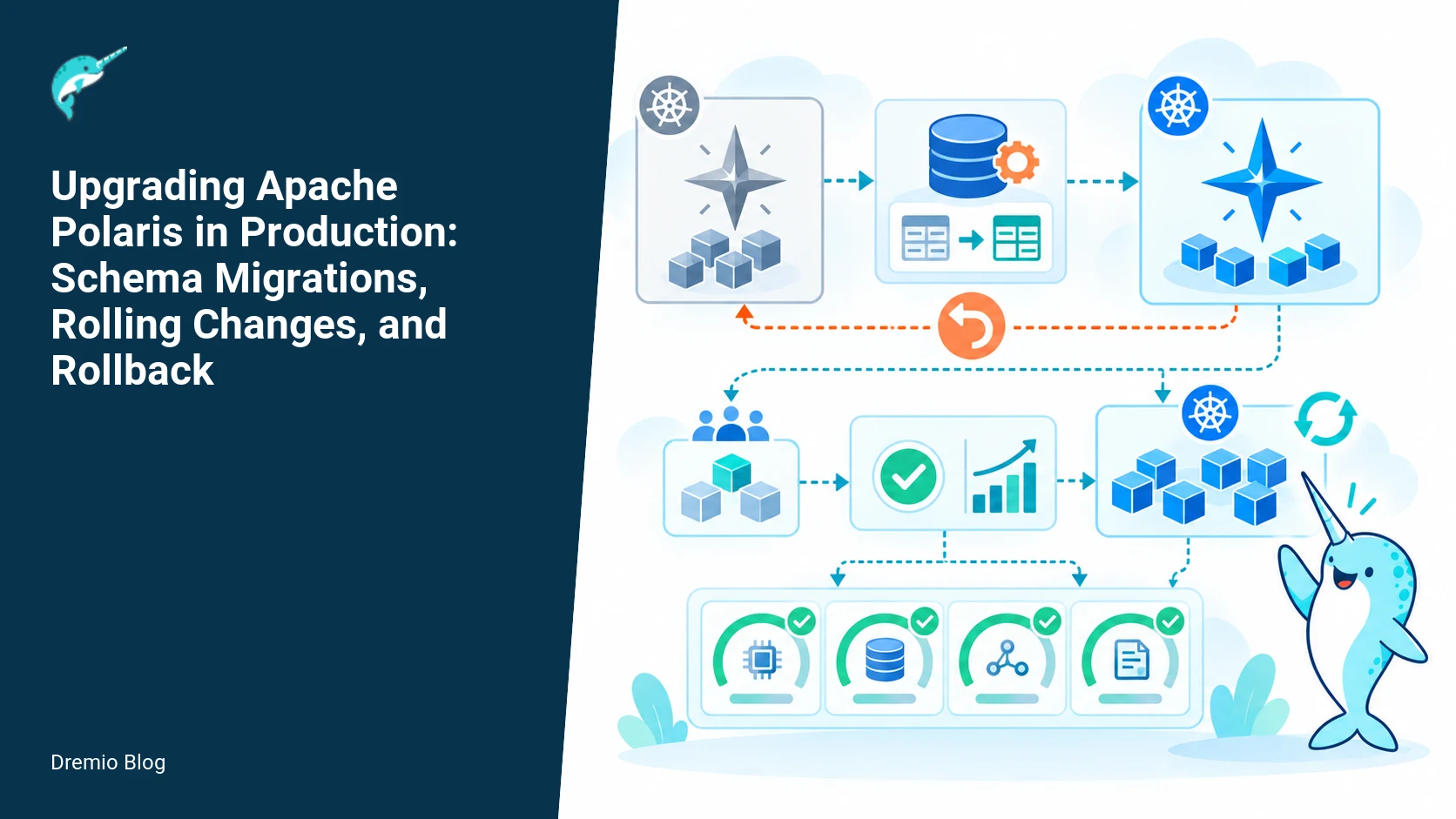
A safe Apache Polaris upgrade treats the application, persistence schema, authentication behavior, and client compatibility as four separate gates. Do the reading, back up the persistence layer, test the exact multi-step upgrade path, apply required schema or index changes in a controlled maintenance window, canary the new version, and prove rollback remains practical before expanding to the whole fleet. This article gives a versioned operations runbook, worked examples, and concrete checks to make staged upgrades repeatable across clusters such as the canary cluster, the regional production cluster, and the recovery cluster.
Why Polaris upgrades need a runbook
Polaris upgrades can touch several independent systems. The control plane code changes, the backing persistence store (for example Postgres), and authorization or token behavior can each change compatibility boundaries. Some of these changes are rolling, others are not. Notably, persistence-type migrations are not rolling upgrades. If a release requires a data format migration, you cannot simply restart nodes one at a time and expect a transparent transition. The wrong assumption about which changes are rolling is the most common operational mistake I have seen.
This runbook is practical. It separates decision points: when to apply schema changes, when to canary, what to test for rollback, and what to measure after deployment. I reference the Polaris project evolution notes and the Helm chart production guidance where appropriate. Where the Polaris docs document behavior, I quote the location and explain what to verify in your environment before you start. Facts that depend on project documentation are checked on October 27, 2026.
High level sequence
Execute upgrades in phases. This list is an operational sequence, not a script. Each phase ends with explicit acceptance criteria that must be met before proceeding.
Read release notes and in-dev evolution entries for the exact path you plan to run. Confirm any schema, index, or token behavior changes. See the Polaris in-development evolution notes and the 1.8.0 release page for token behavior changes documented by the project.
Create a persistence backup snapshot and export (logical and physical if supported by your store). Include WAL or binlog segments needed for point-in-time recovery.
Prepare a pre-upgrade compatibility worksheet for clients and integrations. Include API surface, gRPC and REST, and authentication/token exchange behavior. Polaris 1.8 changed token exchange behavior; verify clients against that change.
Test the full upgrade path in an isolated environment that mirrors production schema sizes and query load. Test both forward and backward transitions when possible.
Run a schema migration plan. If the migration is persistence-type, plan for a maintenance window and an explicit cutover. Schema changes can limit rollback, so record reversible steps and a cutoff point.
Canary the new release with Helm using an explicit values override set, and run a staggered rollout across clusters. Use a small traffic slice and burn-in load tests.
After canary validation, roll the remainder of nodes in waves. Monitor error rates, latencies, and schema-level integrity checks. Keep rollback triggers and a tested rollback procedure available.
Each of these items is expanded below, with concrete examples, commands to run where the upstream docs provide them, and failure modes to watch for.
Dependency mapping: what changes depend on what
Polaris upgrade dependency map. Each stage has a result that can be checked before the next stage begins.
Before you change anything, draw a dependency map for your stack. Polaris application versions depend on schema versions, Helm chart values, and client compatibility. Persistence migrations can require exclusive access. Authentication/token behavior changes can break API clients even when nodes are otherwise healthy. Here is a concise checklist to capture dependencies:
Application binary to schema compatibility, including index availability.
Helm chart values that control database connection pooling, operator behavior, and liveness/readiness probes.
Client versions and SDK behavior, both internal and external. Include job schedulers, UIs, and service-to-service callers.
Map each dependency to clusters. I maintain a simple inventory for each cluster, for example the canary cluster is a single-region fleet, the regional production cluster is multi-az, and the recovery cluster is a DR standby. That classification drives how much downtime I accept for schema migration and whether I coordinate cross-cluster cutover.
Pre-upgrade compatibility worksheet, worked example
Schema migration and application sequence. Each technical risk needs a matching test, boundary, or operating signal.
Start with a worksheet. Below is a worked example you can copy into a spreadsheet. The worksheet makes decisions explicit: can the client remain on the old token flow, must tokens be reissued, or do you need a migration step that updates stored tokens?
Worked example, fields and sample entries:
Cluster: the canary cluster
Current Polaris version: 1.7.2 (example)
Target Polaris version: 1.8.0 (project documents token exchange change on the 1.8.0 download and release notes)
Persistence store: Postgres 13, physical and logical backups available
Schema migration required: yes, add new column and new index plus a background compaction job
Migration type: persistence-type (non-rolling), requires read-only mode during migration
Clients impacted: UI service, ingestion pipeline A, analytics SDK
Auth changes: token exchange behavior altered in 1.8, tokens issued under prior flow may need reissuance or exchange
Rollback risk: schema changes irreversible after compaction step, need pre-migration backup and a reversible pre-commit phase
Use these fields to decide whether you can canary or must perform a full maintenance window. For the canary cluster in this example, the presence of a persistence-type migration forces a short maintenance window even though code changes would otherwise be rolling.
Backing up persistence and preparing migrations
Backups have to be fast, verified, and restore-tested. For Postgres, take a base backup plus WAL segments to enable point-in-time recovery to the exact pre-migration moment. If you use a managed Postgres, export logical dumps in addition to provider snapshots. Save connection strings, superuser credentials, and a restore playbook as part of the runbook.
Decide whether the schema change is rolling or non-rolling. If the migration touches on-disk layout or requires a background compaction that rewrites primary keys, treat it as persistence-type. Persistence-type migrations are not rolling upgrades. That means you must plan a maintenance window, place the cluster into reduced traffic or read-only mode if you can, and run the migration as a coordinated single-step change.
If the project documentation shows a migration script or SQL, validate it in a staging environment with production-sized data. The Polaris in-development evolution notes and the Helm chart production guidance describe migration expectations and recommended operators. Where the docs do not include a script for your exact path, record the SQL you will run and test the reverse path.
Schema migration and application sequence
Rolling compatibility window. The loop turns table or catalog signals into controlled operational changes.
When you have a schema change, you must orchestrate application rolls and SQL changes carefully. Here is a safe sequence that handles rolling-compatible schema changes and non-rolling persistence-type migrations. I list explicit acceptance criteria after each step.
Step 1, prepare code to be backward and forward compatible where possible. If you need new fields, add them nullable, and do not remove old fields until after all clients are on the new version. Acceptance: new release starts against old schema without errors for a burn-in period.
Step 2, deploy new application binary in a canary without applying schema changes if possible. Acceptance: canary handles traffic and returns correct results for the feature matrix.
Step 3, apply non-destructive schema changes, for example adding nullable columns or new indexes that do not block writes. Run these in production outside of major write peaks. Acceptance: no increase in error rate, and new index appears in explain plans where expected.
Step 4, if you must run a data migration that rewrites rows, switch to maintenance or read-only mode, take a final backup, and run the migration. Do not start node upgrades until the migration completes. Acceptance: full data integrity check, queries return expected row counts, and the application test suite passes against the migrated schema.
Step 5, once the database is at the new schema version, roll pods or application instances in waves. Each wave should replace a small percentage of replicas and be observed for a minimum stable period. Acceptance: no sustained errors, no unexplained retries, and latency within accepted bounds.
Remember, schema changes can limit rollback. For example, a migration that drops columns or rewrites primary keys may make the prior application binary incompatible with the database. Identify a cutoff step where rollback is no longer possible and schedule that step inside your maintenance window with senior approval. Record the exact migration statements and the expected duration.
Helm canary values, worked example
When using Helm to deploy Polaris, set explicit canary values in a values file, and keep the defaults immutable in your chart repository. Below is an example canary values file you can adapt. Use this pattern to run a single canary deployment per cluster while leaving other replicas on the old release.
<!--
values-canary.yaml
-->
replicaCount: 1
image:
  tag: "1.8.0"
  pullPolicy: IfNotPresent
service:
  annotations:
    rollout: canary
resources:
  requests:
    cpu: "500m"
    memory: "1Gi"
readinessProbe:
  initialDelaySeconds: 30
  periodSeconds: 10
livenessProbe:
  initialDelaySeconds: 60
  periodSeconds: 20
# enable only the features you are validating
featureFlags:
  newTokenFlow: true
database:
  migration:
    autoApply: false
-->
Notes about this example: set database.migration.autoApply to false if you plan to apply schema changes manually. The Polaris Helm chart production guidance documents chart values and recommended production defaults; use it to confirm which keys control migration and probes before you run a canary. See the Polaris chart production guidance and the 1.8.0 Helm chart release notes to confirm the exact keys available in the chart for your target version.
Canary validation checklist
Smoke tests for basic API and UI flows
Full auth flow test, including token exchange paths that changed in 1.8 where applicable
Representative queries and ingestion jobs executed end-to-end
Performance microbenchmarks against hot endpoints
Schema integrity checks, including counts and checksum comparisons to the baseline
Rolling compatibility window
Rollback decision tree. A reversible canary keeps an unsupported client or unsafe policy from becoming a fleet-wide incident.
Rolling upgrades work only when the older and newer versions are mutually compatible for a time window. Define that window explicitly. For example, if your application can accept both old and new token formats for 48 hours, your compatibility window is 48 hours. After that, you must stop accepting the old format or complete the migration of all clients.
Design the rolling window with three parameters: grace period, canary observation time, and per-wave stabilization time. Reasonable defaults I use: grace period 48 hours for auth and token exchanges when tokens have long TTLs, canary observation 30 to 60 minutes under load, and per-wave stabilization 15 to 30 minutes for stateless nodes. Adjust these when stateful behaviors or background jobs are involved. When Polaris documentation specifically calls out token exchange changes, adjust your grace period down or require token re-issuance for clients that cannot handle the new flow.
Measure compatibility by tracking error counts for authentication endpoints, the fraction of requests that trigger token exchange logic, and the number of clients upgraded. For clusters with external client fleets, instrument a migration progress dashboard to show percent upgraded by client version. That dashboard is a key input to the decision to proceed beyond canary.
Rollback: policy, tests, and decision tree
Rollback is not a single operation. It is a set of decisions you make before you touch the cluster. First, classify the upgrade by rollback risk:
Low risk: rolling code-only changes with no schema or token behavior changes. Rolling rollback is feasible by rolling back pods.
Medium risk: additive schema changes (nullable columns, new indexes) that are reversible, and token behavior optionally configurable. Some data backfills may be needed during rollback.
High risk: persistence-type migrations that rewrite data or drop columns. Schema changes can limit rollback. For these, full database restore is the safe rollback, not an application pod revert.
Prepare an explicit rollback playbook and run it in a staging environment. The playbook should include acceptance tests. Below is a worked example of a rollback acceptance test you can perform before upgrading production. Keep a copy of it in your runbook.
Rollback acceptance test, worked example
1) In staging, deploy the old release and snapshot data.
2) Deploy the new release and apply the exact schema migration steps planned for production.
3) Run a suite of writes and reads that exercise new fields and token flows, capturing sample tokens and response shapes.
4) Execute rollback by deploying the old binaries and running any down-migration SQL you have prepared. If the migration is irreversible, restore the database from the snapshot and bring the old binaries back up.
5) Acceptance criteria: all previously captured queries and samples succeed, client SDKs can authenticate with restored tokens or reissued tokens per your client plan, and no data loss beyond known acceptable window.
Label the point where rollback requires database restore. Make that state visible in your runbook and have stakeholders sign off before you proceed past it in production. Remember that schema changes can limit rollback, and that a restore may take longer than a pod roll and require additional coordination with networking, DNS, or upstream clients.
Rollback decision tree
Use this decision tree during an incident. I include clear triggers that reflect real-world signals operators can see in dashboards.
<!--
Start
  |-- Are there schema changes that rewrote or dropped data? (Yes/No)
      |-- No --> Can we roll pods back? (Yes) --> Rollback pods in waves, monitor for stability.
                 |-- No --> Perform coordinated restart, check Helm chart values.
      |-- Yes --> Do we have verified point-in-time backup? (Yes/No)
                 |-- Yes --> Restore DB snapshot to isolation environment, verify, then promote.
                 |-- No --> Emergency freeze writes, notify stakeholders, prepare for manual reconciliation.
-->
Put this decision tree on the incident response whiteboard and make sure the on-call engineers can access the backups and have credentials required for restore. For clusters that serve as DR or standby such as the recovery cluster, rehearse the restore and promotion steps so you can cut over quickly if needed.
What to measure after deployment
After a successful rollout, measure both correctness and operational impact. Track these metrics continuously for at least two full compatibility windows, as defined earlier.
Error rates on authentication and token exchange endpoints, broken down by client version and token type. This is critical given Polaris 1.8 token exchange changes.
Query latency p50/p95/p99 for representative workloads, compared to baseline.
Job success rate for ingestion and scheduled analytics jobs.
Database replication lag and index build progress, if you ran background migrations.
Number of rollbacks or recovery actions taken and time to recovery for any incidents.
Client adoption percent over time, indicating whether old clients remain in use and whether you are approaching the end of the compatibility window.
Instrument these metrics in your monitoring system with alerts that are meaningful. An alert that fires for a short blip during a rolling pod replacement is noise. Alerts should tie to sustained error rates or violation of SLA thresholds over a defined window.
Practical rollout checklist
Read the specific release notes and evolution entries for each intermediate version on your path. Confirm any schema or token exchange changes. Fact checked on October 27, 2026: see the Polaris in-development evolution notes and the 1.8.0 release page.
Create and verify backups: logical export and physical snapshot, plus WAL/binlog coverage.
Prepare the pre-upgrade compatibility worksheet per cluster, and decide which clusters can be canaried versus scheduled for maintenance. Label the canary cluster, the regional production cluster, and the recovery cluster with their roles.
Run the upgrade path in staging with production-sized data. Include full rollback rehearsal.
Apply safe schema changes in non-blocking order. Schedule persistence-type migrations in a maintenance window. Acknowledge that persistence-type migrations are not rolling upgrades.
Deploy canary with explicit Helm values. Example values file given earlier. Reference Polaris Helm chart production guidance for exact keys for your chart version.
Observe canary and run the validation checklist, including token exchange tests where 1.8 changed behavior.
Roll remaining nodes by waves with stabilization windows. Monitor error rates and DB metrics closely.
Execute post-deploy measurements for at least two compatibility windows and finalize client cutover plans.
Failure modes and mitigations
Failure mode: schema migration stalls or takes longer than expected, blocking pod upgrades. Mitigation: do not start rolling node upgrades until schema migration completes, and keep a warm standby database snapshot to restore if needed.
Failure mode: token exchange behavior causes client authentication failures after canary. Mitigation: rollback canary pods and revert Helm changes, reissue tokens for a small cohort, and use the compatibility dashboard to find affected clients.
Failure mode: index builds create heavy IO and increase latency. Mitigation: schedule index builds during low-load windows or use the database provider features to throttle index creation. Monitor DB replica lag and pause index work if replication lag crosses thresholds.
Failure mode: misconfigured Helm values cause readiness probe failures and pod churn. Mitigation: keep separate values file for canary, validate probes in staging, and set liveness/readiness generous initial delays for first-run migrations.
Links that help operationally
Use the Polaris project pages for the authoritative upgrade and chart details. The in-development evolution notes list planned migrations and behavior changes. The Polaris Helm chart production guide documents recommended values and operator guidance for production deployments. The Polaris 1.8.0 release page includes specific notes about token behavior changes documented by the project. I also keep a short operator guide that explains running Polaris on Kubernetes, which is useful for cluster-specific troubleshooting and connecting Helm chart features to real deployments. The following Dremio resources help:
For hands-on cluster examples and additional architecture context, these Dremio posts are practical: the walkthrough on running Polaris in production with Kubernetes, Helm, and Postgres includes operational tips I used when managing the canary cluster and the regional production cluster. The architecture explainer is useful for mapping component responsibilities. The Polaris primer helps non-operators understand which capabilities are affected by each upgrade step.
What is Apache Polaris , a primer for stakeholders who need conceptual background during planning.
Operational notes and limits
Do not assume every chart key or migration behavior is the same across releases. The Polaris Helm chart evolved between the in-development guidance and the 1.8.0 chart release; consult the chart docs for your exact release. If the supplied Polaris project documentation does not include a ready-made down-migration, you must design and test the reverse SQL path, or accept that rollback requires a database restore. Do not start an upgrade without a tested restore and rollback rehearsal.
When scheduling upgrades across multiple clusters, stagger by role. Upgrade a canary cluster first, then a regional production cluster such as the canary cluster, then a multi-region like the regional production cluster, and leave a DR cluster such as the recovery cluster for final validation. That order preserves recovery options and minimizes blast radius.
Final operational checklist before switching traffic
Confirmed backups and tested restores.
Pre-upgrade worksheet completed and signed off by owners of dependent services.
Canary observation metrics within acceptance thresholds for the configured observation window.
Rollback plan validated in staging with time estimates for each step.
Monitoring and dashboards updated to show client versions, token types, and key DB metrics.
Worked implementation: running the compatibility worksheet against a real cluster
Start this step with the pre-upgrade compatibility worksheet filled from the draft. The goal here is to convert that worksheet into an executable checklist you can run against a staging cluster that mirrors production. Run these commands and checks in order, and mark pass or fail for each. Do not proceed past a failed check until you either fix the issue or accept the increased risk.
Target versions matter. The Polaris project published the 1.8.0 release and Helm chart details in the official release pages and the in-development Helm production guidance. When I describe behavior, verify it against those documented pages for Polaris 1.8.0 and the production chart sources. Facts checked on October 27, 2026.
Use a staging cluster that mirrors these dimensions: same persistence backend type (etcd, PostgreSQL, or MySQL as used in your production), same network topology for tokens, identical ingress behavior, and the same client versions. If you cannot match all of those, explicitly record the mismatch on the worksheet. Missing a persistence match invalidates any migration run planning that assumes non-rolling behavior.
Checklist, commands, and expected outcomes
Below I list concrete checks you can add to the worksheet, with example commands where Polaris documentation provides the resource. Replace placeholders such as STAGING and NAMESPACE before running. Do not invent cluster keys; consult your environment for exact resource names.
Confirm Helm chart and pod image versions, verify chart provenance. Expected outcome, Helm release matches the target chart version documentation. Example check, run kubectl to inspect the image tags and compare to the Polaris 1.8.0 release notes.
Validate persistence compatibility, ensure your DB schema will accept the new migrations. Spin up a copy of your production DB and run the migration in a tombstoned environment. Expect the migration to complete without error and to generate the same DDL statements shown in the migration output. If the DB user lacks permission, the migration will error out. That is a blocker.
Token exchange and session behavior, Polaris 1.8 changed token exchange semantics. Verify how your client sessions acquire and refresh tokens by running a short client workload against the staging cluster, then observing token creation and refresh logs on the Polaris server. Expected outcome, clients that rely on the older exchange flow fail or emit deprecation warnings. If you see authentication failures, record the client version and the exact error message for mitigation planning.
Health and readiness under rolling upgrade, run a rolling pod restart against the staging Helm release using the same canary values you intend to use. Expected outcome, all liveness and readiness probes pass and no client requests get 5xx errors beyond the acceptable threshold you recorded. If readiness probes take longer, increase probe timeouts or reduce canary rate; this is an operational tuning decision to document.
Persistence migration dry run, run the schema migration in a copy of your persistence and capture the migration SQL or statements produced. Expected outcome, review confirms non-destructive statements or documents destructive ones. If the migration drops columns or changes types, this is a migration that prevents simple rollback. Mark the worksheet and add a rollback mitigation plan.
When each item passes, mark it green. If anything fails, add a short remediation action and a timebox for the fix. Do not skip the persistence migration dry run. Persistence-type migrations are not rolling upgrades, and the worksheet must record the exact migration steps and their irreversible effects.
Helm canary values: concrete examples and mutation table
The existing draft has a worked example. Here I add a mutation table that maps a small set of Helm values to observable behavior, and a concrete plan for changing values during canary waves. Use the Polaris Helm chart documented in the official release pages for exact value names. Verify keys against your chart version before applying them.
Label the following as your baseline canary wave values. The names below are illustrative; replace them with the actual keys from the Polaris production chart documentation for 1.8.0.
Pod replica control, reduce control-plane replicas for the canary to minimize blast radius. Observable effect, fewer pods to rotate so faster canary cycles. If readiness fails, scale back up.
Feature gates and flags, selectively enable new behaviors in the canary. Observable effect, you can test specific new code paths without upgrading everything. If the flag enables a persistence migration, do not enable it in a canary that shares production persistence.
Client token issuance mode, Polaris 1.8 changed token exchange behavior. If the chart exposes a setting that influences token lifetimes or exchange mode, set it to the compatible mode for your canary clients. Observable effect, client sessions will either continue to refresh or will fail fast. Record exact client behavior and logs during the wave.
Use a mutation table like the one below in your runbook. Each row is a single, scoped Helm value change. For each change, record the expected impact, the validation command or test, and the rollback action if the canary fails.
Example row: change replica count from 3 to 1 for the control-plane in namespace N. Expected impact, smaller control-plane footprint. Validation, run kubectl get pods and traffic test; look for errors above 1 percent of requests. Rollback action, restore replica count value and helm upgrade to previous release values.
Practical sequencing: apply one Helm value mutation at a time. Wait for the canary validation checklist item that maps to that mutation to complete before the next Helm change. This isolates failures so you know which value caused the regression. If a mutation must touch persistence behavior, treat it as a migration and move to a non-rolling, maintenance-window plan.
Rollback acceptance test: a runnable scenario and injection plan
The draft has a rollback acceptance test. Expand that into a reproducible scenario you can run on staging to validate your rollback playbook including Helm and persistence paths. This test proves your rollback decision tree and acceptance criteria are actionable.
Setup and preconditions
Start with a live staging release that mirrors the production Helm values and persistence copy. Use two release tags so you can roll forward and then roll back with Helm. Label them vOLD and vNEW. Ensure you have a snapshot of the persistence taken immediately before the vNEW migration if persistence changes are involved. If you cannot snapshot the exact production storage engine the same way, record that limitation; it changes rollback feasibility.
Fault injection plan
Inject these faults one at a time and run the acceptance checks after each. Each step is intended to exercise a different branch of the rollback decision tree.
Control-plane pod crash, kill a pod during a canary wave. Expectation, readiness probes cause a replacement and the canary should still pass. If the canary fails due to missing pods, the rollback test must trigger the Helm rollback to vOLD and verify client traffic recovers within the acceptance timeout.
Authentication failure, configure a client to use the older token-exchange flow when the new chart is set to the 1.8 behavior. Expected result, observe authentication errors for that client class. Rollback acceptance checks, ensure that after Helm rollback to vOLD, the auth errors stop for the injected client within your timeout window.
Persistence-induced state mismatch, apply a migration that renames or drops a column in the persistence copy, then attempt an application rollback to vOLD. Expected result, the rollback should either be blocked by the runbook or proceed with documented data loss. The acceptance criteria require that your automated rollback playbook detect the incompatible schema and abort the rollback, leaving the operators with clear remediation steps and a log of the irreversible changes.
Acceptance checks and automation hooks
Automate these checks in your CI/CD pipeline so they are quick to run before a production push. For each rollback scenario, the acceptance test must include:
Validation of application traffic recovery within a set timeout, with the metric and threshold recorded.
Confirmation that client authentication flows return to expected behavior after rollback, for every client class recorded in the worksheet.
Verification that no hidden persistent metadata prevents rollback, for example missing columns that vOLD expects. If such mismatches exist, the test should fail loudly and require manual acknowledgement before any automated rollback proceeds.
When a rollback acceptance test fails, record the exact failure with logs, timestamps, and the Helm commands used. That information shortens live incident debug time. The rollback test must prove that your documented Helm rollback commands, combined with persistence snapshots when applicable, return the system to a known good state or halt with a clear remediation plan.
What to measure during canary waves: detailed operational metrics and alert thresholds
Beyond the general metrics in the draft, here are concrete signals to collect, how to calculate them, and operational thresholds to use as part of the canary acceptance criteria. Record baseline values on the pre-upgrade worksheet so you can compare.
Request success rate, measure the percent of successful requests in 1 minute windows. Threshold, fail the canary if success rate drops more than 2 percentage points from baseline for 3 consecutive windows. Tooling, use your APM or request logs aggregated by timestamped counts.
Tail latency, track the 95th and 99th percentile latencies. Threshold, fail the canary if P95 increases more than 25 percent or P99 increases by an absolute 200 milliseconds compared to baseline for two successive windows. Rationale, small increases happen during restarts, larger durable increases suggest a correctness or resource problem.
Authentication failure rate, count 401 and 403 responses per minute. Threshold, if failures increase by 50 percent over baseline and do not decline within two minutes, mark the canary as failed. This is especially relevant given Polaris 1.8 token exchange behavior changes.
Control-plane restarts, track restart counts per pod per 10 minutes. Threshold, if any pod restarts more than 2 times in 10 minutes, pause the upgrade. Frequent restarts indicate a misconfiguration or probe mismatch.
Persistence DDL execution time and errors, if you are running migrations, measure the time each DDL takes and capture SQL error rates. Threshold, abort if any DDL statement fails or if total migration time exceeds your maintenance window. Remember, persistence-type migrations are not rolling upgrades and the window must be reserved.
Set alerts for each threshold. Make them distinct from generic CPU or memory alerts so operators know a canary failure is due to the upgrade, not unrelated infrastructure noise. For every triggered alert, capture the dump of the pre-upgrade worksheet entry that corresponds to the metric, so the team has immediate context.
Failure injection test matrix and decision table
Do these tests in staging before attempting production, and record results back into the worksheet. The goal is to exercise each branch of your rollback decision tree with precise actions and acceptance criteria. Below is a concise decision table you can paste into your runbook.
Failure: client auth errors after upgrade. Action, immediately reduce incoming canary traffic and run the rollback acceptance test for authentication. If rollback acceptance test passes, perform Helm rollback to vOLD. If it fails due to schema mismatch, escalate to a manual rollback and invoke the persistence mitigation plan.
Failure: persistent migration error mid-apply. Action, stop other migration steps, do not attempt a rolling rollback. If you have a pre-shot snapshot, restore that snapshot in a maintenance window and reapply migrations with the corrected DDL. If no snapshot exists, document the irreversible changes and follow the data recovery plan. Persistence-type migrations are not rolling upgrades; treat this as a data incident.
Failure: control-plane instability, such as repeated restarts or crash loops. Action, reduce canary replicas to zero for the new release and rollback Helm. Validate metrics after rollback for stability. If instability is caused by probe timing, adjust probes and rerun the canary on staging before reattempting production.
Failure: degraded latency but no errors. Action, pause canary growth and run traffic routing that isolates the new nodes. Compare heap, CPU, and syscall profiles between vOLD and vNEW. If resource exhaustion is the cause, scale resources or tune GC and rerun canary. If not resolvable within your timebox, rollback Helm.
Each table row should contain the exact Helm commands you will run, the persistence snapshot location, the people to notify, and the maximum allowed time for each step. These details convert theory into a playbook you can follow under incident pressure.
Finally, update your pre-upgrade worksheet, Helm canary values, and rollback acceptance test documents after every rehearsal. That is how the runbook stays accurate and how you avoid discovering a token exchange behavioral mismatch, a missing DB privilege, or an irreversible schema change during a live upgrade.
FAQ
Q1: Are persistence migrations always non-rolling?
Not always, but treat them as non-rolling until proven otherwise. If the migration rewrites on-disk formats, primary keys, or requires exclusive table locks, you cannot rely on pod-by-pod restarts. Verify the exact SQL and test it against production-sized data.
Q2: How does Polaris 1.8 token exchange behavior affect rolling upgrades?
Polaris 1.8 changed token exchange behavior as documented on the 1.8.0 release page. That can shorten the compatibility window or require token reissuance for some clients. Test authentication flows end-to-end in canary and verify how long old tokens remain valid.
Q3: Can I automate rollbacks with Helm?
You can automate pod rollbacks for code-only regressions. Helm rollbacks revert release metadata and can trigger pod restarts. They do not revert irreversible database migrations. For migrations that altered data, your rollback is a database restore plus redeploying the old chart values.
Q4: What is the right canary size?
Keep canary size small enough to limit blast radius, but large enough to surface relevant behavior under load. For control-plane services I typically run one replica for functional canaries and 5 to 10 percent of traffic for load validation. Use the Helm canary values example earlier to pin replicaCount and resource requests.
Q5: How long should I observe the canary?
Observe for at least the length of your longest usual failure mode. Practical defaults: 30 to 60 minutes for API correctness, and 48 hours for auth/token compatibility when tokens are long lived. Extend the window if background jobs or long-running queries might expose issues.
Q6: Which Dremio resources help with Polaris upgrades?
Start with the Dremio walkthrough on running Polaris in production for hands-on operational tips and backup guidance. Use the architecture explainer to map components, and the primer to educate stakeholders about which services will be affected during the upgrade.
Related Dremio guides
These guides cover adjacent implementation details that are outside this article's main scope.
Intro to Dremio, Nessie, and Apache Iceberg on Your Laptop
Editor’s note, September 2026. This post was published in September 2023 and some product details have changed since. Nessie is still available and self-deployable under the Apache-2.0 licence, and it remains the clearest implementation of catalog-level branching. It is not an Apache Software Foundation project, and its development has slowed considerably. For how the current […]
Oct 12, 2026·Dremio Blog: Open Data Insights
Apache Iceberg Table Statistics: NDV, Puffin and Query Plans
Iceberg keeps per-file bounds automatically but table-level NDV statistics only when you compute them. Why that decides join order, and how to keep them fresh.
Aug 16, 2023·Dremio Blog: News Highlights
5 Use Cases for the Dremio Lakehouse
With its capabilities in on-prem to cloud migration, data warehouse offload, data virtualization, upgrading data lakes and lakehouses, and building customer-facing analytics applications, Dremio provides the tools and functionalities to streamline operations and unlock the full potential of data assets.