This article has been revised and updated from its original version published in 2022 to reflect the latest Apache Iceberg developments.
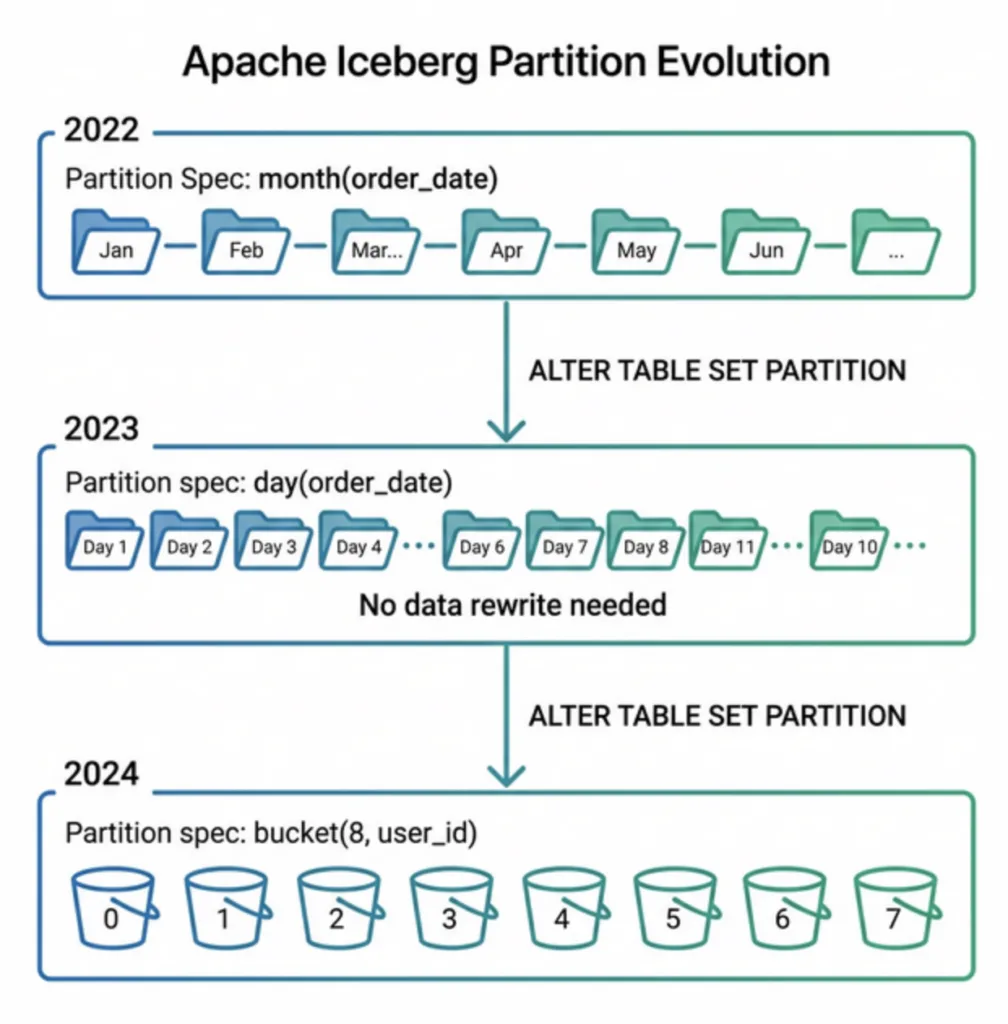
Partition evolution is one of Apache Iceberg's most valuable features for production data teams. It lets you change how a table is partitioned, from monthly to daily granularity, from one column to multiple columns, or from no partition to a fully partitioned layout, without rewriting a single data file.
In traditional data lakes built on Hive, changing the partition scheme requires a full table rewrite: reading every file, re-organizing the data into new directory structures, and overwriting the entire dataset. On a petabyte table, this costs thousands of dollars in compute, takes hours or days, and requires coordinating a maintenance window where no reads or writes can occur.
Iceberg eliminates this operational burden entirely. For a comprehensive introduction to how partitions work in Iceberg, see Hidden Partitioning.
The Problem: Partition Lock-In
Partitioning decisions have massive downstream impact on query performance, compute costs, and operational complexity. The wrong partition strategy can cause full table scans that waste hours of compute on every query. Yet choosing the right strategy upfront is nearly impossible, data volumes, query patterns, and business requirements all change over time. What worked for 10GB of data doesn't work for 10TB. What worked for batch analytics doesn't work when you add real-time dashboards. For official documentation, refer to the Iceberg partition evolution spec.
When you create a Hive table with PARTITIONED BY (year, month), that decision is permanent. As your data grows, you may need finer-grained partitions (daily or hourly) for better query performance. Or your query patterns may change, requiring partitioning by a completely different column.
Try Dremio’s Interactive Demo
Explore this interactive demo and see how Dremio's Intelligent Lakehouse enables Agentic AI
The directory name IS the partition. Changing the partition scheme means creating new directories and moving every file. It's a full data migration disguised as a schema change.
Real-World Consequences
Organizations frequently make partition decisions early in a project that become expensive to change later:
Startup to scale-up: Initially partitioned by month, but 10x traffic growth makes monthly partitions too large
Query pattern shift: Originally partitioned by date, but new analytics require region-first access
Multi-tenant growth: Started unpartitioned, now need tenant-based partitioning for isolation
Regulatory change: New compliance requirements demand partitioning by data classification
Each of these changes requires a full table rewrite in Hive, but not in Iceberg.
How Partition Evolution Works in Iceberg
Iceberg separates the partition specification from the physical data layout. Each data file records which partition spec was active when it was written. When you change the partition spec, only new writes use the new spec, existing data files keep their original partition values.
The table metadata stores all historical partition specs. Each manifest entry records which spec-id was used for its data file. The query planner evaluates the query predicate against ALL relevant specs during read path pruning.
Evolving the Partition Spec
-- Original: monthly partitions
CREATE TABLE orders (
    order_id BIGINT,
    order_date TIMESTAMP,
    amount DECIMAL(10,2),
    region STRING
) PARTITIONED BY (month(order_date));

-- After traffic grows: switch to daily partitions
ALTER TABLE orders SET PARTITION SPEC (day(order_date));

-- Even later: add region as a second partition dimension
ALTER TABLE orders SET PARTITION SPEC (day(order_date), identity(region));
Each ALTER TABLE is a metadata-only operation. No data files are read, written, or moved.
What Happens to Queries
After evolving from month(order_date) to day(order_date):
SELECT * FROM orders WHERE order_date = '2024-06-15';
The planner:
For old data (spec-id 0): evaluates month('2024-06-15') = 2024-06 against monthly partition summaries
For new data (spec-id 1): evaluates day('2024-06-15') = 2024-06-15 against daily partition summaries
Both evaluations use hidden partitioning, the user's query is identical regardless of the underlying spec
The query works correctly and efficiently across both partition specs. Over time, as old monthly data is compacted or overwritten, all data moves to the new spec.
Compared to Other Table Formats
Capability
Iceberg
Delta Lake
Hudi
Change partition scheme without rewrite
Yes
No (requires OPTIMIZE/Liquid Clustering)
No
Multiple active partition specs
Yes
No
No
Old data keeps old partition layout
Yes
N/A
N/A
Metadata-only partition change
Yes
No
No
Delta Lake introduced Liquid Clustering as an alternative to traditional partitioning, but it replaces the partitioning paradigm entirely rather than supporting evolution. See the full format comparison for details.
Common Partition Evolution Patterns
Pattern 1: Unpartitioned → Partitioned
The safest starting point for new tables is no partitioning. Once you understand query patterns, add partitions:
-- Start unpartitioned
CREATE TABLE events (event_id BIGINT, event_ts TIMESTAMP, payload STRING);

-- After understanding access patterns: add month partition
ALTER TABLE events SET PARTITION SPEC (month(event_ts));
Pattern 2: Coarse → Fine Granularity
As data volume grows, increase partition granularity:
ALTER TABLE events SET PARTITION SPEC (day(event_ts));
-- Then later, if needed:
ALTER TABLE events SET PARTITION SPEC (hour(event_ts));
Pattern 3: Single → Multi-Column Partitioning
Add a second partition dimension for common multi-column filters:
ALTER TABLE orders SET PARTITION SPEC (day(order_date), bucket(16, customer_id));
Pattern 4: Complete Partition Overhaul
Change the primary partition column entirely:
-- Was: date-based partitioning
-- Now: region-based partitioning (query pattern changed)
ALTER TABLE orders SET PARTITION SPEC (identity(region), month(order_date));
Best Practices for Partition Evolution
Start Simple, Evolve as Needed
Don't over-engineer your initial partition strategy. Start with month(timestamp) or even unpartitioned, measure query patterns, and evolve based on real data.
Monitor Partition Sizes
After evolution, monitor file sizes per partition. Evolving to too-fine partitions (minute-level) creates many small files that need compaction.
Compact After Evolution
After changing the partition spec, run sorted compaction on old data to migrate it to the new spec and tighten column statistics:
Dremio's Reflections maintain their own partition specs. You can evolve the source table's partitions independently of Reflection definitions, giving you flexibility to optimize both the source and the accelerated views.
Combine with Sort Order Changes
Partition evolution often goes hand-in-hand with sort order changes. When you refine partitions, also consider adding or changing the sort order to match new query patterns:
ALTER TABLE orders WRITE ORDERED BY (order_date ASC, region ASC);
Impact on Time Travel and Rollback
Partition evolution interacts cleanly with other Iceberg features:
Time travel: Historical snapshots work correctly regardless of partition changes, each snapshot records which spec was active
Rollback: Rolling back to a snapshot with a different spec restores that spec as current
COW and MOR: Both write modes respect the current partition spec
Real-World Scenario
A financial services company has a transactions table partitioned by month(transaction_date). After two years, the table has grown to 50TB with 500 million rows per month. Dashboard queries filtering by date now scan too much data per partition.
Without partition evolution: The team must plan a multi-day maintenance window to repartition by day(transaction_date). During the rewrite, no queries or writes can access the table. Total cost: ~$5,000 in compute plus 48 hours of table unavailability.
With partition evolution:
ALTER TABLE transactions SET PARTITION SPEC (day(transaction_date), identity(region));
Execution time: ~1 second. Zero downtime. New data immediately uses daily partitions. Old monthly data is gradually migrated through scheduled compaction.
Engine Support for Partition Evolution
Engine
Partition Evolution
Multiple Active Specs
Hidden Partition Pruning
Dremio
Full (ALTER TABLE)
Yes
Automatic
Apache Spark
Full (ALTER TABLE)
Yes
Automatic
Trino
Full
Yes
Automatic
Apache Flink
Read support
Yes
Automatic
DuckDB
Read support
Yes
Automatic
All major engines support reading tables with multiple partition specs. Write support (evolving specs) is available in Spark, Dremio, and Trino.
Sort Order Evolution
Partition evolution pairs naturally with sort order evolution, which Iceberg also supports as a metadata-only operation:
-- Change the sort order without rewriting data
ALTER TABLE orders WRITE ORDERED BY (customer_id ASC, order_date DESC);
Like partition evolution, sort order changes affect only new writes. Existing data keeps its original sort order. Over time, as data is compacted or replaced, all data conforms to the new sort order.
Combining partition evolution with sort order evolution gives you complete control over data layout without ever needing a maintenance window or full rewrite.
Migrating from Hive Tables to Iceberg
Organizations with existing Hive tables can migrate to Iceberg and then immediately use partition evolution. The migration itself preserves the original Hive partition scheme, and you can evolve it afterward:
-- Step 1: Migrate the Hive table to Iceberg (preserves existing partitions)
CALL catalog.system.snapshot('hive_db.orders', 'iceberg_db.orders');

-- Step 2: Evolve partitions to a better scheme
ALTER TABLE iceberg_db.orders SET PARTITION SPEC (day(order_date), bucket(16, customer_id));
This two-step process gives you the benefits of Iceberg's partition evolution without the massive rewrite that Hive would require.
Frequently Asked Questions
Can I remove partitions entirely?
Yes. You can evolve to an unpartitioned spec:
ALTER TABLE orders SET PARTITION SPEC ();
New writes will be unpartitioned. Old partitioned data remains accessible and correctly pruned.
Do old queries break after partition evolution?
No. Queries work identically before and after evolution. The planner automatically evaluates queries against all relevant partition specs, users don't need to change any SQL.
How does partition evolution affect storage costs?
Partition evolution itself has zero storage cost, it's a metadata-only change. However, if you compact old data to the new partition spec, you temporarily double storage until old snapshots are expired.
Can I evolve partitions while writes are happening?
Yes. Partition evolution is an atomic metadata change that doesn't conflict with concurrent reads or writes. In-progress writes complete against the old spec; new writes use the new spec.
How does partition evolution interact with Dremio Reflections?
Reflections maintain independent partition specs. When the source table evolves, Reflections continue using their existing spec. You can independently evolve the source and Reflection partition strategies to optimize different access patterns.
What about the table format comparison for partitioning?
For a comprehensive comparison of how Iceberg, Delta Lake, and Hudi handle partitioning differently, see the table format partitioning comparison.
When should I evolve my partition scheme?
Monitor query scan statistics and file sizes to decide when partition evolution is needed. Key indicators include queries consistently scanning more files than expected (check with Dremio query profiles), partition directories containing small files under 32 MB indicating over-partitioning, business access patterns shifting to different filter columns, or significant data volume growth making current partitioning too coarse. The power of Iceberg partition evolution is that changes only affect new files. Old files continue using the old scheme and the engine reconciles both transparently during queries. Combined with hidden partitioning, users never need to reference partitions explicitly, making evolution completely transparent to downstream consumers and BI tools.
How does Iceberg handle queries that span both old and new partition schemes?
When you evolve a partition scheme, Iceberg stores the partition specification version with each data file in the metadata. During query planning, the engine evaluates partition filters against each file's partition spec. Files written under the old scheme are filtered using old partition boundaries, while files written under the new scheme use the new boundaries. This transparent reconciliation is why Iceberg partition evolution requires no data rewriting and imposes no query performance penalty on historical data.
One of the biggest headaches with data lake tables is dealing with the need to change the table’s architecture. Too often, when your partitioning needs to change the only choice you have is to rewrite the entire table and at scale that can be pretty expensive. The alternative is to just live with the existing partitioning scheme and all the issues caused by it.
Fortunately, if you build your data lakehouse based on Apache Iceberg tables, you can avoid these unnecessary and expensive rewrites with Iceberg’s partition evolution feature.
How Does It Work?
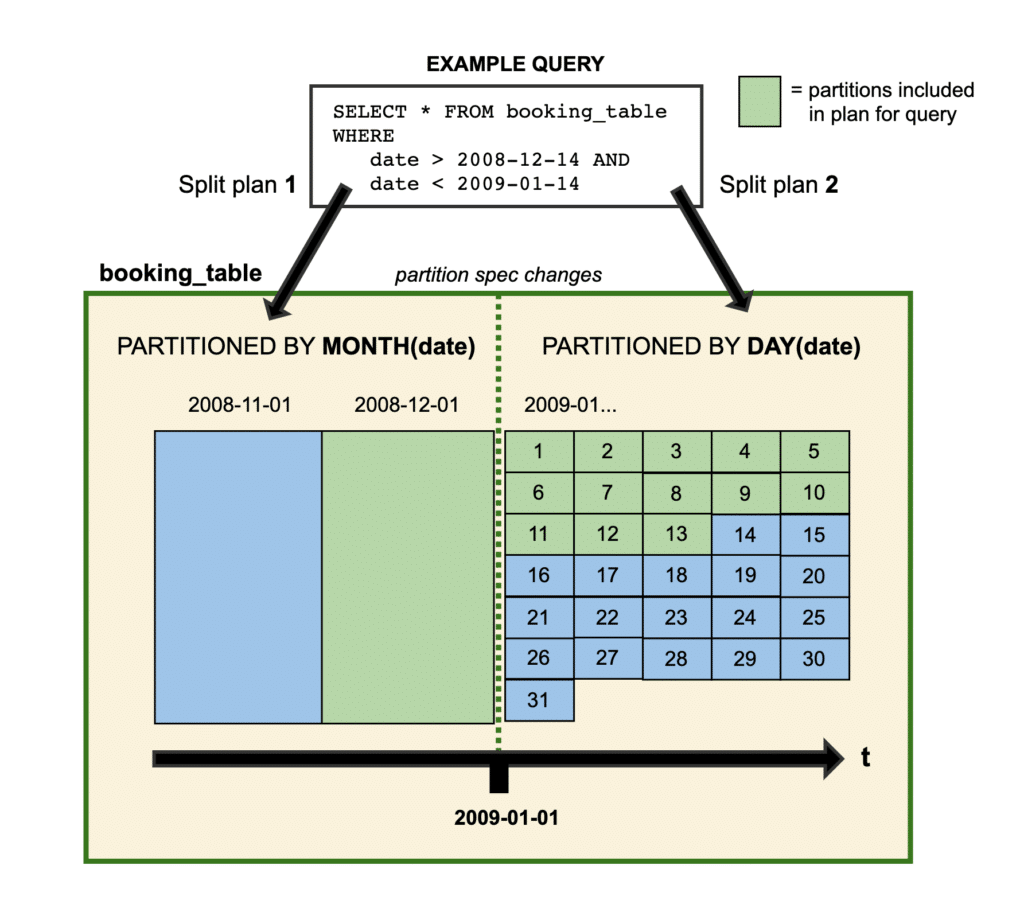
Usually, you can only define a table's partitioning scheme at its creation, but with Iceberg you can change the definition of how the table is partitioned at any time. The new partition specification applies to all new data written to the table while all prior data still has the previous partition specification.
Updating a partition spec is purely a metadata operation since prior data isn’t rewritten, making it very quick, easy, and inexpensive. When a query is planned the engine will split up the work and create a different plan for the data that applies to each partition spec. Since you can break up the planning of the query, there is no need to rewrite all the older data, making incremental changes to your table's architecture easy and inexpensive. Note that you can always rewrite the older data using the rewriteDataFiles procedure for compaction and sorting purposes anytime you want.
How to Update the Partition Scheme
To easily update the partition scheme in your Iceberg table you can use SQL to make all the changes you’d like.
You can add a partition field as easily as this ALTER TABLE statement:
ALTER TABLE catalog.db.table ADD PARTITION FIELD color
You can also take advantage of Apache Iceberg’s partition transforms when altering the partition spec:
-- Partition subsequently written data by id into 8 buckets
ALTER TABLE catalog.db.table ADD PARTITION FIELD bucket(8, id)
-- Partition subsequently written data by the field letter of last_name
ALTER TABLE catalog.db.table ADD PARTITION FIELD truncate(last_name, 1)
-- Partition subsequently written data by year of a timestamp field
ALTER TABLE catalog.db.table ADD PARTITION FIELD year(timestamp_field)
Just as easily, you can drop a field that you’ve been partitioning and not partition it going forward:
-- Stop partitioning the table by year of a timestamp field
ALTER TABLE catalog.db.table DROP PARTITION FIELD year(timestamp_field)
You can also use Iceberg’s Java API to update the partitioning:
Apache Iceberg is the only data lakehouse table format with the ability to incrementally update your partitioning specification, and the ability to use SQL to make the updates easy and accessible. Data lakehouses need to be open, flexible, and easy to use to support your ever-evolving data needs, and Apache Iceberg, with its evolution features and intuitive SQL syntax, provides the backbone to make your data lakehouse productive.
Try Dremio Cloud free for 30 days
Deploy agentic analytics directly on Apache Iceberg data with no pipelines and no added overhead.
Ingesting Data Into Apache Iceberg Tables with Dremio: A Unified Path to Iceberg
By unifying data from diverse sources, simplifying data operations, and providing powerful tools for data management, Dremio stands out as a comprehensive solution for modern data needs. Whether you are a data engineer, business analyst, or data scientist, harnessing the combined power of Dremio and Apache Iceberg will undoubtedly be a valuable asset in your data management toolkit.
Sep 22, 2023·Dremio Blog: Open Data Insights
Intro to Dremio, Nessie, and Apache Iceberg on Your Laptop
We're always looking for ways to better handle and save money on our data. That's why the "data lakehouse" is becoming so popular. It offers a mix of the flexibility of data lakes and the ease of use and performance of data warehouses. The goal? Make data handling easier and cheaper. So, how do we […]
Oct 12, 2023·Product Insights from the Dremio Blog
Table-Driven Access Policies Using Subqueries
This blog helps you learn about table-driven access policies in Dremio Cloud and Dremio Software v24.1+.