Dremio can automatically take advantage of partitioning on parquet data sets (or derivatives such as Iceberg or Delta Lake). By understanding the dataset’s partitioning, Dremio can perform partition pruning, the process of excluding irrelevant partitions of data during the query optimisation phase, to boost query performance. (See Data Partition Pruning). Partition bucketing provides a technique for query optimisation against data whose cardinality might not be considered suitable.
Try Dremio’s Interactive Demo
Explore this interactive demo and see how Dremio's Intelligent Lakehouse enables Agentic AI
Example of Classical Partitioning
A dataset is partitioned by “columnA” and our query accesses that dataset by filtering on that same column; Dremio will “prune” (or ignore) the unmatched partitions. This ability to prune means that the queries will run faster because Dremio is reading and scanning less data in order to satisfy the query.
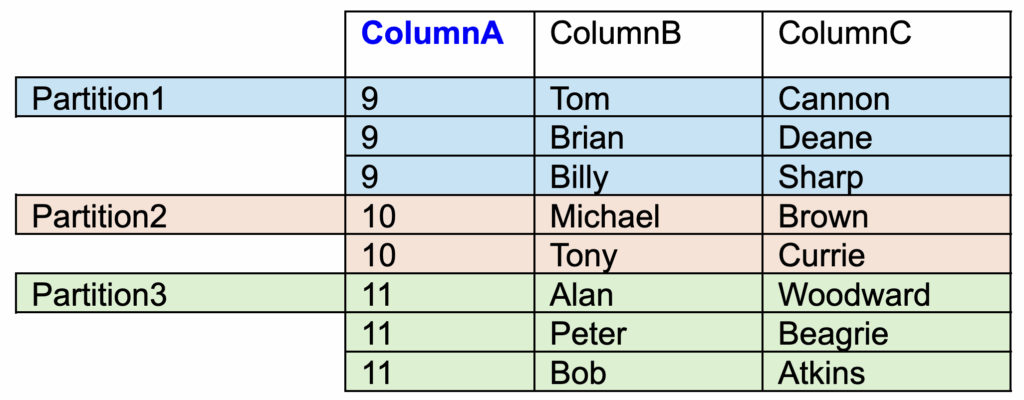
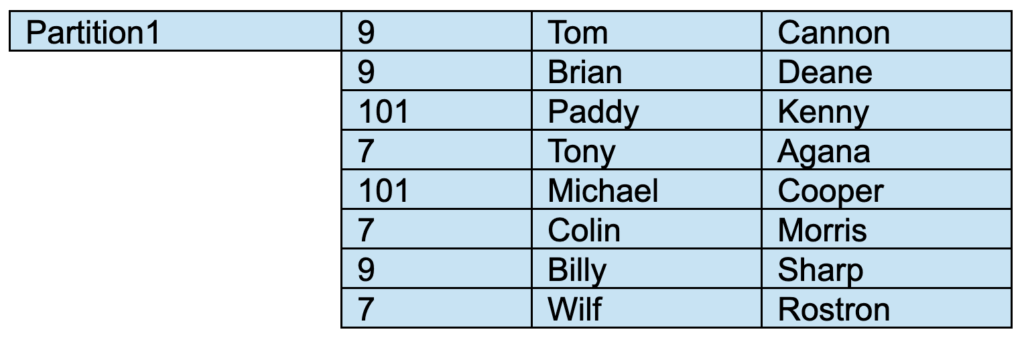
Table 1: “DatasetX” which is partitioned on “ColumnA”
In the above example table all of the same ColumnA values will be stored in the same partition. A partition will be made for each distinct value and contain all entries for that value,
e.g.
Partition 1 will contain all rows in which ColumnA = 9.
Partition 1 will not contain rows for any other ColumnA value.
If we ran this query
SELECT * from “DatasetX” where “ColumnA” = 9;
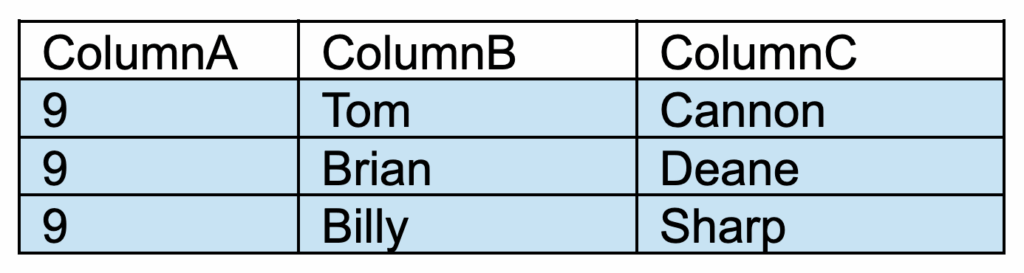
Because the table is partitioned on ColumnA, Dremio will recognise that it has to read just Partition1. All of the other partitions will be pruned, and do not have to be read.
Our query will return 3 rows.
When Can Pruning Be Used?
Partition pruning can be utilised when querying both a regular Iceberg partitioned table and also when using Dremio Reflections (see “Simplifying Your Partition Strategies with Dremio Reflections and Apache Iceberg”). Reflections are stored in Iceberg table format, in Parquet files. A partition definition can also be included in the Reflection definition; a feature that we will use later in this blog post.
Example of Partition Bucketing
A high-cardinality column (one with many unique values) can present a challenge for partitioning. This can result in lots of small partitions, leading to issues in maintenance and overall table performance. When the full table does need to be scanned, it will take much longer to open lots of small partitions, compared to opening fewer larger partitions (see “Optimizing The Performance of Iceberg Tables”).
In our earlier example, we only had 3 distinct values for “ColumnA” (9, 10 and 11) and we had 1 partition for each distinct value.
Let’s consider instead that we have thousands of distinct values. If we partitioned on ColumnA, then we would have thousands of partitions. In this situation, we can consider an alternative; instead of having just a single set of distinct ColumnA entries in each partition, we can “bucket” several sets of distinct values into the same partition. This method is called Partition Bucketing.
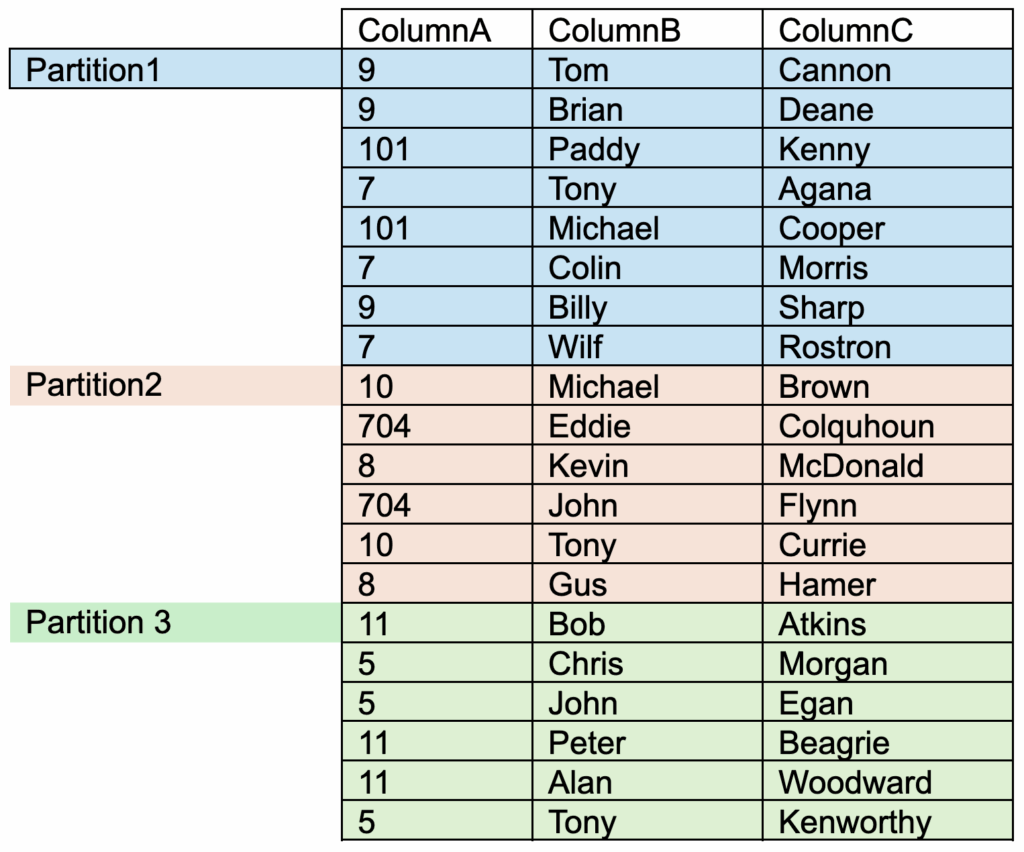
Table2: “DatasetY” which is partition-bucketed on “ColumnA”
All of the same ColumnA values will be stored in the same partition. However, a single partition will now contain entries for multiple values.
eg
Partition 1 will still contain all rows in which ColumnA = 9.
Partition 1 will also contain rows for certain other ColumnA values (in this case, 101 and 7).
So if we ran the query
SELECT * from “DatasetY” where “ColumnA” = 9;
then Dremio will understand that any records for value “9” will only exist in Partition1.
It will scan all of the rows only in Partition1, and then filter those rows to match the query condition. It will return 3 rows.
This query is still performing partition-pruning, with an additional filter operation also being performed.
Practical Example of Partition Bucketing
Now let’s get hands-on with a practical example of partition bucketing. I will list the steps and code so you can follow along and try it out for yourself.
Let’s use the Dremio-provided TPCDS Samples data source
We’ll use the web_returns dataset:
Contains 71,997,522 rows.
Its full path name is Samples."samples.dremio.com".tpcds_sf1000.web_returns
Query Without Reflection
Run our test query
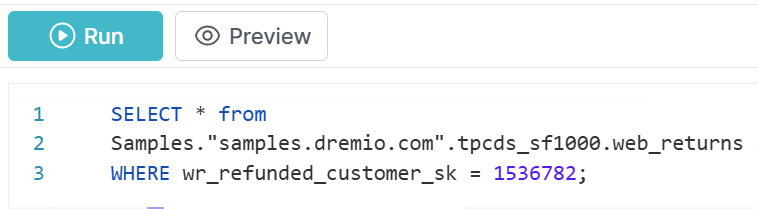
Examine the column wr_refunded_customer_sk. This is the column we would like to filter against. Run this query:
SELECT * FROM
Samples."samples.dremio.com".tpcds_sf1000.web_returns
WHERE wr_refunded_customer_sk = 1536782;
During my own test, this query took 30 seconds to complete in my small test environment.
Examine the non-Reflection query profile
After the query has completed, find the Job in your Jobs page:
Note that the query has not been accelerated with a Reflection (i.e. the Job has not been flagged with the purple lightning-bolt icon .)
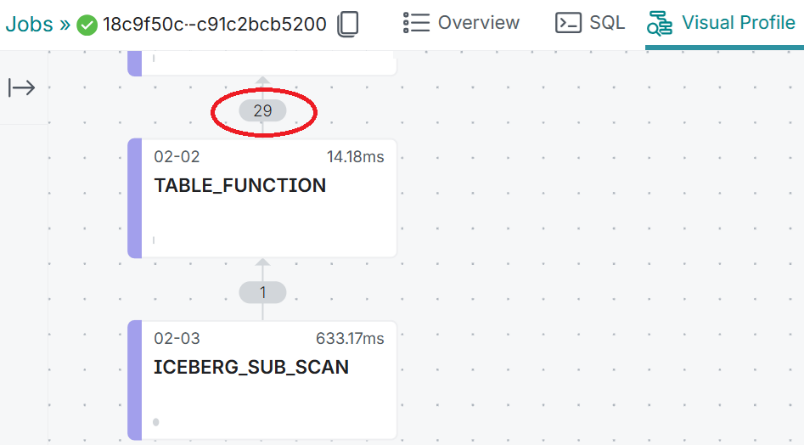
Click on the Job ID and then click on the Visual Profile tab to examine the contents:
Reading the plan top down:
Here we can see that Dremio will scan all 29 data files (where the actual data resides).
Later in the plan, we see where the 29 data files were scanned and filtered, in the TABLE_FUNCTION operator.
Build Reflection with Partition Buckets
Partition idea
Since we’re filtering on column wr_refunded_customer_sk, then in order to improve the performance of our query, we’d ideally like to partition our dataset also on the column wr_refunded_customer_sk.
Drawback to partitioning on this high-cardinality column
There are 11,964,763 distinct values of wr_refunded_customer_sk; this is far too many for a sensible partition scheme.
Solution? Use a bucketed partition
Instead of partitioning on each distinct wr_refunded_customer_sk value, we will create a reflection in which we will partition into 1000 buckets. This will mean that all the same values will be stored together in the same partition bucket, but that there will be partition buckets which contain more than one wr_refunded_customer_sk value.
Reflection Definition
We could define our reflection using the Dremio UI to create a Reflection, but for clarity, here’s the SQL which will define the reflection, with the partition logic highlighted in bold:
ALTER DATASET "Samples"."samples.dremio.com"."tpcds_sf1000"."web_returns" CREATE RAW REFLECTION "Flower_Bucketed_Reflection" USING
DISPLAY ("wr_returned_date_sk","wr_returned_time_sk","wr_item_sk","wr_refunded_customer_sk","wr_refunded_cdemo_sk","wr_refunded_hdemo_sk","wr_refunded_addr_sk","wr_returning_customer_sk","wr_returning_cdemo_sk","wr_returning_hdemo_sk","wr_returning_addr_sk","wr_web_page_sk","wr_reason_sk","wr_order_number","wr_return_quantity","wr_return_amt","wr_return_tax","wr_return_amt_inc_tax","wr_fee","wr_return_ship_cost","wr_refunded_cash","wr_reversed_charge","wr_account_credit","wr_net_loss")
PARTITION BY (BUCKET(1000,"wr_refunded_customer_sk"));
Check that the Reflection has built
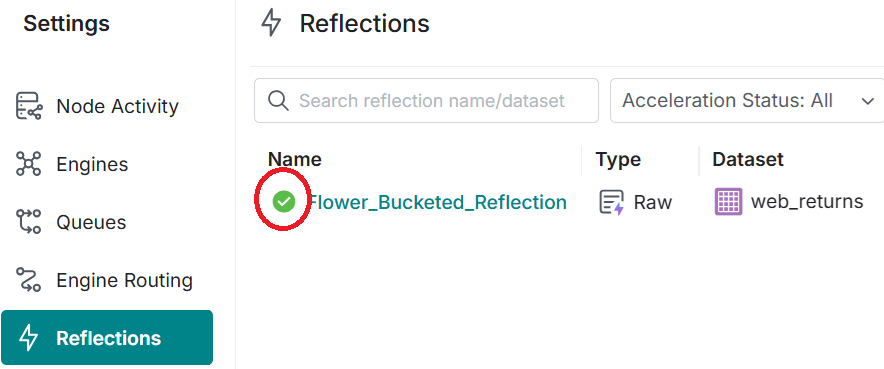
Check that the Reflection has completed by monitoring the Settings - Reflections page.
The "loading" icon indicates that the reflection is still building.
The green tick icon indicates that the Reflection has been built successfully.
Query with Reflection
Rerun the test query
After the raw reflection has been built, let’s rerun the same query:
SELECT * FROM
Samples."samples.dremio.com".tpcds_sf1000.web_returns
WHERE wr_refunded_customer_sk = 1536782;
You will notice that this query runs much faster. In my test it took 2 seconds (compared to 30 seconds previously).
Examine the Reflection query profile
After the query has completed, find the Job in your Jobs page: After the query has completed, find the Job in your Jobs page:
Note that the query has been accelerated with a Reflection; the Job has been flagged with the purple lightning-bolt icon .
Click on the Job ID and then click on the Visual Profile tab:
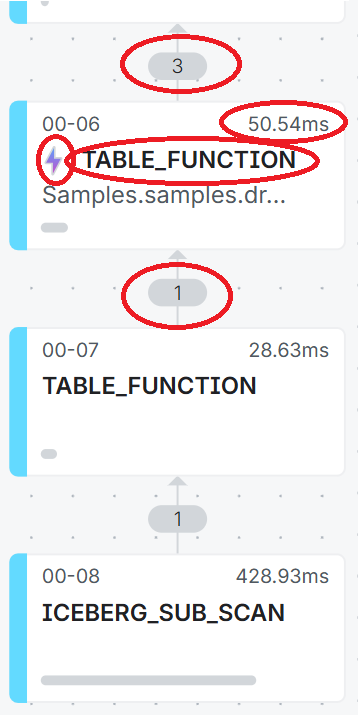
Reading the plan from the bottom-up.
Here we see that we are only scanning 1 data file (compared to 29 data files when we didn’t use a partitioned scan). This data file is being read by the top-most TABLE_FUNCTION operator.
The TABLE_FUNCTION operator then scans the 1 data file in the Reflection ,. The operation takes only 50.54 ms to scan the data file and to output 3 rows of data.
Conclusion
Partition Bucketing proves to be a powerful optimisation technique for significantly improving query performance on high-cardinality columns in Dremio. This practical demonstration has highlighted several key points:
Demonstrated Benefits
Dramatic reduction in query execution time, dropping from 30 seconds to 2 seconds in our use-case and test environment.
Significant decrease in the number of data files scanned (from 29 to 1 file).
Enhanced partition-pruning process through bucketing.
Maintenance. There are fewer partitions to maintain, compared to a normal partitioned dataset.
Technical Aspects
Using 1000 buckets for a column containing nearly 12 million distinct values demonstrates an excellent compromise between granularity and performance.
Implementation of partitions through Dremio's Reflections enables simple and effective deployment.
Performance monitoring via Visual Profile confirms the effectiveness of the bucketing strategy.
Recommendations
Favour this approach for high-cardinality columns frequently used in WHERE clauses.
Adjust the number of buckets based on data volume and column cardinality.
Monitor reflection performance to ensure continuous optimisation.
This solution represents an excellent example of performance optimisation for modern data architectures, particularly suited to large-scale analytical environments.
Try Dremio Cloud free for 30 days
Deploy agentic analytics directly on Apache Iceberg data with no pipelines and no added overhead.
Ingesting Data Into Apache Iceberg Tables with Dremio: A Unified Path to Iceberg
By unifying data from diverse sources, simplifying data operations, and providing powerful tools for data management, Dremio stands out as a comprehensive solution for modern data needs. Whether you are a data engineer, business analyst, or data scientist, harnessing the combined power of Dremio and Apache Iceberg will undoubtedly be a valuable asset in your data management toolkit.
Sep 22, 2023·Dremio Blog: Open Data Insights
Intro to Dremio, Nessie, and Apache Iceberg on Your Laptop
We're always looking for ways to better handle and save money on our data. That's why the "data lakehouse" is becoming so popular. It offers a mix of the flexibility of data lakes and the ease of use and performance of data warehouses. The goal? Make data handling easier and cheaper. So, how do we […]
Oct 12, 2023·Product Insights from the Dremio Blog
Table-Driven Access Policies Using Subqueries
This blog helps you learn about table-driven access policies in Dremio Cloud and Dremio Software v24.1+.