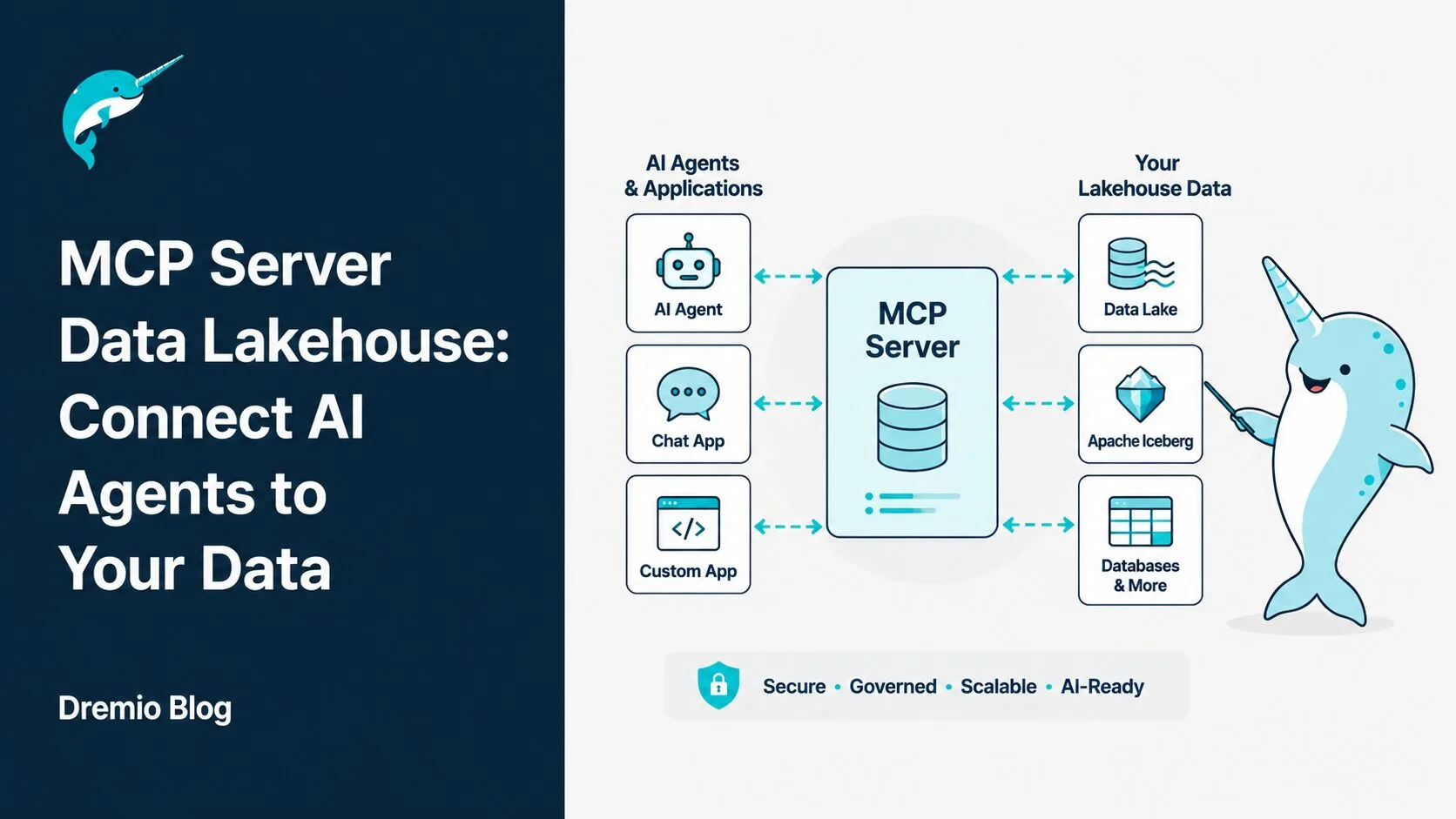
Every AI agent that touches enterprise data without a standard protocol needs its own custom integration code: bespoke authentication, hand-rolled schema discovery, one-off SQL generation tuned to a specific database. Multiply that by a dozen agents and half a dozen data sources, and you have an integration backlog that grows faster than your team can ship.
The Model Context Protocol (MCP) changes this equation. An MCP server data lakehouse setup gives any compliant AI client a single, governed, structured gateway to your data. You configure it once. Every agent that follows the spec connects automatically. This tutorial walks you through exactly how to do that using Dremio's open-source MCP Server, with working examples for both Claude Desktop and a custom Python agent.
What Is MCP and Why Does It Matter for Data Engineers
The Model Context Protocol is an open standard originally introduced by Anthropic and now governed by the Linux Foundation's Agentic AI Foundation. It defines a common interface through which AI applications connect to external tools, data sources, and services.
The simplest analogy: MCP is USB-C for AI. Before USB-C, every device had its own proprietary connector. USB-C gave manufacturers and consumers one universal port. Before MCP, every AI tool needed a custom integration with every data source. MCP gives you one protocol that any AI client can use to talk to any MCP server.
For more conceptual background, the Dremio MCP Beginner's Guide covers how the protocol works from first principles.
The N×M Integration Problem
Without a standard protocol, your integration complexity scales badly. If you have 5 AI tools and 6 data sources, you potentially need 30 custom connectors. Each one has different error handling, different authentication, different schema discovery logic.
With MCP, the math collapses. Build one MCP server for each data source (6 servers). Build one MCP client into each AI tool (5 clients). Any client can talk to any server. Total complexity: 11 components instead of 30, and each component is reusable.
The Three-Tier MCP Architecture
MCP has three distinct roles:
MCP Hosts are the AI applications that want to access data or tools. Examples include Claude Desktop, custom Python agents, IDE plugins like Cursor and Zed, and any OpenAI-compatible client that implements MCP. The host contains the LLM that decides when and how to use external capabilities.
MCP Clients are the protocol connectors embedded inside the host. The client handles the connection lifecycle: establishing the session, serializing requests, deserializing responses, and managing errors. As a developer, you typically use an SDK (like the MCP Python SDK) that handles the client for you.
MCP Servers are the services that expose capabilities. The Dremio MCP Server, for example, runs as a subprocess or network service and exposes Dremio's SQL query engine to any connected client. Servers expose three types of capabilities:
Resources: Readable data artifacts with a URI address (schema definitions, table metadata, documentation). Read-only.
Tools: Callable functions the LLM can invoke (execute_sql, list_tables, get_schema). These are the primary mechanism for agents to take actions.
Prompts: Pre-built templated messages or workflows (e.g., "Profile this table and return summary statistics").
MCP supports two transport modes. Stdio (standard input/output) runs the server as a local subprocess and is simple to set up for local development and tools like Claude Desktop. HTTP/SSE (Server-Sent Events) runs the server as a network service and is the right choice for production deployments where multiple agents connect concurrently.
Why an MCP Server Data Lakehouse Is the Right Architecture
A data lakehouse is where your organization keeps its most valuable analytical data: sales transactions, customer behavior, financial metrics, operational telemetry. When AI agents need to answer business questions, this is the data they need.
The problem with connecting agents directly to a lakehouse is access control and consistency. Each agent would need its own authentication mechanism, its own schema documentation, its own enforcement of data policies. Multiply that across a team of developers building different agents and you end up with inconsistent access patterns, policy gaps, and no centralized audit trail.
An MCP server sits between the agents and the lakehouse and solves all three problems simultaneously. It provides a single authentication point (OAuth or token-based), consistent schema documentation through the semantic layer, and enforces all access policies at the query engine level before any data leaves the system.
Apache Iceberg tables in the lakehouse are a natural fit here. Iceberg's table format carries rich metadata: schema history, partition specifications, snapshot information, and column statistics. An MCP server can surface this metadata as Resources, giving agents the context they need to generate accurate queries without hallucinating column names or table structures.
One server. Any agent that speaks MCP can connect. Add new agents without changing the lakehouse or the server.
Dremio's MCP Server: What It Exposes
Dremio ships an open-source MCP Server as an npm package (@dremio/mcp-server). Once running, it exposes the following tools to any connected MCP client:
Tool
Description
execute_sql
Runs a SQL query and returns results as structured JSON
list_tables
Lists available tables and virtual datasets in a schema
get_schema
Returns column definitions, types, and descriptions for a table
list_catalogs
Shows available catalogs (Nessie, Hive, Arctic, etc.)
list_schemas
Lists schemas within a catalog
These tools are backed by Dremio's AI Semantic Layer, which means agents interact with governed virtual datasets rather than raw tables. Instead of seeing datalake.raw.events_v3_2023_final, the agent sees analytics.app.quarterly_revenue with documented columns, pre-built metric definitions, and access controls already applied.
Authentication works through a Personal Access Token (PAT) or an OAuth token passed in the environment. When a query arrives, Dremio maps the token to a role and applies all FGAC (Fine-Grained Access Control) policies automatically. The agent cannot see or query data outside what its role allows. Under the hood, Dremio uses Arrow Flight for high-performance columnar data transfer, so large result sets move efficiently from the query engine to the agent.
Dremio's full Agentic Lakehouse platform is built around this pattern: MCP as the agentic interface layer on top of a governed, high-performance lakehouse.
Step-by-Step: Connect Claude Desktop to Dremio via MCP
This walkthrough connects Claude Desktop to a Dremio Cloud instance. The result: Claude can query your lakehouse data directly in a conversation, using natural language, with full governance enforced.
Prerequisites
You need:
A Dremio Cloud account or a self-managed Dremio Software instance
A Personal Access Token from Dremio (Settings → Personal Access Tokens → New Token)
Node.js 18 or later installed on your machine
Claude Desktop (macOS or Windows)
Configure Claude Desktop's MCP Settings
Claude Desktop reads its MCP server configuration from a JSON file. On macOS, the file lives at:
The npx -y command downloads and runs @dremio/mcp-server without a separate install step. Claude Desktop manages the subprocess lifecycle automatically: it starts the server when you open a conversation and stops it when you close Claude.
Save the file and restart Claude Desktop.
Ask Your First Data Question
Open a new Claude conversation. Type a question like:
"What are the top 5 regions by net revenue this quarter?"
Claude does not answer from memory. It recognizes that this is a data question and activates its MCP client. Here is what happens in sequence:
Claude calls list_tables to discover what data is available in your Dremio instance.
Claude calls get_schema on the relevant table to understand column names and types.
Claude constructs a SQL query based on the schema and your question.
Claude calls execute_sql with that query.
Dremio executes the query against your lakehouse, applies FGAC policies, and returns results.
Claude formats the results and presents them in the conversation.
The entire chain is transparent. Claude shows you the tool calls it made, the SQL it generated, and the results. You can ask follow-up questions and Claude will continue using the same MCP connection.
Step-by-Step: Connect a Custom Python Agent to Dremio via MCP
Claude Desktop works well for conversational analytics. For programmatic use cases (automated reports, data pipelines triggered by agents, multi-agent orchestration), you need to connect a custom Python agent to the Dremio MCP Server.
Install the MCP Python SDK
Install the mcp package from PyPI:
pip install mcp
You also need Node.js installed because the Dremio MCP Server runs as a Node.js subprocess. The Python SDK's stdio transport launches it automatically.
Write the Agent Code
The following example connects to the Dremio MCP Server, discovers available tools, and executes a SQL query:
import asyncio
from mcp import ClientSession, StdioServerParameters
from mcp.client.stdio import stdio_client

server_params = StdioServerParameters(
    command="npx",
    args=["-y", "@dremio/mcp-server"],
    env={
        "DREMIO_ENDPOINT": "https://your-instance.dremio.cloud",
        "DREMIO_TOKEN": "your-token"
    }
)

async def query_lakehouse(question: str):
    async with stdio_client(server_params) as (read, write):
        async with ClientSession(read, write) as session:
            await session.initialize()

            # List available tools
            tools = await session.list_tools()
            print(f"Available tools: {[t.name for t in tools.tools]}")

            # Execute SQL via MCP tool
            result = await session.call_tool(
                "execute_sql",
                arguments={
                    "sql": "SELECT region, SUM(net_revenue) as revenue FROM analytics.app.quarterly_revenue GROUP BY region ORDER BY revenue DESC"
                }
            )
            return result

asyncio.run(query_lakehouse("What is revenue by region this quarter?"))
Walk through the key components:
StdioServerParameters describes how to launch the MCP server subprocess. It specifies the command (npx), arguments (-y @dremio/mcp-server), and environment variables (your Dremio endpoint and token).
stdio_client is an async context manager that spawns the subprocess and creates bidirectional read/write streams over its stdin/stdout.
ClientSession wraps those streams and manages the MCP protocol lifecycle: framing messages, handling concurrency, tracking request IDs.
session.initialize() performs the MCP handshake. The client sends its capabilities; the server responds with its capabilities (tools, resources, prompts). After this, the session is ready.
session.list_tools() asks the server what tools are available. For the Dremio MCP Server, this returns execute_sql, list_tables, get_schema, list_catalogs, and list_schemas.
session.call_tool() invokes a specific tool with named arguments and returns the result. For execute_sql, the result contains the query results as structured JSON.
Running the Agent and Extending It
Running asyncio.run(query_lakehouse(...)) starts the subprocess, performs the MCP handshake, runs the query, and returns results. The subprocess shuts down cleanly when the async context managers exit.
To extend this into a full AI agent, add an LLM reasoning loop. The agent calls list_tables and get_schema at startup to build context about the available data, then uses an LLM to convert user questions into SQL queries, executes them via call_tool("execute_sql", ...), and feeds results back to the LLM for interpretation and response generation.
Governance: What Happens to Every Agent Query
Governance is where MCP on top of Dremio becomes genuinely useful for enterprise deployments. You do not have to build a separate access control layer for your AI agents. Dremio handles it entirely.
Authentication and Role Mapping
The DREMIO_TOKEN in your MCP server configuration is a Dremio Personal Access Token or OAuth token. When the MCP server receives a tool call like execute_sql, it uses this token to authenticate with Dremio before executing anything.
Dremio maps the token to a Dremio role (for example, marketing_analyst, finance_reader, or data_admin). That role determines which catalogs, schemas, and tables are visible. If the role cannot see a table, list_tables will not include it. The agent does not know the table exists.
Row-Level Security and Column Masking in Action
Consider a table analytics.app.customer_data. The marketing_analyst role has the following policies applied:
Row filter: Only rows where region IN ('US', 'Canada') are returned
Column masking: The email column returns ****@****.*** for this role
When an agent with the marketing_analyst token calls execute_sql with SELECT * FROM analytics.app.customer_data, Dremio applies both policies inside the query engine before returning results. The agent receives only the rows it is authorized to see, and the email column is masked.
These policies execute at the query engine level, not in the MCP layer. The agent has no way to bypass them. There is no MCP tool that exposes unfiltered data. There is no side channel.
Audit Trail
Every execute_sql call creates a job entry in Dremio's job history. The job record includes: the SQL query, the token (and therefore the user or service account), the timestamp, rows returned, and execution time. Your data governance team can query this history, set up alerts for unusual patterns, and demonstrate compliance during audits.
The Semantic Layer Advantage for AI Agents
Without a semantic layer, an AI agent connecting to a raw lakehouse sees table names like datalake.raw.events_v3_2023_final, column names like ev_ts_utc and usr_id_hsh, and no documentation. The agent has to guess what these mean. Guessing leads to wrong SQL. Wrong SQL leads to wrong answers.
Dremio's AI Semantic Layer changes what the agent sees. Virtual datasets expose clean, documented interfaces:
analytics.app.quarterly_revenue instead of datalake.raw.fact_order_lines_v2
Column net_revenue with description: "Total order value after refunds, discounts, and returns. Pre-aggregated to order grain."
Column region with description: "Sales region. Values: US, Canada, EMEA, APAC."
When the agent calls get_schema on this virtual dataset, it reads these descriptions. Now it knows that net_revenue already excludes refunds (no double-counting), that region has specific valid values (no hallucinated filters), and what grain the data is at.
The result is dramatically fewer hallucinated queries. An agent that knows net_revenue is already a clean metric does not try to reconstruct the metric from raw order lines. An agent that knows the valid values for region does not filter on 'North America' when the column only contains 'US' and 'Canada'.
MCP Resources can surface the semantic layer documentation directly into the agent's context window at session start, giving it a structured understanding of the available data before it writes a single line of SQL.
Building Multi-Agent Architectures with Dremio MCP
Single-agent analytics covers a lot of ground, but the most powerful pattern is multi-agent orchestration where specialized agents handle different data domains.
The orchestrator receives a high-level question: "Why did our Q2 profit margin drop despite revenue growth?" It breaks this into sub-questions, dispatches the Finance Agent to retrieve revenue and cost data, and the Operations Agent to check fulfillment costs. Each sub-agent makes its own MCP connection using its own Dremio token. Each inherits its own FGAC policies automatically.
From the orchestrator's perspective, the sub-agents are just tools. It calls them with inputs and receives structured outputs, exactly like calling execute_sql on the MCP server. MCP makes this composable at every level of the hierarchy.
This pattern maps directly to the Agentic Analytics vision where autonomous agents handle the full analytics pipeline: question decomposition, data retrieval, synthesis, and presentation. MCP is the interface layer that makes governed, role-aware composition possible.
Dremio's Agentic Lakehouse platform is designed around exactly this architecture: a governed lakehouse exposed through MCP, with a semantic layer that gives agents consistent, documented access to the right data.
Production Considerations and Tradeoffs
stdio vs HTTP/SSE Transport
The choice of transport affects how you deploy and scale the MCP server.
Dimension
stdio
HTTP/SSE
Setup complexity
Minimal
Moderate
Concurrent clients
One subprocess per client
Single server, many clients
Network deployment
No (local only)
Yes
Streaming results
No
Yes
Best for
Local dev, Claude Desktop
Production, multiple agents
For Claude Desktop and local Python agent development, stdio is the right choice. The host manages the subprocess and cleanup happens automatically. For production deployments where multiple agents (or many instances of the same agent) connect concurrently, deploy the Dremio MCP Server in HTTP/SSE mode behind an API gateway. This reduces subprocess overhead and allows the server to handle multiple concurrent sessions.
Security Best Practices
Never hardcode your Dremio PAT in source code or configuration files committed to version control. Use secrets management: environment variables injected at runtime, a secrets manager like HashiCorp Vault or AWS Secrets Manager, or Kubernetes secrets. Rotate tokens on a regular schedule.
For production deployments, prefer short-lived OAuth tokens over long-lived PATs. Configure the Dremio role associated with each agent to have the minimum necessary permissions. An agent that only reads marketing data should not have a role that can access financial data, even if it will not query it.
Server Lifecycle Management
Claude Desktop manages the MCP server subprocess automatically. In custom Python agents using stdio transport, the subprocess lifecycle is managed by the stdio_client context manager. When the async with block exits (normally or due to an exception), the subprocess terminates cleanly.
For production Python agents, wrap your MCP calls in proper exception handling:
try:
    async with stdio_client(server_params) as (read, write):
        async with ClientSession(read, write) as session:
            await session.initialize()
            result = await session.call_tool("execute_sql", arguments={"sql": query})
            return result
except Exception as e:
    # Log the error, trigger retry logic, or escalate
    raise
For truly production-grade deployments, containerize the MCP server in HTTP/SSE mode, expose it through a reverse proxy with rate limiting, and connect your agents over HTTPS. This gives you full observability and the ability to scale the server independently from your agent fleet.
What Comes Next for MCP and Data Lakehouses
The MCP ecosystem is moving quickly. OpenAI has announced MCP support, which means Claude Desktop is no longer the only major host. As more AI clients adopt the spec, an MCP server data lakehouse becomes more valuable: you build the server once and it serves an expanding universe of clients.
Within Dremio, the MCP Server is one piece of a larger agentic infrastructure. Autonomous Reflections automatically optimizes query performance based on actual query patterns, which means agent queries that run repeatedly get faster over time without any manual tuning. C3 (Columnar Cloud Cache) keeps frequently accessed data warm, so agent queries against popular datasets return in milliseconds rather than seconds.
The next frontier is agents that do not just read data but write back to it: annotating records with AI-generated classifications, triggering pipeline refreshes based on query results, updating semantic layer documentation based on agent usage patterns. MCP's Tools capability is broad enough to support these write-back patterns as Dremio expands the server's tool set.
If you are building AI agents that need access to enterprise analytical data, the MCP pattern with Dremio gives you a production path that is governed, auditable, and extensible. Start with Claude Desktop to validate your data access and semantic layer quality. Move to custom Python agents for automation. Build toward multi-agent orchestration as your use cases mature.
The integration backlog that grows faster than your team can ship? MCP cuts it down to one server per data source. Start with Dremio.
For a deeper treatment of the topics in this post, download Apache Iceberg: The Definitive Guide by Tomer Shiran, Jason Hughes, and Alex Merced, free from Dremio.
Intro to Dremio, Nessie, and Apache Iceberg on Your Laptop
Editor’s note, September 2026. This post was published in September 2023 and some product details have changed since. Nessie is still available and self-deployable under the Apache-2.0 licence, and it remains the clearest implementation of catalog-level branching. It is not an Apache Software Foundation project, and its development has slowed considerably. For how the current […]
Aug 16, 2023·Dremio Blog: News Highlights
5 Use Cases for the Dremio Lakehouse
With its capabilities in on-prem to cloud migration, data warehouse offload, data virtualization, upgrading data lakes and lakehouses, and building customer-facing analytics applications, Dremio provides the tools and functionalities to streamline operations and unlock the full potential of data assets.
Sep 30, 2026·Dremio Blog: Open Data Insights
Apache Iceberg 1.12.0: What’s New, Breaking Changes, and Upgrade Guide
Apache Iceberg 1.12.0 expands v3 engine support, REST catalog operations, streaming reliability, and v4 groundwork. Learn how to upgrade safely.