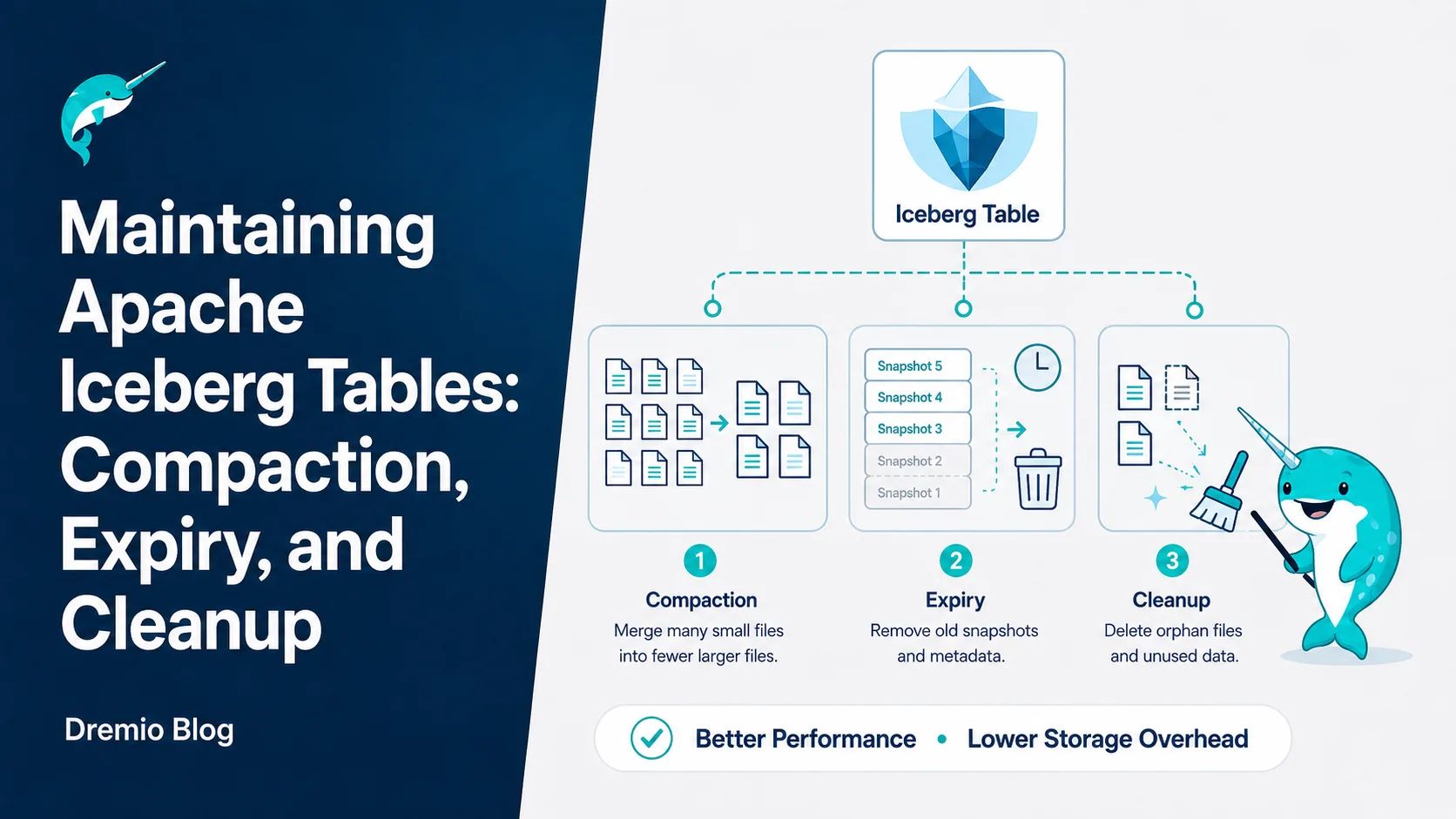
This is Part 10 of a 15-part Apache Iceberg Masterclass. Part 9 covered how tables degrade. This article covers the four maintenance operations that keep Iceberg tables healthy and the three approaches to running them.
Compaction reads small files, merges them into optimally-sized files (128-512 MB), and optionally re-sorts the data. It is the most impactful maintenance operation because it directly addresses the small file problem and restores sort order effectiveness.
OPTIMIZE TABLE analytics.orders REWRITE DATA USING BIN_PACK
Compaction with sorting rewrites files so that column values are ordered, tightening the min/max statistics and making file skipping far more effective:
OPTIMIZE TABLE analytics.orders REWRITE DATA USING SORT (order_date, customer_id)
2. Snapshot Expiry
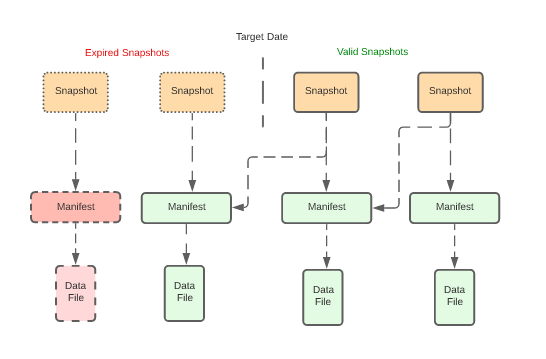
Snapshot expiry removes old snapshots from the metadata. After expiry, the snapshot and its exclusive data files are eligible for cleanup. You typically retain snapshots for a window (e.g., 7 days) to support time travel, then expire everything older.
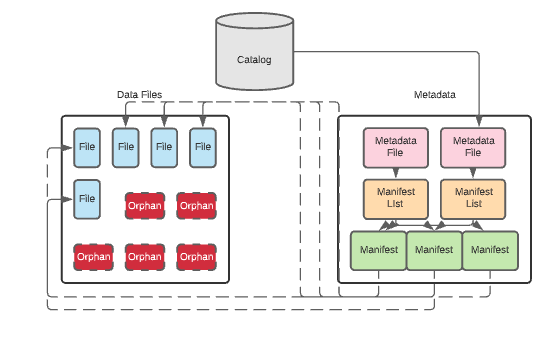
After snapshots are expired, the data files they exclusively referenced become orphans. Orphan cleanup scans the storage directory, compares files against the current metadata, and deletes files that are not referenced by any snapshot.
This operation should run after snapshot expiry and with a safety delay (e.g., files older than 3 days) to avoid deleting files from in-progress writes.
Running orphan cleanup too aggressively can delete files from long-running write operations. A 3-day safety window ensures that any write operation has had time to complete before its files are considered orphans.
4. Manifest Rewriting
Over many commits, manifests accumulate. A single snapshot's manifest list might reference hundreds of small manifests from individual commits. Manifest rewriting consolidates them into fewer, larger manifests.
This speeds up scan planning because the engine reads fewer manifest files. Each manifest file requires a separate I/O operation to read, so reducing the count from 500 to 20 eliminates 480 I/O round trips during query planning.
Metadata File Retention
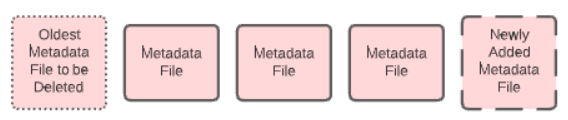
Every commit writes a new metadata file, and Iceberg tracks all of them by default. On a table taking streaming writes these accumulate quickly. Two table properties control how many are kept.
Setting write.metadata.delete-after-commit.enabled to true deletes the oldest tracked metadata file after each commit, keeping at most write.metadata.previous-versions-max of them. Deletion is off by default, so a long-lived table with frequent commits keeps every metadata file it has ever written until you turn this on.
Sort-Order Compaction
Standard compaction (BIN_PACK) merges small files without changing the data order. Sort-order compaction rewrites files with data sorted by specified columns, which tightens the min/max statistics and makes file skipping more effective:
Sort-order compaction is more expensive than BIN_PACK because it reads, sorts, and rewrites all data. However, the performance improvement for queries that filter on the sorted columns is substantial: file skipping can eliminate 90%+ of data files when the sort columns match common query filters.
Data Retention Policies
Decide how long to keep historical data accessible through time travel:
Retention Need
Recommended Snapshot Retention
Debugging recent issues
7 days
Monthly reporting compliance
30 days
Regulatory audit requirements
90+ days
Storage cost optimization
3-5 days
Longer retention means more snapshots, more metadata, and more storage consumed by old data files. Shorter retention reduces costs but limits time travel capabilities.
Three Approaches to Maintenance
Manual (Scheduled Jobs)
Run maintenance operations on a schedule using Spark, Trino, or Dremio. A typical pattern:
Run compaction daily for heavily-written tables
Expire snapshots older than 7 days
Remove orphan files older than 3 days
Rewrite manifests monthly
Pros: Full control over timing and configuration. Cons: Requires operational effort; forgotten or broken jobs lead to degradation.
Semi-Automated (Scheduled with Monitoring)
Build a monitoring layer that checks table health metrics (Part 9 diagnostics) and triggers maintenance only when thresholds are exceeded (e.g., average file size drops below 64 MB).
Fully Automated
Use a platform that handles maintenance autonomously. Dremio's automatic table optimization runs compaction, expiry, and cleanup for tables managed by Open Catalog without any user configuration. AWS S3 Tables provides built-in compaction.
Approach
Effort
Risk
Best For
Manual
High
High (can forget)
Full control needs
Semi-Automated
Medium
Medium
Custom thresholds
Fully Automated
None
Low
Most production tables
Recommended Maintenance Schedule
Operation
Frequency
Recommendation
Compaction
Daily (heavy tables), weekly (light)
Trigger when avg file size < 64 MB
Snapshot expiry
Daily
Retain 7-30 days for time travel
Orphan cleanup
Weekly
Safety delay of 3+ days
Manifest rewrite
Monthly
When manifest count > 500
For most teams, starting with Dremio's autonomous optimization and only adding manual jobs for tables with unusual requirements is the most practical approach.
Common Maintenance Pitfalls
Running compaction during peak query hours: Compaction reads and rewrites data files, which competes with analytical queries for I/O bandwidth. Schedule compaction during off-peak hours, or use a separate compute cluster (Spark on EMR) that does not share resources with your query engine.
Expiring snapshots too aggressively: If you expire snapshots while a long-running query is using one of them, the query can fail because the data files it needs might be cleaned up. Always keep snapshots for at least as long as your longest-running query.
Forgetting orphan cleanup: Many teams run compaction and snapshot expiry but forget orphan cleanup. Without it, compacted and expired data files accumulate indefinitely. Set up orphan cleanup as a weekly job with a 3-day safety window.
Not monitoring after migration: Tables migrated from Hive or other formats (Part 15) often inherit poor file layouts. Run an immediate compaction pass after any in-place migration.
Part 11 covers how to query the metadata tables that power diagnostics.
Intro to Dremio, Nessie, and Apache Iceberg on Your Laptop
Editor’s note, September 2026. This post was published in September 2023 and some product details have changed since. Nessie is still available and self-deployable under the Apache-2.0 licence, and it remains the clearest implementation of catalog-level branching. It is not an Apache Software Foundation project, and its development has slowed considerably. For how the current […]
Oct 12, 2026·Dremio Blog: Open Data Insights
Apache Iceberg Table Statistics: NDV, Puffin and Query Plans
Iceberg keeps per-file bounds automatically but table-level NDV statistics only when you compute them. Why that decides join order, and how to keep them fresh.
Aug 16, 2023·Dremio Blog: News Highlights
5 Use Cases for the Dremio Lakehouse
With its capabilities in on-prem to cloud migration, data warehouse offload, data virtualization, upgrading data lakes and lakehouses, and building customer-facing analytics applications, Dremio provides the tools and functionalities to streamline operations and unlock the full potential of data assets.