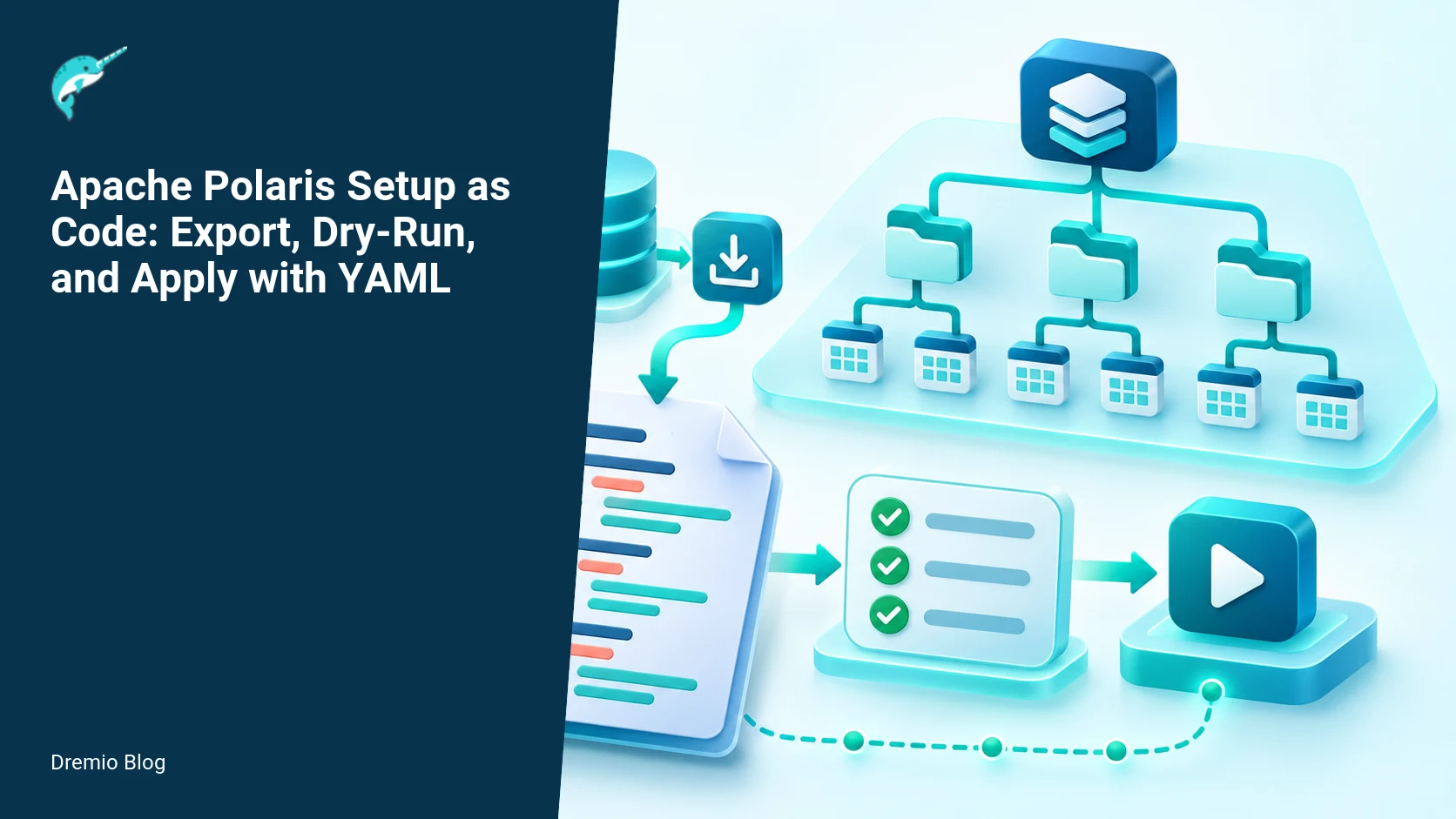
Polaris setup tools can export catalog configuration to YAML, validate a proposed file with dry-run, and apply supported resources repeatedly. Use this when you want reviewed bootstrap and environment promotion from staging to production. But understand a hard limit up front: the setup apply command is create-oriented and will skip resources that already exist. That means this is not a full state reconciler. Operators still must detect drift, handle updates explicitly, and protect sensitive data in exported files.
What the setup tooling does and does not do
The Polaris CLI setup tools provide three core operations documented in the Polaris 1.8.0 setup tools guide and the CLI reference. You can export an existing catalog to YAML, you can validate a YAML bundle with a dry-run mode, and you can apply YAML resources to create new catalog entities. These features are useful for bootstrapping clusters and promoting configuration between environments, and they are described in the official setup tools documentation (Polaris 1.8.0 setup tools) and the Polaris CLI reference.
Key limits to accept now, so you do not base an operation on a false assumption:
Apply is create-oriented. If a resource already exists, the apply step will generally skip it instead of updating it. You must plan explicit update steps for existing resources.
Exported YAML can contain sensitive operational detail, including credentials, endpoints, or secrets encoded in resource fields. Treat exported files as sensitive artifacts and handle them with secret management or encryption at rest and in transit.
Dry-run validates request shape and some server-side constraints, but it cannot prove every runtime dependency, such as external credential vending or downstream plugin availability. Use dry-run as a gate, not a guarantee.
The examples and recommendations below assume Polaris 1.8.0 or the in-development CLI behaviors described in the Polaris CLI reference. Check those pages when you plan your exact commands and flags.
Export, review, and apply: a practical workflow
Here is a practical workflow you can adopt. I have operated similar flows in production, and I prefer explicit steps that separate reviewable artifacts from automated gates. The workflow has five stages: export a baseline, sanitize and review, commit to Git, run CI dry-run, and apply in the target cluster with a controlled rollout.
Export, review, and apply workflow. Each stage has a result that can be checked before the next stage begins.
1) Export a baseline YAML file
Start from a source Polaris cluster where the desired catalog resources already exist. Use the documented setup export command from the Polaris setup tools. The export will produce a YAML bundle describing the resources the tool supports.
Adjust the include set to match the resource kinds you need. The Polaris 1.8.0 setup tools documentation lists what kinds are exportable. Verify that export produced all fields you expect, including annotations and credential references.
If your cluster uses credential vending or RBAC, exported entries can reference sensitive secrets. Sanitize or replace secrets with references to your secret store. See the Dremio guide to Polaris access control for background on RBAC and credential vending patterns.
2) Sanitize and review in Git
Commit the YAML to a reviewable branch. At this stage, remove or mask sensitive fields. I use placeholder references that CI can replace, or I keep secrets out of the repo and reference them from a secret manager during apply.
Reviewers should check resource names, namespace mappings, and any environment-specific endpoints. If you run Polaris on Kubernetes with Helm and PostgreSQL backing, confirm that the cluster configuration described in the exported YAML aligns with how your Helm chart provisions services. The Dremio guide on running Polaris in production with Kubernetes gives operational context you should reconcile with exported resources.
3) CI dry-run
Before applying to an environment, validate the bundle with the setup dry-run. Run this in CI with service account credentials that have the same creation privileges as the target environment. Dry-run will perform server-side validation and report errors without persisting changes to the catalog. It is an essential gate because it catches schema and permission problems earlier than apply time.
Dry-run release gate. The loop turns table or catalog signals into controlled operational changes.
Run dry-run using ephemeral credentials provisioned by your CI runtime, or use a dedicated CI service account with least privilege needed to create the resource kinds in the bundle.
Fail the pipeline on any validation error. Capture the server-side error payload for triage. Dry-run errors are actionable: missing role bindings, malformed spec fields, or unsupported resource fields show up here.
Remember that dry-run does not validate external runtime dependencies. Add acceptance tests in CI that exercise things like credential vending or external plugin calls if your catalog resources depend on those systems.
4) Apply to target and verify
Once dry-run passes in CI and reviewers approve the change, apply to the target cluster with a controlled process. Use a targeted, incremental rollout. Start with noncritical namespaces or a single project, then expand. Because apply is create-oriented and will skip existing resources, design your rollout so that new resources create cleanly and updates are handled separately.
Query the Polaris catalog for the created entries immediately after apply. For example, use the CLI or the REST API to list namespaces, projects, and roles to confirm creation.
Run functional checks that depend on those resources, such as creating a credential using your credential vending flow or running a sample job that uses the new project scope.
If any resource was skipped because it already existed, note it in your rollout log and schedule an explicit reconciliation to update fields you need changed.
YAML resource ordering and dependency rules
Polaris resources often have creation dependencies. For example, roles reference namespaces, projects reference namespaces and policies, and credentials may reference projects or identities. When you build your YAML bundle, order resources so parents come before children. The CLI will attempt to create what it can, but ordering reduces partial failures and makes logs easier to interpret. Diagram two shows a typical dependency order.
YAML resource dependency order. Each technical risk needs a matching test, boundary, or operating signal.
A safe, minimal ordering I use:
Namespaces and system-level configuration
Projects, with their namespace references
Roles and role bindings
Credentials and credential templates
Applications, plugins, or webhook configurations that depend on the created entities
Polaris 1.8.0 setup documentation shows the resource kinds and what the export tool emits. Use that as the canonical list to design your ordering for your version.
Dry-run as a release gate, with limits
Dry-run is a powerful gate in a CI pipeline, but it has limits you must test for. The dry-run performs server-side validation and simulates creation, but it will not exercise external systems that your runtime plugins call or prove that dynamic credentials will successfully be issued at runtime. Place additional integration tests that exercise those external paths behind the dry-run gate.
Specifically, dry-run will help you catch:
Malformed resource fields and schema validation failures
Permission-related failures where the credential performing the dry-run lacks rights to create a resource kind
Missing references to in-cluster entities that are checked by the server during validation
But dry-run will not catch:
Runtime plugin failures where a resource triggers an outbound call at creation time. Test these with integration tests that run against a staging instance that uses the same external services.
Race conditions that only appear under concurrent apply loads. If you do parallel applies, include concurrency tests that simulate production traffic.
Drift detection and reconciliation
Since apply is create-oriented, you need a drift detection strategy. Treat the setup-as-code YAML as the source of truth for desired creation state, but have an explicit reconciliation and drift feedback loop to identify differences and handle updates.
Drift detection feedback loop. A reversible canary keeps an unsupported client or unsafe policy from becoming a fleet-wide incident.
Two practical approaches I have used:
Periodic export-and-compare. Regularly export the live catalog, sanitize it, and compare to the Git-tracked desired file. Create automated tickets when diffs exceed a threshold.
Explicit update recipes. Maintain a small set of update scripts or patches that run targeted REST API calls for resources that need in-place updates. This is safer than attempting blind replacements from a generic apply step.
Operational caution: exported catalog files commonly contain operational detail that your team may not intend to store in Git. Treat these files as sensitive; use short-lived exports, encrypt artifacts in CI, and set tight access controls. The Polaris setup export documentation outlines which fields will appear in exports for the version you run, so check export output for sensitive values when you upgrade Polaris or change plugins.
Worked example: export a baseline YAML file
This worked example is concrete. It assumes you have polaris installed and the network access needed for your source cluster. Confirm your installed polaris version matches the behavior described for exports in the Polaris 1.8.0 setup tools documentation or the in-development CLI docs.
# Export namespaces, projects, and roles from an existing cluster
polaris setup export --output baseline.yaml --include namespaces,projects,roles

# Inspect the first 200 lines to confirm no secrets are embedded
head -n 200 baseline.yaml
Sanitization example, replace credential contents with a reference key your secret manager can resolve at apply time. This is a manual step or a small script that your CI can run before committing the file.
# naive sed-based placeholder replacement for an exported credential field
sed -E 's/secret:.*/secret: REPLACE_WITH_SECRET_REF/' -i baseline.yaml
After sanitizing, commit the file to Git and open a pull request for review.
Worked example: run a dry-run in CI
This CI job runs the Polaris dry-run against a staging endpoint. The CI runner uses an ephemeral service account key stored in the pipeline secrets store. The job fails if polaris setup apply returns a nonzero exit status.
Remember to fail the pipeline on any validation error and to archive the server response for triage. If dry-run reports failures that look like missing external services, add a separate integration job that runs against a staging environment with those services available.
Worked example: apply and verify catalog resources
After approval, apply to the production cluster in a controlled window. Start small, then expand. If your production cluster is Operating Apache Polaris with the Admin Tool: Bootstrap, Purge, and Metastore Maintenance or any other target, perform the first rollout in a sandbox or a limited-visibility namespace before a full expansion.
# Apply to production with monitoring hooks
polaris setup apply --file baseline.yaml --target https://polaris-prod.internal

# Immediately verify by listing critical resources
polaris namespace list --target https://polaris-prod.internal
polaris project list --target https://polaris-prod.internal
polaris role list --target https://polaris-prod.internal
If any creation step reports a resource already exists, the apply will typically skip it. Record such occurrences and treat them as a trigger to run an explicit reconciliation. For entries that must be updated, use the Polaris REST API with a targeted patch or update call rather than relying on setup apply.
Failure modes and how to handle them
Expect a few common failure modes. For each, I show detection and remediation steps I have used in production.
Export includes secrets, detection: CI or reviewers flag sensitive fields in the exported YAML. Remediation: remove or replace secrets with secret manager references, rotate any implicated credentials, and re-export to confirm they are gone.
Dry-run fails with permission errors, detection: CI dry-run returns 403 or a server-side permission error. Remediation: verify the CI service account privileges, and update IAM policies. Re-run dry-run after adjusting privileges. Use the Polaris access control guide to understand RBAC and credential vending interactions.
Apply reports resource exists, detection: apply output shows resource skipped. Remediation: run a targeted diff between the live resource and desired YAML. If updates are needed, perform a patch via API or run a scripted update with tight validation.
Runtime plugin failures after create, detection: functional tests or production jobs that depend on the resource fail against external systems. Remediation: revert the change or fix external configuration, then re-run targeted verification tests in staging before reapplying to production.
Race conditions under parallel apply, detection: intermittent create failures and inconsistent resource state. Remediation: serialize critical applies or add retries with backoff. Test concurrency in a staging environment to tune retry logic.
Rollout checklist
Confirm polaris CLI version and check setup export behavior against the Polaris 1.8.0 documentation or the in-development CLI docs if you are on a newer branch.
Export baseline and sanitize secrets, verify with a security reviewer.
Order resources so parents appear before children in the YAML bundle.
Run CI dry-run using a least-privilege service account. Fail the merge on dry-run errors.
Apply in a controlled window, start with a sandbox namespace or Operating Apache Polaris with the Admin Tool: Bootstrap, Purge, and Metastore Maintenance if that is your staged target, then expand.
Immediately run functional verification and log any skipped resources for reconciliation.
Schedule a periodic export-and-compare job to detect drift and open tickets for any unexpected differences.
What to measure after deployment
Measure both technical correctness and operational signals. I track these metrics after each rollout.
Apply success rate, percent of resources in the bundle that were created successfully versus skipped or failed. A low success rate indicates ordering or permission problems.
Dry-run pass rate, how often CI dry-run succeeds on pull requests. A sudden drop indicates schema drift or changes in server-side validation rules.
Drift delta, the diff size between the live exported catalog and the Git-tracked desired YAML. Use a daily export to see trends.
Time to reconcile, how long it takes from detection of drift to a reconciled state. This measures your operational throughput.
Functional test failure rate, failures in integration tests that exercise external systems referenced by the created resources. This shows whether runtime dependencies are healthy.
Label any facts that depended on documentation availability on November 9, 2026. The behaviors of the Polaris setup export, apply, and the CLI modes discussed above are consistent with the Polaris 1.8.0 setup tools documentation and the in-development CLI reference as of that date.
Integrations and further reading
If you need architecture context for how Polaris fits into larger deployments, read the Dremio explanation of Apache Polaris architecture. For operational details on RBAC and credential vending that influence how you sanitize exports and design tests, see the Dremio post on access control in Polaris. If you plan to run Polaris on Kubernetes with Helm and PostgreSQL, the Dremio guide on running Polaris in production explains what the runtime looks like and what parts of exported configuration you should check against your Helm values.
FAQ
Is polaris setup apply idempotent?
No, not fully. Apply is create-oriented and will skip resources that already exist. It is safe to run repeatedly for creating new resources, but do not rely on it to update existing entities. Use explicit update steps for changes.
Can I store exported YAML in Git?
Yes, but treat exports as sensitive. Sanitize or remove secrets, encrypt artifacts in CI, and restrict repository access. Keep secret values out of the repo and reference a secret manager at apply time.
Does dry-run prove runtime correctness?
No. Dry-run validates resource shape and server-side constraints. It does not exercise external plugins or credential vending. Add integration tests that run in staging to validate runtime dependencies.
How should I handle resources that already exist?
Detect skipped resources in apply logs, then run a targeted reconciliation using the Polaris REST API or scripted patches to update in-place. Avoid blind replacements from a generic apply step.
How often should I export and compare for drift?
Daily exports are a good starting point. Increase frequency if you have many automated changes. Use diff thresholds to avoid noisy alerts and open tickets when meaningful differences appear.
Where can I find the authoritative CLI documentation?
Check the Polaris setup tools documentation for the release you run, such as the Polaris 1.8.0 setup tools guide, and consult the Polaris CLI reference for in-development or newer behaviors.
Related Dremio guides
Continue with these related implementation guides.
Intro to Dremio, Nessie, and Apache Iceberg on Your Laptop
Editor’s note, September 2026. This post was published in September 2023 and some product details have changed since. Nessie is still available and self-deployable under the Apache-2.0 licence, and it remains the clearest implementation of catalog-level branching. It is not an Apache Software Foundation project, and its development has slowed considerably. For how the current […]
Oct 12, 2026·Dremio Blog: Open Data Insights
Apache Iceberg Table Statistics: NDV, Puffin and Query Plans
Iceberg keeps per-file bounds automatically but table-level NDV statistics only when you compute them. Why that decides join order, and how to keep them fresh.
Aug 16, 2023·Dremio Blog: News Highlights
5 Use Cases for the Dremio Lakehouse
With its capabilities in on-prem to cloud migration, data warehouse offload, data virtualization, upgrading data lakes and lakehouses, and building customer-facing analytics applications, Dremio provides the tools and functionalities to streamline operations and unlock the full potential of data assets.