As organizations store more data in cloud data lakes, data teams must provide access to that data for technical and non-technical data consumers. The Dremio Open Data Lakehouse platform provides easy and direct access to the data lake without the need for complex ETL pipelines or data copies, and it connects with Microsoft Power BI to give data consumers at every level of the organization the power and freedom to explore a consistent and up-to-date view of their data.
Previously, customers using Power BI to connect to Dremio needed to use Power BI gateway, an application that enables connections to various on-premises data sources without having to move the data. Power BI gateway introduced several inefficiencies. Administrators needed to add users and maintain multiple gateways which became a bottleneck for access to on-premises data sources. With this solution, all end users leveraged the administrator’s ID, and it was difficult to track queries at the individual level. Finally, the business accrued additional costs from Virtual Machines (VMs) dedicated to running Power BI Gateway.
Dremio customers love the benefits they get using Power BI with Dremio, but they don’t like the costs and complexities associated with connecting them via Power BI gateway.
Today, we are pleased to announce an update to the Dremio connector for Power BI that allows customers to connect directly to Dremio without the need for an on-premises Power BI gateway. When users interact with a report, Power BI sends SQL queries to their Dremio cluster. The connector enables analysts to create lightning-fast reports directly on their data lakes without waiting for data imports or cache refreshes.
Follow the steps below and connect Power BI to your Dremio cluster without an on-premise gateway.
Requirements
Before we get started, you will need to ensure you have the following:
June 2022 version of Power BI or later
Dremio Cloud or Dremio Software 20.1+ cluster with encryption enabled on the client port
In this example, we will be connecting Power BI to your Dremio Software cluster.
Launch Power BI Desktop
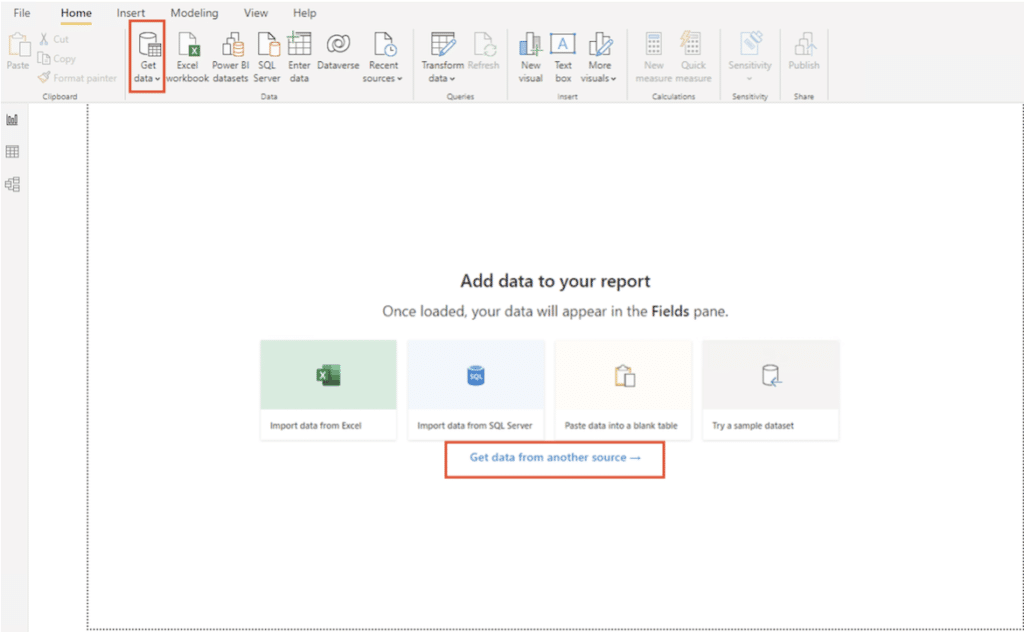
Click the Get data option on the Home screen, or Get data from another source on the Home screen.
In the Get Data dialog, search for Dremio, select Dremio Software, and click Connect.
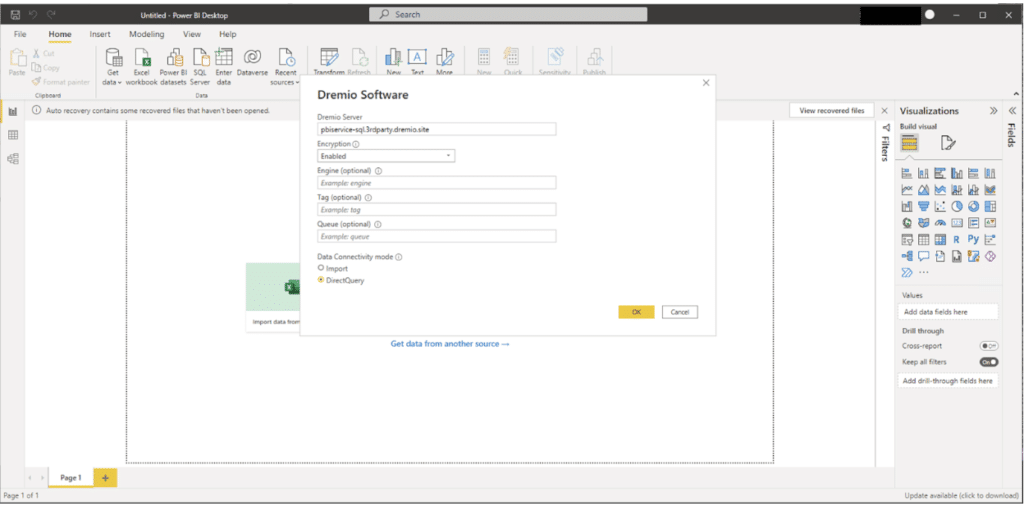
Enter your Dremio Server information. Set Encryption to Enabled
Select DirectQuery as your Data Connectivity Mode. Select OK.
You are now connected to your Dremio cluster and you can start creating your report.
Once your report is ready to be shared, you can publish it to the Power BI service and use the report there, which will run live queries against your Dremio datasets.
Navigate to Files > Publish > Publish to Power BI.
Select the destination. You may pick from a list of available workspaces to choose the desired one on which to publish. Select the workspace, and then click the Select button to publish.
Navigate to Dataset, select the dataset you want to view, and click More Options.
Select the Settings icon to enter your credentials
Navigate to Data Source Credentials
Select Edit Credentials to authenticate
Try Dremio’s Interactive Demo
Explore this interactive demo and see how Dremio's Intelligent Lakehouse enables Agentic AI
Get Started with an Easy and Open Lakehouse Platform
Dremio’s open lakehouse platform is available as a fully managed cloud service with a forever-free tier. Dremio Cloud makes deploying an open data lakehouse architecture as easy as a cloud data warehouse. You can spin up Dremio Cloud in your AWS account and explore your data lake in minutes. Get started today.
For more information on how to connect Power BI to Dremio, please visit our docs page.
Hadoop Modernization on AWS with Dremio: The Path to Faster, Scalable, and Cost-Efficient Data Analytics
Hadoop modernization on AWS with Dremio represents a significant leap forward for organizations looking to leverage their data more effectively. By migrating to a cloud-native architecture, decoupling storage and compute, and enabling self-service data access, businesses can unlock the full potential of their data while minimizing costs and operational complexity.
Nov 26, 2025·Dremio Blog: Partnerships Unveiled
Using Dremio, lakeFS & Python for Multimodal Data Management
With lakeFS, you version everything: Iceberg tables, images, models, logs. With Dremio, you query and analyze it all, structured or not, at scale. Together, they bring Git-style control and interactive querying to your data lake, so you can build more intelligent, version-aware workflows without sacrificing flexibility or performance.
Jun 11, 2019·Dremio Blog: Partnerships Unveiled
What is ADLS Gen2 and Why it Matters
Described by Microsoft as a “no-compromise data lake”, ADLS Gen 2 extends the capabilities of Azure Blob Storage and is optimized for large scale analytics workloads.