How Iceberg write distribution modes change where records land
Short answer: Iceberg write distribution decides how rows are grouped before writers create files. None leaves grouping to the Spark plan, hash groups rows by partition columns so related keys go to the same writer, and range fully orders rows across the job using partition and sort keys. Hash is the usual starting point for partitioned tables, range can improve cluster density and pruning at higher CPU and planning cost, and none is useful for append-heavy or pre-partitioned inputs. Also remember, target file-size settings are a ceiling, not a guarantee, because Spark task memory and compression change bytes on disk.
This article is focused on Spark writes to Apache Iceberg and assumes familiarity with Spark SQL writes, DataFrameWriter, and common cluster operations. I worked through these modes on real clusters and will show you what to change, what to measure, and how to validate results. I cite the Iceberg docs for Spark writes and configuration, the Iceberg table spec for distribution semantics, and Spark tuning guidance where it affects task sizing and shuffles.
Modes, mechanics, and when to use each
Iceberg defines three main write distribution modes that affect how rows travel from input partitions to writer tasks. These are documented in the Iceberg Spark writes page and the table specification. The behaviors matter for partition and file layout, shuffle cost, and query pruning later.
None
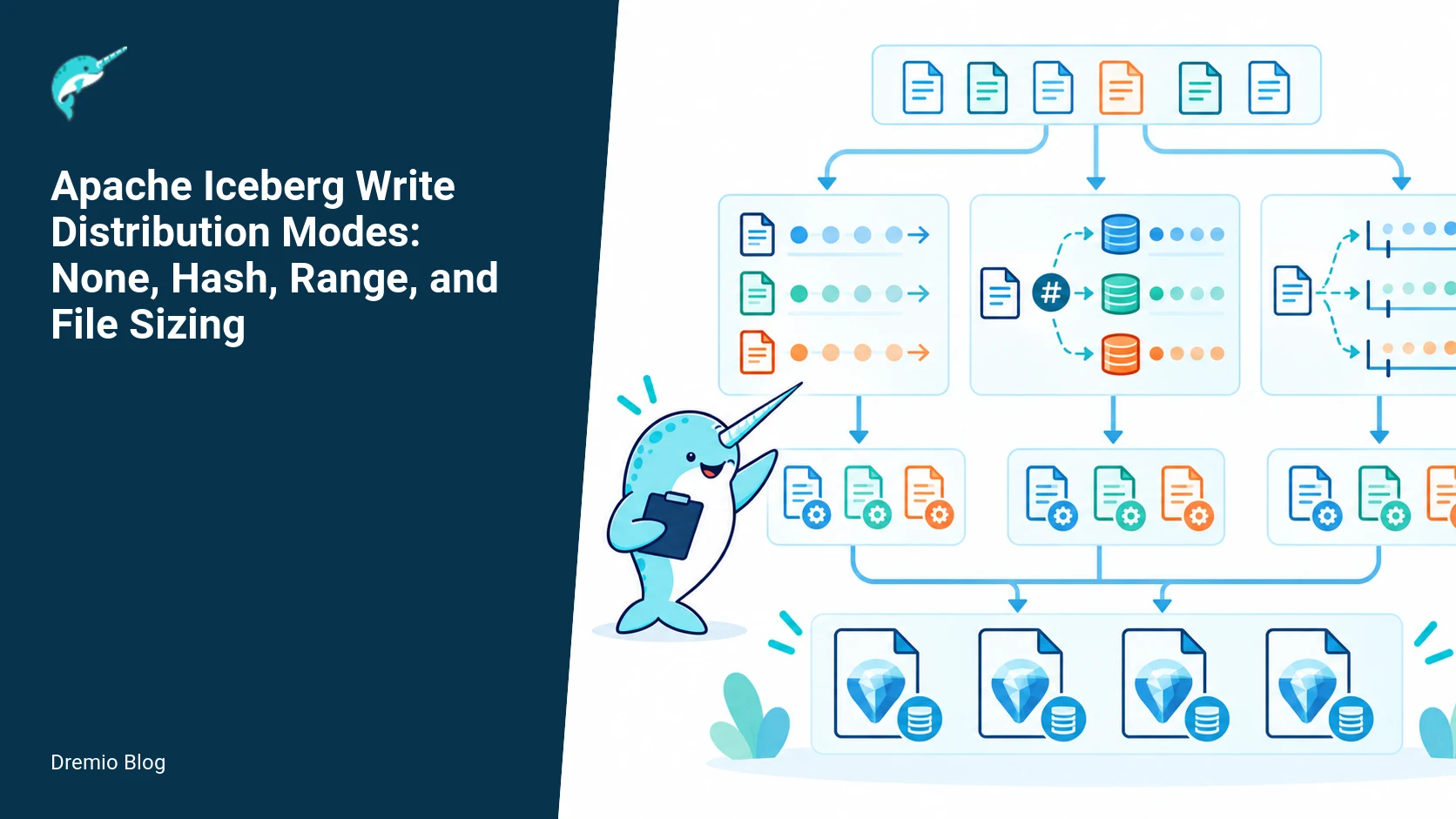
None means Iceberg does not reorder or repartition rows. The Spark execution plan determines how records are grouped and which task writes which rows. Use cases:
Fast appends: If upstream partitions or files are already laid out the way you want, None avoids extra shuffles.
Streaming or micro-batch writes where the input is already partition-sorted.
Bulk imports where you do your own pre-bucketing or partitioning outside Iceberg.
Consequences: no global guarantees about file boundaries per partition. If your Spark tasks are skewed, a single task can produce many small or very large files. That affects small-file counts and read performance later. Validate with a file-size query after write.
None, hash, and range data flow. Each stage has a result that can be checked before the next stage begins.
Hash
Hash causes Iceberg to insert a hash-based shuffle keyed by partition columns. In Spark this becomes an exchange that groups rows so a writer task handles a deterministic set of partition values. This is the documented default for many partitioned-table operations in Iceberg and a good starting point for most workloads.
Benefits:
Predictable distribution across writers for partitioned tables, reducing repartition storms later.
Moderate shuffle cost, lower than range because it does not require global order.
Drawbacks: if partition cardinality is huge you can still get skew, and hash cannot create contiguous file-level sorting inside a partition the way range can. Hash also binds rows to partition columns only, so sort columns not in the partition do not affect which writer gets a row.
Range
Range distribution orders records globally by partition columns and then by any configured sort columns, so each writer gets a contiguous range of the global order. The Iceberg Spark write docs explain that this requires an extra planning stage and can add significant cost for large writes. Range is the only mode that can provide file-level sort order guarantees Iceberg can track for improved pruning when reads filter by sort columns.
Benefits:
Better file clustering when you use sort-order in the table definition, which can reduce the number of files scanned and speed up predicate pushdown and pruning.
Helpful when your queries frequently filter or range-scan on the sort columns.
Costs and cautions:
Range adds a planning pass to collect quantiles and compute split points across the full dataset. This is documented and can increase job latency and memory pressure.
It can be expensive for very large ingests. If you have a 10 TB load, range planning will scan distribution statistics and coordinate split points which uses driver memory and network I/O.
Range delivers better clustering only when the sort keys match common query predicates. Otherwise the extra cost may not be worth it.
Partitioning versus distribution: separation of concerns
People often conflate partitioning and distribution. Partitioning is a table schema property; distribution is a write-time behavior. Partitioning defines which columns are used to split data into directory-like units at read time, and it is recorded in the table metadata. Distribution defines how the write job divides rows among writers so files end up in those partitions in a particular pattern.
Why the difference matters: you can have a table partitioned by date but write with range that also sorts by user_id. The table schema still only has date as the partition key, but range makes files within each date partition sorted or clustered by user_id. That helps queries that filter on user_id within a date, because file-level metadata will show contiguous spans of user_id values.
Operational consequence: if you change partitioning later, distribution behavior during writes still follows the mode you set at write-time. Testing is essential before changing either. For more on inspecting metadata tables and the internal representation of partitions and files, the Dremio article on Iceberg metadata tables helps you map file-level layout to what Iceberg stores.
Partitioning versus distribution. Each technical risk needs a matching test, boundary, or operating signal.
How Spark task size, compression, and file sizing interact
Target file size in Iceberg is an instruction, not a promise. The Iceberg write docs and spec describe options such as write.target-file-size-bytes. Spark divides work into tasks based on input partitions, shuffle partitions, and adaptive execution. A writer task holds rows in memory, serializes them, compresses, and flushes to object storage. The result is a function of how many rows a task receives, row size, and compression ratio. In practice:
If a task receives more data than expected it can produce a file larger than the target. The target is an upper ceiling Iceberg tries to achieve by splitting writers, but task boundaries and buffering mean you can exceed it.
If a task receives less data you will get smaller files. Small files hurt read throughput and increase metadata overhead.
Compression changes bytes on disk. Two tasks with the same number of rows can produce files that differ by 20 to 50 percent depending on compression codec and data characteristics.
To control file size you need to control task input size. That is where Spark shuffle partitions and adaptive execution come in. Spark's SQL tuning documentation explains the knobs for shuffle partitions and adaptive partition coalescing. Adaptive execution can merge or split shuffle partitions at runtime to target a task size range, but Iceberg distribution choices alter the shuffle pattern and therefore the effectiveness of adaptive coalescing.
Spark task size to file size. The loop turns table or catalog signals into controlled operational changes.
Configuration examples and what to set
I will show concrete Iceberg table properties for distribution, the relevant Spark adaptive execution settings, and a file-size validation query you can run after a job. These examples are operational, not hypothetical. If your environment has custom catalog plugins or different Spark versions, verify behavior with a dry run. CTAS distribution behavior depends on Spark version and the Iceberg writer implementation, so test CTAS jobs specifically in your version.
Write distribution table properties
Iceberg accepts table properties to control distribution and target file size. An example properties block for a partitioned table that uses hash distribution and targets 512 MB files:
<?php
{"code":"-- This block must be set via catalog-specific create table properties or ALTER TABLE in your environment\n-- Example for an Iceberg table using hash distribution and a 512MB target file size\n\n-- Table properties (conceptual)\nwrite.distribution-mode=hash\nwrite.target-file-size-bytes=536870912\n\n-- Optional: specify sort order in the schema if you want range-style benefits later\nsort.order=\"user_id.asc,date.desc\"\n"}
Note: the exact key names and how you set them may vary by catalog and Iceberg version. Verify the available properties from your Iceberg Spark configuration documentation. The Iceberg Spark configuration docs list supported write properties and how they are read by the writer process.
Spark adaptive execution and shuffle knobs
Adaptive Query Execution, dynamic partition coalescing, and shuffle partition counts control task sizes. Practical Spark settings to try:
<?php
{"code":"-- Spark settings to influence task size and adaptive partitioning\nspark.sql.adaptive.enabled=true\nspark.sql.adaptive.coalescePartitions.enabled=true\nspark.sql.adaptive.advisoryPartitionSizeInBytes=67108864  -- aim for ~64MB task input\nspark.sql.shuffle.partitions=200  -- default shuffle count, tune by cluster size\n"}
What these do: enabling adaptive execution lets Spark observe shuffle statistics and coalesce partitions into a target advisory size. The advisoryPartitionSizeInBytes instructs Spark to try to make task inputs around that size. If you set Iceberg target-file-size to 512 MB and Spark advisory partition size to 64 MB, multiple writer tasks may be combined per file or a single writer may produce multiple files depending on distribution mode. Test to see how these interact with hash and range modes in your Spark version. For guidance on these options see the Spark SQL performance tuning documentation.
Important: CTAS commands can use different planner paths in different Spark versions. The way CTAS triggers Iceberg distribution behavior depends on the planner and the Iceberg DataSource writer. Verify CTAS behavior for your cluster and Spark version by running a small CTAS and inspecting the resulting files.
File-size validation query
After a write, validate file sizes with a query against the Iceberg metadata table or by listing object storage. A portable SQL using Iceberg metadata (if your catalog exposes metadata tables) looks like this:
<?php
{"code":"-- Example SQL to find number of files and size distribution per partition\nSELECT partition,\n       count(*) AS file_count,\n       approx_percentile(size, array(0.25,0.5,0.75,0.9,0.99)) AS size_percentiles,\n       sum(size) AS total_bytes\nFROM iceberg_catalog.db.table_files -- adjust to your metadata table name\nGROUP BY partition\nORDER BY total_bytes DESC\n"}
On some deployments you must query the _files metadata table path or use the catalog's system tables. The Iceberg spec and Spark write docs explain what metadata tables are available. If you use Dremio to explore metadata, the Dremio guide on monitoring Iceberg table health explains how to map those metadata tables into monitoring reports, which helps you build dashboards that track file-size regressions over time.
Practical implementation and evaluation sequence
Do not change distribution mode and file-size targets on a production table without testing. Use a representative sample of your data and the sequence below to evaluate cost versus benefit.
Step by step test plan
Pick a representative dataset, at least 1% of production size and representative in cardinality and row width. If your table is 10 TB, test with 100 GB.
Create or copy a test Iceberg table in the same catalog and storage. Keep it on the same cluster nodes to mimic IO throughput, for example the compute test cluster for compute and the catalog test cluster for metadata if your environment separates roles.
Baseline run: write with write.distribution-mode=none and your current Spark settings. Record job time, shuffle bytes, task size histogram, file count, and file-size percentiles.
Run with write.distribution-mode=hash, same Spark settings. Record the same metrics.
Run with write.distribution-mode=range and a sensible sort order. Record metrics. Range will add a planning pass and may increase driver memory usage, note driver metrics and any OOM events.
Iterate on Spark adaptive settings, particularly advisoryPartitionSizeInBytes and shuffle.partitions, to shape task sizes towards your target-file-size-bytes. Keep two variables at a time while tuning to isolate effects.
For each run, validate file-size distribution with the metadata query above and scan performance for a set of representative queries to measure read-time benefits from clustering.
Tuning experiment loop. A reversible canary keeps an unsupported client or unsafe policy from becoming a fleet-wide incident.
What to measure and why
Shuffle write bytes and shuffle spill, to understand distribution cost.
Driver memory and GC metrics, important for range planning because it collects global statistics.
Task input sizes and number of tasks producing files, to correlate to file-size outcomes.
File-size percentiles and file-count per partition, to detect small-file problems or giant files.
Read query latency and number of files scanned for representative filters, to measure pruning gains from clustering.
Collect these metrics over multiple runs. Use the Dremio monitoring guide on Iceberg table health to create dashboards for file-size percentiles and metadata table anomalies. That guide also shows which Iceberg metadata fields indicate data file ranges and metrics so you can correlate them with query plans.
Failure modes and how to respond
These are the failure modes I hit in production and how I handled them.
Oversized files despite target
Symptom: files exceed the write.target-file-size-bytes value. Causes and mitigations:
Cause: a single task received more rows than expected due to shuffle skew. Mitigate by increasing shuffle partitions, enable adaptive coalescing, or change distribution to hash to rebalance by partition key.
Cause: compression ratio lower than expected, pushing bytes up. Mitigate by testing codecs, or lowering the target-file-size to account for compression variability.
Cause: target is a ceiling Iceberg tries to approximate; verify that the writer implementation supports exact splitting in your Iceberg version. If not, accept the ceiling and tune via task sizing.
Range planning OOM or driver slowdowns
Symptom: Range writes cause driver GC spikes or job stalls. Cause: an extra global planning stage collects distribution statistics. Response:
Increase driver memory temporarily to allow quantile collection for range split computation.
Run range on a sampled subset to compute split points, then apply those splits to full data, if your workflow allows deterministic split re-use.
Use hash for regular writes and reserve range for periodic reclustering operations if your read patterns need strong clustering.
CTAS produces unexpected distribution
Symptom: a CTAS job produced many small files or did not use the configured distribution mode. Cause: CTAS planner differences between Spark versions and how the Iceberg data source integrates. Response: test CTAS on your Spark version, and if it differs, use an explicit INSERT INTO ... SELECT with distribution properties set, or adjust your Spark version or Iceberg writer configuration. The configuration of CTAS and write distribution can vary by Spark release, so verify on your cluster.
Rollout checklist
Run the test plan above on a representative dataset.
Create a rollback plan: preserve the previous table snapshot or write to a new table name. Iceberg snapshotting makes rollbacks fast if metadata commits are available.
Instrument job metrics: enable Spark and driver metrics, capture shuffle metrics, and collect metadata table stats after writes.
Limit blast radius: roll out distribution changes on one dataset or partitioned prefix at a time.
Automate validation: add a post-write job that runs the file-size validation query and flags regressions in file counts or size percentiles.
Plan for maintenance: if you use hash for daily writes but want range clustering, schedule periodic compaction jobs that use range to recluster files when cold data meets thresholds.
What to measure after deployment
After you deploy a distribution change, measure these over several weeks and compare to the baseline:
Average and 95th percentile read latency for representative queries.
Number of files and file-size percentiles per partition or time window.
Shuffle write bytes and shuffle spill per write job.
Frequency of small-file cleanup or compaction jobs triggered.
Driver and executor resource usage during write jobs.
Track regression thresholds. If read latency improves but write cost doubles, evaluate the operational trade-off and consider periodic reclustering instead of making range the default for all writes.
Practical notes, limits, and verification steps
Version and implementation details matter. The Iceberg Spark write docs and the Spark SQL tuning guide are the primary references for exact behavior. Confirm these for your deployed Iceberg and Spark versions, because CTAS distribution behavior and write property names changed between releases in some environments. I checked relevant behaviors against the Iceberg documentation and Spark SQL tuning documentation as of October 27, 2026 when freshness matters.
Where Dremio fits in: use the Dremio Apache Iceberg guide to understand catalog options and how Dremio surfaces Iceberg metadata in the UI. Use the Dremio blog post on metadata tables to inspect file ranges and metrics in a human-friendly way. The Dremio monitoring article shows how to create automated reports from metadata tables so you can detect regressions in file sizes and partition health as you roll out distribution changes.
A worked implementation: configuring and validating write distribution with Spark and Iceberg
This section walks through a concrete Spark job that writes to an Iceberg table using distribution table properties, exercises Spark adaptive execution settings, and then runs the file-size validation query. The goal is reproducible steps you can run in a staging cluster. All behavior is conditioned on the project documentation referenced below; verify exact property names and defaults against your runtime versions.
Start with a small test dataset, for example 10 million rows, so you can iterate without burning resources. The job will write to a partitioned table by date, plus a distribution property. The example uses write.distribution and write.target-file-size-bytes style properties. Confirm the exact property keys in your Iceberg version, because docs have changed across releases. The following Spark job fragments assume Spark 3.x compatible APIs and an Iceberg Spark runtime from the Iceberg documentation.
<!--
Scala job outline. Replace placeholders for catalog, namespace, and table.
-->
import org.apache.spark.sql.SparkSession

val spark = SparkSession.builder()
  .appName("iceberg-dist-test")
  // enable adaptive execution if desired; see settings below
  .getOrCreate()

val df = spark.read.parquet("s3a://my-bucket/test-data/10m")

// create table with partitioning and distribution properties
spark.sql("CREATE TABLE my_catalog.ns.events " +
  "(id BIGINT, ts TIMESTAMP, user_id STRING, value DOUBLE) " +
  "USING iceberg PARTITIONED BY (days(ts)) " +
  "TBLPROPERTIES ( 'write.distribution-mode'='hash', 'write.distribution-column'='user_id', 'write.target-file-size-bytes'='134217728')")

// write using DataFrame API
df.repartition(200) // tune upstream parallelism
  .writeTo("my_catalog.ns.events")
  .append()
Key knobs to set before you run the job. These are explicit examples, not guaranteed keys for every Iceberg version. If a key above does not exist in your version, check the Iceberg spark write documentation and spec. Set these on the Spark driver or via the job configuration.
Enable Spark adaptive execution when testing range planning effects. Example Spark confs: spark.sql.adaptive.enabled true, spark.sql.adaptive.coalescePartitions.enabled true, spark.sql.adaptive.advisoryPartitionSizeInBytes 64MB. Verify names in your Spark docs.
Set a target file size for Iceberg writes, for example 128 MiB, with the table property write.target-file-size-bytes or equivalent key in your version.
Specify distribution mode explicitly with the table property, such as write.distribution-mode set to none, hash, or range. When using hash, supply the write.distribution-column or columns. When using range, set the distribution columns and verify range planning memory limits in your runtime.
After the job completes, run the file-size validation query below to check whether files are near the target. That query reads Iceberg metadata and checks file sizes against the configured target table property. This helps you find partitions or buckets that violated sizing expectations.
<!--
Example file-size validation query using Spark SQL reading the Iceberg metadata table. Adapt catalog and table names.
-->
SELECT
  partition,
  file_path,
  file_size,
  CAST(file_size AS double) / CAST(134217728 AS double) AS size_ratio
FROM my_catalog.ns.events.files
WHERE file_size > 0
ORDER BY size_ratio DESC
LIMIT 100
Interpretation: a size_ratio near 1 indicates a file close to a 128 MiB target. Ratios above 1 show files that exceeded the target. Remember that target is a ceiling guideline for Iceberg file creation heuristics, not an absolute guarantee, and other factors can produce oversized files.
Failure injection tests you should run before production rollout
Exercise failure modes intentionally. Controlled failures reveal how Iceberg and Spark behave, and they expose required operational safeguards. Below are four focused failure injections with the exact things to watch, expected symptoms, and recovery steps.
1) Oversized files due to upstream partition skew and large partition writes
How to trigger: create a dataset where 90 percent of rows share one partition key value, then write with hash distribution on another column. Use a small number of task partitions so a few tasks produce very large output files.
What to watch: file-size validation query will show a few files with size_ratio much greater than 1. CPU and memory on the task nodes may show elevated GC and I/O wait. Look at the Spark UI for stragglers, long-running tasks, and data skew in the write stage.
Recovery steps: increase upstream parallelism with more partitions, or change distribution to range if you can define good range columns. Alternatively, use pre-splitting or salting on the partition key. If you must accept oversized files, schedule a background compaction job that rewrites large files into smaller ones with controlled parallelism.
2) Range planning OOM or slow driver when computing split points
How to trigger: create a large table with very high cardinality on the selected range column, then attempt a range-distributed write without limiting planning memory. Range distribution requires a planning stage that samples or sorts values to create split points. If the sample is large, the driver can run out of memory or become slow.
What to watch: the Spark driver logs will show OutOfMemoryError or long GC pauses. The write job will stall on a planning step with low executor activity. Driver CPU can spike while executors idle.
Recovery steps: reduce planner sample sizes or enable sampling-based planning options if your Iceberg version supports them. Limit range distribution to lower-cardinality columns or pre-aggregate to reduce cardinality. Also test Spark adaptive execution settings; sometimes coalescing partitions early helps. If planning fails repeatedly, fall back to hash or none for that table and document the limitation.
3) CTAS ignores distribution settings on certain Spark versions
How to trigger: run a CREATE TABLE AS SELECT that creates a table with distribution table properties, then inspect the produced files. Some Spark and Iceberg combinations apply default write behavior during CTAS. This is version dependent and noted in the Spark and Iceberg docs.
What to watch: file-size validation or Spark UI shows unexpected parallelism or file sizes. The created table may have properties set but the CTAS execution used a different write path. Verify behavior by checking the CREATE TABLE statement logs and the table metadata file.
Recovery steps: if CTAS does not honor distribution properties, perform a rewrite step after CTAS using a controlled insert or INSERT INTO ... SELECT, or create the empty table with properties first, then insert into it. Check the Iceberg and Spark docs for CTAS behavior for your versions and update your templates accordingly.
4) Spark adaptive execution causes unexpected coalescing that defeats your planned file sizing
How to trigger: enable adaptive execution with aggressive coalescing and a low advisoryPartitionSizeInBytes. Run a write that relies on a specific repartitioning pattern or distribution planning. Adaptive coalescing can merge small partitions before the Iceberg write creates files, producing fewer, larger files.
What to watch: file-size validation shows files substantially larger than the target. Spark UI shows coalesced tasks and fewer shuffle partitions than expected. Driver and executor logs will contain adaptive execution planning entries when the merge occurred.
Recovery steps: tune adaptive execution parameters, for example raising advisoryPartitionSizeInBytes so coalescing happens at a larger threshold, or disable adaptive coalescing for the write job. Another approach is to control partitioning explicitly with df.repartition before write, so adaptive coalescing has less effect. Verify changes by replaying the file-size validation query.
Decision table: choosing distribution mode and operational trade offs
This decision table strips choices down to measurable trade offs you will encounter. Use it when you need a quick recommendation for production settings. All advice is version-qualified; verify the exact table property names and Spark behavior for your Iceberg and Spark releases.
If you want simple writes and your read patterns are broad scans, choose write.distribution-mode none. Benefits: lowest write planning overhead. Costs: potential large files in skewed partitions and worse read amplification for small-point queries.
If you have a stable, medium-cardinality column used frequently in point lookups, choose write.distribution-mode hash with write.distribution-column set. Benefits: spreads records across files for that key, better read parallelism for lookups. Costs: you must choose the correct hash column, and hashing does not help range queries.
If your most common reads are range scans on an ordered column and the column cardinality is not enormous, choose write.distribution-mode range. Benefits: clustered data, efficient range reads and predicate pruning. Costs: planning cost on the driver, risk of OOM with high cardinality, and relying on the planner split algorithm which may sample values differently across versions.
If your workload contains very skewed keys or hot partitions, consider hybrid approaches: pre-salt keys, use hash distribution on a salted key, or use compaction jobs combined with none or hash. Benefits: practical mitigation for skew. Costs: added write complexity and extra compaction cost.
Operational trade offs to record in your runbook: memory requirements for range planning, expected file-size variance from your target, and how CTAS behaves in your environment. Document which Spark adaptive execution settings are allowed or forbidden for write jobs in production.
What to measure after deployment and alerting thresholds
After you deploy distribution settings, track a handful of metrics and set alert thresholds. These are practical, measurable signals that will catch the common failures described earlier.
File size distribution: run the file-size validation query nightly. Alert when more than 2 percent of files exceed 1.5 times the configured target, or when median file size is below 0.2 times the target for more than a day. These thresholds are conservative starting points; tune to your read latency sensitivity.
Write stage task skew: instrument Spark job metrics. Alert when the top 5 percent of tasks consume more than 50 percent of compute time in write stages. This typically indicates partition skew or uneven distribution.
Driver memory pressure during writes: monitor driver heap usage and GC pause time. Alert when driver heap usage exceeds 75 percent for sustained periods during write planning stages, or when driver GC pause time exceeds 5 seconds for more than 30 seconds. This helps detect range planning pressure.
Adaptive coalescing events: track the count of times Spark logs coalescing decisions during write stages. If coalescing happens and file sizes are drifting from target, adjust advisory partition size or disable adaptive coalescing for these jobs.
CTAS divergence: after any CTAS, automatically sample output with the file-size validation query. If results differ from expectations, trigger a policy to rewrite the table or flag for manual review.
Attach these metrics to your existing alerting system with sensible notification routes. For example, file-size alerts can go to data platform owners, while driver OOM alerts go to platform SREs. Include a link to the table metadata in the alert so engineers can run the file-size validation query quickly.
Label facts checked on October 27, 2026: Iceberg write distribution properties and the need to verify exact property names against your installed Iceberg version, and Spark adaptive execution behaviors, are accurate as of the referenced documentation dates. Always compare property keys and default values with the runtime documentation for your version before applying them in production.
FAQ
1. Which distribution mode should I start with?
Start with hash for partitioned tables. It balances shuffle cost and file locality. Use none for simple appends or when your upstream plan already partitions data. Use range only when read patterns show clear benefits from file-level ordering and you can accept the extra planning cost.
2. Will write.target-file-size-bytes guarantee file sizes?
No. Target file size is a ceiling Iceberg tries to respect, not a strict guarantee. Task input size, compression, and shuffle behavior determine actual file bytes. Verify with the metadata file-size query and tune Spark task sizes to get closer to the target.
3. Does range always improve read performance?
No. Range helps when sort columns match common filters and queries scan ranges of values. For broad scans or filters on other columns, range adds cost without proportional benefit. Test representative queries to validate improvements.
4. How does Spark adaptive execution affect file sizing?
Adaptive execution can coalesce or split shuffle partitions at runtime to reach an advisory partition size, which helps control task input size and therefore file sizes. However, distribution mode changes the shuffle pattern, so adaptive execution results vary with none, hash, and range.
5. My CTAS ignored distribution settings, what now?
Answer
CTAS planner paths differ between Spark versions. Test CTAS behavior in your Spark version. If it ignores distribution properties, use an explicit CREATE TABLE then INSERT INTO with properties set, or upgrade or configure your environment so the Iceberg writer path is used consistently.
6. What quick query should I run after a write to detect problems?
Run a metadata-based file-size distribution query. Check file count per partition and percentiles of file size. If you see many tiny files or files much larger than your target, investigate task sizes, shuffle partitions, and compression.
Related Dremio guides
These guides cover adjacent implementation details that are outside this article's main scope.
Intro to Dremio, Nessie, and Apache Iceberg on Your Laptop
Editor’s note, September 2026. This post was published in September 2023 and some product details have changed since. Nessie is still available and self-deployable under the Apache-2.0 licence, and it remains the clearest implementation of catalog-level branching. It is not an Apache Software Foundation project, and its development has slowed considerably. For how the current […]
Oct 12, 2026·Dremio Blog: Open Data Insights
Apache Iceberg Table Statistics: NDV, Puffin and Query Plans
Iceberg keeps per-file bounds automatically but table-level NDV statistics only when you compute them. Why that decides join order, and how to keep them fresh.
Aug 16, 2023·Dremio Blog: News Highlights
5 Use Cases for the Dremio Lakehouse
With its capabilities in on-prem to cloud migration, data warehouse offload, data virtualization, upgrading data lakes and lakehouses, and building customer-facing analytics applications, Dremio provides the tools and functionalities to streamline operations and unlock the full potential of data assets.