This article has been revised and updated from its original version published in 2022 to reflect the latest Apache Iceberg migration techniques and tools.
Migrating from Hive tables to Apache Iceberg unlocks time travel, hidden partitioning, schema evolution, and dramatically faster queries through file-level pruning. The good news: you don't have to rewrite your data to migrate. Iceberg provides zero-copy migration paths that add Iceberg metadata on top of existing Parquet files.
Organizations that have migrated from Hive to Iceberg consistently report massive improvements: query planning times drop from minutes to seconds (because Iceberg eliminates slow directory listing operations), partition management becomes instant instead of requiring multi-hour rewrites, and data teams gain access to modern features like time travel and rollback that simply don't exist in Hive. For organizations already using Dremio, the migration unlocks even greater value through Dremio's Reflections, which are stored as Iceberg tables and can deliver sub-second query performance on top of the migrated data.
This guide covers three migration approaches (in-place migration, snapshot migration, and CTAS migration) with detailed trade-offs and production considerations for each.
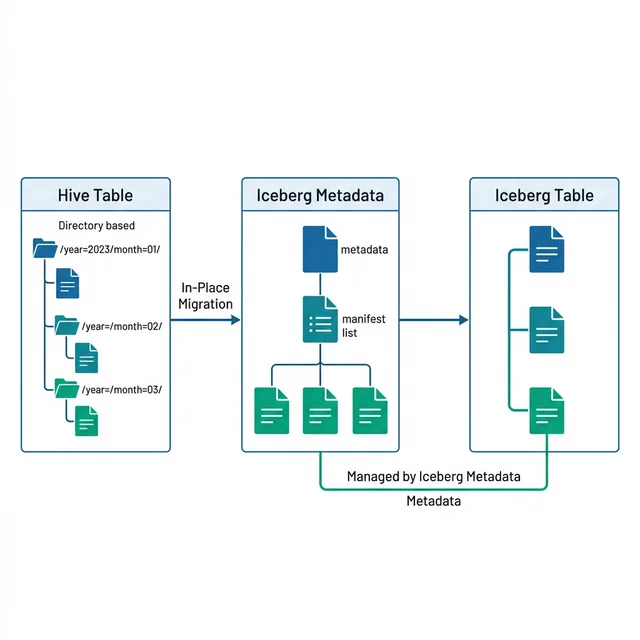
In-place migration converts the Hive table to Iceberg without copying data. Iceberg creates metadata files that point to the existing Parquet data files:
CALL catalog.system.migrate('hive_db.orders');
What Happens
Iceberg reads the Hive Metastore to discover all partitions and files
Creates manifest files listing every existing data file with column statistics
Creates a metadata file with the table schema, partition spec, and initial snapshot
Updates the catalog entry to point to the new metadata file
Advantages
Zero data copy: No data files are written
Fast: Only metadata operations, typically completes in seconds to minutes
Preserves data layout: Existing partitioning and file organization remain
Considerations
Irreversible: The original Hive metadata is replaced
Requires compatible file formats: Data files must be Parquet or ORC
Hive partition directories: Existing directory-based partition layout is preserved
Migration Approach 2: Snapshot Migration (Safest)
Snapshot migration creates an Iceberg table that points to the same data files as the Hive table, without modifying the original Hive table:
Iceberg reads the Hive table's metadata to discover all files
Creates a new Iceberg table (iceberg_db.orders) with manifests pointing to the same data files
The original Hive table (hive_db.orders) remains unchanged
Advantages
Non-destructive: The original Hive table is untouched
Parallel operation: Both Hive and Iceberg can read the same data
Easy rollback: If migration fails, drop the Iceberg table; Hive table is unaffected
Considerations
Writes go to Iceberg only: New writes to the Iceberg table create new data files not visible to Hive
Eventual cut-over: You must eventually decommission the Hive table to avoid confusion
Migration Approach 3: CTAS Migration (Full Copy)
Create Table As Select creates a completely new Iceberg table with a full data copy:
CREATE TABLE iceberg_db.orders
USING iceberg
PARTITIONED BY (month(order_date))
AS SELECT * FROM hive_db.orders;
When to Use CTAS
When you want to change the partition scheme during migration
When data files need to be reorganized or optimally sized
When migrating from non-Parquet formats (CSV, JSON, Avro)
When you want to apply Z-ordering during migration
Post-Migration Steps
1. Verify Data Integrity
-- Compare row counts
SELECT COUNT(*) FROM hive_db.orders;
SELECT COUNT(*) FROM iceberg_db.orders;

-- Compare a sample of rows
SELECT SUM(amount), COUNT(DISTINCT customer_id) FROM hive_db.orders;
SELECT SUM(amount), COUNT(DISTINCT customer_id) FROM iceberg_db.orders;
2. Evolve Partitions
Now that you're on Iceberg, you can evolve partitions without rewriting data:
ALTER TABLE iceberg_db.orders SET PARTITION SPEC (day(order_date), bucket(16, customer_id));
3. Run Compaction
Hive tables often have suboptimal file sizes. Run compaction to right-size files:
ANALYZE TABLE iceberg_db.orders COMPUTE STATISTICS FOR ALL COLUMNS;
5. Update Downstream Consumers
Update all pipelines, dashboards, and applications to point to the new Iceberg table. With Dremio, you can use virtual datasets (views) as an abstraction layer, retarget the view from the Hive source to the Iceberg source without changing downstream consumers.
Migration with Dremio
Dremio simplifies Hive-to-Iceberg migration:
Connect both sources: Register your Hive Metastore and Iceberg catalog as Dremio sources
Create Iceberg tables: Use Dremio's CTAS to create optimized Iceberg tables
Use Reflections: Create Reflections on Iceberg tables for accelerated queries
Cut over: Update views to point to Iceberg sources
Real-World Migration: E-Commerce Platform
A SaaS company migrated 200 Hive tables (50TB total) to Iceberg over three weeks:
Week 1: Snapshot migration of read-heavy dimension tables
Week 2: In-place migration of fact tables
Week 3: CTAS migration of tables needing partition changes
Storage costs: 20% reduction after compaction right-sized files
Operational overhead: Zero table maintenance windows (partition evolution replaces full rewrites)
Common Migration Pitfalls
Pitfall 1: Not Validating Data After Migration
Always compare row counts, checksums, and sample queries between old and new tables.
Pitfall 2: Forgetting to Update ACLs
Migrating metadata doesn't migrate access controls. Ensure the new Iceberg catalog has appropriate permissions.
Pitfall 3: Leaving Hive Tables Active
After cut-over, decommission Hive tables to prevent confusion. Mark them as deprecated first, then drop after a validation period.
Dremio's Role in Hive-to-Iceberg Migration
Dremio simplifies every phase of Hive-to-Iceberg migration beyond what Spark alone can provide:
Phase 1: Pre-Migration Assessment with Dremio
Connect your existing Hive Metastore as a Dremio source. Dremio can query Hive tables natively, allowing you to profile your data before migration:
-- Profile table sizes and partition counts through Dremio
SELECT
  COUNT(*) as total_rows,
  COUNT(DISTINCT order_date) as unique_dates,
  MIN(order_date) as earliest,
  MAX(order_date) as latest
FROM hive_source.db.orders;
This assessment helps you plan the optimal Iceberg partition strategy before migration begins.
Phase 2: Migration with Dremio CTAS
Dremio supports creating Iceberg tables directly using CTAS from any connected source, including Hive tables:
-- Create an Iceberg table from a Hive source through Dremio
CREATE TABLE nessie_catalog.db.orders AS
SELECT * FROM hive_source.db.orders;
Dremio handles the data movement, writing optimally-sized Parquet files with the partition spec you configure.
Phase 3: Post-Migration Optimization
After migration, use Dremio's built-in table maintenance commands:
-- Optimize file sizes and sort order
OPTIMIZE TABLE nessie_catalog.db.orders;

-- Clean up old snapshots
VACUUM TABLE nessie_catalog.db.orders EXPIRE SNAPSHOTS older_than = '2024-01-01 00:00:00';
These commands handle compaction, manifest optimization, and snapshot cleanup in a single operation.
Phase 4: Query Acceleration with Reflections
After migration, create Dremio Reflections on your new Iceberg tables for sub-second query performance:
Raw Reflections for frequently queried datasets with optimal sort order
Aggregation Reflections for BI dashboards with pre-computed GROUP BY results
Starflake Reflections for star schema joins that BI tools generate
Reflections are themselves stored as Iceberg tables, so they benefit from all the same performance optimizations.
Nessie Catalog: Git-Like Version Control for Migrated Tables
When migrating to Iceberg, consider using a Nessie catalog instead of a simple Hive-compatible catalog. Nessie provides Git-like branching and tagging for your entire data catalog:
-- Create a migration branch to test without affecting production
CREATE BRANCH migration_test IN nessie_catalog;

-- Switch to the branch and test migration
USE BRANCH migration_test IN nessie_catalog;
CREATE TABLE orders AS SELECT * FROM hive_source.db.orders;

-- Validate the migration
SELECT COUNT(*) FROM orders;

-- If everything looks good, merge to main
MERGE BRANCH migration_test INTO main IN nessie_catalog;
This branching model gives you a safe, reversible migration process, you can test the migration on a branch, validate results, and only merge to production when you're confident everything is correct.
Large-Scale Migration Patterns
Pattern 1: Incremental Migration by Partition
For petabyte-scale tables, migrate one partition range at a time:
-- Migrate 2024 data first
CREATE TABLE iceberg_db.orders_2024 AS
SELECT * FROM hive_db.orders WHERE order_date >= '2024-01-01';

-- Then migrate 2023, 2022, etc.
INSERT INTO iceberg_db.orders_2024
SELECT * FROM hive_db.orders WHERE order_date BETWEEN '2023-01-01' AND '2023-12-31';
Pattern 2: Dual-Write During Transition
During the migration period, write to both Hive and Iceberg:
Set up the new Iceberg table with the desired partition spec
Configure your ETL pipeline to write to both targets
Backfill historical data from Hive to Iceberg in the background
Once backfill is complete, cut over reads to Iceberg
Decommission the Hive write path
Pattern 3: View-Based Abstraction
Use Dremio views to abstract the migration from downstream consumers:
-- Create a view that consumers use
CREATE VIEW analytics.orders AS
  SELECT * FROM iceberg_catalog.db.orders;

-- During migration, point the view at either source
-- After migration, consumers never change their queries
Migration Planning Checklist
Before starting migration, verify:
[ ] All source data files are in a compatible format (Parquet or ORC)
[ ] Target catalog is configured (Nessie, Glue, or REST catalog)
[ ] Iceberg partition strategy is planned based on actual query patterns
[ ] Downstream consumers are identified and informed
[ ] Rollback plan is documented (keep Hive table until validation period ends)
[ ] Monitoring is in place for Iceberg table health (file counts, snapshot growth)
[ ] Access controls and permissions are configured on the new catalog
Frequently Asked Questions
How long does a zero-copy migration take?
The in-place and snapshot migration approaches create only metadata, no data files are copied. For a table with 100,000 data files, migration typically completes in 30-120 seconds. The time scales linearly with the number of files, not with data volume.
Can I migrate while the Hive table is being written to?
Yes, for snapshot migration. The snapshot captures the current state of the Hive table. New writes to Hive after the snapshot won't appear in the Iceberg table. For in-place migration, pause writes during the conversion to avoid race conditions.
Do I need to change my downstream SQL after migration?
No, if you use Dremio views as an abstraction layer. Otherwise, you may need to update table references from hive_db.table to iceberg_catalog.db.table. The SQL syntax for querying data (SELECT, JOIN, WHERE) remains identical.
What about tables with complex Hive SerDe formats?
Tables using custom SerDe formats (JSON SerDe, CSV SerDe, custom Avro) cannot be migrated zero-copy. Use CTAS to convert the data to Parquet during migration. This is an opportunity to also apply optimal partitioning and Z-ordering.
So, you’ve heard about the trend that data lakes are migrating to Apache Iceberg as their table format. You’ve heard how Apache Iceberg can enable ACID transactions, partition evolution, schema evolution, time travel, version rollback, concurrent writing, and more on your data lake. If you aren’t familiar with Apache Iceberg read this great deep dive into its architecture.
This all sounds great, but all your existing data lake tables are currently in the legacy Hive format and you’d like to know how best to migrate this data. In this article, I hope to illuminate the differences between the two migration options, along with the benefits and drawbacks of each approach:
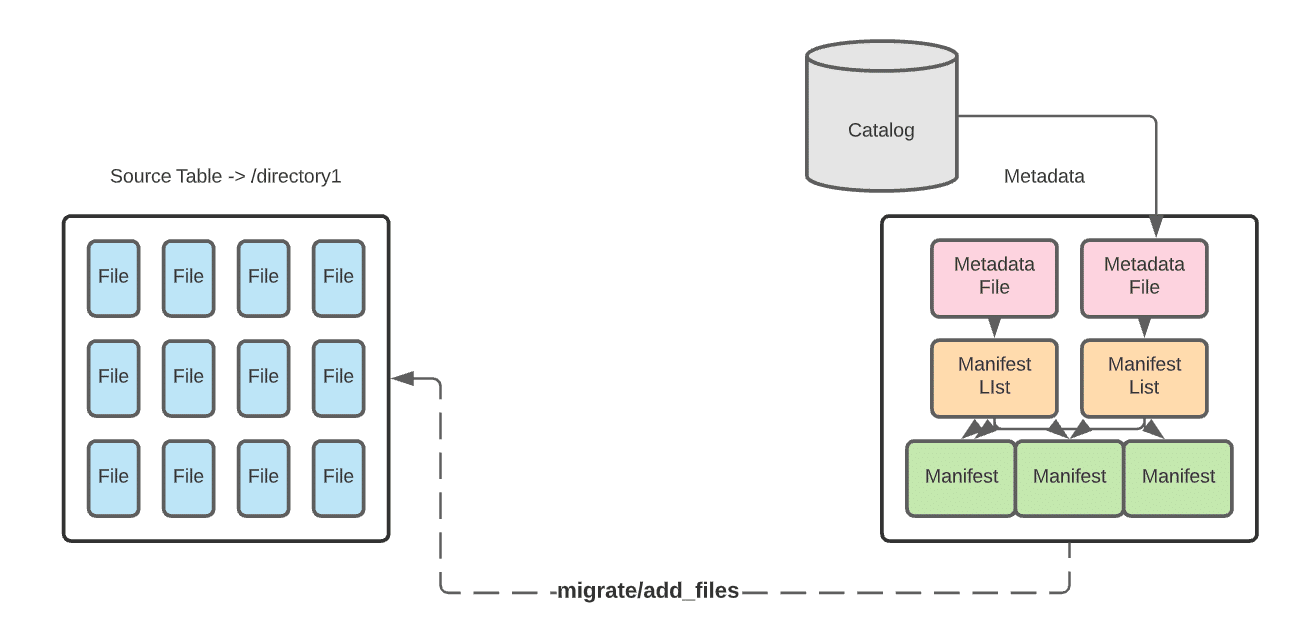
In-place data migration avoids rewriting the data. Instead, you write new Apache Iceberg tables that comprise the already existing data files in your data lake.
In-Place Benefits
In-place migration can be less time-consuming as all the data won’t be restated.
If there is an error in writing the Iceberg metadata, you only need to re-write the metadata, not the data as well.
Data lineage is preserved, as the metadata from the pre-existing catalog still exists.
In-Place Drawbacks
If data is added to the dataset during the metadata write you’ll need to reattempt to include the new data.
To prevent having to reattempt this operation you’ll have write downtime, which may not be feasible in some situations.
This approach won’t work if any of the data needs to be restated.
To allow for this kind of migration, Iceberg has several procedures built into its Spark extensions. Which procedure you should use will be based on whether you are using a Spark Catalog.
To replace an existing Hive table, making it an Iceberg table
Use the migrate procedure to write a new table using the source table’s data files. The new Iceberg table uses the same data files as the source Hive table. Ideally, first you’d create a temporary test table using the snapshot procedure and then use the migrate procedure when ready to migrate. The source data files must be Parquet, AVRO, or ORC.
To add the data files from an existing Hive table to an existing Iceberg table
Use the add_files procedure. This procedure adds the existing data files in the source Hive table to an existing Iceberg table with a new snapshot that includes the files. The source Hive table and the destination Iceberg table will both be referring to the same data files.
Option 2: Shadow Migration of Hive Tables
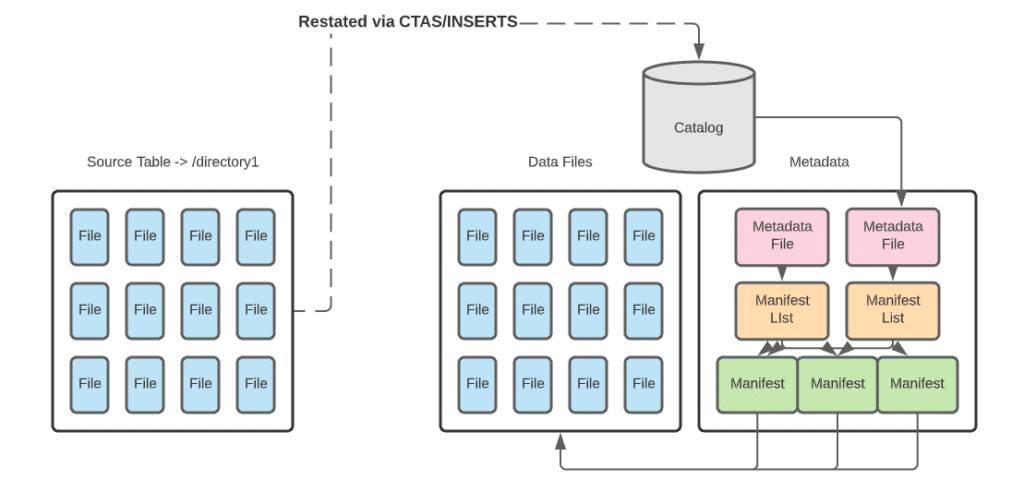
With a shadow migration you are not only creating a new Iceberg table and all the metadata that comes with it, but also restating all data files. This new table is known as the shadow. It becomes the main table once all data is in sync. For larger datasets, you may want to restate them in batches. This approach will have its own set of pros and cons
Shadow Benefits
Shadow migration allows you to audit and validate the data, as the data files must read to be restated.
You’re able to apply schema and partition changes up front.
Data corruption issues are unlikely, as data is audited, validated, and counted through the migration process.
Shadow Drawbacks
You will double the storage for the dataset, as you will store both the original table and the new Iceberg table. (You will retire the old table once the migration is complete, so it’s a temporary issue.)
Because you are writing data and metadata, this migration path can take much longer than in-place migration.
It is difficult to keep tables in sync if there are changes to the original table during the migration. (This issue is also temporary, as syncing updates won’t matter after you retire the original table at migration completion.)
For smaller datasets, restating a table in whole can easily be done with CTAS statements. For larger datasets, you may want to restate an initial batch of data with a CTAS statement and follow up with batched inserts until the entire source is ingested into the new table.
Architecting the Migration
Whether you restate the data with a shadow migration or avoid restating the data with an in-place migration, the actual migration process needs careful architecture.
In general, it should go through a four-phase process:
As the process begins, the new Iceberg table is not yet created or in sync with the source. User-facing read and write operations remain operating on the source table.
The table is created but not fully in sync. Read operations are applied on the source table and write operations are applied to the source and new table.
Once the new table is in sync, you can switch to read operations on the new table. Until you are certain the migration is successful, continue to apply write operations to the source and new table.
When everything is tested, synced, and working properly, you can apply all read and write operations to the new Iceberg table and retire the source table
As you progress through these phases, be sure to check for consistency, logging errors, and logging progress. These checks can help you manage quality, troubleshoot, and measure the length of the migration.
While Iceberg’s procedures and CTAS statements give you a simple path to migrating existing Hive tables, the true art is in architecting your migration plan to minimize or eliminate disruption. Follow the advice in this article to have a solid migration plan and you’ll be enjoying the benefits of Apache Iceberg on your data lake in no time.
Try Dremio Cloud free for 30 days
Deploy agentic analytics directly on Apache Iceberg data with no pipelines and no added overhead.
Ingesting Data Into Apache Iceberg Tables with Dremio: A Unified Path to Iceberg
By unifying data from diverse sources, simplifying data operations, and providing powerful tools for data management, Dremio stands out as a comprehensive solution for modern data needs. Whether you are a data engineer, business analyst, or data scientist, harnessing the combined power of Dremio and Apache Iceberg will undoubtedly be a valuable asset in your data management toolkit.
Sep 22, 2023·Dremio Blog: Open Data Insights
Intro to Dremio, Nessie, and Apache Iceberg on Your Laptop
We're always looking for ways to better handle and save money on our data. That's why the "data lakehouse" is becoming so popular. It offers a mix of the flexibility of data lakes and the ease of use and performance of data warehouses. The goal? Make data handling easier and cheaper. So, how do we […]
Oct 12, 2023·Product Insights from the Dremio Blog
Table-Driven Access Policies Using Subqueries
This blog helps you learn about table-driven access policies in Dremio Cloud and Dremio Software v24.1+.