If you want to know what is a model context protocol server, it is a lightweight application that connects artificial intelligence models to external data sources and tools. This server acts as a translator between an AI system and your corporate databases. It exposes file systems, developer tools, and APIs through a standardized communication layer.
Traditional setups require developers to build custom integration code for every new database and AI model. This process is slow, expensive, and difficult to maintain. An MCP server solves this problem by providing a universal connector. The AI model communicates with the server using a single protocol to retrieve the data it needs.
Key highlights:
A model context protocol (MCP) server connects artificial intelligence models to external data systems and tools through a standard interface.
These servers reduce connection complexity by replacing custom integration code with a single communication layer.
Using these servers lowers token consumption by retrieving context on demand rather than sending entire databases to models.
The Dremio MCP Server connects AI agents directly to your enterprise data catalog with built-in security and high speed.
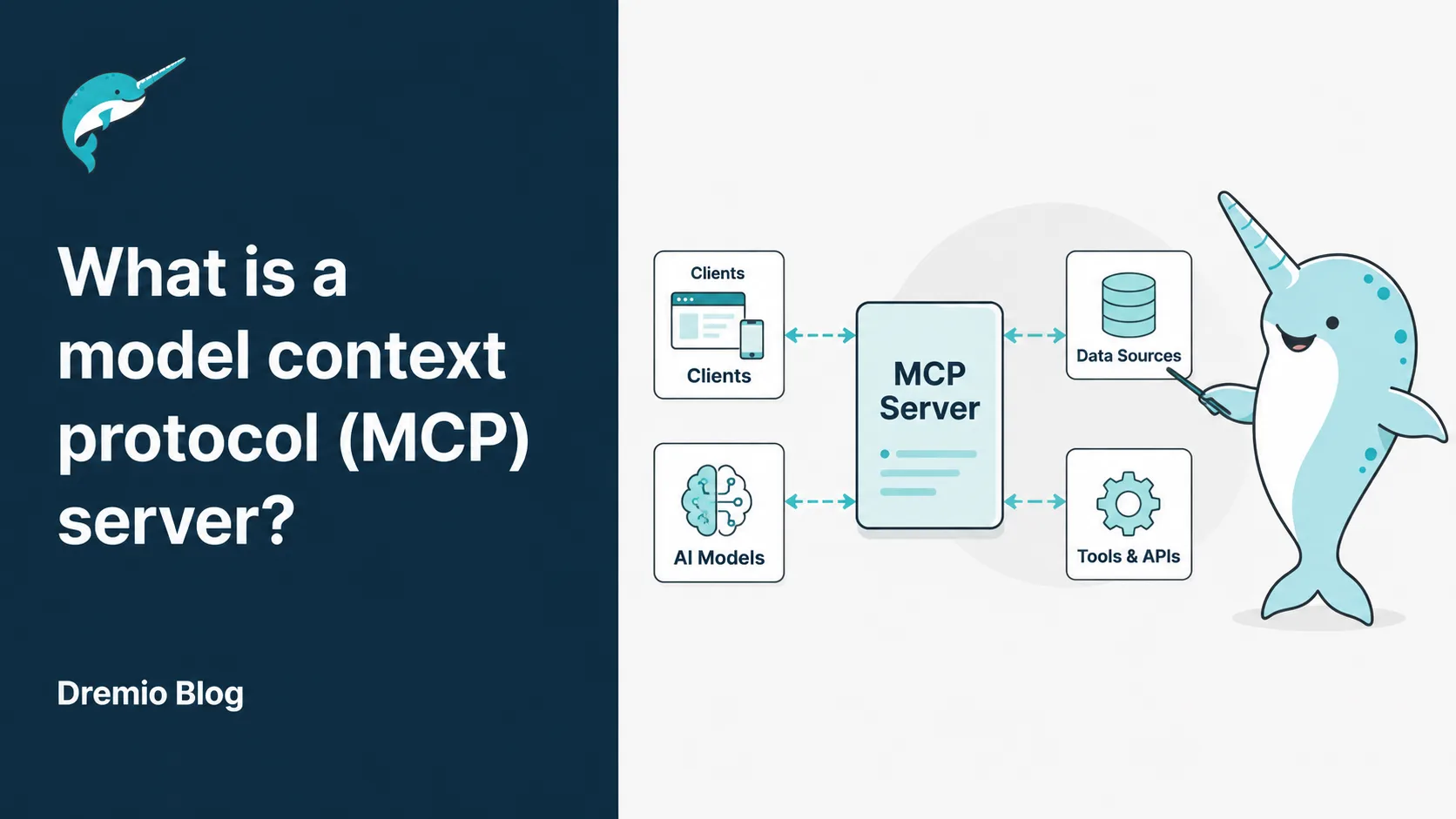
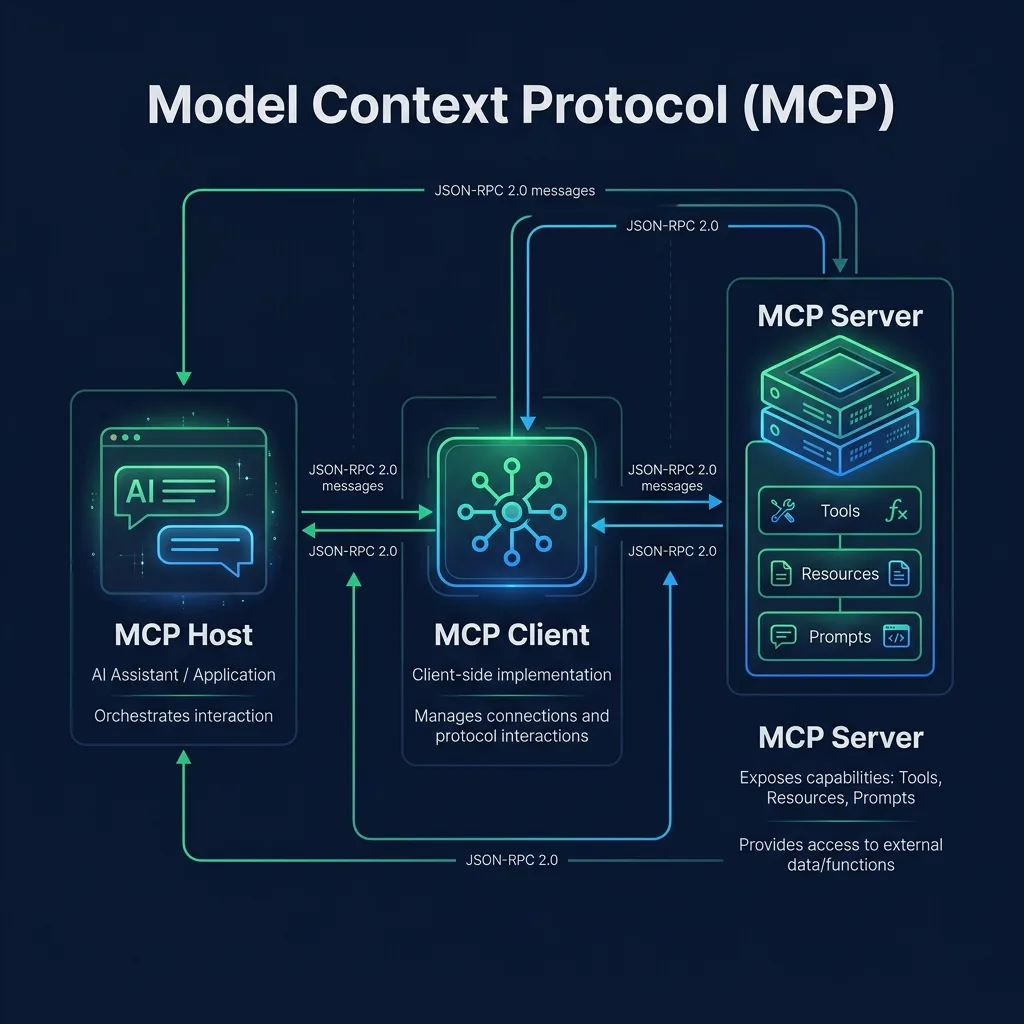
The mcp diagram above illustrates this client-host-server relationship.
Why MCP servers are critical for agentic AI and data-driven workflows
Large language models struggle when they work without external tools. They do not have access to live database records, local files, or SaaS accounts. This lack of access causes inaccurate answers and stale information. Businesses cannot use simple models for complex, multi-step operations.
Modern mcp ai systems use the model context protocol to connect models to external data sources. This protocol lets models read data and run commands securely. AI applications can now retrieve real-time facts to answer questions. This makes AI agents far more useful for daily enterprise operations.
Managing context across multi-step workflows
Complex AI tasks require multiple steps to complete. For instance, an agent needs to read a database schema, run a query, and write a summary. Standard systems lose track of the conversation history during these long tasks. The agent forgets its original goal or confuses different data tables.
Using MCP servers helps agents maintain a clear history of the workflow. The server helps the client coordinate data retrievals at each stage. This active context mapping keeps the agent focused on the task. The model receives only the data relevant to its current step.
The server tracks state across multiple conversational turns.
Agents access specific database tables only when necessary.
Developers define clear paths for data retrieval.
The model avoids confusion by ignoring irrelevant metadata.
Reducing token overhead and cost
Large language models charge users based on the number of tokens they process. Traditional systems send entire schemas and database tables to the model context window. This method is called context-stuffing. It creates high costs and slows down response times. A standard agent workflow can easily consume 100,000 to 300,000 tokens per request.
An MCP server resolves this issue by retrieving data on demand. It filters out unnecessary fields before sending responses to the model. This protocol-based data tokenization keeps payload sizes small. Industry benchmarks show that discovery-based tool retrieval reduces input tokens by 91% to 97%. A typical MCP-optimized query uses only 1,000 to 3,000 tokens. This reduction lowers costs by up to 96%.
Discovery-based toolsets lower input tokens by 91% to 97%.
Optimized queries consume 1,000 to 3,000 tokens instead of 300,000.
Server-side filtering reduces database payload size by 80% to 90%.
Plain text serialization saves 18% to 40% of token overhead.
Improving consistency and response quality
AI models sometimes invent facts when they lack accurate data. This behavior is called hallucination. Hallucinations occur when models guess missing details. In enterprise databases, a small guess can lead to wrong financial reports. Companies need a way to verify every fact the model uses.
MCP servers solve this problem by providing structured data outputs. The server fetches live records directly from the source. This process guarantees data consistency across all model responses. The model receives exact numbers instead of guessing. Accurate data inputs lead to reliable business decisions.
Structured schemas prevent models from making guesses.
Live database connections provide current facts.
Standardized responses make output quality predictable.
Data validation rules prevent malformed queries.
Enabling scalable agent architectures
Building AI applications that grow with your business is difficult. Developers often write unique code for every database connector. When the company adds new tools, the codebase becomes too complex. This complexity stops teams from deploying more AI agents.
MCP servers separate the host application from the data sources. Developers write one connector for a database. Any MCP host can then use this connector immediately. This separation allows companies to build scalable data applications. Teams can add new models and databases without rewriting core code.
A single connector serves multiple AI hosts.
Teams add databases without modifying existing agents.
Modular designs simplify code maintenance.
Separation of concerns speeds up software development.
How do MCP servers work?
To understand what is a model context protocol server, look at the message flow between client and server. An MCP server acts as an intermediary between the AI model and your systems. The host application starts the server as a local or remote process. The client and server then agree on a list of available tools. This process occurs before the user sends any requests.
When a user types a command, the host passes the message to the model. The model decides if it needs an external tool to answer. If it does, the model requests a tool execution through the MCP client. The server runs the action and returns the output to the model.
1. Interpret natural language requests
AI agents start by reading user commands in plain text. Users do not write SQL or API queries directly. They ask questions like: "How many items did we sell last month?" The host application uses natural language processing to understand the user's intent.
The AI model analyzes the request to identify key variables. It looks for dates, product names, and specific metrics. The model then looks at the list of tools provided by the MCP server. It selects the tool that matches the user's request.
User text is analyzed for intent and parameters.
The model extracts key filter values from prompts.
Available server tools are matched to user requests.
The client prepares the communication parameters.
2. Map requests to tools and resources
Once the model selects a tool, it maps the request to the server's capabilities. The server exposes specific tools with clear descriptions. For example, a tool description says: "Retrieves sales data for a given month." The model uses this description to build the tool parameters.
The model fills in the required fields with data from the user's prompt. It creates a structured JSON request. This request contains the tool name and the arguments. The client sends this JSON payload to the server.
The model matches intent to tool descriptions.
Parameters are extracted directly from user text.
JSON payloads are structured automatically.
The client sends the mapped request over the transport layer.
3. Retrieve structured context such as schemas and metadata
The MCP server receives the request and checks the database details. It must find the correct tables and columns to query. To do this, the server retrieves metadata. This includes table names, descriptions, and column data types.
The server reads the database schema to verify the query is valid. This step prevents syntax errors and references to missing tables. The server organizes this metadata into a clean structure. This structure helps the model write the correct SQL statement.
The server reads table schemas and descriptions.
Column data types are checked before execution.
Metadata is organized into structured JSON format.
The system validates the query against the schema.
4. Execute actions such as queries or system checks
After checking the schema, the server runs the requested action. This action can be a read operation, a file search, or a system check. For database tools, the server converts the request into a SQL query. It then connects to the database engine.
The server performs the data querying step securely. It uses pre-approved permissions to access the data. This process protects sensitive tables from unauthorized access. The database engine executes the query and returns the raw rows.
SQL queries are generated from JSON parameters.
The server runs queries against active databases.
Access controls restrict query execution.
Raw results are gathered from the database engine.
5. Return structured responses to the model
The server takes the raw database rows and formats them. It removes extra spaces and irrelevant columns to save tokens. The server then packages the clean data into a JSON response. It sends this response back to the MCP client.
The client delivers the structured response to the model. AI agents use this data to write their final answers in plain language. The user receives a clear, fact-backed response. This step completes the communication cycle.
Raw rows are converted into clean JSON objects.
Irrelevant fields are stripped to save tokens.
The host receives structured facts from the client.
The model writes a plain-language answer for the user.
MCP examples and use cases
With the core concept of the mcp explained, let us look at real-world use cases. Looking at mcp examples shows how developers connect systems without custom API integration code. This standardized method works across local computers and cloud servers. Companies can deploy agents faster.
Common use cases span software development, business analysis, and customer support. In each scenario, the server provides a secure bridge to corporate databases. This setup lets models read and write data safely. Let us look at specific examples of this technology in action.
Powering AI agents for data querying
Data analysts spend hours writing SQL queries to pull reports. An MCP server lets an AI agent write and run these queries instead. The user asks the agent to find specific trends. The agent connects to the database through the server, reads the schema, and executes the SQL.
This setup protects the database from manual mistakes. The server only exposes pre-defined read tools. The model cannot run destructive commands like drop table. Analysts get their reports in seconds, and data teams maintain control over database security.
AI agents run read-only queries autonomously.
Analysts receive reports without writing manual SQL.
The server restricts query actions to prevent data loss.
Query execution times drop from hours to seconds.
Enabling natural language interfaces for analytics
Business leaders need fast access to company metrics. They often struggle with complex business intelligence software. An MCP server provides a natural language interface for these analytics platforms. Users type questions in plain English instead of clicking through dashboards.
The server translates the user's question into API calls. It retrieves the required chart data and sends it to the host. The host then displays the numbers in a clean format. This setup makes data accessible to everyone in the company.
Plain English queries replace complex dashboards.
Non-technical users access company metrics directly.
The server translates questions into API calls.
Response times for data requests decrease.
Supporting multi-step agent workflows
Some tasks require coordinating actions across different software systems. For instance, an agent must check inventory, update a CRM, and email a customer. A single prompt cannot handle this workflow without coordination. MCP servers provide the tools for each step.
The agent runs these tools in a specific sequence. It uses the output of the first tool to run the second tool. For example, it reads the inventory count, then writes a note to the CRM. The server manages these connections to confirm the agent completes the work.
Agents run multiple tools in a sequential chain.
Data flows from one tool to another automatically.
Multi-system tasks are completed within a single session.
The server coordinates tools across different SaaS platforms.
Connecting LLMs to enterprise data systems
Enterprises store data in separate siloes across the company. They use cloud warehouses, local databases, and filesystems. AI models cannot access this fragmented data. Custom connectors are too expensive to build for every system.
MCP servers solve this by wrapping around each storage system. The host application connects to multiple servers at the same time. The model can then join data from a local file and a cloud database. This setup creates a unified view of corporate data.
Servers wrap around separate databases and filesystems.
The host connects to multiple servers simultaneously.
AI models join data across different environments.
Companies avoid building custom, fragile connectors.
MCP server architectures and design patterns
Developers build MCP servers in different ways based on their needs. The design pattern determines how the server accesses data and handles connection state. Choosing the right pattern is critical for speed and security. Let us analyze the common architectural choices.
We will compare different deployment models, context styles, and state options. These choices affect how much CPU the server uses and how fast it answers. Developers must select the pattern that matches their security guidelines.
Tool-based vs resource-based context access
Tool-based access lets the model execute actions on the server. The server exposes functions that write files, run queries, or call external APIs. The model decides when to run the tool and what parameters to send. This pattern is active and flexible.
Resource-based access provides read-only data to the model. The server exposes static files, schemas, or documentation. The model reads these resources to gain background context. This pattern is passive and secure. It prevents the model from changing system state.
Tools run active commands like database queries.
Resources expose read-only documents and schemas.
Tool access is flexible but requires strict security controls.
Resource access is passive and minimizes security risks.
Architectural Dimension
Tool-Based Access
Resource-Based Access
Data Interaction
Active execution of commands and queries
Passive reading of files and schemas
State Modification
Can modify files, database rows, or system states
Strictly read-only, cannot modify data
Model Usage
Model decides parameters and invokes execution
Model reads data as background context
Security Risk
Higher risk, requires strict permission checks
Lower risk, data exposure is limited
Typical Example
RunSqlQuery, WriteToFile, SendEmail
GetSchemaOfTable, ReadDocumentation
Stateless vs stateful context handling
Stateless MCP servers do not save information between requests. Each tool call is independent. The server receives the request, runs the action, and forgets the transaction. This pattern is simple to build and scales easily across cloud servers.
Stateful servers keep track of past requests and connection data. They store variables, open database connections, or session histories. This pattern speeds up multi-step tasks by avoiding repeated logins. But stateful servers use more memory and are harder to scale.
Stateless servers treat every request as a new transaction.
Stateful servers store connection and user session history.
Stateless designs scale easily across cloud environments.
Stateful designs speed up tasks by keeping connections open.
Feature / Detail
Stateless Handling
Stateful Handling
Session Memory
None, forgets requests immediately
Keeps history of queries and connections
Scaling Capability
High, easily deployed behind load balancers
Complex, requires session binding or database storage
Resource Overhead
Low memory usage per connection
Higher memory usage to maintain open sessions
Connection Speed
Slower from reconnecting each time
Faster with active connections
Implementation Complexity
Simple, no database state required
High, must handle session timeouts and cleanup
Embedded vs external MCP servers
Embedded servers run inside the host application's process. The host launches the server directly on the local machine. They communicate using standard input and output (stdio). This setup is fast and requires no network configuration.
External servers run as separate services on a network. The host connects to them using HTTP and Server-Sent Events (SSE). This setup allows multiple hosts to share the same server. It is ideal for enterprise deployments where data sits on remote hardware.
Embedded servers use stdio for fast, local communication.
External servers use HTTP and SSE for network connections.
Embedded setups require no port or firewall configuration.
External setups let multiple applications share a single server.
Real-time vs cached context retrieval
Real-time servers query the database every time the model asks. This guarantees the model receives the most current facts. Real-time queries are necessary for financial transactions or live system checks. But they can slow down performance if the database is busy.
Cached servers store recent database answers in local memory. If a new request matches a recent query, the server returns the cached data. This pattern speeds up response times and reduces database load. But the model can receive stale data if the source changed.
Real-time retrieval pulls current database records.
Cached retrieval serves responses from local memory.
Real-time queries are slower but guarantee fresh data.
Cached queries reduce database load and speed up responses.
Best practices for MCP server implementation
A successful mcp server implementation requires careful planning to prevent performance issues. When you implement a model context protocol server, you must design schemas that AI models can read easily. You must protect sensitive database columns from unauthorized queries.
We will outline five key strategies for successful implementation. These practices focus on schema design, context control, and security. Following these guidelines helps teams build reliable and secure AI integrations.
1. Define clear context boundaries and scope
AI models perform best when they have a narrow focus. Exposing your entire database to the model causes confusion. The model will struggle to select the correct tables. To prevent this, developers must define clear boundaries for the server.
Only expose the tables and columns necessary for the specific AI task. Write custom SQL views that combine only the relevant data. This practice keeps the schema description small. It prevents the model from reading sensitive employee or financial records.
Expose only the tables needed for the AI task.
Use database views to hide sensitive columns.
Keep tool descriptions focused on single tasks.
Limit the number of tools per server to reduce confusion.
2. Refine context window usage
AI context windows are limited and expensive to fill. Sending raw, unformatted data quickly exhausts this space. Developers must refine how the server packages data. This involves formatting table results and removing filler characters.
Convert database rows into compact plain text or simple JSON objects. Remove empty columns and repeated headers from the query output. This practice saves tokens and allows the model to process longer conversation histories. It reduces API costs.
Convert database rows into compact text blocks.
Remove empty columns from query outputs.
Use short, plain-text descriptions for tools.
Filter out redundant metadata to save tokens.
3. Implement relevance filtering and ranking
When a query returns hundreds of rows, the model cannot read them all. Sending too much data confuses the model and wastes tokens. Developers must implement filtering at the server layer. The server must rank results by relevance before sending them.
Use SQL limit clauses to restrict the number of returned rows. Implement semantic search to find the most relevant records. The server should only return the top matches to the client. This keeps the response clean and easy for the model to read.
Use SQL limit clauses to cap query results.
Rank database records by semantic relevance.
Return only the top matching rows to the model.
Filter out duplicate records at the server layer.
4. Monitor context drift and model performance
Over time, database schemas and user queries change. These changes can cause the model to select the wrong tools. This issue is called context drift. Developers must monitor how the model interacts with the server.
Log the tool calls, query performance, and user feedback. Look for queries that fail or return empty results. Monitoring these metrics helps developers find outdated tool descriptions. They can then update the server to match current user needs.
Log every tool execution and query result.
Track failed queries to find outdated schemas.
Monitor user feedback to measure response quality.
Update tool descriptions when schemas change.
5. Secure your data and implement data governance
AI agents need access to company data, but they must not bypass security rules. If an agent has unlimited access, it can read sensitive files. Developers must secure the connection between the server and the database. They must apply role-based access control to the server's credentials.
Implement strict data governance policies at the database layer. The server should use credentials that only allow read-only access. This setup prevents the model from writing unauthorized data or modifying table structures. Security rules must apply to AI agents just as they do to human users.
Apply role-based access control to server credentials.
Use read-only connections to prevent data modification.
Encrypt data in transit between the host and server.
Audit tool executions to track AI data access.
Power model context management with Dremio MCP server
Businesses asking what is a model context protocol server can use the Dremio MCP Server. The Dremio MCP Server provides a powerful way to manage context for enterprise AI. Dremio is the Intelligent Lakehouse Platform for the Agentic AI Era. Built by the creators of Apache Polaris and Apache Arrow, it meets the needs of both AI agents and humans. The server connects agents directly to your data catalog without complex pipelines.
The server exposes specific, secure tools to the model. These tools include RunSqlQuery, GetSchemaOfTable, and GetTableOrViewLineage. AI agents use these tools to read schemas, trace data lineage, and run SQL queries securely. By using Dremio’s unified semantic layer, agents understand business terms without looking at raw table structures. This makes Dremio the fastest lakehouse for autonomous AI operations.
A model context protocol (MCP) server like the Dremio MCP Server guarantees that enterprise AI remains secure and fast.
Provides built-in tools like RunSqlQuery and GetSchemaOfTable.
Integrates with Apache Polaris to manage data catalog access.
Uses Apache Arrow to process queries at high speeds.
Exposes lineage information through GetTableOrViewLineage.
Applies enterprise security policies to all AI queries.
See how Dremio can accelerate your AI applications. Book a demo today to experience the power of governed, context-aware AI workflows.
Model context protocol (MCP) server FAQ
This FAQ section answers common questions about the model context protocol (MCP) server.
What is a model context protocol server?
A model context protocol server is an open-standard connector that links AI hosts to external systems. It allows models to retrieve data and execute tools through a standard JSON-RPC interface. This replaces the need to build custom APIs for every database.
What is mcp in ai?
MCP stands for Model Context Protocol. In AI, it is an open standard designed to solve the data connectivity bottleneck. It lets developer tools and AI agents connect to database systems without writing unique integration code.
How do mcp servers work?
MCP servers work by exposing tools, resources, and prompts to an AI host application. When the model needs external facts, it sends a JSON-RPC request to the server. The server executes the task and returns a structured response to the model.
What are some model context protocol examples?
Examples include database connectors like the Dremio MCP Server, local file system explorers, and developer API wrappers. These integrations let AI models run SQL queries, read local directories, or manage code repositories.
What is the standard mcp server architecture?
The architecture follows a client-host-server design. The host application contains the client, which communicates with the server process. The server interacts directly with databases and APIs to fetch facts for the model.
Try Dremio Cloud free for 30 days
Deploy agentic analytics directly on Apache Iceberg data with no pipelines and no added overhead.
Intro to Dremio, Nessie, and Apache Iceberg on Your Laptop
Editor’s note, September 2026. This post was published in September 2023 and some product details have changed since. Nessie is still available and self-deployable under the Apache-2.0 licence, and it remains the clearest implementation of catalog-level branching. It is not an Apache Software Foundation project, and its development has slowed considerably. For how the current […]
Aug 16, 2023·Dremio Blog: News Highlights
5 Use Cases for the Dremio Lakehouse
With its capabilities in on-prem to cloud migration, data warehouse offload, data virtualization, upgrading data lakes and lakehouses, and building customer-facing analytics applications, Dremio provides the tools and functionalities to streamline operations and unlock the full potential of data assets.
Sep 30, 2026·Dremio Blog: Open Data Insights
Apache Iceberg 1.12.0: What’s New, Breaking Changes, and Upgrade Guide
Apache Iceberg 1.12.0 expands v3 engine support, REST catalog operations, streaming reliability, and v4 groundwork. Learn how to upgrade safely.