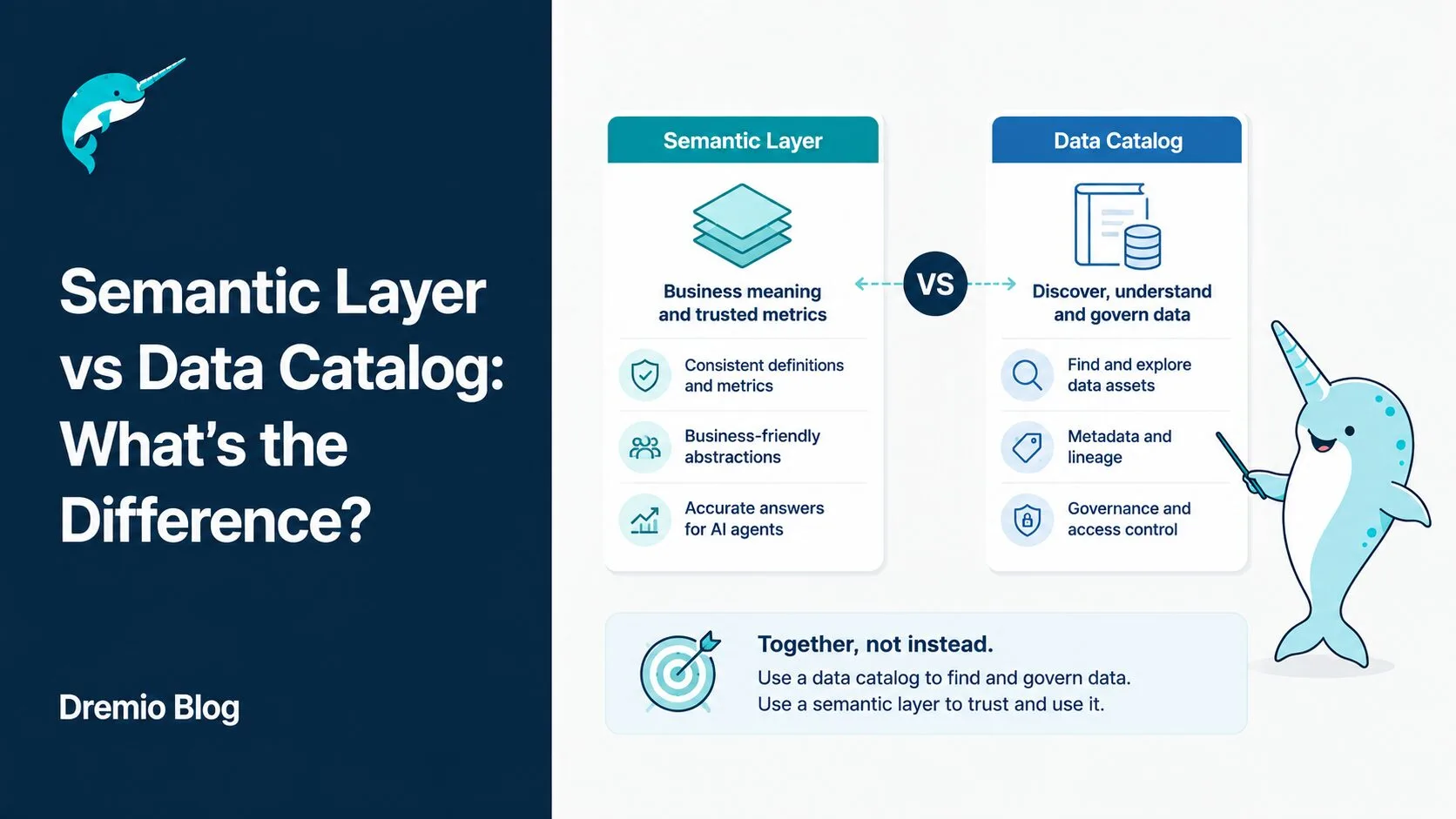
These two terms show up in almost every data platform conversation, and they are often used interchangeably. Both deal with metadata. Both aim to make data more understandable to humans and machines. But they serve fundamentally different purposes, sit in completely different places in your architecture, and solving one problem does not solve the other.
If you are evaluating tooling for your data platform, confusing the semantic layer vs data catalog question is one of the most common and costly mistakes you can make. You might build an elaborate governance catalog when what your analysts actually need is consistent metric definitions. Or you might deploy a semantic layer and discover that no one can find the data it serves because there is no catalog to expose it.
This guide breaks down what each tool actually does, where the real differences lie, how they work together, and how Dremio handles both functions within a single platform.
The Confusion Is Understandable. But It Is Costly.
Vendor marketing deserves some of the blame here. Many catalog vendors describe their tools as providing "business context" or "semantic enrichment," language that sounds a lot like what a semantic layer does. Meanwhile, some semantic layer tools store metadata about metrics and dimensions in ways that look like a catalog.
The functional overlap is real: both tools deal with definitions. A catalog documents what "revenue" means. A semantic layer computes what "revenue" means. That is a meaningful distinction, but it is easy to miss when you are reading product pages.
The cost of confusing them shows up in two ways. First, teams invest heavily in a catalog and still produce conflicting metrics across business units because there is nothing enforcing the definitions at query time. Second, teams build a semantic layer that no one can discover or trust because there is no central inventory of what exists, who owns it, or where it came from.
Getting this right starts with a clear-eyed look at what each tool actually does.
What a Data Catalog Does
It Is an Inventory System
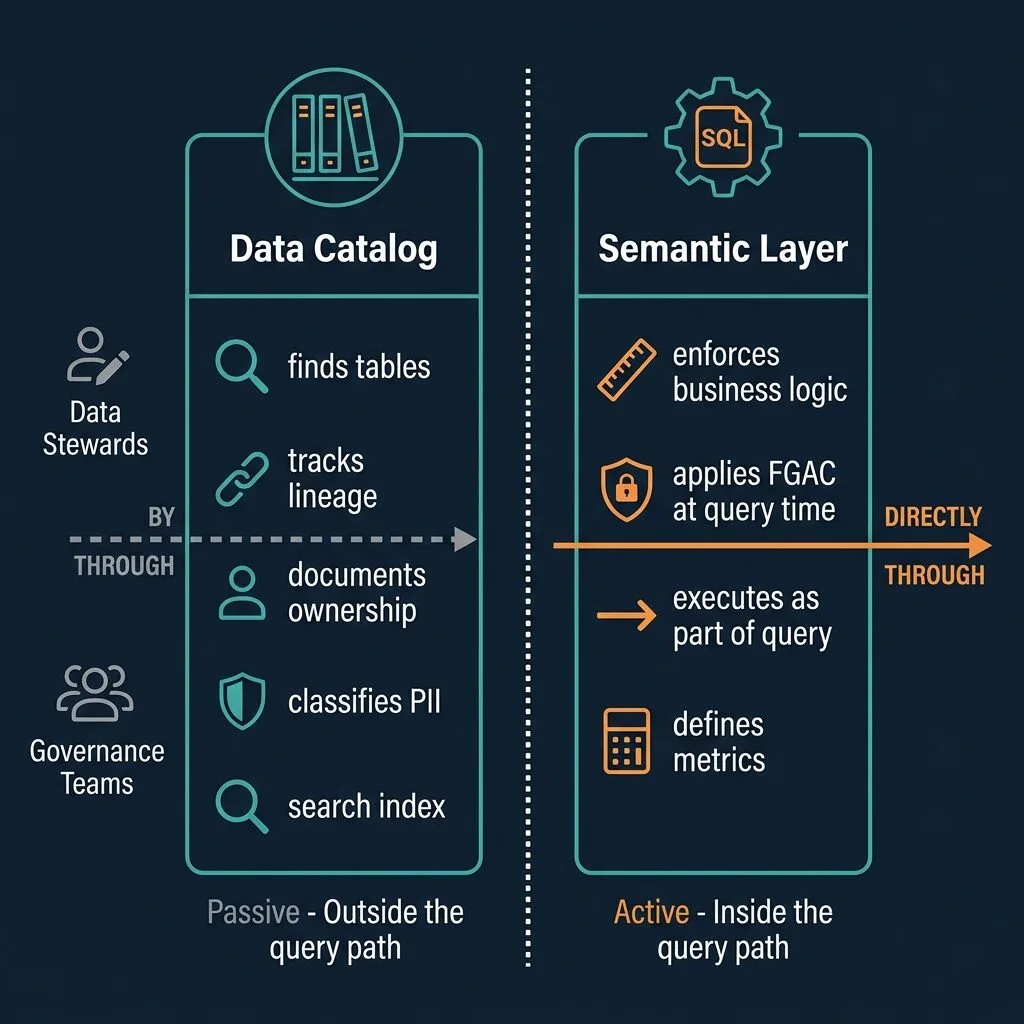
A data catalog is a passive inventory of your organization's data assets. It answers the question: "What data exists, where does it live, and what does it mean?"
Think of it like a library catalog. The card tells you a book exists, where it is shelved, and a brief description of its contents. But the card does not give you the book. You still have to go get it.
A catalog tracks:
Tables and columns across databases, data lakes, and warehouses
Business glossary entries: human-readable definitions for business terms
Data lineage: where data came from and where it flows downstream
Ownership and stewardship: who is responsible for each dataset
PII classification: which columns contain sensitive personal data
Compliance documentation: audit trails for GDPR, CCPA, and similar requirements
Crucially, a catalog does not execute queries. It sits outside the query path entirely. When an analyst opens a catalog, they are browsing an index, not running a computation.
Who Uses a Data Catalog
The primary users of a data catalog are the people responsible for organizing and governing data, not the people consuming it for analysis. That means:
Data stewards tagging assets and maintaining definitions
Data governance teams enforcing policies and tracking compliance
Compliance officers generating audit reports
Analysts searching for datasets before they start building a report or pipeline
Analysts use the catalog to find data. They use the semantic layer to query it correctly.
Example Data Catalog Tools
The most widely used catalog tools include Apache Atlas (open source, widely deployed in Hadoop/Hive environments), Alation, Atlan, DataHub (open source, built by LinkedIn and widely adopted), and Collibra. Microsoft Purview and Google Data Catalog serve this role in their respective cloud ecosystems.
Each has different strengths in lineage depth, AI-powered search, and integration breadth. But they all share the same fundamental characteristic: passive metadata management outside the query path.
What a Semantic Layer Does
It Is an Active Query Layer
A semantic layer is an active layer that sits inside your query path and translates physical data into business concepts. It answers the question: "What does this data mean, and how should it be calculated?"
Unlike a catalog, a semantic layer does not just describe a metric. It computes it. When a BI tool or AI agent asks for "monthly recurring revenue," the semantic layer knows which tables to join, which filters to apply, which grain to use, and which rows a given user is permitted to see. It executes that logic every time.
Virtual datasets and views: logical representations of physical tables with business logic embedded
Metric definitions: consistent calculations for KPIs like revenue, churn, and conversion
Fine-grained access control (FGAC): row-level and column-level security enforced at query time
Query rewriting: optimizing or redirecting queries to pre-aggregated results (Reflections in Dremio)
Multi-tool consistency: the same definition delivered to Tableau, Power BI, Python, and AI agents
The semantic layer does not just document your business rules. It enforces them.
Who Uses a Semantic Layer
The semantic layer serves the people and systems actually running queries:
BI tools like Tableau, Power BI, and Apache Superset
Analysts and data scientists writing SQL or using notebooks
AI agents executing SQL queries via MCP or natural language interfaces
Application developers embedding analytics into products
Every query runs through the semantic layer. That is what makes it active rather than passive.
Example Semantic Layer Tools
Dremio is the primary example covered in this post, using virtual datasets and its AI semantic layer as the core abstraction. Other tools in this space include the dbt Semantic Layer (metric definitions built into the dbt transformation layer), Cube (a standalone semantic layer with an API), and Looker LookML (Looker's proprietary modeling layer).
Semantic Layer vs Data Catalog: 4 Key Differences
These four distinctions are where the rubber meets the road. Understanding them will clarify which tool you actually need, and whether you need both.
Passive vs. Active
This is the most fundamental difference. A data catalog is passive. It holds information about data. It does not participate in query execution.
A semantic layer is active. Every query for a governed metric passes through it. Remove it, and you are querying raw physical tables with no business logic applied. Remove the catalog, and queries still work. But no one can find or trust the data.
Inside vs. Outside the Query Path
A catalog sits adjacent to your query infrastructure. You consult it before writing a query, not during. The query itself bypasses the catalog entirely.
A semantic layer sits in the query path. When Tableau sends a SQL query for "total orders by region," the semantic layer intercepts it, applies the correct join logic, enforces row-level access, and returns a governed result. The catalog had no part in that.
This architectural difference has real implications for tool selection and infrastructure design. The catalog is a governance tool. The semantic layer is a query execution layer.
Business Logic: Documented vs. Executed
A catalog documents business definitions. You can look up the catalog entry for "active customer" and read that it means "a customer who has placed an order in the last 90 days." That is useful context.
But when your BI dashboard queries for active customers, that definition needs to be computed, not just described. The semantic layer holds the SQL that implements the rule: WHERE last_order_date >= CURRENT_DATE - INTERVAL 90 DAY. It runs that logic on every query.
If the semantic layer does not exist, each analyst or BI developer writes their own version of the SQL. Inconsistencies accumulate. Reports diverge. Leadership loses confidence in the numbers.
Access Control: Metadata Policies vs. Query-Time FGAC
Catalogs enforce access control at the metadata level. They can restrict who can discover or view the catalog entry for a sensitive dataset. That is useful for data discovery governance but does not protect the data itself from direct query.
A semantic layer enforces access at query time. In Dremio, FGAC (fine-grained access control) applies row-level and column-level filtering based on the authenticated user. A sales analyst querying through the semantic layer gets results filtered to their region. The filtering happens during query execution, not after.
Comparison Table: 8 Dimensions
Dimension
Data Catalog
Semantic Layer
Primary purpose
Data discovery and inventory
Business logic and query execution
Key question
What data exists?
What does this data mean?
In the query path?
No (passive)
Yes (active)
Primary users
Data stewards, governance teams
BI tools, analysts, AI agents
Implements business logic?
Documents it
Executes it
Access control mechanism
Metadata policies
Query-time enforcement (FGAC)
Tracks lineage?
Yes (its primary function)
Partially (view dependencies)
Example tools
Alation, DataHub, Atlan, Collibra
Dremio, dbt Semantic Layer, Cube, Looker
The table makes the complementary nature clear. These tools occupy different cells. Neither duplicates the other.
Do You Need Both?
Yes, and Here Is Why They Work Together
The honest answer for most organizations operating at scale is: you need both, and the way they work together is what makes your data platform coherent.
Here is a realistic workflow that illustrates the relationship:
Your data governance team defines "monthly recurring revenue" in the data catalog's business glossary.
Data stewards tag the source subscriptions table with ownership, PII fields, and quality score.
Data engineers implement the MRR metric as a virtual dataset in Dremio's semantic layer. This is the SQL that joins subscriptions to billing_events and applies the 30-day filter.
Analysts and BI tools query Dremio for MRR. They get a governed, consistent result every time, with FGAC applied.
Lineage in the catalog shows that MRR depends on subscriptions and billing_events, flagging downstream impact if either source changes.
The catalog provides the organizational framework. The semantic layer provides the execution engine. Neither works as well without the other.
The AI Agent Case
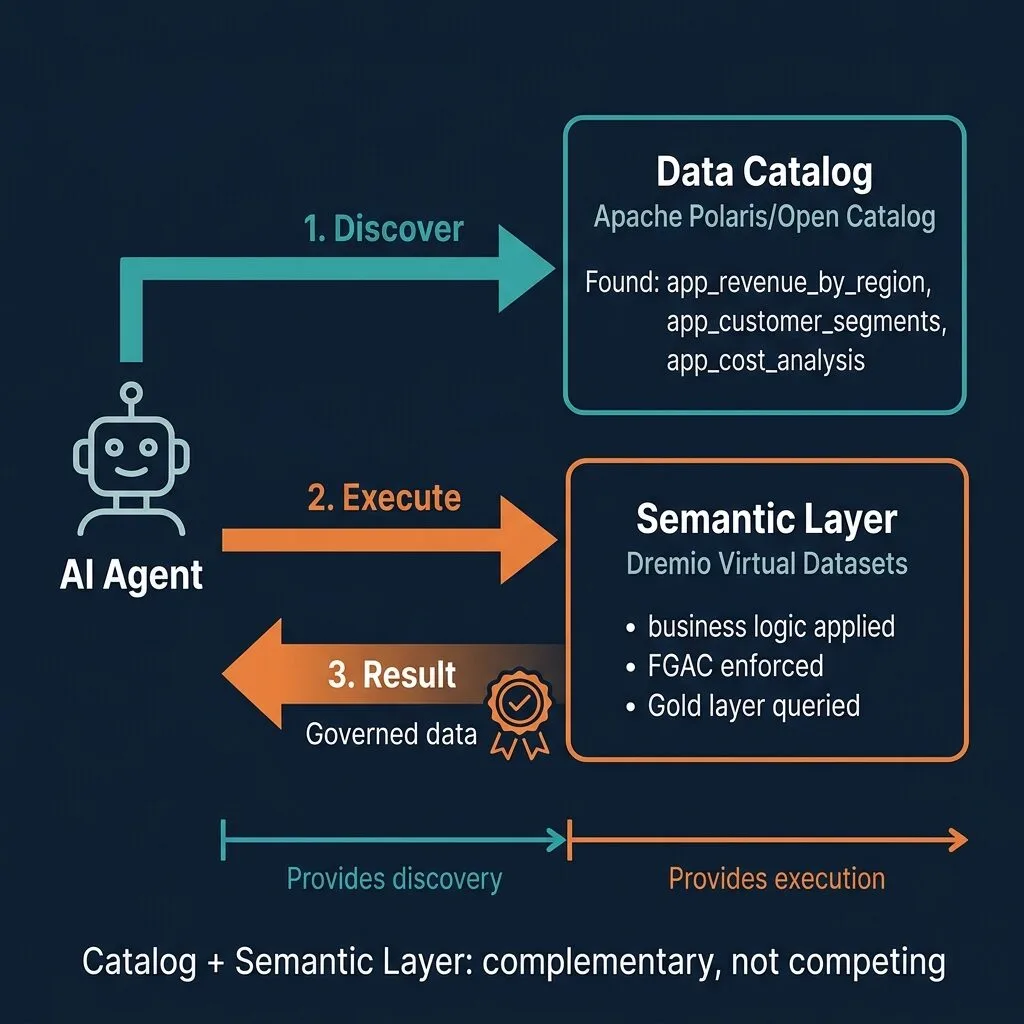
The case for using both becomes even more compelling when AI agents enter the picture. Agents executing data queries, whether for reporting, investigation, or automated workflows, need to navigate your data infrastructure intelligently.
An AI agent needs the catalog to discover what is available. It searches for "tables related to customer churn" and the catalog returns semantically relevant options. Without the catalog, the agent has no structured index to search.
Then the agent needs the semantic layer to execute the query correctly. It cannot write raw SQL against the physical schema and expect governed, accurate results. It needs the semantic layer to apply business logic, enforce FGAC for the current user context, and return trusted output.
This is the architecture behind Dremio's Agentic Lakehouse: catalog for discovery, semantic layer for governed execution. The two work in sequence for every agentic query.
How Dremio Bridges Both
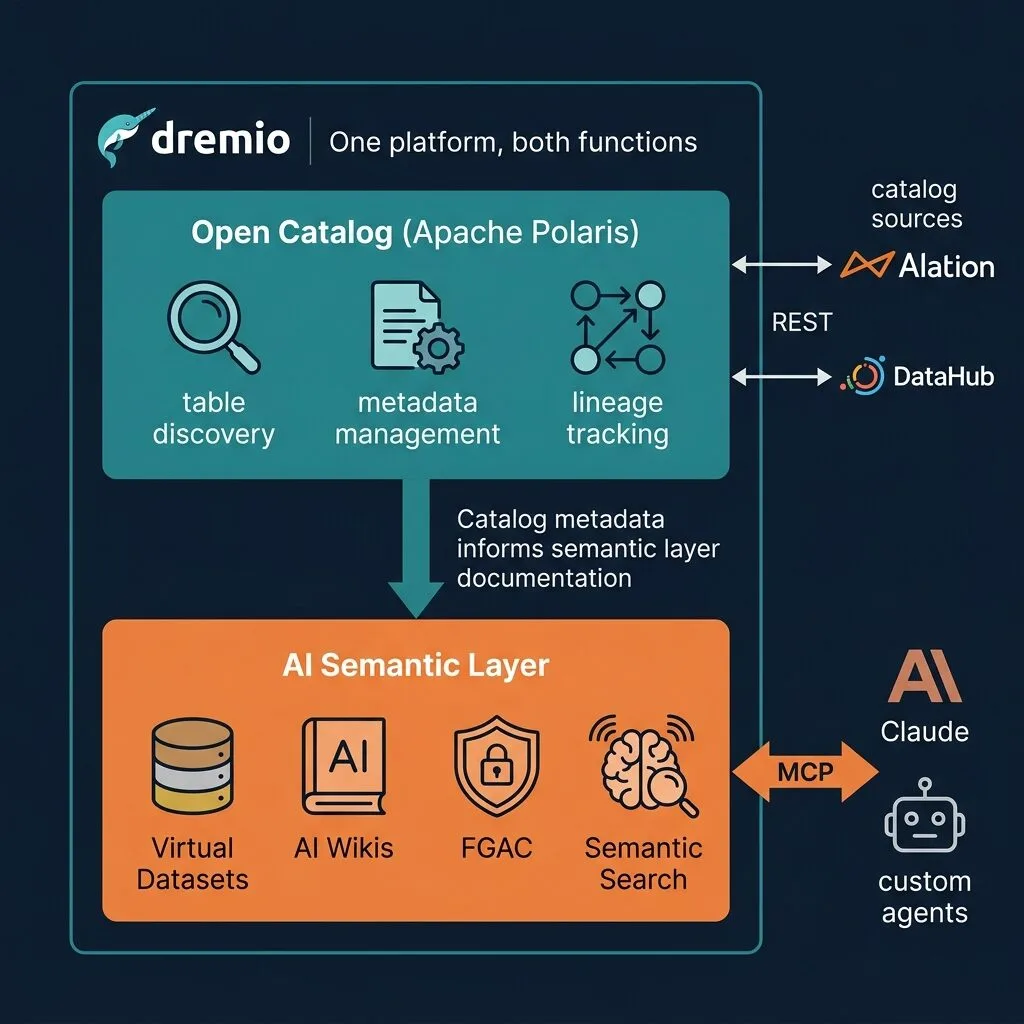
Most organizations need to integrate catalog and semantic layer tools from different vendors. Dremio reduces that complexity by providing both functions within a single platform for Iceberg-native workloads.
Open Catalog for Data Discovery
Dremio's Open Catalog, built on Apache Polaris, handles the catalog side of the equation. It provides:
Table discovery for Apache Iceberg tables across your lakehouse
Metadata management: schemas, partition specs, snapshots, and custom properties
Lineage tracking at the Iceberg layer
Multi-engine access: Spark, Flink, Trino, and other engines can query the same catalog via the open Polaris REST API
For a full overview of what Apache Polaris enables, the Dremio Polaris overview covers the architecture and its role in the open Iceberg ecosystem.
Open Catalog is not a replacement for an enterprise catalog like DataHub or Collibra in complex multi-tool environments. But for teams building on Apache Iceberg, it provides the discovery and metadata management layer without requiring a separate tool.
Virtual Datasets and AI Semantic Layer for Query Execution
On the semantic layer side, Dremio uses virtual datasets: SQL views that encode business logic and serve as the primary abstraction for BI and AI consumers. These virtual datasets live in the semantic layer and are what analysts and AI agents query, never the raw physical tables.
Dremio's Reflections (including Autonomous Reflections) take this further by automatically building pre-aggregated materializations that accelerate query performance without requiring manual optimization. C3 (Columnar Cloud Cache) adds caching acceleration on top of that.
FGAC in Dremio applies row-level and column-level security at query time on virtual datasets. Access policies follow the data through the semantic layer regardless of which tool is querying.
The MCP Server in Dremio allows AI agents to connect directly to the semantic layer via the Model Context Protocol, executing governed SQL queries with business logic applied.
One Platform, Fewer Moving Parts
For teams building on Apache Iceberg, Dremio provides catalog and semantic layer in one platform. You define your Iceberg tables in Open Catalog, build virtual datasets in the semantic layer, apply FGAC, and serve governed results to BI tools and AI agents.
This matters for operational simplicity. Maintaining two separate tools with separate authentication systems, separate lineage models, and separate upgrade cycles adds friction. Dremio eliminates that for the Iceberg-native use case.
When a Standalone Catalog Is Still Worth It
Dremio handles both functions well within its scope, but there are scenarios where a dedicated enterprise catalog alongside Dremio still makes sense.
Enterprise-wide data discovery across systems not connected to Dremio. If your organization runs Oracle databases, Salesforce, SAP, and dozens of other systems, a catalog like Collibra or DataHub can index all of them in a unified inventory. Dremio's catalog scope is focused on the lakehouse.
Complex cross-tool lineage tracking. If you need lineage that spans ETL pipelines (Airflow, dbt), multiple warehouses, BI tools, and operational databases, a dedicated catalog provides the cross-system view that no query engine catalog can fully replicate.
Compliance documentation workflows. Organizations subject to GDPR, CCPA, or HIPAA often need formal audit trails showing which datasets contain PII, who accessed them, and how long they are retained. Dedicated catalog tools have built-in workflows for this that go beyond what a query engine catalog provides.
Organization-wide business glossary. A company-wide glossary with approval workflows, versioning, and business stakeholder ownership often fits better in a tool designed specifically for that purpose, accessible to non-technical governance leads.
In these cases, the right architecture is a dedicated enterprise catalog feeding lineage and context to Dremio, with Dremio providing the semantic layer for query execution.
Making the Right Choice for Your Stack
If you can only deploy one tool right now, the choice depends on your biggest immediate pain.
If analysts cannot find data, do not know who to ask about it, and regularly discover that the same term means different things across teams, your immediate need is a catalog. Start there.
If analysts can find data but produce conflicting metrics, spend time rebuilding joins every report, and cannot enforce consistent access policies across BI tools, your immediate need is a semantic layer. The catalog can come later.
If AI agents are part of your strategy, and they should be, plan for both from the start. Agentic workloads require both discovery (catalog) and governed execution (semantic layer) to produce trustworthy results. Bolting on the missing piece later is harder than designing for both upfront.
For organizations building on Apache Iceberg, Dremio gives you both in a single platform. That is a significant simplification for the lakehouse-native use case. For organizations with broader enterprise scope, a dedicated catalog tool alongside Dremio is the right call.
The convergence of AI agents, open table formats, and semantic tooling is making this architecture decision more consequential than it was a few years ago. AI agents that query through ungoverned raw tables or that cannot discover what data exists are not reliable. The teams that invest in both catalog and semantic layer now will have a significant advantage when agentic analytics becomes the norm.
Start building your governed data platform today.Try Dremio Cloud free for 30 days and explore how Open Catalog and the AI Semantic Layer work together for your Apache Iceberg workloads.
Keep learning
For a deeper treatment of the topics in this post, download Apache Iceberg: The Definitive Guide by Tomer Shiran, Jason Hughes, and Alex Merced, free from Dremio.
Intro to Dremio, Nessie, and Apache Iceberg on Your Laptop
Editor’s note, September 2026. This post was published in September 2023 and some product details have changed since. Nessie is still available and self-deployable under the Apache-2.0 licence, and it remains the clearest implementation of catalog-level branching. It is not an Apache Software Foundation project, and its development has slowed considerably. For how the current […]
Aug 16, 2023·Dremio Blog: News Highlights
5 Use Cases for the Dremio Lakehouse
With its capabilities in on-prem to cloud migration, data warehouse offload, data virtualization, upgrading data lakes and lakehouses, and building customer-facing analytics applications, Dremio provides the tools and functionalities to streamline operations and unlock the full potential of data assets.
Sep 30, 2026·Dremio Blog: Open Data Insights
Apache Iceberg 1.12.0: What’s New, Breaking Changes, and Upgrade Guide
Apache Iceberg 1.12.0 expands v3 engine support, REST catalog operations, streaming reliability, and v4 groundwork. Learn how to upgrade safely.