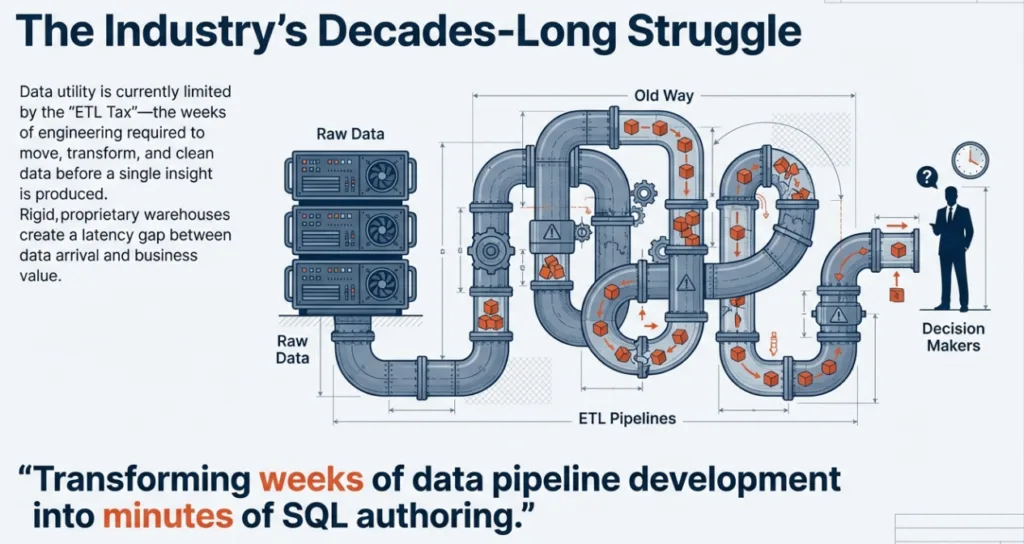
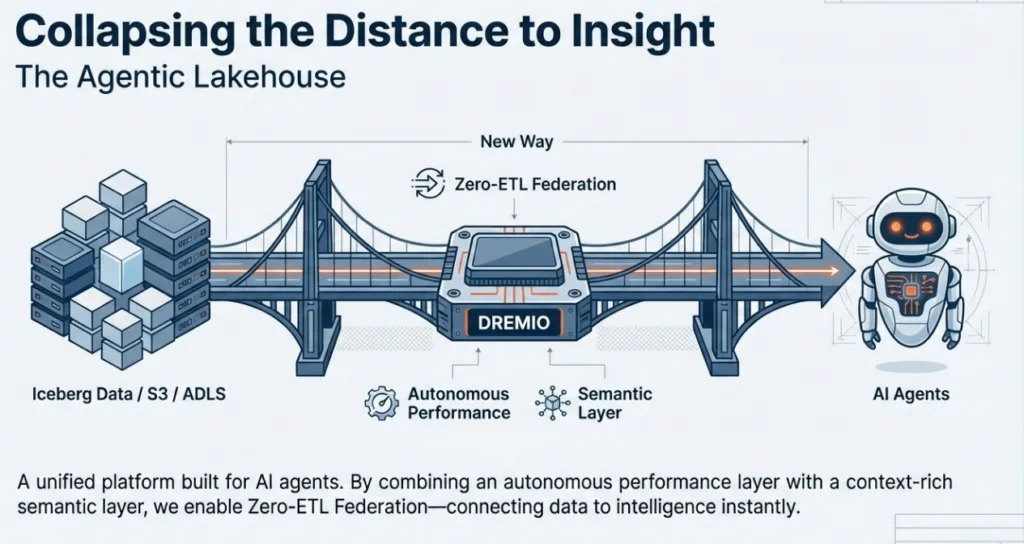
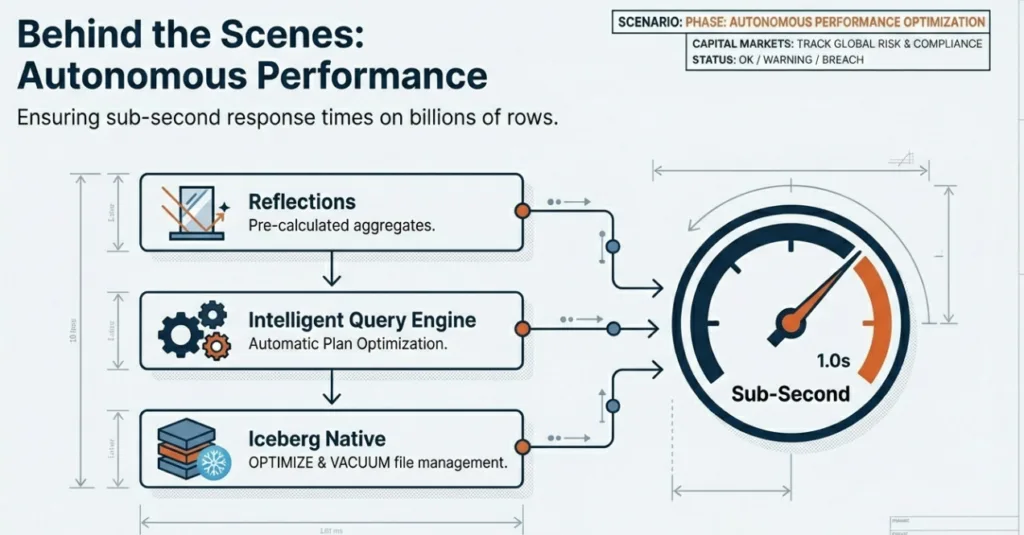
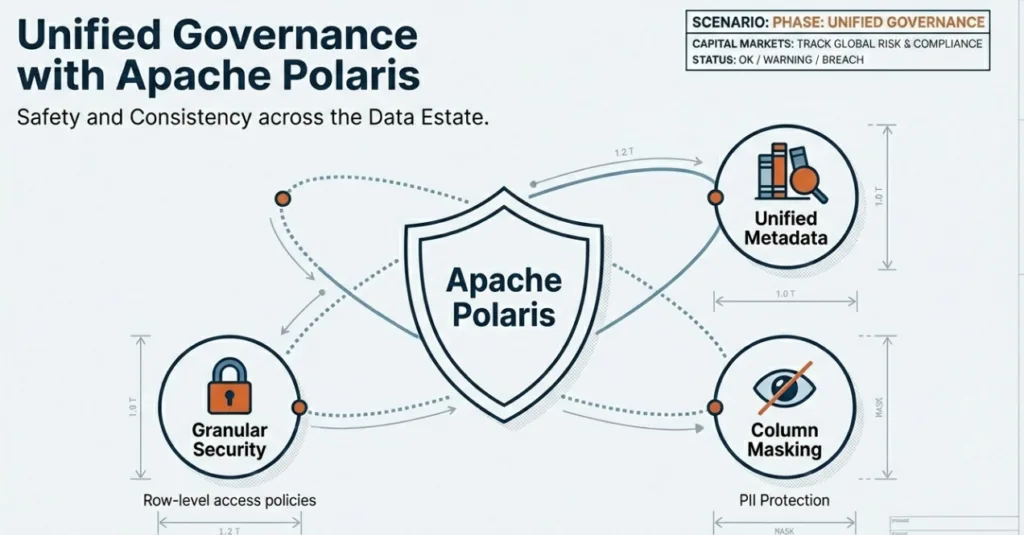
For decades, the data industry has been defined by the struggle to move data from rigid, proprietary warehouses into the hands of decision-makers. We have been limited by the "ETL tax", the weeks of engineering required to move, transform, and clean data before a single insight is produced.
Dremio Cloud is a fully managed platform available on AWS and Azure that provides the high-performance foundation for your agentic workflows. Follow these steps to get started:
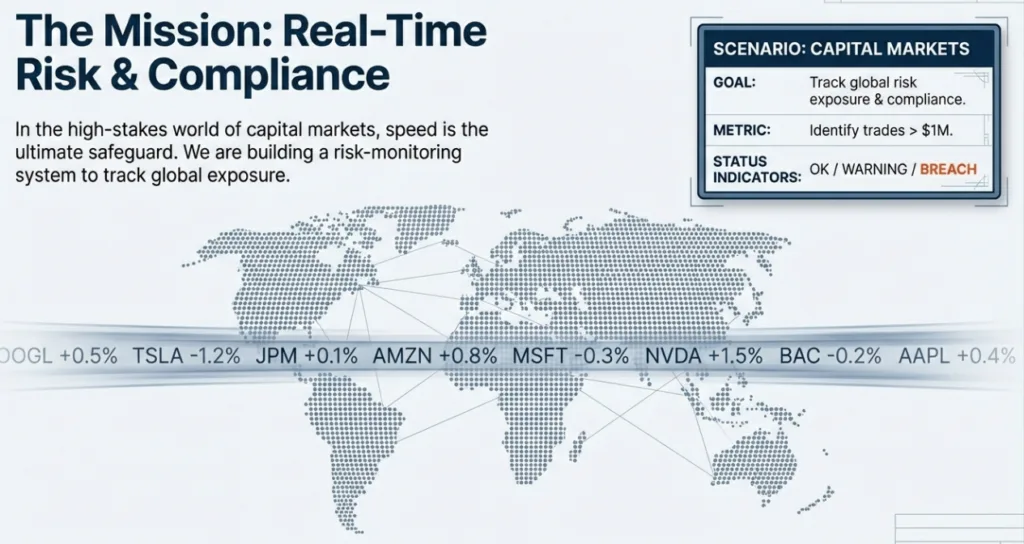
In the high-stakes world of capital markets, speed is the ultimate safeguard. To demonstrate the power of the Agentic Lakehouse, we will build a risk-monitoring system for a financial institution.
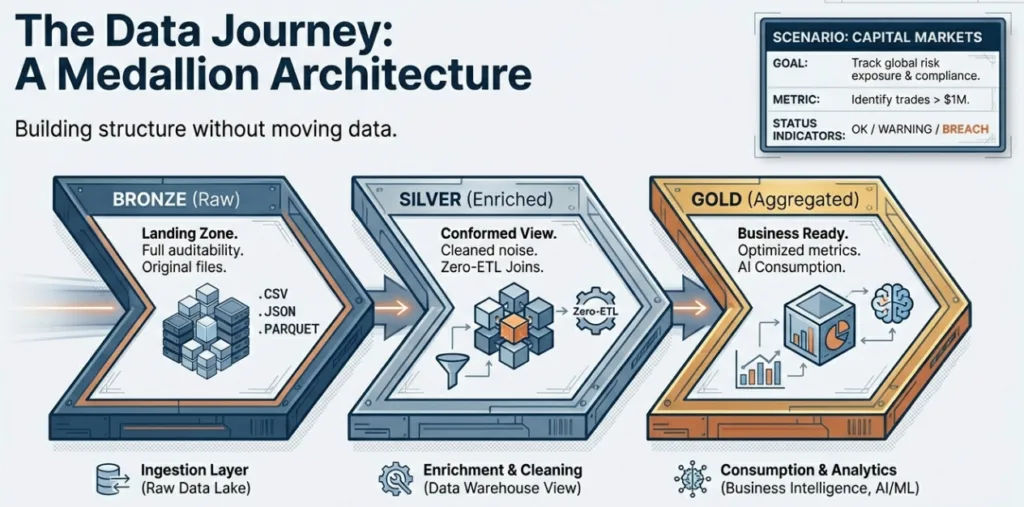
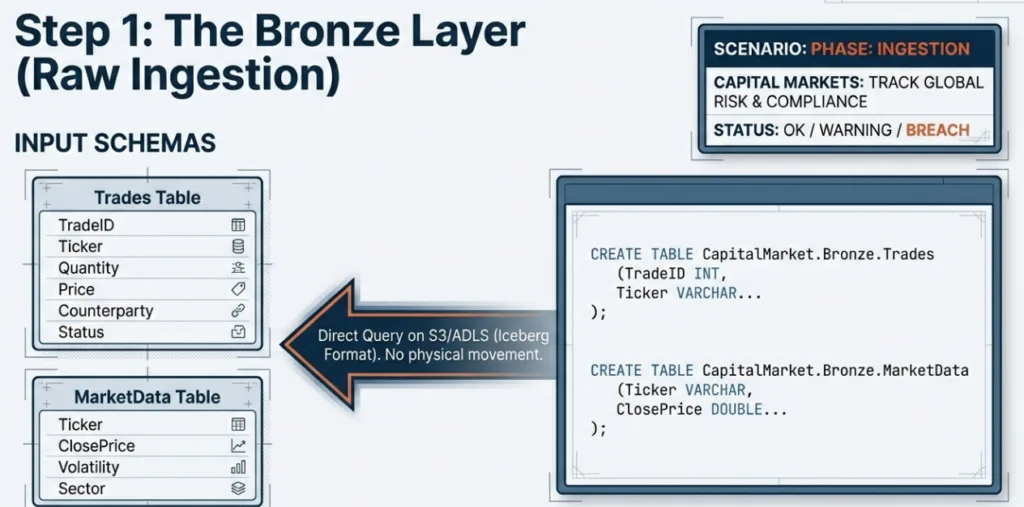
The Bronze layer is our "Raw" landing zone. We capture data exactly as it arrives from the source systems to maintain full auditability. In Dremio, we create this structure using standard SQL.
/*

 * Capital Markets Risk Management & Compliance Demo

 *

 * Scenario:

 * A financial institution manages trade data and market data.

 * Architecture: Medallion (Bronze -> Silver -> Gold)

 * Goal: Track risk exposure and compliance violations.

 *

 * Note: Assumes a catalog named 'CapitalMarket' exists.

 *       If using a different source, find/replace 'CapitalMarket' with your source name.

 */

-------------------------------------------------------------------------------

-- 0. SETUP: Create Folder Structure

-- Note: 'CREATE FOLDER' is supported in CapitalMarket/Iceberg catalogs often as namespaces.

-------------------------------------------------------------------------------

CREATE FOLDER IF NOT EXISTS CapitalMarket;

CREATE FOLDER IF NOT EXISTS CapitalMarket.Bronze;

CREATE FOLDER IF NOT EXISTS CapitalMarket.Silver;

CREATE FOLDER IF NOT EXISTS CapitalMarket.Gold;

-------------------------------------------------------------------------------

-- 1. BRONZE LAYER: Raw Data Ingestion

-- In a real scenario, this would be auto-ingested via COPY INTO or Pipes.

-------------------------------------------------------------------------------

-- 1.1 Create Bronze.Trades Tables

CREATE TABLE IF NOT EXISTS CapitalMarket.Bronze.Trades (

    TradeID INT,

    Ticker VARCHAR,

    Quantity INT,

    Price DOUBLE,

    TradeDate DATE,

    Counterparty VARCHAR,

    Status VARCHAR

);

-- 1.2 Create Bronze.MarketData Table

CREATE TABLE IF NOT EXISTS CapitalMarket.Bronze.MarketData (

    Ticker VARCHAR,

    "Date" DATE,

    ClosePrice DOUBLE,

    Volatility DOUBLE,

    Sector VARCHAR

);

-- 1.3 Populate Bronze Tables (Generated Data)

-- Insert 100 records into Bronze.Trades

INSERT INTO CapitalMarket.Bronze.Trades (TradeID, Ticker, Quantity, Price, TradeDate, Counterparty, Status) VALUES

(1, 'C', 153, 240.16, '2025-03-24', 'Bank_X', 'PENDING'),

(2, 'C', 136, 347.99, '2025-01-13', 'Pension_Z', 'PENDING'),

(3, 'BAC', 213, 441.79, '2025-02-12', 'Fund_A', 'SETTLED'),

(4, 'GOOGL', 773, 318.58, '2025-02-22', 'Fund_B', 'SETTLED'),

(5, 'MSFT', 769, 223.74, '2025-02-04', 'Bank_X', 'CANCELLED'),

(6, 'WFC', 603, 306.88, '2025-03-22', 'Bank_X', 'PENDING'),

(7, 'TSLA', 341, 393.09, '2025-02-27', 'Pension_Z', 'PENDING'),

(8, 'GOOGL', 661, 219.41, '2025-02-01', 'Bank_X', 'PENDING'),

(9, 'GS', 387, 396.22, '2025-03-21', 'Pension_Z', 'SETTLED'),

(10, 'GS', 439, 395.19, '2025-01-13', 'Pension_Z', 'SETTLED'),

(11, 'WFC', 103, 401.44, '2025-03-18', 'Bank_Y', 'SETTLED'),

(12, 'AMZN', 253, 404.15, '2025-03-15', 'Bank_X', 'SETTLED'),

(13, 'AMZN', 951, 250.19, '2025-01-30', 'Pension_Z', 'SETTLED'),

(14, 'WFC', 750, 56.72, '2025-02-15', 'Fund_A', 'SETTLED'),

(15, 'AAPL', 249, 351.72, '2025-02-09', 'Pension_Z', 'SETTLED'),

(16, 'MSFT', 348, 379.77, '2025-03-09', 'Bank_Y', 'PENDING'),

(17, 'AMZN', 609, 457.0, '2025-02-16', 'Fund_A', 'PENDING'),

(18, 'MSFT', 180, 192.37, '2025-03-11', 'Bank_X', 'SETTLED'),

(19, 'JPM', 155, 428.72, '2025-01-27', 'Fund_B', 'CANCELLED'),

(20, 'WFC', 393, 60.01, '2025-02-26', 'Bank_X', 'SETTLED'),

(21, 'MSFT', 761, 205.22, '2025-03-29', 'Bank_Y', 'SETTLED'),

(22, 'C', 642, 326.41, '2025-03-07', 'Fund_A', 'SETTLED'),

(23, 'JPM', 708, 57.66, '2025-03-27', 'Fund_B', 'SETTLED'),

(24, 'JPM', 289, 470.97, '2025-02-18', 'Bank_X', 'PENDING'),

(25, 'C', 637, 154.05, '2025-03-26', 'Pension_Z', 'SETTLED'),

(26, 'JPM', 654, 67.24, '2025-01-14', 'Fund_A', 'FAILED'),

(27, 'AAPL', 876, 91.83, '2025-02-24', 'Bank_X', 'PENDING'),

(28, 'GS', 987, 90.94, '2025-02-27', 'Bank_Y', 'SETTLED'),

(29, 'GOOGL', 718, 377.87, '2025-02-09', 'Bank_Y', 'SETTLED'),

(30, 'BAC', 183, 183.79, '2025-01-15', 'Fund_A', 'SETTLED'),

(31, 'JPM', 361, 489.29, '2025-03-17', 'Bank_Y', 'SETTLED'),

(32, 'AMZN', 325, 487.98, '2025-03-31', 'Pension_Z', 'SETTLED'),

(33, 'C', 619, 381.77, '2025-03-01', 'Fund_A', 'SETTLED'),

(34, 'C', 188, 128.98, '2025-02-22', 'Fund_A', 'FAILED'),

(35, 'GOOGL', 954, 194.92, '2025-02-19', 'Bank_X', 'SETTLED'),

(36, 'TSLA', 440, 316.91, '2025-02-09', 'Bank_X', 'SETTLED'),

(37, 'JPM', 86, 289.38, '2025-03-18', 'Fund_A', 'SETTLED'),

(38, 'BAC', 635, 174.44, '2025-03-10', 'Bank_X', 'SETTLED'),

(39, 'TSLA', 737, 327.49, '2025-03-17', 'Bank_Y', 'SETTLED'),

(40, 'MSFT', 80, 286.0, '2025-02-12', 'Fund_A', 'SETTLED'),

(41, 'MSFT', 313, 490.53, '2025-02-16', 'Bank_Y', 'SETTLED'),

(42, 'C', 432, 112.7, '2025-03-22', 'Bank_X', 'PENDING'),

(43, 'GOOGL', 901, 476.81, '2025-01-30', 'Fund_A', 'SETTLED'),

(44, 'GS', 258, 270.46, '2025-03-07', 'Fund_B', 'PENDING'),

(45, 'GOOGL', 874, 306.34, '2025-03-09', 'Bank_Y', 'SETTLED'),

(46, 'MSFT', 748, 73.45, '2025-01-03', 'Fund_B', 'SETTLED'),

(47, 'GOOGL', 197, 318.41, '2025-03-10', 'Bank_X', 'SETTLED'),

(48, 'JPM', 56, 272.78, '2025-02-26', 'Bank_Y', 'CANCELLED'),

(49, 'WFC', 256, 122.5, '2025-03-06', 'Bank_X', 'PENDING'),

(50, 'WFC', 277, 129.58, '2025-03-02', 'Fund_A', 'SETTLED'),

(51, 'WFC', 76, 297.11, '2025-02-19', 'Fund_A', 'SETTLED'),

(52, 'WFC', 816, 197.55, '2025-02-13', 'Pension_Z', 'SETTLED'),

(53, 'GOOGL', 587, 186.91, '2025-03-01', 'Fund_B', 'SETTLED'),

(54, 'C', 628, 359.28, '2025-03-23', 'Bank_X', 'PENDING'),

(55, 'AAPL', 536, 490.96, '2025-03-16', 'Pension_Z', 'SETTLED'),

(56, 'C', 902, 363.29, '2025-02-07', 'Fund_B', 'SETTLED'),

(57, 'GS', 816, 266.89, '2025-01-16', 'Fund_B', 'SETTLED'),

(58, 'AAPL', 120, 376.99, '2025-02-20', 'Pension_Z', 'SETTLED'),

(59, 'WFC', 711, 383.82, '2025-02-06', 'Fund_A', 'SETTLED'),

(60, 'AAPL', 248, 129.97, '2025-03-31', 'Bank_Y', 'SETTLED'),

(61, 'TSLA', 338, 272.63, '2025-01-18', 'Bank_Y', 'SETTLED'),

(62, 'GOOGL', 638, 115.01, '2025-02-12', 'Fund_A', 'PENDING'),

(63, 'BAC', 602, 264.92, '2025-03-12', 'Bank_Y', 'PENDING'),

(64, 'AAPL', 184, 238.94, '2025-02-12', 'Pension_Z', 'SETTLED'),

(65, 'C', 192, 459.58, '2025-01-31', 'Fund_B', 'SETTLED'),

(66, 'GS', 524, 373.08, '2025-02-03', 'Fund_A', 'FAILED'),

(67, 'GS', 843, 114.96, '2025-02-18', 'Bank_X', 'SETTLED'),

(68, 'GOOGL', 137, 126.89, '2025-02-02', 'Bank_Y', 'SETTLED'),

(69, 'JPM', 962, 167.56, '2025-01-18', 'Fund_A', 'FAILED'),

(70, 'C', 91, 158.74, '2025-02-21', 'Fund_B', 'SETTLED'),

(71, 'JPM', 953, 402.33, '2025-02-26', 'Fund_B', 'SETTLED'),

(72, 'BAC', 156, 66.71, '2025-02-26', 'Bank_X', 'SETTLED'),

(73, 'JPM', 704, 55.22, '2025-01-05', 'Bank_Y', 'SETTLED'),

(74, 'WFC', 284, 211.03, '2025-01-02', 'Fund_A', 'SETTLED'),

(75, 'GOOGL', 407, 281.37, '2025-02-17', 'Bank_X', 'PENDING'),

(76, 'GS', 760, 66.12, '2025-01-19', 'Bank_X', 'SETTLED'),

(77, 'TSLA', 173, 403.65, '2025-02-28', 'Fund_A', 'PENDING'),

(78, 'TSLA', 548, 274.0, '2025-01-27', 'Bank_Y', 'FAILED'),

(79, 'JPM', 664, 238.66, '2025-01-04', 'Pension_Z', 'CANCELLED'),

(80, 'WFC', 252, 396.47, '2025-01-08', 'Bank_X', 'PENDING'),

(81, 'MSFT', 731, 110.66, '2025-02-02', 'Pension_Z', 'SETTLED'),

(82, 'GOOGL', 656, 264.38, '2025-01-14', 'Bank_Y', 'PENDING'),

(83, 'TSLA', 384, 108.51, '2025-01-26', 'Bank_X', 'SETTLED'),

(84, 'AMZN', 580, 472.91, '2025-01-18', 'Pension_Z', 'PENDING'),

(85, 'MSFT', 49, 129.7, '2025-02-10', 'Fund_B', 'SETTLED'),

(86, 'GS', 577, 193.77, '2025-03-23', 'Pension_Z', 'SETTLED'),

(87, 'C', 379, 231.57, '2025-01-20', 'Bank_Y', 'SETTLED'),

(88, 'TSLA', 616, 91.22, '2025-02-17', 'Fund_B', 'CANCELLED'),

(89, 'JPM', 366, 253.52, '2025-01-19', 'Pension_Z', 'SETTLED'),

(90, 'WFC', 268, 458.51, '2025-03-21', 'Pension_Z', 'SETTLED'),

(91, 'WFC', 813, 124.56, '2025-01-11', 'Pension_Z', 'SETTLED'),

(92, 'AAPL', 460, 443.8, '2025-01-30', 'Bank_Y', 'SETTLED'),

(93, 'WFC', 998, 260.2, '2025-01-16', 'Pension_Z', 'SETTLED'),

(94, 'AAPL', 871, 67.07, '2025-03-14', 'Bank_Y', 'PENDING'),

(95, 'BAC', 409, 275.58, '2025-03-06', 'Bank_X', 'PENDING'),

(96, 'MSFT', 853, 207.48, '2025-02-14', 'Pension_Z', 'SETTLED'),

(97, 'WFC', 885, 71.35, '2025-01-07', 'Pension_Z', 'PENDING'),

(98, 'AAPL', 481, 153.83, '2025-03-05', 'Bank_Y', 'SETTLED'),

(99, 'TSLA', 965, 60.24, '2025-01-20', 'Bank_Y', 'SETTLED'),

(100, 'WFC', 617, 181.12, '2025-03-11', 'Bank_X', 'SETTLED');

-- Insert 100 records into Bronze.MarketData

INSERT INTO CapitalMarket.Bronze.MarketData (Ticker, "Date", ClosePrice, Volatility, Sector) VALUES

('GOOGL', '2025-01-23', 243.57, 0.2, 'Tech'),

('TSLA', '2025-01-24', 277.61, 0.17, 'Auto'),

('WFC', '2025-01-24', 271.63, 0.35, 'Finance'),

('TSLA', '2025-02-20', 402.92, 0.46, 'Auto'),

('TSLA', '2025-01-24', 71.69, 0.3, 'Auto'),

('AMZN', '2025-02-05', 70.04, 0.49, 'Tech'),

('WFC', '2025-03-15', 98.27, 0.19, 'Finance'),

('GOOGL', '2025-02-09', 457.94, 0.31, 'Tech'),

('AAPL', '2025-03-26', 422.68, 0.46, 'Tech'),

('BAC', '2025-02-23', 462.42, 0.47, 'Finance'),

('GS', '2025-03-06', 405.65, 0.26, 'Finance'),

('AAPL', '2025-01-02', 316.43, 0.16, 'Tech'),

('AAPL', '2025-02-19', 275.03, 0.32, 'Tech'),

('GS', '2025-02-08', 267.66, 0.36, 'Finance'),

('AAPL', '2025-01-15', 155.11, 0.27, 'Tech'),

('GS', '2025-03-04', 323.58, 0.2, 'Finance'),

('GS', '2025-02-10', 53.69, 0.22, 'Finance'),

('WFC', '2025-02-13', 280.38, 0.47, 'Finance'),

('MSFT', '2025-01-25', 239.76, 0.26, 'Tech'),

('MSFT', '2025-03-20', 369.86, 0.17, 'Tech'),

('MSFT', '2025-03-28', 124.58, 0.25, 'Tech'),

('C', '2025-03-05', 479.13, 0.44, 'Finance'),

('BAC', '2025-01-01', 221.19, 0.24, 'Finance'),

('AAPL', '2025-03-12', 438.29, 0.15, 'Tech'),

('AMZN', '2025-02-05', 263.76, 0.12, 'Tech'),

('GS', '2025-01-08', 312.03, 0.44, 'Finance'),

('AMZN', '2025-03-30', 118.5, 0.36, 'Tech'),

('BAC', '2025-01-26', 459.04, 0.33, 'Finance'),

('C', '2025-03-23', 141.08, 0.34, 'Finance'),

('GS', '2025-03-29', 254.95, 0.5, 'Finance'),

('MSFT', '2025-03-12', 85.62, 0.38, 'Tech'),

('GOOGL', '2025-03-08', 370.67, 0.42, 'Tech'),

('JPM', '2025-01-30', 203.22, 0.4, 'Finance'),

('AAPL', '2025-03-29', 240.31, 0.32, 'Tech'),

('BAC', '2025-01-31', 253.51, 0.33, 'Finance'),

('BAC', '2025-01-31', 489.4, 0.45, 'Finance'),

('JPM', '2025-02-27', 334.89, 0.15, 'Finance'),

('GS', '2025-01-11', 216.55, 0.1, 'Finance'),

('JPM', '2025-01-30', 295.06, 0.15, 'Finance'),

('C', '2025-03-21', 254.71, 0.4, 'Finance'),

('GS', '2025-02-14', 356.42, 0.17, 'Finance'),

('GS', '2025-01-02', 336.36, 0.38, 'Finance'),

('GOOGL', '2025-02-16', 350.54, 0.1, 'Tech'),

('TSLA', '2025-03-20', 126.35, 0.18, 'Auto'),

('GOOGL', '2025-03-07', 95.31, 0.39, 'Tech'),

('BAC', '2025-02-21', 142.9, 0.2, 'Finance'),

('GS', '2025-02-22', 229.86, 0.28, 'Finance'),

('JPM', '2025-02-01', 91.58, 0.26, 'Finance'),

('C', '2025-01-04', 322.62, 0.41, 'Finance'),

('JPM', '2025-01-27', 242.14, 0.16, 'Finance'),

('C', '2025-01-11', 93.34, 0.29, 'Finance'),

('WFC', '2025-03-04', 465.32, 0.48, 'Finance'),

('BAC', '2025-02-03', 433.71, 0.14, 'Finance'),

('MSFT', '2025-02-15', 54.72, 0.44, 'Tech'),

('BAC', '2025-02-09', 288.93, 0.17, 'Finance'),

('GOOGL', '2025-03-18', 283.66, 0.17, 'Tech'),

('C', '2025-03-22', 282.07, 0.31, 'Finance'),

('BAC', '2025-01-04', 130.18, 0.48, 'Finance'),

('C', '2025-03-10', 424.32, 0.1, 'Finance'),

('AAPL', '2025-01-31', 268.87, 0.3, 'Tech'),

('GOOGL', '2025-01-29', 341.75, 0.29, 'Tech'),

('JPM', '2025-02-08', 485.62, 0.14, 'Finance'),

('AMZN', '2025-01-26', 342.91, 0.33, 'Tech'),

('GOOGL', '2025-03-22', 255.53, 0.25, 'Tech'),

('JPM', '2025-03-26', 302.4, 0.2, 'Finance'),

('GOOGL', '2025-02-26', 87.74, 0.41, 'Tech'),

('AMZN', '2025-01-16', 308.24, 0.37, 'Tech'),

('AMZN', '2025-01-07', 270.05, 0.31, 'Tech'),

('BAC', '2025-01-25', 172.57, 0.48, 'Finance'),

('MSFT', '2025-02-12', 121.3, 0.27, 'Tech'),

('AAPL', '2025-03-22', 266.17, 0.45, 'Tech'),

('GS', '2025-02-28', 317.85, 0.13, 'Finance'),

('JPM', '2025-02-12', 365.48, 0.31, 'Finance'),

('AAPL', '2025-03-23', 162.84, 0.28, 'Tech'),

('JPM', '2025-03-03', 316.27, 0.35, 'Finance'),

('AAPL', '2025-03-08', 184.97, 0.46, 'Tech'),

('JPM', '2025-01-20', 388.63, 0.17, 'Finance'),

('GOOGL', '2025-02-14', 296.57, 0.46, 'Tech'),

('AMZN', '2025-03-10', 434.52, 0.46, 'Tech'),

('AMZN', '2025-02-18', 58.18, 0.13, 'Tech'),

('BAC', '2025-03-09', 96.27, 0.46, 'Finance'),

('AMZN', '2025-01-08', 227.39, 0.2, 'Tech'),

('MSFT', '2025-01-09', 159.63, 0.36, 'Tech'),

('TSLA', '2025-02-12', 202.07, 0.49, 'Auto'),

('JPM', '2025-02-14', 458.47, 0.47, 'Finance'),

('C', '2025-01-24', 265.4, 0.12, 'Finance'),

('BAC', '2025-03-31', 480.83, 0.16, 'Finance'),

('C', '2025-02-20', 179.8, 0.3, 'Finance'),

('AMZN', '2025-01-18', 326.62, 0.38, 'Tech'),

('MSFT', '2025-01-20', 218.6, 0.37, 'Tech'),

('BAC', '2025-03-27', 496.59, 0.28, 'Finance'),

('TSLA', '2025-03-04', 118.35, 0.32, 'Auto'),

('WFC', '2025-02-04', 318.78, 0.3, 'Finance'),

('AAPL', '2025-03-17', 121.11, 0.31, 'Tech'),

('C', '2025-01-04', 320.9, 0.25, 'Finance'),

('AMZN', '2025-01-31', 137.93, 0.26, 'Tech'),

('JPM', '2025-01-05', 177.28, 0.42, 'Finance'),

('TSLA', '2025-03-20', 398.79, 0.35, 'Auto'),

('C', '2025-03-05', 184.28, 0.22, 'Finance'),

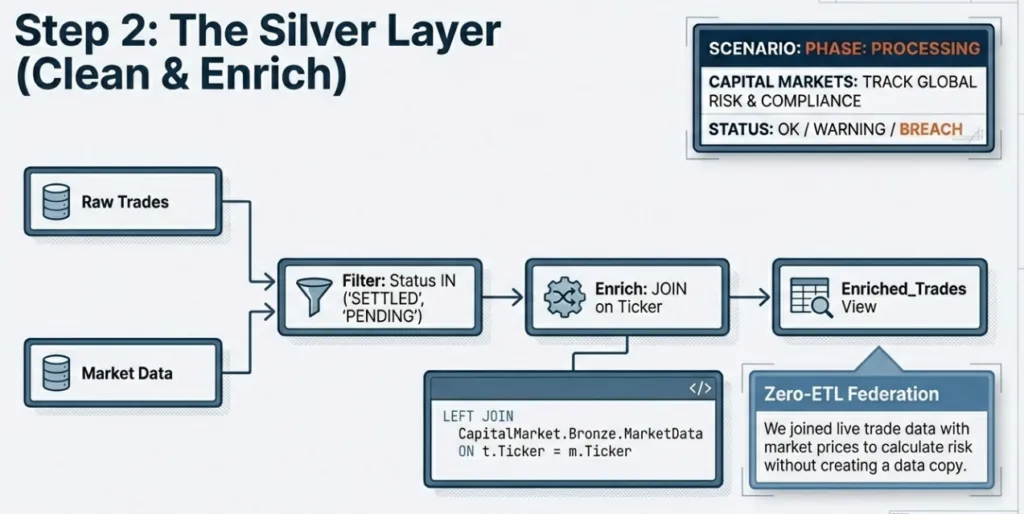
('C', '2025-03-25', 133.78, 0.31, 'Finance');The Silver layer provides a "conformed" enterprise view. We filter out noise (such as invalid prices) and enrich our data.
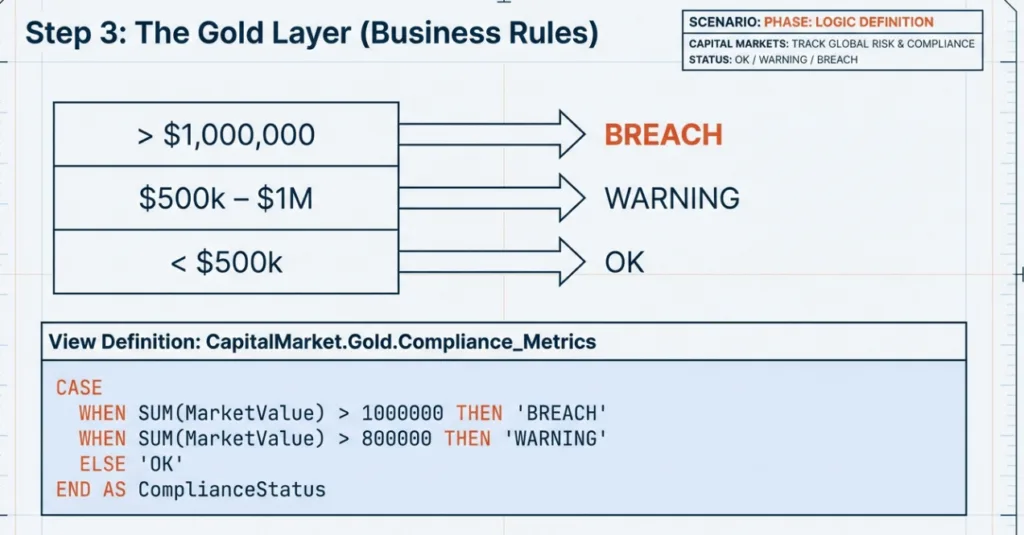
The Gold layer is optimized for consumption. Here, we apply the final business rules to prepare the data for AI agents.
This guide is just the beginning. The Agentic Lakehouse is designed to grow with your needs. Beyond simple queries, you can leverage Dremio for: