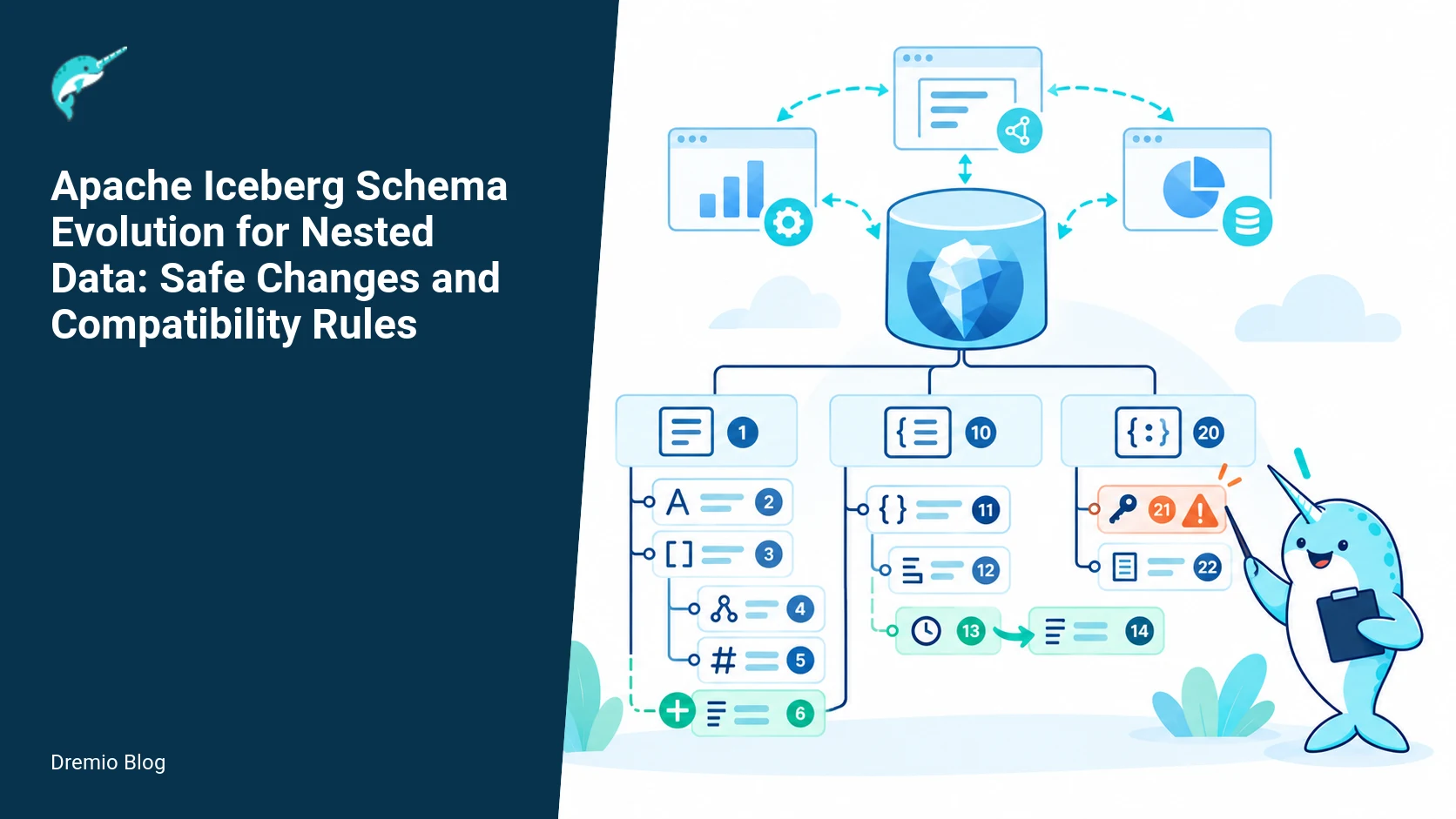
How Iceberg tracks nested fields and why IDs matter
Short answer: Iceberg does nested-schema evolution by stable field ID, not by column position or path. That means you can add, drop, rename, reorder, and in many cases promote types for fields inside structs without rewriting files. But metadata-only changes are only safe if every reader you use understands and honors Iceberg field IDs and the format version rules you rely on.
Field IDs are numeric tokens attached to schema fields in the Iceberg table metadata. For nested data the ID is assigned to each field inside a struct or list element. When a reader resolves on-disk files, it matches requested fields to physical data using those IDs, not by name or by position. That prevents common accidental mismatches when you rename or reorder fields.
This ID model is described in the Iceberg evolution and spec documentation, which explains how field IDs, type descriptors, and schema branches are recorded. Verify the behavior for the table format version you use because type-promotion rules and some evolution semantics changed between Iceberg v1, v2, and v3. (Facts checked October 27, 2026.)
Nested field ID model. Each stage has a result that can be checked before the next stage begins.
Key compatibility rules for safe nested-schema changes
These are the practical rules you must check before making a metadata-only schema change that touches nested fields.
Add a field , Safe, assign a fresh field ID and a default or mark optional. Readers that do not know the ID will still read existing files, they just will not see the new field until they read new data or the reader understands the metadata. Verify in your clients.
Drop a field , Safe as metadata change; underlying files keep the data. Dropped fields can be re-added only with a new field ID, otherwise readers may misinterpret values.
Rename a field , Safe if you only change the name and keep the ID. The name in metadata is cosmetic for ID-aware readers.
Reorder fields , Safe, ordering in the schema is presentation only.
Change a struct to add or remove nested fields , Additions are safe, removals are metadata-only. Beware required flags without defaults.
Type promotion and conversions , Allowed conversions depend on format version and the reader engine. Some promotions are allowed in v2 or v3, others are not. Always check the Iceberg spec and your engine docs for exact conversions.
Map keys , Cannot be evolved in place. Map-key type changes are unsafe and require rewriting or creating a new logical column. This is a core limitation to remember when designing nested maps.
Required fields , Converting optional to required is not safe unless you provide a valid default for every existing row. Metadata-only required changes will break readers that expect non-null values.
These rules come from the Iceberg evolution documentation and the formal spec. When in doubt, run compatibility assertions that exercise your readers, as I show in the worked examples. Also read the API docs for how to set field IDs and defaults programmatically.
Safe and unsafe schema changes. Each technical risk needs a matching test, boundary, or operating signal.
Mechanics: how readers resolve nested schemas at read time
At read time Iceberg uses the table schema and file-level schema together with field IDs to build a column projection and a resolver. The resolver maps requested columns to file columns by ID, then applies on-the-fly conversions or defaulting if the table schema differs. If the reader does not implement ID-based resolution, it may fall back to name-based or position-based resolution, which can misread nested structs.
Resolution can do these things: inject default values for missing fields when a default is supplied, convert supported primitive types (within the allowed promotion rules for your format version), and ignore unknown fields present in files. Where the reader cannot reconcile the type or missing required values, it raises an error or returns nulls depending on engine behavior.
Reader compatibility resolution. The loop turns table or catalog signals into controlled operational changes.
Practical implementations: SQL examples for nested struct evolution
The SQL and API surface differs by engine. Below are Spark DDL examples and the programmatic checks I use when operating Iceberg tables. These examples assume you created a table with nested_struct of type struct<a:int,b:struct<c:string>>. Adjust identifiers and cluster endpoints for your environment.
1) Create a starting table (Spark DDL)
<!-- wp:code -->
CREATE TABLE db.nested_example (
  id bigint,
  nested struct<a:int,b:struct<c:string>>
) USING ICEBERG;
<!-- /wp:code -->
This DDL uses the Spark DDL layer documented in the Iceberg Spark DDL guide. Spark will assign IDs when creating the table unless you explicitly set them via the API. If you require specific IDs to coordinate cross-engine clients, use the Iceberg API to write schema objects with explicit IDs.
When run in a Spark environment that speaks Iceberg DDL, this issues a metadata-only schema change that adds nested.b.d with a new field ID. Verify that the generated table metadata under the table location shows the new field with an ID. If you need to control the ID explicitly, use the Iceberg API documented in the API reference to build the Schema object and write the new metadata snapshot.
3) Rename a nested field without rewriting data
<!-- wp:code -->
ALTER TABLE db.nested_example RENAME COLUMN nested.b.c TO nested.b.c_name;
<!-- /wp:code -->
This change keeps the same field ID. Engines that implement ID-based resolution will see the new name but map data by ID. Confirm by querying old files; they still return values for nested.b.c_name because the ID maps to the underlying data.
4) Example of an unsafe change: map key type change
<!-- wp:code -->
-- This will not be a safe metadata-only change in most engines
ALTER TABLE db.map_example ALTER COLUMN mymap.key TYPE bigint;
<!-- /wp:code -->
Map keys cannot be evolved in place. The Iceberg docs explicitly caution against in-place map-key modifications. In practice this means you must rewrite the column or create a new column with the new map type and migrate data. Do not assume metadata-only operations will work for map keys.
Schema compatibility assertions and automated checks
I build a pre-flight checklist that runs two kinds of assertions. First, a metadata sanity check that inspects table JSON metadata to ensure every modified field has an explicit new field ID and that no conflicting ID reuse exists. Second, a runtime compatibility matrix that reads files with each engine used in production to verify the read schema matches expectations.
Metadata sanity check (example script outline)
Use the Iceberg table metadata JSON found under the table location. Programmatically check:
Each field in the new schema has a numeric ID.
No two fields share the same ID unless they are the same logical field across renames.
Added fields are optional or have a default if required.
No map key types were changed in-place.
Tools: any language that reads JSON. The Iceberg API can produce the Schema object programmatically; see the API docs for the exact calls. These checks ensure the metadata change itself is well formed before we exercise readers.
Runtime compatibility matrix
Test read behavior on every engine version you run. My matrix looks like this in practice:
a supported Spark release with its matching Iceberg runtime, read old files after rename and after add field.
Presto or Trino versions in use, read same files.
Dremio queries against the table to verify column mapping and that metadata tables show the new schema correctly.
Include both the cluster or environment and the exact connector or runtime version, because behavior can differ. For Dremio-specific operational guidance and metadata table querying, read the Dremio blog post about Iceberg metadata tables and the resource guide for Iceberg on Dremio. The former explains how to inspect metadata snapshots using Dremio queries, which is useful during your matrix run. The latter collects practical configuration and connector notes helpful during rollout.
<!-- wp:code -->
-- Example smoke test SQL run on each engine
SELECT id, nested.b.c_name, nested.b.d
FROM db.nested_example
LIMIT 10;
<!-- /wp:code -->
Make sure the query returns expected non-null values for pre-existing rows and that newly added fields either return null or the default you set.
Cross-engine rollout gate. A reversible canary keeps an unsupported client or unsafe policy from becoming a fleet-wide incident.
Rollout checklist and gate for multi-engine environments
Rolling a schema change to multiple engines is where things go wrong. I use a gate that requires explicit green tests from every reader and a staged promotion across clusters. Here is the checklist I run before changing production metadata.
Inventory readers and versions that access the table, with cluster locations. Include the DML validation cluster and the incremental-read validation cluster in your inventory if they run queries against this table.
Run metadata sanity script against the planned schema change. Abort on ID collisions or map-key edits.
Apply change in a staging table or a new snapshot in a non-production environment.
Run the runtime compatibility matrix with the staging snapshot on all engines. Mark each engine green only if the read semantics and result rows match expectations.
If any engine is red, either adjust the schema change (for example make the new field optional) or plan for a data rewrite and migration path.
When all engines are green, apply the change to production metadata. Keep the old snapshot retention for a rollback window measured in minutes to hours depending on workload.
Monitor post-deployment metrics for errors and unexpected nulls for a defined window.
Staging and per-engine verification is essential. Dremio provides guides for integrating Iceberg and explains v2 versus v3 differences, which is helpful when you decide whether to rely on newer format-version promotions or to perform a rewrite. Read the Dremio post comparing Iceberg v2 and v3 to help choose your target format version before doing schema-changing operations.
Failure modes and how to recover
Here are the failure modes I have operated into, and the recovery actions that worked.
Reader returns wrong column values after a rename , Cause: reader did not honor field IDs and resolved by name or position. Recovery: roll back metadata snapshot, update the reader client to an Iceberg-aware version, or re-create the column with a new ID and migrate data with a rewrite.
Queries error on missing required field , Cause: schema change made an optional field required without defaults. Recovery: roll back snapshot, reapply schema change adding a default, or backfill files with non-null values and rewrite files.
Map key reads fail or return corrupt-looking keys , Cause: attempted map-key type change. Recovery: create a new map column with the desired key type, run a conversion job to rewrite data into the new column, then switch reads to the new column.
Type incompatibility across engines , Cause: a type promotion permitted by the table format behaved differently in another engine. Recovery: rewrite affected files with the target on-disk type, or downgrade the change to a compatible type and migrate data with a conversion job.
Keep automated rollback snapshots and a short retention period to make metadata rollbacks practical. The Iceberg metadata tables and the Dremio metadata introspection guide explain how to find the snapshot IDs you need to roll back.
What to measure after deployment
Measure these indicators for at least one traffic cycle or the lifetime of slow changes like backfills.
Query errors per engine and client, filtered to schema-change time windows.
Null rate for newly added fields on rows written before the change.
Read latencies and scan sizes, to detect unexpected full-file reads or increased data movement.
Number of files rewritten when you perform a data migration, and rewrite throughput in GB/hour.
Snapshot churn and metadata size growth after repeated metadata-only changes.
These metrics capture both correctness and operational cost. For example, a sudden spike in read latency after a metadata change often signals an engine falling back to unsafe resolution and re-reading or re-processing data. If you operate Dremio, the resource guide linked earlier contains practical operational hints to measure and analyze these effects in Dremio deployments.
Cross-engine smoke-test matrix: a worked example
Here is a concrete matrix I ran when adding nested.b.d to a production table used by batch Spark and interactive Dremio.
Environment: staging snapshot of db.nested_example containing pre-change files.
Engines tested: the supported Spark and Iceberg runtime in the test environment, the current Dremio release, and the current Trino connector release.
Tests: read basic projection, read nested projection with new field, run aggregation on nested field where applicable.
Results: Spark and Dremio returned the expected rows for existing nested fields and null for newly added nested.b.d. Trino failed to map the nested rename correctly in the older connector version and returned nulls for existing values. Conclusion: delay the production change until Trino connector was upgraded, or rewrite files and introduce a new column path that Trino could resolve reliably.
That example shows why per-engine gating is non-negotiable. Use the operator-visible region and cluster labels like the DML validation cluster and the incremental-read validation cluster in your test plans so that engineers can map results back to running deployments and connector versions.
Decision points when you cannot rely on metadata-only changes
If a reader cannot support the metadata-only change, you have three options.
Upgrade the reader or connector to a version that implements ID-based resolution and the required format features.
Perform a controlled data rewrite that converts files to the new schema on disk, then publish the change. This is required for map-key changes or when you change a field to required without defaults.
Create a new column name/path with a fresh ID and run a migration job that populates it from the old data, then update consumers to read the new column over time.
Which option you pick depends on service-level requirements, the ability to upgrade clients, and the cost of rewrites. The Iceberg spec and evolution docs explain when a rewrite is conceptually necessary. If the docs are ambiguous for your engine combination, run the matrix tests or prefer the conservative option of a rewrite.
Putting it together: recommended operator workflow
My recommended workflow for nested-schema evolution, distilled into steps you can operationalize.
Plan the schema change and identify affected nested fields and map types.
Run metadata sanity checks to confirm IDs and absence of map-key edits.
Create a staging snapshot and run the full runtime compatibility matrix across engines and clusters, referencing the DML validation cluster and the incremental-read validation cluster where applicable.
If any engine fails, choose upgrade, rewrite, or new-column migration. Document the chosen path.
Once every engine is green, apply to production and monitor the metrics described earlier for your defined validation window.
Keep a rollback snapshot and be prepared to revert within the window if compatibility breaks occur.
This workflow balances low-cost metadata evolution with the practical reality that not every client is equal. The Dremio resource guide for Iceberg is a convenient reference for configuring Dremio-specific connectors and understanding how Dremio surfaces metadata tables for inspection during these steps.
Practical failure-injection test for nested struct evolution
Start here if you want to validate a nested struct change under real-world conditions, across Spark and a SQL engine that uses Iceberg readers. The goal is to exercise metadata-only changes, detect engines that ignore field IDs, and confirm read-time resolution behaves as documented. This is a hands-on script you can run in a staging environment.
Assumptions, checked on October 27, 2026: your Iceberg distribution supports schema evolution APIs described in the Apache Iceberg documentation and your engines are at versions for which you have verified behavior. If you need to confirm exact behavior, check the Iceberg documentation and your engine release notes before running the test.
Test goals and pass criteria
Validate adding a nested field using a metadata-only update, and confirm both readers surface the new field as null for older rows and populated for new writes.
Validate renaming a nested field using a metadata-only ID-preserving rename, and confirm both readers read the renamed column without rewriting data.
Catch an engine that only matches columns by name and fails to read renamed fields correctly.
Exercise an unsafe change, for example replacing a nested map with a struct, and confirm it fails or requires rewrite.
Test steps
Use both a Spark session and a second engine. Replace engine commands with your environment specifics. Run each step and record results in a short test log.
-- Step 0, create base table with nested struct
CREATE TABLE db.orders (
  order_id BIGINT,
  customer STRUCT>
)
USING iceberg;

-- Insert a few rows with address populated
INSERT INTO db.orders VALUES
(1, NAMED_STRUCT('id', 10, 'name', 'Alice', 'address', NAMED_STRUCT('street', '1 Main', 'city', 'Metropolis'))),
(2, NAMED_STRUCT('id', 11, 'name', 'Bob', 'address', NAMED_STRUCT('street', '2 Side', 'city', 'Gotham')));
Note, the SQL syntax above is an example DDL for engines that accept Iceberg Spark DDL. For other engines use the documented DDL form. The important outcome is a table with stable field IDs assigned by Iceberg metadata. Record the table schema with the Iceberg API or catalog to capture those IDs before making changes.
-- Step 1, metadata-only add: introduce a nested "phone" field under customer.address
ALTER TABLE db.orders
ADD COLUMN customer.address.phone STRING;

-- Write a new row that includes phone
INSERT INTO db.orders VALUES
(3, NAMED_STRUCT('id', 12, 'name', 'Carla', 'address', NAMED_STRUCT('street', '3 Circle', 'city', 'Star', 'phone', '555-0103')));
For this change to be metadata-only Iceberg needs to add a new field entry with a new field ID inside the nested address struct. Confirm the change by reading the Iceberg schema via the catalog API or by SHOW CREATE TABLE if supported. Record the field ID for customer.address.phone.
-- Step 2, validation queries
-- A: Read all rows in Spark and project the new field
SELECT order_id, customer.address.street, customer.address.city, customer.address.phone FROM db.orders ORDER BY order_id;

-- B: Read same projection in the other engine and compare outputs
-- Export query results to CSV from both engines and run a diff line by line
Expected behavior: rows 1 and 2 show null for phone, row 3 shows "555-0103". If the other engine shows the phone only for row 3 as well, that engine respects Iceberg field IDs. If it shows phone as null for all rows or fails, it may be name-matching only or using stale metadata.
-- Step 3, metadata-only rename: rename customer.name to customer.display_name using the Iceberg schema API
-- Use your engine or the Iceberg Java API to rename while preserving field ID.
-- Example using Iceberg SQL aliasing if available:
ALTER TABLE db.orders RENAME COLUMN customer.name TO customer.display_name;
After renaming, query both engines selecting the new name and the old name to detect difference. Some engines will allow selecting the old name for backwards compatibility, others will return an error. The key check is that the renamed column returns the original values, without rewriting files.
-- Step 4, verify post-rename reads
SELECT order_id, customer.display_name FROM db.orders ORDER BY order_id;

-- Attempt to read using the old name in each engine to see how they handle projection
SELECT order_id, customer.name FROM db.orders ORDER BY order_id;
If an engine still returns values when selecting customer.name, it is performing a name alias or compatibility convenience. If it errors, your client queries need updating. If customer.display_name returns original names with no file rewrite, the ID-based rename worked.
Injecting an unsafe change and observing failure modes
Now test an unsafe change to confirm you must rewrite data. For example, map key types cannot be evolved in place. Also, changing a nested map into a struct is not metadata-only. These are important safety guards.
-- Step 5, unsafe change: replace map with struct or change map key type
-- First create a table with a nested map
CREATE TABLE db.prefs (
  user_id BIGINT,
  preferences MAP
)
USING iceberg;

INSERT INTO db.prefs VALUES
(1, MAP('theme', 'dark'));

-- Attempt a metadata-only change that changes the key type
ALTER TABLE db.prefs REPLACE COLUMNS (preferences MAP);
Expected behavior: Iceberg schema evolution semantics disallow in-place map key type changes. Your engine should reject the ALTER or it will accept but break readers. Record the exact error message. If the ALTER succeeds without rewriting data, you have a serious compatibility risk: different readers may interpret keys differently. To fix this you must rewrite files after the schema change or create a new table and migrate data with a controlled write job.
Automation: schema compatibility assertions and a CI gate
Automating schema checks prevents accidental incompatible changes. The CI gate described here integrates with your schema registry or deployment pipeline. It uses schema compatibility assertions that compare the current table schema and proposed change, and it will reject changes that are unsafe without a data rewrite.
What to assert
Field existence and ID stability for renamed or moved nested fields, assert the same field ID exists for the logical field you intend to rename.
Disallow map key type changes, assert map key types are identical or require explicit migration steps.
Type promotions: assert the proposed type change is permitted by the table's Iceberg format version and the documented promotion rules.
Disallow replacing a struct with a map or vice versa inside the same field ID without a rewrite.
When an assertion fails, the CI gate should block the change and produce actionable remediation steps. For example, the failure message for a map key change should recommend creating a new table and streaming a rewrite job that performs explicit key conversion.
Sample assertion sequence
# Pseudocode for a CI step that validates a proposed schema change
# 1. Load current Iceberg schema via catalog API
current = iceberg.loadTable('db.orders').schema()
# 2. Load proposed schema from change request
proposed = parse_proposed_schema('proposed_schema.sql')
# 3. For each changed field, check compatibility
for change in diff(current, proposed):
  if change.type == 'rename' and change.is_nested:
    assert change.old_field_id == change.new_field_id, 'Rename must preserve field ID'
  if change.type == 'map_key_type_change':
    fail('Map key type change requires data rewrite and is not allowed by CI gate')
  if change.type == 'type_promotion':
    # check allowed promotions based on format version
    assert allowed_promotion(current.format_version, change)
Implement this as a small service or a pipeline stage. Use the Iceberg API to obtain precise field IDs and type metadata. If you cannot access field IDs from a wrapped catalog, add a step that fetches the table metadata file directly and parses the schema to avoid mismatches introduced by catalog abstractions.
Integrating with pull request and deployment pipelines
Add the assertion step as a required status check before merging schema changes. If a change requires a rewrite, the CI should output a job spec for the necessary rewrite, including estimated scan size and a suggested write parallelism. This keeps schema changes explicit and auditable.
Expanding the multi-engine smoke-test matrix into a decision table
You already have a smoke-test matrix example. Here is a compact decision table that maps observed outcomes to operator actions. Use it during rollout, after any metadata-only schema change, and as part of nightly checks.
Columns and observations
Observation: how the engine reads renamed fields, does it return values under the new name?
Observation: how the engine reads fields added to nested structs, are they null for older rows?
Observation: error behavior when projecting the old field name.
Observation: whether the engine exposes map keys correctly after a key-type change attempt.
Decision table
Use the table below to decide the next action after a schema change. Capture the engine name, version, and the exact query used to produce the observation.
Case A, Both engines read renamed field correctly via ID: Proceed with metadata-only deployment, mark change as low-risk, no rewrite needed. Action: update client queries to use the new name if required and schedule passive monitoring for 24 hours.
Case B, Engine 2 reads renamed field only by the old name or shows null under the new name: Block production deployment for read-critical services. Action: either perform a file rewrite to align physical column names, or update the engine configuration if it supports an alternate reader setting. If neither is possible, roll the schema change back.
Case C, Field add is visible as null on older rows in both engines: Accept change. Action: monitor write paths to ensure new rows populate the field and that downstream ETL does not assume non-nullability.
Case D, Map key or incompatible structural changes accepted by catalog but cause query errors: Immediately revert schema change or perform a controlled migration with data rewrite. Action: create a migration job to export and re-import data with explicit conversions, and add a CI assertion to disallow the same change in the future without an approved migration plan.
For each case record the remediation steps and the time-to-resolution target. Typical targets: 1 hour for blocking rollbacks in staging, 24 hours for controlled migrations with a defined job runbook.
Operational notes and limits
Some engines provide compatibility modes or configuration flags that change read-time behavior. Document those flags in your matrix. Do not assume flags exist across projects. If you rely on a vendor-provided connector, confirm the connector version and test it explicitly. When in doubt, require a file rewrite as the safe path, especially for customer-facing read services.
What to measure after deployment: focused metrics for nested-schema changes
After applying a nested-schema change, measuring the right signals lets you detect silent compatibility issues and performance regressions. Concentrate on read correctness, failure rates, query latencies, and write plumbing.
Required metrics
Projection mismatch rate, per query type. Track queries that project the changed nested fields and count rows where values differ between engines or between pre-change and post-change snapshots. Set a baseline before the change.
Field null rate for the new nested fields. For an added nested field you expect old rows to be null. Unexpected non-null or missing values indicate a reader mismatch or write-time bug.
Schema-related query error rate. Monitor DDL and query errors that reference renamed or moved fields. Any spike after change is a red flag.
End-to-end latency for queries that read the changed nested fields. Some readers may downgrade performance if they do heavy schema reconciliation at read time.
Catalog metadata fetch time and cache hit rate. If clients are inconsistent because of stale metadata caches, you will see increased metadata misses and longer planning times.
Data rewrite job metrics, if you perform a rewrite: bytes scanned, bytes rewritten, job duration, and number of files rewritten.
Instrumentation and alerting thresholds
Set alerts that trigger investigation rather than immediate rollbacks. Suggested thresholds:
Projection mismatch rate over 0.1% for production read paths, sustained for 5 minutes, alert on-call.
Schema-related query error rate increase of 50% over baseline in 1 hour, create incident.
Catalog metadata cache miss rate above 5% sustained for 15 minutes, investigate metadata propagation or cache configuration.
Keep a small set of canary queries that project the exact nested fields changed. Run them constantly against each engine and compare results. Automate diffs and fail the deployment pipeline if comparisons diverge beyond a small epsilon.
Example monitoring panel queries
# Pseudocode for a monitoring check that compares two engines
# 1. Periodically run the same projection on both engines
spark_rows = run_query(spark, "SELECT order_id, customer.address.phone FROM db.orders WHERE order_id IN (1,2,3)")
other_rows = run_query(other, "SELECT order_id, customer.address.phone FROM db.orders WHERE order_id IN (1,2,3)")
# 2. Compare results
if diff(spark_rows, other_rows) > allowed_tolerance:
  emit_alert('Nested field projection mismatch')
Log exact schema snapshots alongside the query results. When investigating a mismatch you want the Iceberg table schema JSON, the client-side resolved schema, and the query plan from each engine. These three artifacts usually reveal whether the problem is metadata propagation, reader mismatch, or a genuine data issue.
FAQ
Q1: Can I rename a nested field and expect all engines to read the same data?
A1: Yes if every engine you use honors Iceberg field IDs. Some older connectors or misconfigured clients may fall back to name or position resolution and misread data. Validate in your runtime matrix.
Q2: Are map key type changes supported as metadata-only operations?
A2: No. Map keys cannot be evolved in place. You must rewrite data or create a new column and migrate. This is a documented technical caution in the Iceberg evolution guidance.
Q3: How do type-promotion rules differ by format version?
A3: The Iceberg spec and evolution docs specify allowed promotions and conversions, and those rules changed between format versions. Check the spec and your table's format version. If behavior is unclear, run engine-level tests. (Facts checked October 27, 2026.)
Q4: What should I measure immediately after applying a nested-schema change?
A4: Track query errors per engine, null rates for new fields on old rows, read latencies, scan sizes, rewrite throughput if you ran a migration, and snapshot churn. These show both correctness and cost.
Q5: Where can I inspect the Iceberg metadata and snapshots?
A5: Table metadata JSON appears under the table location and in Iceberg metadata tables. If you run Dremio, the Dremio blog post on Iceberg metadata tables explains how to query and inspect snapshots using Dremio, which is handy for snapshot IDs and schema history.
Q6: How do I test schema changes safely in a multi-cluster deployment?
A6: Use a staged snapshot in a staging environment. Run your runtime compatibility matrix across every cluster and connector version, including instances like the DML validation cluster and the incremental-read validation cluster. Only promote once every reader passes the smoke tests.
Related Dremio guides
These guides cover adjacent implementation details that are outside this article's main scope.
Intro to Dremio, Nessie, and Apache Iceberg on Your Laptop
Editor’s note, September 2026. This post was published in September 2023 and some product details have changed since. Nessie is still available and self-deployable under the Apache-2.0 licence, and it remains the clearest implementation of catalog-level branching. It is not an Apache Software Foundation project, and its development has slowed considerably. For how the current […]
Oct 12, 2026·Dremio Blog: Open Data Insights
Apache Iceberg Table Statistics: NDV, Puffin and Query Plans
Iceberg keeps per-file bounds automatically but table-level NDV statistics only when you compute them. Why that decides join order, and how to keep them fresh.
Aug 16, 2023·Dremio Blog: News Highlights
5 Use Cases for the Dremio Lakehouse
With its capabilities in on-prem to cloud migration, data warehouse offload, data virtualization, upgrading data lakes and lakehouses, and building customer-facing analytics applications, Dremio provides the tools and functionalities to streamline operations and unlock the full potential of data assets.