Today, we’re excited to announce our Dremio June 2021 release!
This month’s release enhances our integrations with various data sources, including general availability of Google Cloud Storage, and support for custom authentication methods with AWS.
General Availability for Google Cloud Storage
Companies across all industries use Dremio to power high-performing dashboards and interactive analytics directly on data lake storage. We collaborate closely with existing customers, prospects, and technology partners to build seamless integration with their data lake storage of choice.
Amazon S3 and Azure Data Lake Storage have been popular cloud data lake storage options for our customers. With today’s release, you can also run mission-critical BI workloads directly on data residing in Google Cloud Storage (GCS).
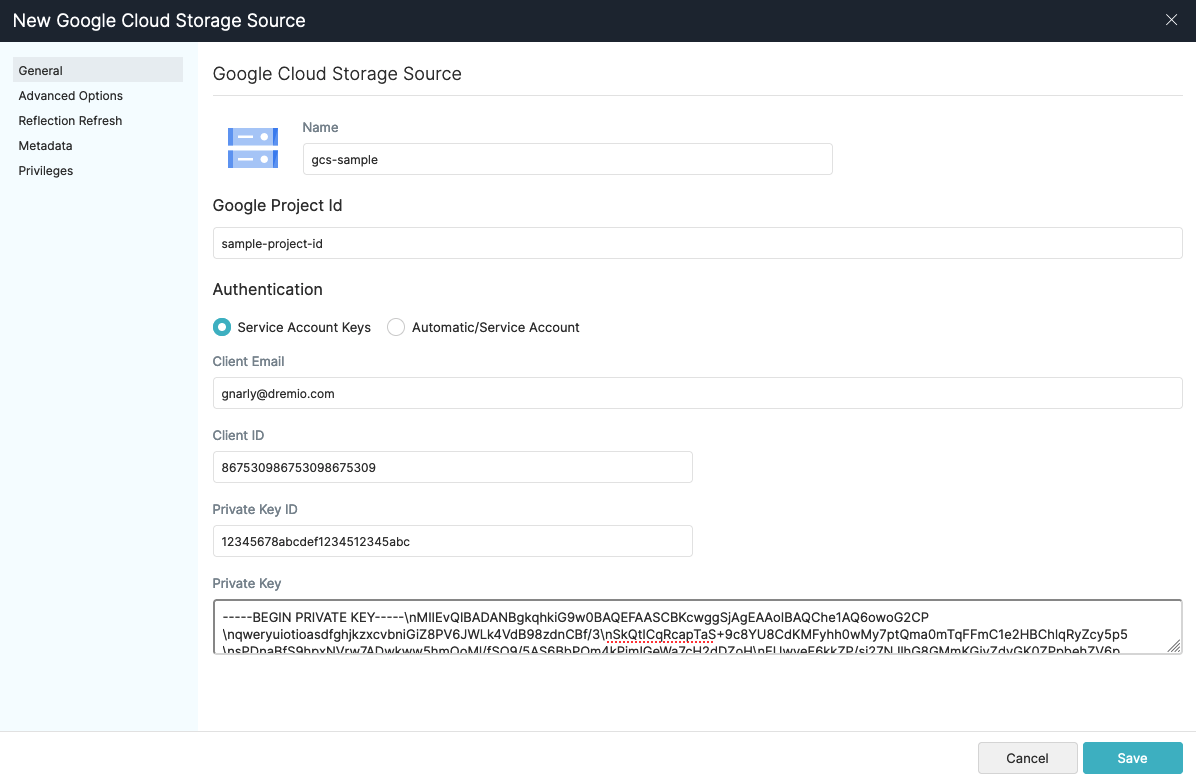
You can add GCS as a data source through the Dremio UI in 4 easy steps:
- In the Dremio UI, click the “Add Data Lake” button
- Select “Google Cloud Storage”
- Create a name for your GCS source and input all the required credentials to connect your GCS account: Project ID, Client Email, Client ID, Private Key ID, Private Key*
- Click “Save”
After you click “Save”, you’ll find your GCS account listed as a data source alongside all your other existing data sources. From there, you’ll be able to start querying and creating dashboards on your GCS data!
*GCP’s Cloud IAM documentation contains instructions for creating and managing account keys for your GCS account.
Enhanced Support for External Sources
While cloud data lake storage has become the de facto storage layer for most companies, many companies want to enrich their analyses with data residing in external sources, such as relational and NoSQL databases. For example, you might want to join a small dimension table in Postgres with your core fact tables in Amazon S3.
We’ve supported querying and joining data from external sources since day one, and we continue to enhance and optimize support for our most popular external sources.
Today’s release introduces:
- Support for Java date/time formats introduced by Elasticsearch 7. (In Elasticsearch 7, Elasticsearch switched from joda time to java time for date-related parsing, formatting, and calculations — Dremio supports both of these date/time formats)
- Improved Oracle/Postgres/SQL Server pushdown functionality
Percentile Functions
Today’s release broadens our coverage of built-in analytical SQL functions, so you can run statistical analyses on your data more easily. You can now use built-in SQL functions to calculate percentiles based on discrete and continuous distributions of their data.
For example, if you had a dataset of employee salaries, you could use the PERCENTILE_CONT function to calculate 25th, 50th, and 75th percentiles for employee salaries based on a continuous distribution:
SELECT
PERCENTILE_CONT(0.25) WITHIN GROUP (ORDER BY salary) AS pct_25,
PERCENTILE_CONT(0.5) WITHIN GROUP (ORDER BY salary) AS pct_50,
PERCENTILE_CONT(0.75) WITHIN GROUP (ORDER BY salary) AS pct_75
FROM employees
Custom Authentication with AWS
Companies have the flexibility to choose their preferred authentication and authorization methods with Dremio. For example, Dremio supports authenticating with AWS data sources via AWS access keys or EC2 metadata. However, companies with stricter security requirements may need to authenticate via custom processes. For example, you may want to use short-lived access tokens provided on-demand by an external service.
With today’s release, you can use custom processes to generate access tokens for AWS data sources by specifying an AWS profile when adding your AWS data source:
When you specify “AWS Profile” as the authentication method, Dremio will source credentials from your specified AWS profile. Specifically, you can define a custom process to generate access tokens through the credential_process option in your AWS profile:
$ cat ~/.aws/credentials
[default]
aws_access_key_id = ABCDEFGHIJKLMNOPQRST
aws_secret_access_key = SAMPLESAMLPLESAMPLESAMPLESAMPLESAMPLESAM

[dev]
aws_access_key_id = TSRQPONMLKJIHGFEDCBA
aws_secret_access_key = SAMPLESAMLPLESAMPLESAMPLESAMPLESAMPLESAM

# use the credential_process option to specify a custom authentication process!
[custom]
credential_process = "/path/to/generate-credentials.sh"
The script you specify in the credential_process option can be any process that generates access tokens. For example, the script could query a key vault for access key/secret key credentials, or query an ADFS system for SAML tokens. Dremio will leverage the AWS SDK to run your script and generate access tokens for authentication with AWS.
Sourcing profile credentials this way enables you to integrate any authentication method supported by AWS, including new methods offered in the future. You can use custom AWS authentication with all Dremio-supported AWS data sources, including Amazon S3, AWS Glue, Amazon Redshift, and Amazon Elasticsearch Service.
Learn More
We’re excited about the features and improvements we’ve made this month! For a complete list of additional new features, enhancements, changes, and fixes, check out the Release Notes. And, as always, we look forward to your feedback, questions, and comments in the Dremio Community!
Try Dremio Cloud free for 30 days
Deploy agentic analytics directly on Apache Iceberg data with no pipelines and no added overhead.