Transform Studio is a free, open source visual pipeline builder and data quality tool built specifically for Dremio, available now on GitHub.
53 pre-built transforms across 7 categories (Clean, Reshape, DateTime, Enrich, Aggregate, String, Custom SQL) let analysts and engineers build pipelines without manual coding.
The Data Quality Hub provides dedicated monitors, automated scoring, scheduling, and 14 built-in rules so teams can detect and respond to data issues before they reach production.
Pipeline health monitoring and alerting includes Custom SQL, Data Quality, Pipeline Health, and Source Freshness alert types, and keeps teams informed without manual checking.
Transform Studio connects to both Dremio Cloud and self-hosted Dremio deployments, and supports dbt project import/export for teams already using dbt.
Eight pre-built pipeline templates, from Customer 360 to Churn Candidates to Data Freshness Audit, let teams deploy common patterns in a single click.
Built for the Dremio Community
Transform Studio for Dremio, is a free and open source pipeline builder and data quality tool built for the Dremio community. Whether you run Dremio Cloud or a self-hosted deployment, Transform Studio gives analysts and data engineers a visual workspace to build transformation pipelines, monitor data quality, and schedule runs, all within the Dremio ecosystem.
This is a community projectit's free to use, and contributions are welcome.
Build Pipelines Without Writing SQL
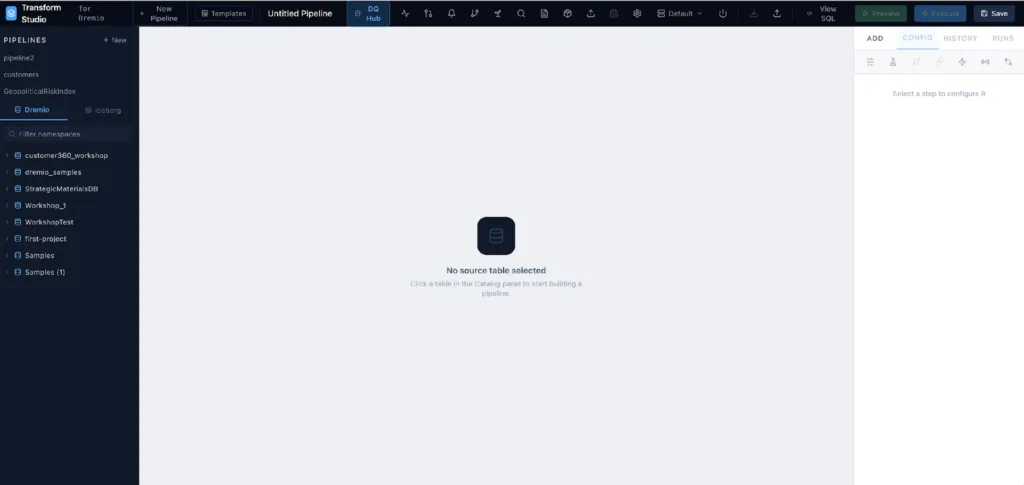
The core of Transform Studio is a visual, low-code pipeline editor. You browse your Dremio catalog, click a source table, and start assembling transformations from a library of 53 built-in steps. No SQL required.
The pipeline editor connects directly to your Dremio catalog. Click any table to start building.
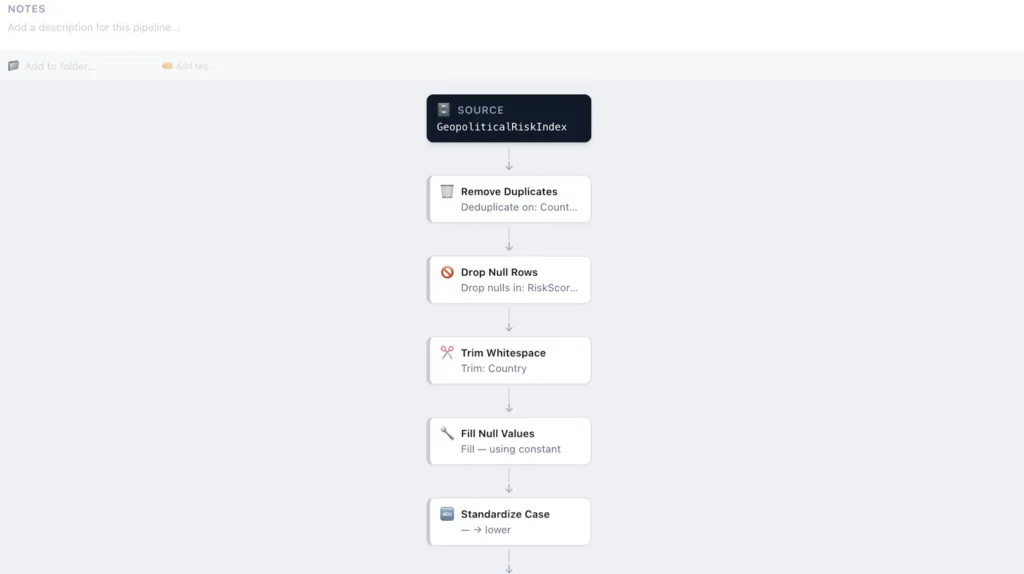
The transform library is organized into seven categories: Clean, Reshape, DateTime, Enrich, Aggregate, String, and Custom SQL. Common operations like Drop Null Rows, Trim Whitespace, Standardize Case, Cast Column Type, and Join are available as point-and-click steps. Each step includes a live preview so you can see exactly what your data looks like before you write anything to a table.
The transform library surfaces the most-used cleaning and reshaping operations so teams can build production-quality pipelines quickly.
For more complex logic, the Custom SQL transform lets you drop into SQL at any point in the pipeline. You can also switch to a visual lineage view to see the full flow of your pipeline as a node graph, useful for reviewing dependencies and understanding data movement at a glance.
The visual pipeline view shows every transform step and its configuration. Switch between list and graph views to navigate complex pipelines.
For teams that already use dbt, Transform Studio imports dbt project ZIPs and converts each model into an equivalent pipeline, with no dbt installation required.
Monitor Data Quality Out of the Box
Data quality isn't a reporting problem. It is a pipeline problem.. Transform Studio addresses this directly with a dedicated Data Quality Hub, a workspace where teams configure monitors, score data quality against built-in rules, and track quality over time.
The Data Quality Hub provides an at-a-glance view of monitor health, average scores, and active/failing monitors across all tracked tables.
When creating a monitor, you pick from a Rule Catalog of 14 built-in checks organized by dimension: Completeness (Null Rate, Not Null Strict, Row Count), Uniqueness (Column Uniqueness, Duplicate Rows), Validity (Accepted Values, Numeric Range, Regex Pattern, String Length, Referential Integrity), and more.
Monitors can combine multiple rules from the catalog. Scores aggregate across all active rules, giving a single quality score per table.
Monitors run on a schedule. Results feed into history tracking so teams can see whether data quality is improving or degrading over time. Teams can also set alerting thresholds to get notified when a score drops below an acceptable level.
Stay on Top of Pipeline Health
Beyond data quality, Transform Studio monitors the operational health of your pipelines through a Pipeline Health Dashboard. It surfaces success rates, run history, and current status for every pipeline in a single view, refreshing every 30 seconds.
The Pipeline Health Dashboard gives teams a live view of pipeline run status. Healthy pipelines show success rates and last-run timestamps.
When something needs attention, four alert types let teams define exactly what to watch:
Custom SQL: run any SQL query and trigger an alert when it returns rows
Pipeline Health: alert when a pipeline fails or degrades
Data Quality: alert when row counts, null rates, or other checks fall outside bounds
Source Freshness: alert when a source table hasn't been updated within an expected window
Alerts cover both operational and quality dimensions, so teams can respond to issues before downstream consumers are affected.
Pipelines run on cron schedules with configurable retry logic and SLA deadlines. The Pipeline Graph view shows cross-pipeline dependencies and calculates execution order automatically, with cycle detection to prevent deadlocks.
Get Started in Minutes
Transform Studio connects to Dremio in three clicks. Choose Dremio Cloud (US or EU) or self-hosted, enter your host and Personal Access Token, and you're browsing your catalog.
Setup takes under a minute. Dremio Cloud users connect with a Personal Access Token from their Cloud project settings.
To accelerate adoption, eight pre-built pipeline templates cover the most common analytical patterns:
Daily Sales Summary: aggregate revenue, order count, and order value by day
Customer 360: join customers with their latest order, lifetime value, and order count
Churn Candidates: flag customers inactive for 90+ days
User Activity Funnel: count users at each stage of sign-up → activation → purchase
Monthly Cohort Retention: group users by sign-up month and measure return rate
Top Products by Revenue: rank products by total revenue with category breakdown
Data Freshness Audit: check when each table was last updated
Revenue by Region: join orders with geography to break revenue down by region
Templates are one-click deployments. Open a template, connect it to your Dremio tables, and run.
Transform Studio is available as a Docker container, a native desktop app for Mac, Windows, and Linux, or as a self-hosted team deployment with nginx and SSL. The GitHub repository includes full documentation and setup guides.
What's Next
Transform Studio is an open source community project. Its direction is shaped by the people using it. If you build something useful on top of Dremio and want a better way to manage pipelines and data quality, this is where to start.
And if you're not yet running Dremio, try Dremio Cloud free. No pipelines required, data stays where it lives.
Try Dremio Cloud free Deploy analytics directly on your Apache Iceberg data with no ETL and no added overhead.
Transform Studio is a community project under the dremio-community GitHub organization. It is free and open source, licensed under the Apache 2.0 License.
Try Dremio Cloud free for 30 days
Deploy agentic analytics directly on Apache Iceberg data with no pipelines and no added overhead.
Ingesting Data Into Apache Iceberg Tables with Dremio: A Unified Path to Iceberg
By unifying data from diverse sources, simplifying data operations, and providing powerful tools for data management, Dremio stands out as a comprehensive solution for modern data needs. Whether you are a data engineer, business analyst, or data scientist, harnessing the combined power of Dremio and Apache Iceberg will undoubtedly be a valuable asset in your data management toolkit.
Sep 22, 2023·Dremio Blog: Open Data Insights
Intro to Dremio, Nessie, and Apache Iceberg on Your Laptop
Editor’s note, September 2026. This post was published in September 2023 and some product details have changed since. Nessie is still available and self-deployable under the Apache-2.0 licence, and it remains the clearest implementation of catalog-level branching. It is not an Apache Software Foundation project, and its development has slowed considerably. For how the current […]
Oct 12, 2023·Product Insights from the Dremio Blog
Table-Driven Access Policies Using Subqueries
This blog helps you learn about table-driven access policies in Dremio Cloud and Dremio Software v24.1+.