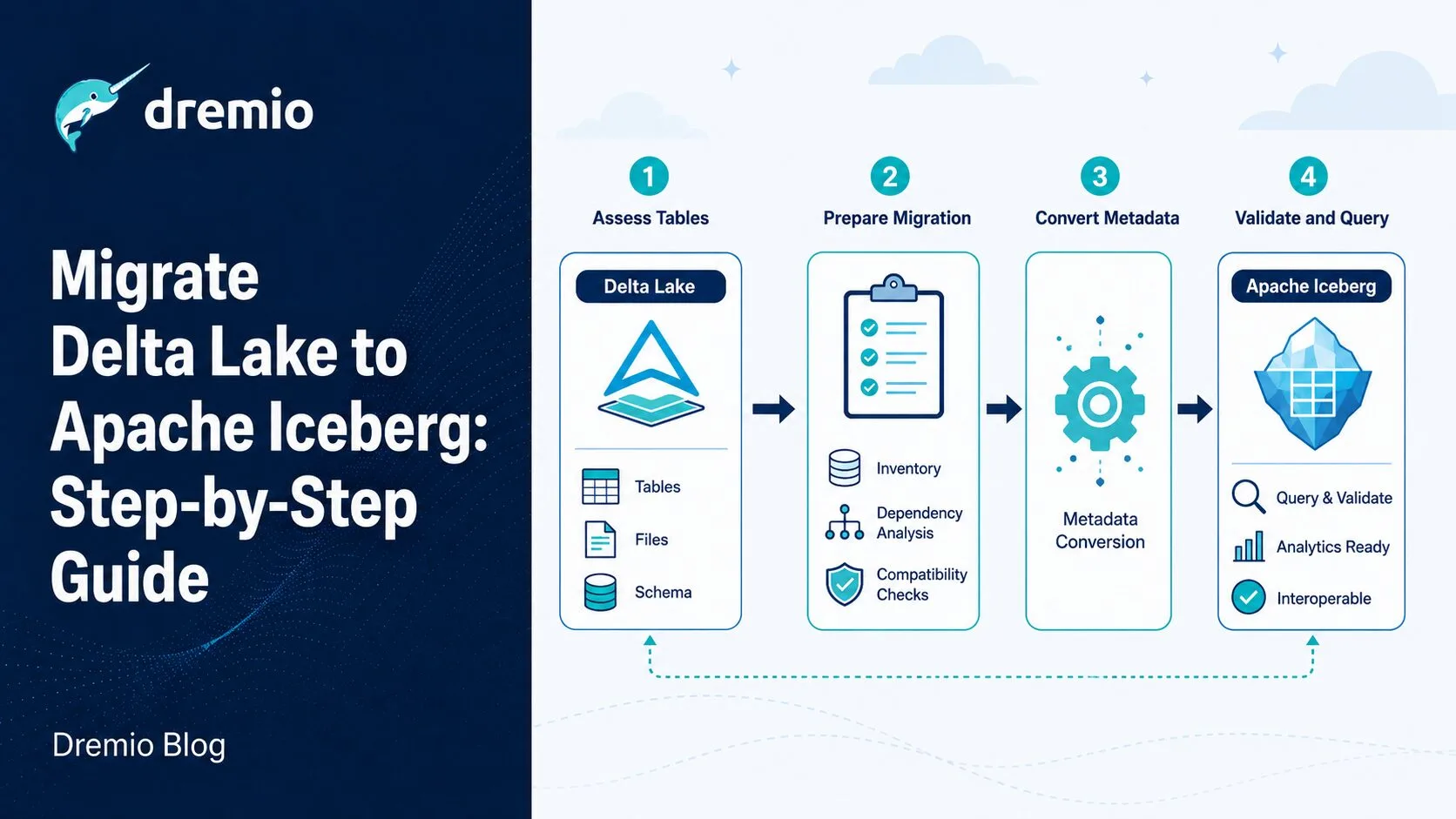
Apache Iceberg now has native read/write support across more than a dozen query engines, from Spark and Flink to Trino, Dremio, DuckDB, Snowflake, and BigQuery. That breadth of support is the single biggest reason data engineering teams in 2025 and 2026 are choosing to migrate Delta Lake to Apache Iceberg, and this guide walks through exactly how to do it.
Delta Lake is not a bad format. It solved real problems when it launched, and the _delta_log transaction model is well-understood. But its governance is tightly coupled to Databricks' roadmap, its advanced features often require Databricks tooling to fully utilize, and it does not have a standard REST Catalog interface that lets any engine connect to any catalog without custom integration work. For teams who want to run Flink alongside Spark, or use Dremio for federated analytics, or expose data to AI agents through an Agentic Lakehouse, those limitations matter.
This is a practical, opinionated guide. You will find three migration approaches with code, a decision matrix to pick the right one, a step-by-step walkthrough for each path, and a validation checklist you can run after every migration. Refer to the Apache Iceberg Architectural Guide for a deeper primer on how Iceberg's metadata model works before you start.
Why Teams Are Moving Away from Delta Lake in 2025
The Vendor Dependency Problem
Delta Lake is open source under the Linux Foundation, but its direction is controlled by Databricks. Features like Liquid Clustering, Photon engine optimization, and Delta Sharing are either Databricks-specific or work best within the Databricks platform. When a team needs to run Delta tables on a self-managed Spark cluster, a Trino deployment, or a standalone Dremio instance, they find that full Delta Lake feature parity is not guaranteed.
The deeper issue is catalog interoperability. Delta Lake does not have a standard REST Catalog specification. Every engine that wants to read Delta tables must either implement Delta protocol parsing independently or rely on the Delta Standalone library. That creates friction at the ecosystem level.
Broader Engine Support with Apache Iceberg
Apache Iceberg's table spec is implemented natively by Spark, Flink, Trino, Presto, Dremio, Hive, DuckDB, StarRocks, BigQuery, and Snowflake. Any engine that implements the Iceberg spec gets full read/write access to Iceberg tables, including schema evolution, time travel, and partition pruning. There is no "best on engine X" caveat.
When your team adds a new processing layer, say migrating from batch Spark to streaming Flink, you do not need a migration. The tables are already Iceberg. That engine portability is why Iceberg has become the default choice for new lakehouses built in 2024 and 2025.
REST Catalog Interoperability
The Iceberg REST Catalog specification (stable since Iceberg 1.x) defines a standard HTTP API for catalog operations: creating namespaces, listing tables, loading table metadata, and committing changes. AWS Glue, Apache Polaris, and Databricks Unity Catalog all implement this spec for Iceberg tables. Any engine with a REST Catalog client can connect to any of these catalogs without custom integration code.
Delta Lake has no equivalent. Each catalog vendor implements its own Delta Lake integration separately, which means you get inconsistent feature support depending on which catalog and which engine you combine.
The AI Tooling Advantage
Iceberg's structured, queryable metadata, including snapshot history, manifest files, and column-level statistics, is well-suited for AI-adjacent workloads. Tools that scan metadata to generate data quality reports, build data lineage graphs, or power natural language query agents can work consistently across any Iceberg catalog. Dremio's Agentic Lakehouse platform is built on this principle: structured Iceberg metadata plus a rich semantic layer enables AI agents to query, explore, and reason about data without hand-holding.
Key Differences Between Delta Lake and Apache Iceberg
Understanding these differences before migration prevents surprises:
Hidden partitioning, partition evolution without data rewrite
Schema evolution
Column names used for tracking
Field IDs used (safer renames, column reorder)
Time travel
VERSION AS OF n / TIMESTAMP AS OF
FOR SYSTEM_VERSION AS OF / FOR SYSTEM_TIME AS OF
Z-order / sorting
OPTIMIZE ... ZORDER BY
Configurable sort orders via SORT ORDER
IDENTITY columns
Supported natively
Not supported natively
Generated columns
Supported
Not supported
Standard catalog API
None (proprietary per-vendor)
REST Catalog spec (standard)
Data file formats
Parquet (primary)
Parquet, ORC, Avro
The IDENTITY column and generated column gaps are important. Any Delta table that uses auto-increment IDs or computed columns cannot be migrated using metadata-only tools. You must use a full data re-read approach.
The partitioning difference is also significant. Delta partition columns are physically present in the file path (like Hive). Iceberg hidden partitions are derived from data column values without being stored in the path. When you migrate, you choose the Iceberg partition spec from scratch, which is actually an opportunity to improve your partition layout at the same time.
Read about Iceberg's hidden partitioning to understand the performance gains available when you define your partition spec correctly during migration.
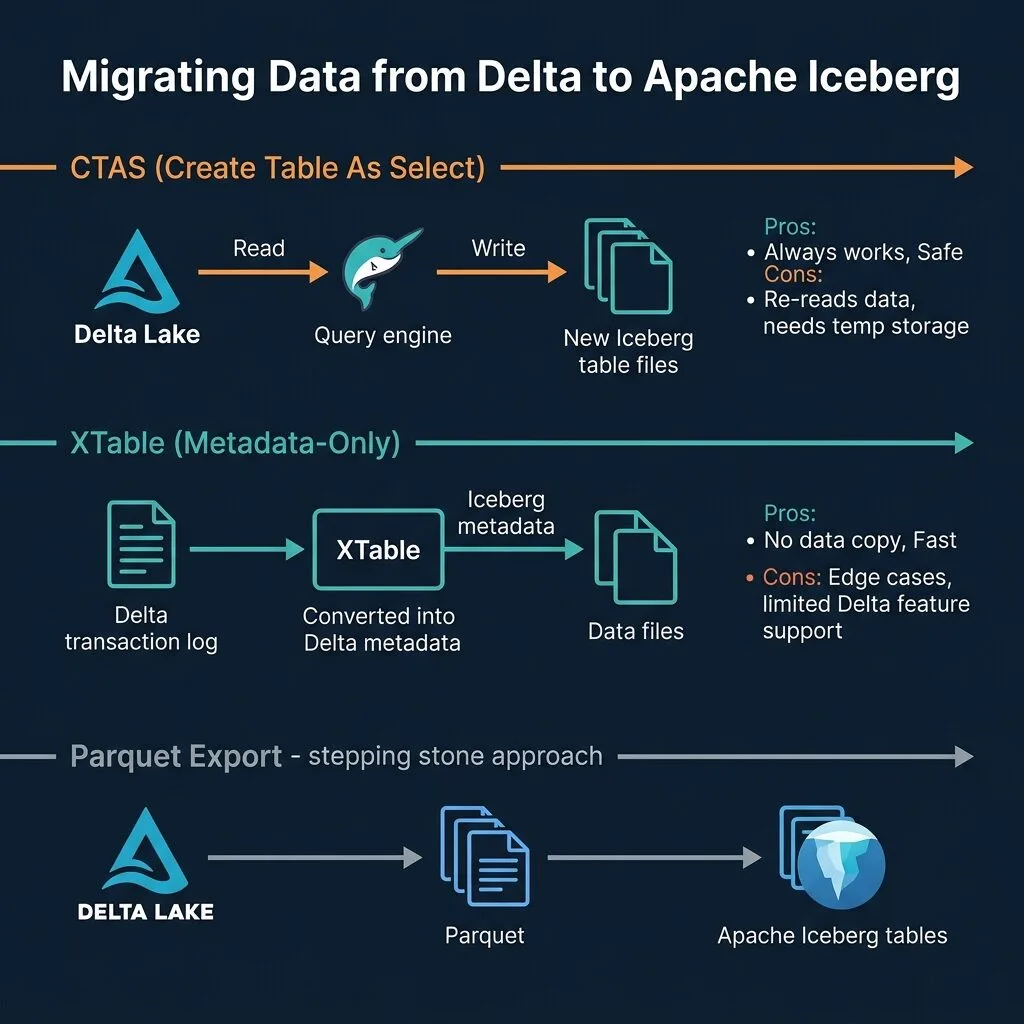
Three Approaches to Migrate Delta Lake to Apache Iceberg
Every migration falls into one of three patterns. The right choice depends on table size, feature usage, and how much downtime you can accept.
Approach 1: CTAS (Create Table As Select)
CTAS uses a query engine to read the Delta Lake table and write a brand-new Iceberg table. Every row is physically read and written. The result is a clean, canonical Iceberg table with no dependency on Delta metadata.
How it works: You point your query engine at the Delta source (via a federated connector or a delta.\path`reference), runCREATE TABLE ... AS SELECT *`, and write to your target Iceberg catalog.
Pros:
Produces a correct, fully supported Iceberg table every time.
Works for all Delta features including IDENTITY columns, generated columns, and complex merge histories.
You can change partition spec, sort order, and file layout during migration.
Easy to validate: row counts must match.
Cons:
Reads all data. For a 5TB table, that means 5TB of I/O and significant compute cost.
Requires temporary dual storage (Delta and Iceberg tables coexist).
Requires a quiescence window or a follow-up incremental sync for tables with active writes.
Best for: Tables under 100-200GB, tables that use Delta-specific features XTable cannot handle, and critical production tables where correctness is non-negotiable.
Approach 2: XTable Metadata Translation
Apache XTable (formerly OneTable, donated to the Apache Software Foundation in 2024) translates Delta Lake transaction log entries into Iceberg metadata files. It does not copy or move data. The Parquet files remain in place and are referenced by both Delta and Iceberg metadata simultaneously after the sync.
How it works: You configure a dataset YAML file pointing at your Delta table's base path, run the XTable sync, and XTable generates Iceberg metadata files. Once sync completes, you register the table in your Iceberg catalog pointing at the metadata location.
Pros:
Zero data copy. For a 10TB table, the sync completes in minutes, not hours.
No storage cost increase during migration.
Can keep both formats in sync for a transition period.
Cons:
Does not support Delta IDENTITY columns.
Does not support Delta generated columns.
Delta DML operation history does not map to Iceberg snapshot semantics.
Complex Delta features (bloom filters, Liquid Clustering) do not translate.
Still an early-stage Apache project. Edge cases exist, especially with large checkpoint files and newer Delta protocol versions.
Best for: Large tables (1TB+) where re-reading all data is cost-prohibitive, tables without IDENTITY or generated columns, and non-critical tables where you can validate carefully.
Approach 3: Parquet Export and Iceberg Import
This intermediate approach exports Delta table data as raw Parquet files, then creates a new Iceberg table reading those Parquet files. It is useful when you want a clean break from Delta metadata and also want fine-grained control over file layout before the Iceberg table is created.
How it works: Export the Delta table using df.write.parquet(output_path) in Spark, or use a COPY INTO / export command if your platform supports it. Then create an Iceberg table either by reading those Parquet files with CTAS, or by using Iceberg's ADD FILES capability where supported.
Pros:
Decouples export from import. You can export now and import later.
Lets you restructure file layout, merge small files, or repartition before creating the Iceberg table.
Cons:
Multi-step, more operational complexity than CTAS.
Still requires reading all data (similar cost to CTAS).
Intermediate Parquet files consume storage during the transition.
Best for: Teams that want a clean break with full control over the physical layout, or situations where the export and import happen across organizational boundaries or time gaps.
Decision Matrix: Which Approach Is Right for You
Scenario
Recommended Approach
Table < 100GB, downtime OK
CTAS
Table > 1TB, minimal downtime
XTable (validate carefully)
Uses Delta IDENTITY columns
CTAS (XTable doesn't support these)
Uses Delta generated columns
CTAS
Delta MERGE history required
CTAS
Needs fastest path, accepts risk
XTable
Critical production table
CTAS + parallel validation
Want new partition spec or sort order
CTAS or Parquet Export
Multiple engines needed immediately
CTAS
Dev/test table, cost-sensitive
XTable
The matrix simplifies to a primary question: does your table use any Delta-specific features that XTable cannot translate? If yes, use CTAS. If no, and the table is large enough that re-reading is expensive, XTable is worth evaluating, with careful validation.
For critical production tables, the recommendation is CTAS regardless of table size. The cost of storage and compute during migration is smaller than the cost of a data correctness issue in production.
Step-by-Step CTAS Migration Walkthrough
This walkthrough assumes you have a Spark cluster or a Dremio instance with access to both the Delta source and the Iceberg target catalog.
Prerequisites:
Spark 3.3+ with Delta Lake connector and Iceberg connector on the classpath, or Dremio with Delta Lake source configured.
An Iceberg catalog configured as the write target (AWS Glue, Polaris, Hive Metastore, or Nessie).
Write access to the target storage location.
Step 1: Audit the Delta source table
Before writing anything, capture the source schema and row count:
-- In Spark SQL
DESCRIBE TABLE delta.`s3://my-bucket/delta/events/`;

SELECT COUNT(*) FROM delta.`s3://my-bucket/delta/events/`;
Note whether the table uses IDENTITY columns, generated columns, or complex partition expressions. Check the partition columns, because you will need to decide whether to keep the same partitioning in Iceberg or adopt hidden partitioning.
Step 2: Design the Iceberg partition spec
Iceberg hidden partitioning lets you partition by a transform on a column value, for example days(event_timestamp), without storing the partition value in the file path. This means queries that filter by timestamp ranges automatically get partition pruning without knowing the partition scheme.
If your Delta table is partitioned by event_date (a date column), you can keep the same effective partitioning in Iceberg using PARTITIONED BY (days(event_date)). If it was partitioned by a string like event_month, you can improve it to months(event_timestamp) on the timestamp column.
Step 3: Run the CTAS
Using Spark SQL with the Iceberg catalog configured:
-- Spark SQL: read from Delta, write to Iceberg
CREATE TABLE iceberg_catalog.prod.events
USING ICEBERG
PARTITIONED BY (days(event_timestamp))
AS SELECT *
FROM delta.`s3://my-bucket/delta/events/`;
Using Dremio SQL (Delta source federated as delta_source, Iceberg catalog as arctic):
-- Dremio SQL: federated Delta source → Iceberg catalog
CREATE TABLE arctic.prod.events
AS SELECT *
FROM delta_source.prod.events;
For very large tables, consider partitioned CTAS: run the migration partition-by-partition, writing one month of data at a time. This reduces memory pressure and lets you restart from a checkpoint if something fails.
-- Partition-by-partition approach (run for each month value)
INSERT INTO iceberg_catalog.prod.events
SELECT *
FROM delta.`s3://my-bucket/delta/events/`
WHERE event_timestamp >= '2024-01-01' AND event_timestamp < '2024-02-01';
Step 4: Validate row counts and schema
Run these queries immediately after CTAS completes:
-- Row count validation
SELECT
  (SELECT COUNT(*) FROM delta.`s3://my-bucket/delta/events/`) AS delta_count,
  (SELECT COUNT(*) FROM iceberg_catalog.prod.events) AS iceberg_count;

-- Schema validation: run DESCRIBE on both and compare output
DESCRIBE TABLE delta.`s3://my-bucket/delta/events/`;
DESCRIBE TABLE iceberg_catalog.prod.events;
Step 5: Switch the application pointer
Once validation passes, update your application's catalog reference. If you use Dremio as the query layer, update the virtual dataset or view definition to point to the Iceberg catalog instead of the Delta source. Downstream BI tools and application queries continue to work unchanged.
Step-by-Step XTable Migration Walkthrough
Prerequisites:
Java 11+ runtime.
XTable JAR downloaded from the Apache XTable project, or the pyxtable Python package installed.
S3 or cloud storage credentials accessible from the machine running XTable.
Step 1: Configure the dataset YAML
Create a configuration file describing the source Delta table and the target Iceberg format:
XTable reads the Delta transaction log, generates Iceberg metadata JSON and manifest files alongside the existing Parquet data files, and writes them to the table base path. No data files are copied.
Step 3: Verify Iceberg metadata exists
After sync, check that Iceberg metadata was created:
aws s3 ls s3://my-bucket/delta/events/metadata/ | grep ".json"
You should see one or more v*.metadata.json files. This confirms XTable successfully generated the Iceberg table snapshot.
Step 4: Register in your Iceberg catalog
Depending on your catalog:
-- Register in Spark (using Hadoop catalog or REST catalog)
CALL iceberg_catalog.system.register_table(
  table => 'prod.events',
  metadata_file => 's3://my-bucket/delta/events/metadata/v1.metadata.json'
);
For AWS Glue or Polaris, use their respective catalog APIs to register the Iceberg metadata location. Once registered, any Iceberg-compatible engine can query the table.
Important: XTable has known limitations. Do not use it for tables with IDENTITY columns, generated columns, or tables where you rely on Delta's operation history for audit purposes. For those cases, use CTAS.
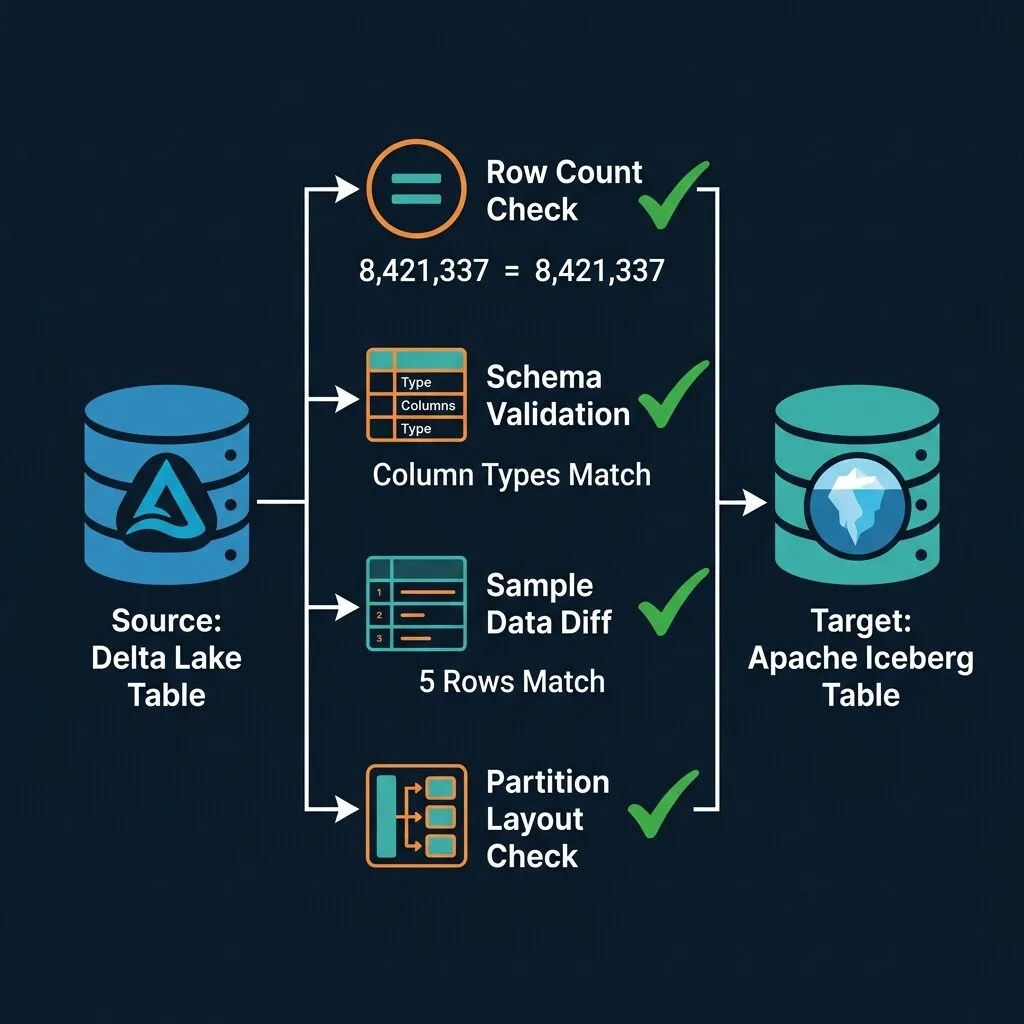
Post-Migration Validation Checklist
Validation is not optional. Run every check before decommissioning the Delta source.
Row count comparison
-- Run against both sources and compare
SELECT COUNT(*) FROM delta.`s3://my-bucket/delta/events/`;
SELECT COUNT(*) FROM iceberg_catalog.prod.events;
The counts must match exactly. Any discrepancy means data was missed or duplicated.
Compare column names, data types, and nullability. Pay special attention to:
TIMESTAMP vs TIMESTAMPTZ: Iceberg distinguishes timezone-aware and timezone-naive timestamps. Delta's timestamp handling may differ.
DECIMAL precision and scale: ensure they match exactly.
Column order: while semantic equality doesn't require same order, downstream tools may depend on it.
Sample data comparison
-- Pull 1000 rows from each and verify they match
SELECT * FROM delta.`s3://my-bucket/delta/events/`
ORDER BY event_id
LIMIT 1000;

SELECT * FROM iceberg_catalog.prod.events
ORDER BY event_id
LIMIT 1000;
For automated validation, write the results to separate files and diff them. Any differences indicate a mapping error.
Partition validation
-- Iceberg: check partition summary
SELECT partition, record_count, file_count
FROM iceberg_catalog.prod.events.partitions
ORDER BY partition;
Verify the partition count and distribution is consistent with what you expect from the Delta source.
Time travel verification
-- Confirm you can access the first snapshot
SELECT COUNT(*) FROM iceberg_catalog.prod.events
FOR SYSTEM_VERSION AS OF 1;
NULL handling
Run targeted queries to check NULL counts on key columns match between Delta and Iceberg:
SELECT
  COUNT(*) FILTER (WHERE event_id IS NULL) AS null_event_ids,
  COUNT(*) FILTER (WHERE user_id IS NULL) AS null_user_ids
FROM iceberg_catalog.prod.events;
Compare these numbers against the same query on the Delta source.
Using Dremio as Your Migration Bridge
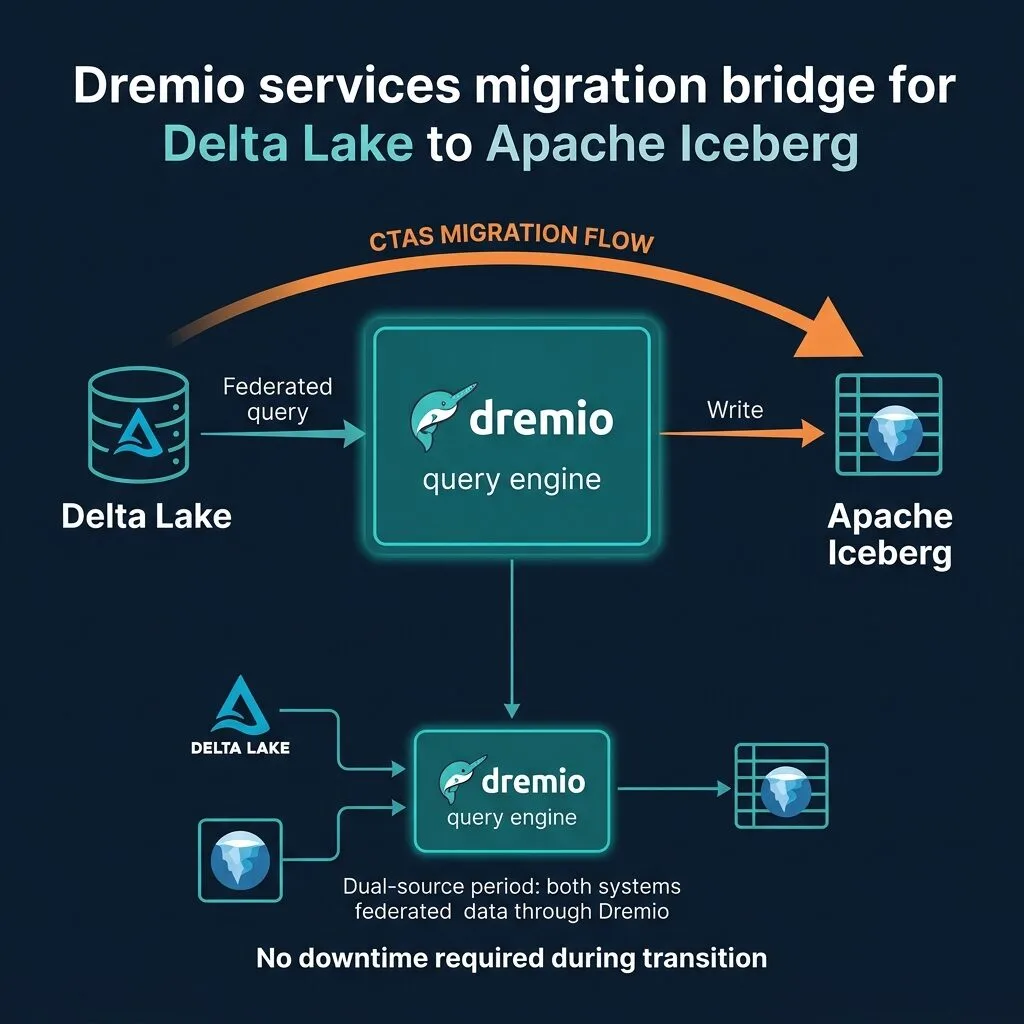
Dremio is particularly effective as the engine powering Delta Lake to Apache Iceberg migrations because it connects to both systems simultaneously through its query federation layer.
During migration: Configure the Delta Lake path as a source in Dremio (S3, ADLS, or GCS with Delta format). Configure your Iceberg catalog as a Dremio catalog (REST, AWS Glue, Polaris/Open Catalog, or Hive Metastore). Then run the CTAS migration entirely in Dremio SQL:
-- Full CTAS migration via Dremio
CREATE TABLE "arctic"."prod"."events"
AS SELECT *
FROM "delta_source"."prod"."events";
During the transition period: Keep both sources active in Dremio. Create a virtual dataset (a view in the Dremio semantic layer) that both teams use as their access point:
-- Dremio virtual dataset pointing to Delta source initially
CREATE VIEW "Shared"."events_view" AS
SELECT * FROM "delta_source"."prod"."events";
After migration validation passes, update the view definition to point to Iceberg:
-- Flip to Iceberg backing: zero changes for downstream consumers
CREATE OR REPLACE VIEW "Shared"."events_view" AS
SELECT * FROM "arctic"."prod"."events";
Dashboards, reports, and application queries that target events_view continue to work without any changes. The migration is invisible to consumers.
Once the new Iceberg table is live, Dremio's Autonomous Reflections can automatically materialize and maintain optimized acceleration structures, selecting the best aggregation or raw reflection layouts based on actual query patterns. You don't need to manually tune anything.
Timezone handling: Delta Lake stores timestamps in local time by default in many configurations. Iceberg has explicit timestamp (no timezone) and timestamptz (UTC-normalized) types. If your Delta table was written with timezone-unaware timestamps but your applications assume UTC, verify the behavior after migration by comparing representative timestamp values.
Partition spec mismatch: Delta partition columns are explicit in the directory path. If you migrate a Delta table partitioned by event_date to Iceberg using days(event_timestamp), the physical layout will differ. This is usually fine from a correctness standpoint but verify that queries with date filters still get proper partition pruning by examining query plans in your engine.
Iceberg's approach to partitioning is explored in detail in the hidden partitioning guide, which explains exactly how partition transforms eliminate unnecessary file scans.
IDENTITY columns: Delta IDENTITY or auto-increment columns have no direct equivalent in Iceberg. If you use these in Delta, the column values are already materialized in the Parquet files, so CTAS will copy the existing values correctly. The concern is that you cannot auto-generate new values on insert in Iceberg after migration without application-side logic. Plan for this before you migrate.
Z-ORDER vs sort order: Delta's OPTIMIZE ... ZORDER BY (col1, col2) produces a physical data layout that interleaves data by multiple columns for range query optimization. Iceberg supports configurable sort orders (e.g., SORT ORDER (col1 ASC, col2 ASC NULLS LAST)) but the semantics differ. Z-ordering is not directly reproducible in standard Iceberg. After migration, you can run OPTIMIZE in your Iceberg engine to apply the Iceberg sort order, and query plans may differ slightly until the data is rewritten.
In-flight DML during migration: If your Delta table receives active writes during a CTAS migration, the snapshot you read will not include changes committed after the CTAS started. Plan a brief quiescence window for active tables, or design a catch-up incremental sync after the initial CTAS using the Delta commit timestamps.
Dual storage cost: During CTAS migration, you pay for two copies of the data. For a 5TB table, that is 5TB of additional storage until you decommission the Delta source. Budget for this and communicate a decommission timeline to your cloud cost team.
XTable and large checkpoints: XTable reads Delta checkpoints to build Iceberg metadata. Very large Delta tables with infrequent checkpointing can produce extremely large checkpoint files. XTable may struggle with these or produce metadata that is slow to query. Test XTable on a staging copy before applying it to production.
Honest Assessment: XTable vs CTAS
XTable is genuinely useful. For a 10TB table where CTAS would cost thousands of dollars in compute and storage during migration, XTable's zero-copy approach is compelling. Development teams validating a migration path, teams building a proof of concept, or teams migrating non-critical tables with large data volumes are good candidates.
The honest limitation is that XTable is still maturing as an Apache project. The feature gap with IDENTITY columns and generated columns is a hard blocker for some tables. The metadata translation has edge cases with newer Delta protocol features. The absence of operation history semantics means audit-sensitive tables lose their Delta lineage.
For critical production tables, the recommendation is clear: use CTAS, accept the cost, and run full validation. The migration is a one-time event. Getting it right matters more than saving on compute for a few hours.
A hybrid approach works well in practice: use XTable to get the Iceberg table available quickly for read access by other engines (so your Flink jobs or Dremio dashboards can start using it), while running CTAS in parallel to produce the clean production table. Once CTAS completes and validates, swap the catalog registration to the CTAS-produced table and retire the XTable-generated metadata.
Putting It Together: A Migration Sequence That Works
Migrations fail when they are treated as a single atomic event. They succeed when they are treated as a phased transition. Here is a sequence that applies to most teams:
Audit all Delta tables: size, feature usage (IDENTITY, generated columns, Z-ORDER), partition spec, active write frequency.
Categorize each table: CTAS candidate, XTable candidate, or deferred (tables with unsupported Delta features that need application changes first).
Start with CTAS on dev/test tables to verify the workflow and validate tooling.
For large tables, run XTable on staging. Validate row counts, schemas, and sample data. If validation passes, proceed with XTable in production.
For critical production tables, run CTAS during a low-traffic window. Validate all checks. Flip the Dremio semantic layer view to point at Iceberg.
Run both Delta and Iceberg sources in parallel for one to two weeks. Monitor for any query discrepancies.
Decommission Delta sources and reclaim storage.
The Iceberg ecosystem is consolidating fast. REST Catalog interoperability, growing AI tooling, and the Apache governance model mean that every month you stay on Delta Lake, you are working against the direction of the industry. The migration investment pays off in engine flexibility, catalog portability, and access to a growing set of tools that assume Iceberg as the standard.
Start your migration with Dremio Cloud, which gives you a federated query engine that reads Delta Lake and writes Iceberg out of the box, plus the semantic layer you need to make the transition invisible to your downstream consumers.
Keep learning
For a deeper treatment of the topics in this post, download Apache Iceberg: The Definitive Guide by Tomer Shiran, Jason Hughes, and Alex Merced, free from Dremio.
Intro to Dremio, Nessie, and Apache Iceberg on Your Laptop
Editor’s note, September 2026. This post was published in September 2023 and some product details have changed since. Nessie is still available and self-deployable under the Apache-2.0 licence, and it remains the clearest implementation of catalog-level branching. It is not an Apache Software Foundation project, and its development has slowed considerably. For how the current […]
Aug 16, 2023·Dremio Blog: News Highlights
5 Use Cases for the Dremio Lakehouse
With its capabilities in on-prem to cloud migration, data warehouse offload, data virtualization, upgrading data lakes and lakehouses, and building customer-facing analytics applications, Dremio provides the tools and functionalities to streamline operations and unlock the full potential of data assets.
Sep 30, 2026·Dremio Blog: Open Data Insights
Apache Iceberg 1.12.0: What’s New, Breaking Changes, and Upgrade Guide
Apache Iceberg 1.12.0 expands v3 engine support, REST catalog operations, streaming reliability, and v4 groundwork. Learn how to upgrade safely.