We’ve spent the last few posts exploring the growing power of AI agents — how they can reason, plan, and take actions across complex tasks. And we’ve looked at the frameworks that help us build these agents. But if you’ve worked with them, you’ve likely hit a wall:
Hardcoded toolchains
Limited to a specific LLM provider
No easy way to share tools or data between agents
No consistent interface across clients
What if we had a standard that let any agent talk to any data source or tool, regardless of where it lives or what it’s built with?
That’s exactly what the Model Context Protocol (MCP) brings to the table.
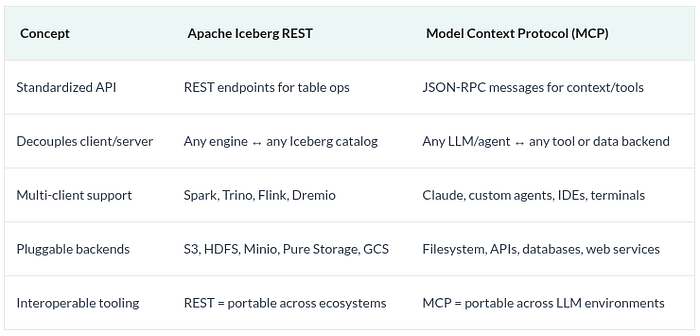
And if you’re from the data engineering world, MCP is to AI agents what the Apache Iceberg REST protocol is to analytics:
A universal, pluggable interface that enables many clients to interact with many servers — without tight coupling.
What Is the Model Context Protocol (MCP)?
MCP is an open protocol that defines how LLM-powered applications (like agents, IDEs, or copilots) can access context, tools, and actions in a standardized way.
Think of it as the “interface layer” between:
Clients: LLMs or AI agents that need context and capabilities
Servers: Local or remote services that expose data, tools, or prompts
Hosts: The environment where the LLM runs (e.g., Claude Desktop, a browser extension, or an IDE plugin)
It defines a common language for exchanging:
Resources (data the model can read)
Tools (functions the model can invoke)
Prompts (templates the user or model can reuse)
Sampling (ways servers can request completions from the model)
This allows you to plug in new capabilities without rearchitecting your agent or retraining your model.
How MCP Mirrors Apache Iceberg’s REST Protocol
Let’s draw the parallel:
Just as Iceberg REST made it possible for Dremio to talk to a table created in Snowflake, MCP allows a tool exposed in Python on your laptop to be used by an LLM in Claude Desktop, a VS Code agent, or even a web-based chatbot.
MCP in Action — A Real-World Use Case
Imagine this workflow:
You’re coding in an IDE powered by an AI assistant
The model wants to read your logs and run some shell scripts
Your data lives locally, and your tools are custom-built in Python
With MCP:
The IDE (host) runs an MCP client
Your Python tool is exposed via an MCP server
The AI assistant (client) calls your custom “tail logs” tool
The results are streamed back, all through the standardized protocol
And tomorrow, you could replace that assistant with a different model or switch to a browser-based environment — and everything would still work.
The Core Components of MCP
Let’s break down the architecture:
1. Hosts
These are environments where the LLM application lives (e.g., Claude Desktop, your IDE). They manage connections to MCP clients.
2. Clients
Embedded in the host, each client maintains a connection to a specific server. It speaks MCP’s message protocol and exposes capabilities upstream to the model.
3. Servers
Programs that expose capabilities like:
resources/list and resources/read
tools/list and tools/call
prompts/list and prompts/get
sampling/createMessage (to request completions from the model)
Servers can live anywhere: locally on your machine, behind an API, or running in a cloud environment.
What Can MCP Servers Do?
Expose local or remote files (logs, documents, screenshots, live data)
Define tools for executing business logic, running commands, or calling APIs
Provide reusable prompt templates
Request completions from the host model (sampling)
And all of this is done in a protocol-agnostic, secure, pluggable format.
Why This Matters
With MCP, we finally get interoperability in the AI stack — a shared interface layer between:
LLMs and tools
Agents and environments
Models and real-world data
It gives us:
Modularity: Swap out components without breaking workflows
Reusability: Build once, use everywhere
Security: Limit what models can see and do through capabilities
Observability: Track how tools are used and what context is passed
Language-agnostic integration: Servers can be written in Python, JavaScript, C#, and more
In short, MCP helps you go from monolithic, tangled agents to modular, composable AI systems.
What’s Next: Diving Deeper into MCP Internals
In the next few posts, we’ll dig into each part of MCP:
Message formats and lifecycle
How resources and tools are structured
Sampling, prompts, and real-time feedback loops
Best practices for building your own MCP server
Try Dremio Cloud free for 30 days
Deploy agentic analytics directly on Apache Iceberg data with no pipelines and no added overhead.
Intro to Dremio, Nessie, and Apache Iceberg on Your Laptop
Editor’s note, September 2026. This post was published in September 2023 and some product details have changed since. Nessie is still available and self-deployable under the Apache-2.0 licence, and it remains the clearest implementation of catalog-level branching. It is not an Apache Software Foundation project, and its development has slowed considerably. For how the current […]
Oct 12, 2026·Dremio Blog: Open Data Insights
Apache Iceberg Table Statistics: NDV, Puffin and Query Plans
Iceberg keeps per-file bounds automatically but table-level NDV statistics only when you compute them. Why that decides join order, and how to keep them fresh.
Aug 16, 2023·Dremio Blog: News Highlights
5 Use Cases for the Dremio Lakehouse
With its capabilities in on-prem to cloud migration, data warehouse offload, data virtualization, upgrading data lakes and lakehouses, and building customer-facing analytics applications, Dremio provides the tools and functionalities to streamline operations and unlock the full potential of data assets.