Most companies still run a separate data warehouse and a data lake. They pay twice for storage, run duplicate pipelines, and spend weeks reconciling numbers that don't match between the two systems. The data lakehouse pattern exists to collapse that complexity into one open architecture.
This guide covers the full picture: how we got to the lakehouse, what its components are, why Apache Iceberg became the table format standard, how Apache Polaris governs it, how to migrate without blowing up your existing stack, and how Dremio turns that lakehouse into a platform for AI-powered analytics.
How We Got Here: From Warehouses to Lakes to Lakehouses
Understanding why the data lakehouse exists requires understanding what broke before it.
The Data Warehouse: Power With a Price Tag
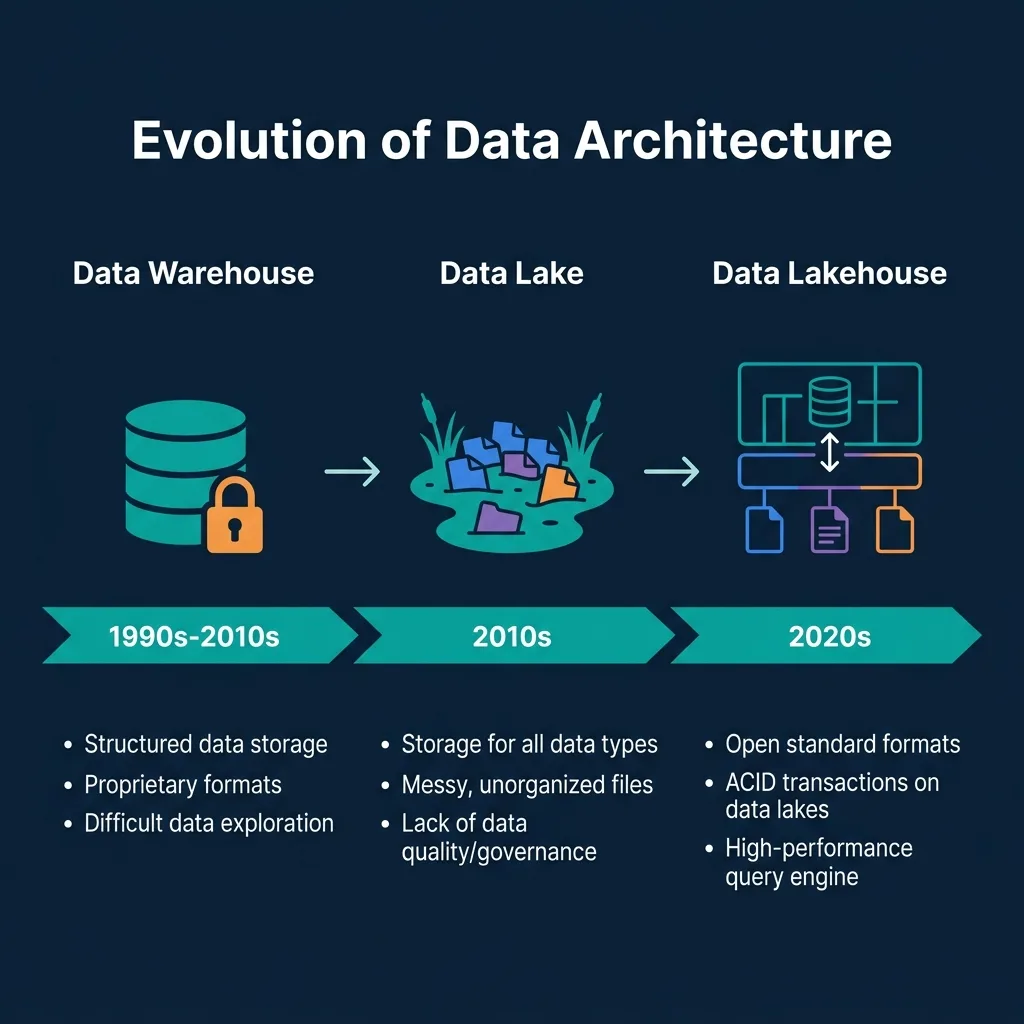
Data warehouses emerged in the late 1980s and dominated the analytics landscape through the 2010s. The architecture was straightforward: extract data from operational systems, transform it into a star or snowflake schema, and load it into a proprietary columnar store optimized for SQL queries. Teradata, IBM Netezza, and later Amazon Redshift and Snowflake ran on this model.
The appeal was real. You got fast, reliable queries, enforced schemas, and SQL tooling that analysts already knew. The catch was equally real. Warehouses were expensive, both in licensing and in proprietary hardware. Schema changes were painful because transforming data to fit a new structure meant reprocessing large volumes of historical data. And they were fundamentally designed for structured data only. Log files, JSON events, images, PDFs: none of that fit cleanly into a relational schema.
The bigger problem was lock-in. Your data lived in a vendor's proprietary format. Moving out meant reprocessing everything.
The Data Lake: Freedom That Became a Swamp
Hadoop and HDFS (2006) gave organizations a new option: store everything in raw form on commodity hardware, then figure out the schema when you query it. Amazon S3 (2006) extended that to object storage, making it even cheaper and more scalable. The pitch was compelling: store all your raw data now, analyze it later, at a fraction of the warehouse cost.
The reality turned ugly fast. Data lakes had no ACID transaction support, which meant concurrent writes could corrupt tables. There was no schema enforcement, so different teams wrote files with incompatible column names or data types. Deleting records: a requirement for GDPR compliance: was nearly impossible without rewriting entire partitions. And performance on ad-hoc analytical queries was frequently terrible because there was no way to prune irrelevant partitions intelligently.
The term "data swamp" came into use to describe what happened when a data lake wasn't carefully governed: a pile of files nobody could trust.
The Lakehouse: The Best of Both Worlds
The data lakehouse pattern emerged around 2020, formalized by work from Netflix, Apple, and later Databricks. The core idea: apply warehouse-grade structure and reliability directly to open-format files on object storage.
Instead of moving data into a proprietary store, a lakehouse keeps data in your own cloud storage (S3, ADLS, GCS) in open file formats (Apache Parquet). A table format layer (Apache Iceberg, Delta Lake, or Hudi) sits on top of those files and provides ACID transactions, versioning, and schema enforcement. A catalog tracks what tables exist and where their files are. Any SQL engine that speaks the catalog's API can query those tables.
The result: the cost profile of a data lake, the reliability of a data warehouse, and no vendor lock-in on either storage or compute.
The Four Components of a Data Lakehouse
A data lakehouse is not a single product. It's a layered architecture composed of four distinct components. Understanding what each layer does: and what it doesn't do: clarifies why specific technology choices matter.
Object Storage: The Foundation
The bottom layer is cloud object storage: Amazon S3, Azure Data Lake Storage Gen2, or Google Cloud Storage. These systems are the foundation because they're cheap (roughly $23 per terabyte per month on S3 Standard), durably replicated across multiple availability zones, and infinitely scalable.
Data is stored as files, most commonly Apache Parquet. Parquet is a columnar format, meaning related column values are stored together, which makes analytical queries that touch only a few columns dramatically faster than reading row-oriented formats. A query scanning a "sales amount" column only reads the bytes for that column, not the entire row.
Object storage has no concept of tables, transactions, or schemas. It's a key-value store for files. That's what the layer above it provides.
The Table Format: ACID on Open Files
The table format layer is where the lakehouse becomes a lakehouse. It sits between the raw files and the query engine, defining how files relate to form a logical table with transactional properties.
Apache Iceberg, Apache Delta Lake, and Apache Hudi are the three dominant formats. All three provide ACID transactions, versioning, and the ability to update and delete individual records: capabilities that raw object storage cannot provide on its own. The differences between them matter and are covered in the Iceberg section below.
The table format also handles partition management. Without it, efficient partition pruning (skipping irrelevant data at query time) requires users to manually specify partitions in their SQL. With a format like Iceberg, the engine reads metadata to know exactly which files are relevant to a query, without requiring any special SQL from the user.
The Catalog: The Registry
The catalog is the index. It records which tables exist, which namespace they belong to, and where their current metadata files are located in object storage. Without a catalog, a query engine has no way to know what "the orders table" is or where to find its files.
Historically, the Hive Metastore served this role. More recently, Apache Polaris has established an open REST catalog API that any Iceberg-compatible engine can use. AWS Glue and Databricks Unity Catalog are also common choices, each with different trade-offs on openness and engine compatibility.
The catalog is also the governance layer. Access control policies, table ownership, and credential management live here. This makes the catalog choice consequential: a proprietary catalog creates lock-in as real as any proprietary storage format.
The Query Engine: The Compute
The top layer is the query engine that reads from the catalog, locates the relevant table files, and executes SQL. Dremio, Apache Spark, Trino, and Apache Flink all operate at this layer. The key distinction of the lakehouse model is that multiple engines can query the same tables simultaneously, each via the catalog's standard API.
A Spark job can write data to an Iceberg table, a Dremio user can query it for a BI dashboard, and a Flink stream can update it, all without coordination or data copying between systems.
Apache Iceberg: Why It Became the Industry Standard
Apache Iceberg started at Netflix and Apple, where engineers were running into the same Hive partition limitations at massive scale. They needed a format that handled hidden partitioning, safe concurrent writes, and schema changes without rewriting petabytes of data. Iceberg was that solution. Netflix donated it to the Apache Software Foundation in 2018.
Hidden Partitioning
In Hive, if a table is partitioned by event_date, a query that doesn't include a WHERE event_date = '...' clause will scan the entire table. This is a silent performance trap. Iceberg eliminates it. Partitioning in Iceberg is defined in the table metadata, not in the file paths. The engine reads the metadata to determine which files can be skipped, regardless of how the user writes their SQL.
This single feature eliminates an entire class of accidental full-table scans that silently blow up warehouse bills.
Schema Evolution
Iceberg supports adding, renaming, dropping, and reordering columns without rewriting data files. Column IDs are tracked independently of column names, so renaming a column doesn't break queries against existing files. Type promotions: converting an integer column to a long, or a float to a double: are supported safely.
In contrast, Hive schema changes can corrupt queries against older partitions when column ordering shifts. Iceberg avoids this entirely.
Time Travel
Every write to an Iceberg table creates a new snapshot. The current snapshot is the "tip" of the table. Older snapshots remain accessible until explicitly expired. This lets you query any historical state of a table using AS OF TIMESTAMP or AS OF VERSION syntax. Teams use this for auditing ("what did this table look like last Tuesday?"), ML reproducibility, and debugging data quality issues after a bad write.
Rolling back a table to a prior snapshot is also a single metadata operation: no data rewriting required.
Partition Evolution
Partitioning strategy can change without rewriting historical data. You can migrate a table from daily partitioning to hourly partitioning, and Iceberg will handle the mixed partition layout transparently. New data uses the new strategy; old data remains in place under the old scheme.
Row-Level Operations
Iceberg supports INSERT, UPDATE, DELETE, and MERGE INTO semantics. For GDPR "right to erasure" requests, you can delete specific customer records without rewriting entire partitions. Two strategies exist: copy-on-write (rewrite affected files immediately) or merge-on-read (write delete markers and merge at query time). Copy-on-write is faster to query; merge-on-read is faster to write. The right choice depends on your update frequency.
Why Iceberg Over Delta Lake or Hudi?
Delta Lake is open-sourced but governed primarily by Databricks. While the format itself is open, the pace and direction of the specification are heavily influenced by one vendor. Hudi (Hadoop Upserts Deletes and Incrementals) is optimized for CDC (change data capture) and streaming upsert workloads. It's a strong choice for real-time ingestion pipelines but more complex to operate for pure OLAP workloads.
Iceberg has the widest engine support of the three: Dremio, Spark, Flink, Trino, Presto, DuckDB, Snowflake, BigQuery, and others all support it. It is governed by the Apache Software Foundation, where no single vendor controls the roadmap. And the REST catalog API: standardized via Apache Polaris: means catalogs and engines interoperate without vendor-specific coupling.
Apache Polaris: The Open Catalog Co-Created by Dremio and Snowflake
A table format solves the file organization problem. A catalog solves the discovery and governance problem. Apache Polaris is the open standard for Iceberg catalogs.
Dremio and Snowflake co-created the Polaris specification in 2024 and donated it to the Apache Software Foundation. The timing was deliberate: as Iceberg adoption accelerated, it became clear that proprietary catalogs (each with their own API) would become the new lock-in vector, even if the table format itself was open. A standardized, open REST catalog API was the answer.
What Polaris Does
Polaris implements the Iceberg REST Catalog API. Any engine that speaks this API can register tables, discover namespaces, and read metadata through a standard HTTP interface. This means you can run Spark jobs to write data, Dremio queries to serve BI dashboards, and Flink streams to handle real-time updates, all pointing at the same Polaris catalog, with a consistent view of every table.
Polaris also handles authentication and authorization. Role-based access control (RBAC) policies define who can read, write, or manage each catalog, namespace, and table. Credential vending is another critical feature: instead of giving query engines a root-level cloud storage key, Polaris issues scoped, short-lived credentials that grant access only to the specific files a given table needs. This dramatically reduces the blast radius of a compromised service account.
Dremio's Open Catalog: Polaris Plus Federation
Dremio's built-in catalog service builds on Apache Polaris and extends it. The relationship is straightforward: one Dremio organization maps to one Polaris Realm, and one Dremio project maps to one Polaris Catalog.
Beyond the base Polaris specification, Dremio's Open Catalog adds federated sources: databases, warehouses, other catalogs (AWS Glue, Unity Catalog), and raw object storage can all be registered alongside Iceberg tables in the same governed namespace. A BI user querying Dremio sees a single unified catalog that includes both Iceberg-native tables and tables that physically live in Snowflake or PostgreSQL.
Dremio also adds fine-grained access control (FGAC) via SQL UDFs. Standard Polaris enforces access at the table level. Dremio's FGAC applies row-level security (filter rows based on the querying user's group) and column-level masking (return **** instead of actual PII for users without clearance). These policies are enforced at query execution time, not at the application layer.
Migrating to a Data Lakehouse: The Minimum Friction Path
Most data teams that evaluate a lakehouse migration stall on the same obstacle: the big-bang approach. Freeze the warehouse, export everything, convert to Iceberg, revalidate every downstream dashboard and pipeline. This takes months, introduces enormous risk, and frequently gets abandoned when a deadline approaches and leadership loses confidence.
Dremio's approach to migration is different. It treats migration as an incremental operation, not a switchover event.
Step 1: Federate Your Existing Sources
Start by connecting Dremio to your existing data sources without moving anything. Dremio can query Snowflake, Redshift, BigQuery, PostgreSQL, MySQL, MongoDB, and dozens of other sources via native connectors. Add your existing S3 data lake. Add your Hive Metastore or AWS Glue catalog.
All of this data is now queryable from a single SQL interface. No ETL. No data movement. Your existing warehouse keeps running; Dremio is additive.
Step 2: Build a Semantic Layer
Once sources are connected, build a semantic layer using Dremio's virtual datasets. A virtual dataset is a saved SQL view that captures business logic, joins, filters, and naming conventions. Instead of exposing raw tables to your BI tools, expose virtual datasets.
This matters for migration because it creates an abstraction layer. A Tableau dashboard consuming analytics.orders_daily doesn't know whether that view reads from Redshift or an Iceberg table on S3. The view is the contract. The underlying physical data can change without touching the dashboard.
Document each virtual dataset with wikis and labels. Describe what each column means, which team owns it, and what business process it represents. This documentation serves both human analysts and AI agents accurately later.
Step 3: Migrate Tables Incrementally to Iceberg
With the semantic layer in place, you can migrate physical tables to Iceberg one at a time. Identify a candidate: typically a large, expensive warehouse table that's queried heavily for historical reporting. Export it to Parquet on S3, register it as an Iceberg table in Dremio's Open Catalog, and update the virtual dataset to read from the Iceberg source instead of the warehouse.
The BI consumer's query against analytics.orders_daily returns the same results. They notice nothing except that the query might run faster.
Repeat this process table by table. High-value, expensive warehouse tables are the best candidates early because the cost savings from moving them to object storage are immediate and measurable. As more tables migrate, the warehouse bill shrinks. When enough tables have moved, decommission the warehouse entirely.
Step 4: Let Dremio Handle Performance
Querying raw Parquet on S3 is faster than most people expect, but it won't match a well-tuned warehouse out of the box. Dremio's Autonomous Reflections close this gap automatically. Dremio monitors query patterns over a rolling seven-day window and materializes Reflections: pre-computed, optimized copies of data stored as Iceberg tables: in the background. When a query matches a Reflection, Dremio routes it there transparently.
You don't configure Reflections manually. You don't know they exist unless you look for them. Your users just notice their dashboards load faster.
This is the key difference between Dremio and a raw query engine: performance is managed by the platform, not by a data engineering team constantly tweaking materialized views.
The Agentic Lakehouse: AI Analytics on an Open Foundation
AI can write SQL. That's not the hard part. The hard part is that AI models generate generic SQL: SQL that's syntactically correct but semantically wrong for your specific business.
"Revenue" means different things in different companies. It might mean gross revenue, net revenue, or recognized revenue. It might be calculated from order date, ship date, or invoice date. An AI model writing a "total revenue" query without knowing your company's definition will produce a number, and that number will probably be wrong. It won't fail loudly. It will just return the wrong answer with complete confidence.
The semantic layer is what prevents this. When virtual datasets in Dremio carry documented column definitions, business logic, and ownership metadata, AI agents have the context they need to generate accurate SQL. This is not a feature of the AI model. It's a property of the data foundation.
The Built-in AI Agent
Dremio's built-in AI Agent works directly inside the platform UI. You type a question in plain English. The agent uses the semantic layer context to write SQL, executes it against the lakehouse, and returns results as a data table or chart. It can suggest follow-up questions, explain the SQL it generated, and walk through query optimization.
This is not a chatbot layer bolted onto a query engine. The agent has direct access to table metadata, query history, and the semantic layer documentation. The quality of its answers is bounded by the quality of your semantic layer, not by the LLM itself.
The MCP Server
The Model Context Protocol (MCP) Server lets external AI clients connect directly to Dremio. Claude Desktop, ChatGPT, custom Python agents: any MCP-compatible client can authenticate with Dremio and use its registered tools: semantic layer discovery, SQL execution, and job management.
This matters because it means your organization's AI tools can query your data with full governance applied. Dremio's RBAC and FGAC policies apply to MCP clients the same way they apply to any other user. A Claude agent connecting as a service account with read access to the marketing catalog gets exactly that: not root access to your entire lakehouse.
AI SQL Functions
Dremio embeds LLM capabilities directly into the SQL engine through three functions that work in standard SELECT statements:
AI_GENERATE: Extracts structured data from unstructured content. Point it at a table of invoice text blobs and a target schema, and it returns structured rows with vendor name, amount, and date. Combined with LIST_FILES, you can batch-process an entire S3 prefix of PDF documents in a single query.
AI_COMPLETE: Generates narrative summaries or completions from column data. Use it to produce executive summaries from query results, or to translate customer-facing text to multiple languages directly in SQL.
AI_CLASSIFY: Categorizes text into predefined labels. Run sentiment analysis on customer support tickets, classify product categories from description text, or flag potential PII without writing a single line of Python.
These functions run inside the query engine. The data never leaves Dremio for an external preprocessing step. You apply filters before the AI function call to limit token usage and control costs.
Conclusion
The data lakehouse resolves the core tradeoff that made the warehouse-vs-lake debate so frustrating. You get open storage at object storage prices, warehouse-grade reliability through Apache Iceberg's transactional guarantees, and multi-engine compute access through a standard catalog API.
Apache Iceberg is the right table format choice for most organizations because it's fully open, has the widest engine support, and is governed by the Apache Software Foundation rather than any single vendor. Apache Polaris provides the neutral catalog layer that makes multi-engine access actually work, with RBAC and credential vending baked in.
The migration path matters as much as the architecture. Big-bang migrations fail. An incremental approach: federate first, build a semantic layer, migrate tables one at a time: produces results in weeks rather than months, and lets teams build confidence through demonstrated, measurable wins before committing fully.
And if you build your lakehouse on Dremio, the Agentic AI layer is already there. The same semantic layer that makes your BI dashboards consistent makes your AI analytics accurate. The same governance that controls analyst access controls your MCP-connected agents.
To see this in practice, get in touch with the Dremio team: dremio.com/contact.
Keep learning
For a deeper treatment of the topics in this post, download Apache Iceberg: The Definitive Guide by Tomer Shiran, Jason Hughes, and Alex Merced, free from Dremio.
Intro to Dremio, Nessie, and Apache Iceberg on Your Laptop
Editor’s note, September 2026. This post was published in September 2023 and some product details have changed since. Nessie is still available and self-deployable under the Apache-2.0 licence, and it remains the clearest implementation of catalog-level branching. It is not an Apache Software Foundation project, and its development has slowed considerably. For how the current […]
Aug 16, 2023·Dremio Blog: News Highlights
5 Use Cases for the Dremio Lakehouse
With its capabilities in on-prem to cloud migration, data warehouse offload, data virtualization, upgrading data lakes and lakehouses, and building customer-facing analytics applications, Dremio provides the tools and functionalities to streamline operations and unlock the full potential of data assets.
Sep 30, 2026·Dremio Blog: Open Data Insights
Apache Iceberg 1.12.0: What’s New, Breaking Changes, and Upgrade Guide
Apache Iceberg 1.12.0 expands v3 engine support, REST catalog operations, streaming reliability, and v4 groundwork. Learn how to upgrade safely.