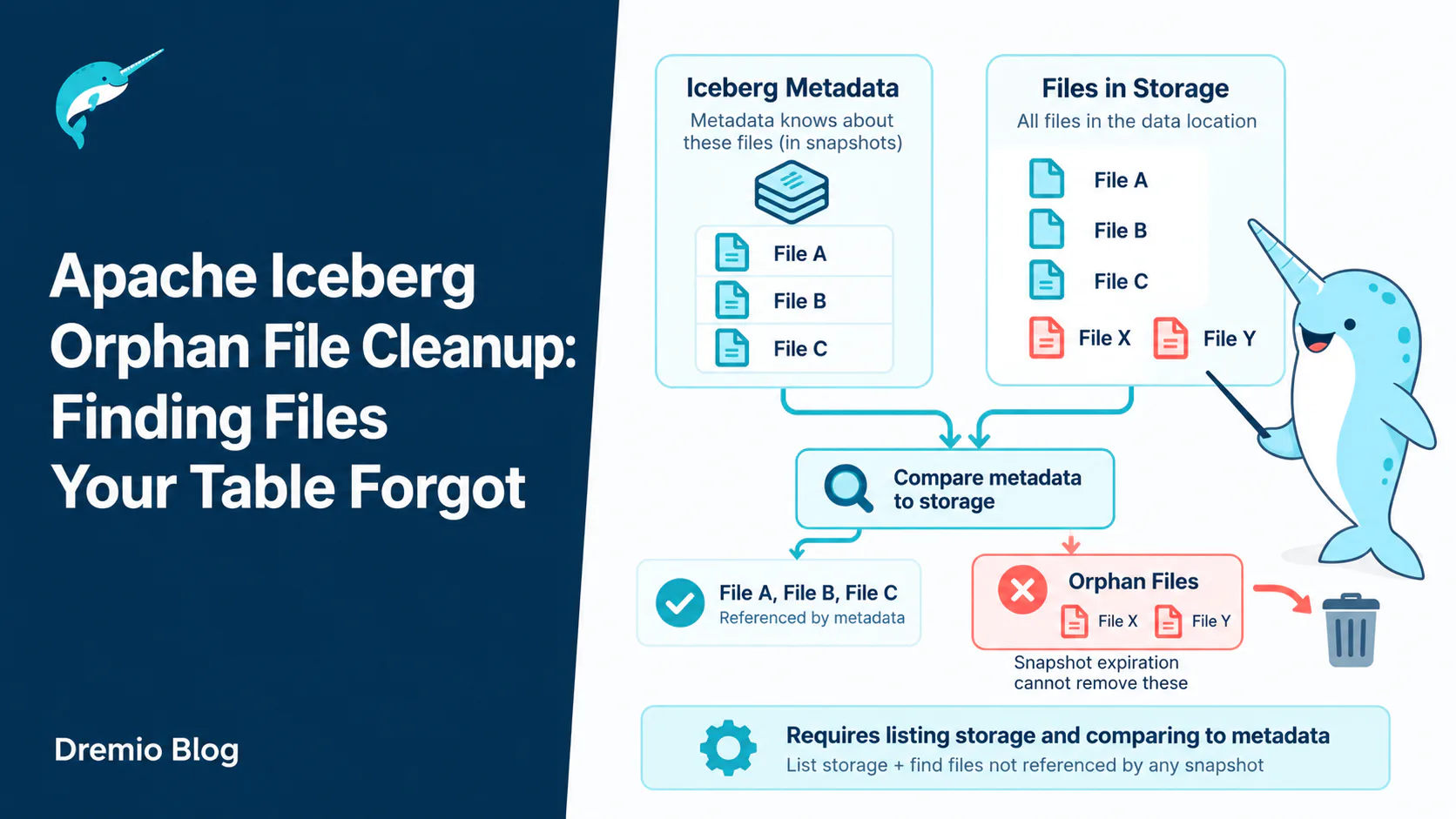
An orphan file is a file sitting in an Apache Iceberg table's storage location that no snapshot references, past or present. It is usually the debris of a write that failed partway through. Snapshot expiration cannot remove it, because expiration works from the metadata outwards and the metadata has never heard of it. Finding orphans requires listing storage and comparing that listing against everything the metadata knows about.
You run compaction weekly. You expire snapshots nightly. The snapshot count is healthy, the file count in the current table state is reasonable, and the storage bucket behind the table is four times larger than the sum of the files the table actually uses.
Those files are orphans, and they are invisible to every tool that works from the metadata tree. No amount of expiry will touch them. They accumulate quietly, mostly from jobs that crashed, and the only way to find them is to list the storage location and subtract.
This article covers where orphans come from, why the detection method is riskier than it looks, how to run cleanup safely, the path mismatch failure that has destroyed real tables, and how to keep the whole thing from being necessary as often.
An orphan is a file the metadata has never heard of. That is exactly why it is hard to find.
Iceberg tracks files explicitly. A data file belongs to the table because a manifest lists it, that manifest belongs to a snapshot because a manifest list references it, and the snapshot belongs to the table because the metadata says so. There is no directory scan anywhere in that chain, which is exactly why Iceberg planning is fast and why Hive-style tables were slow.
The cost of that design is that a file in the table's directory has no inherent relationship to the table. It is in the table if and only if the metadata says it is.
So an orphan is not a stale file or an old file. It is an unreferenced file: written into the location, never committed, therefore never part of anything.
This is worth being precise about because it separates orphan cleanup from the operation people confuse it with. A data file that was referenced by snapshot 12 and is no longer referenced by anything current is not an orphan. It is a file held by history, and snapshot expiration is what releases it.
Where They Come From
Orphans are almost always the debris of writes that did not finish, not of writes that did.
Almost every orphan is the residue of a write that did not finish.
Failed and killed tasks
A Spark executor writes a Parquet file, then dies before the driver commits. The file is complete and readable, and nothing will ever reference it. Multiply by a job that retried four times across a bad afternoon and you have a directory full of perfectly good files that belong to nothing.
Lost commit conflicts
Two writers prepare commits against the same table. Both write their data files. One wins the atomic swap and the other retries or fails. The loser's data files are already in storage, and they are orphans from the moment the conflict resolves.
This is a normal, healthy part of optimistic concurrency working correctly. It is not a bug and it will keep happening on any table with concurrent writers.
Manual copies into the table location
Someone stages a file into the table's data directory intending to register it later, or copies files during a migration and never finishes. Iceberg has no opinion about those files until you ask cleanup to delete everything it does not recognise, at which point it has a very strong one.
Metadata files that fell out of the log
With write.metadata.delete-after-commit.enabled set to true, Iceberg deletes the oldest metadata file it is tracking whenever it writes a new one. It only deletes files in the metadata log. A JSON file that fell out of the log without being deleted stays forever, and only orphan cleanup will find it.
How Detection Works, and Why That Matters
Cleanup compares two sets of path strings. Everything dangerous about it follows from the word strings.
The algorithm is a set difference:
Build the set of every file path reachable from the table metadata. Not just the current snapshot, every snapshot, plus manifests, manifest lists, metadata JSON files and statistics files.
List every file under the table's location in storage.
Anything in the second set and not the first is a candidate.
Filter candidates by age, then delete.
Two properties of that algorithm drive everything else in this article.
It requires a full storage listing. On a table with ten million files, that is ten million objects enumerated through an API that charges per request and rate limits you. This is the expensive part, and it is why cleanup is a monthly job rather than a nightly one.
It compares path strings. Not inodes, not object identities, strings. Iceberg's own documentation warns that on some file systems a path can change while still representing the same file, and that this leads to data loss when cleanup runs. Everything dangerous about this operation follows from that sentence.
The Retention Window Is a Safety Rail
An in-flight write and an orphan look identical to the cleanup job. Only elapsed time tells them apart.
A file being written by an in-flight commit is not referenced by anything yet. Neither is an orphan from a job that died last month. To the set difference they are identical.
The only thing separating them is elapsed time, which is what older_than is for. It defaults to three days.
Iceberg's documentation puts this plainly: removing orphan files with a retention interval shorter than the time any write takes to complete might corrupt the table, because in-progress files get treated as orphans and deleted.
So the rule is simple and not negotiable. The window must be longer than your longest running write, including retries, including the backfill somebody runs quarterly. If your worst case load takes eleven hours, three days is fine. If you run a monthly reprocessing job that takes four days, three days is a table corruption waiting for the right week.
Shortening the window to reclaim storage sooner is the single most common way teams turn a maintenance job into an incident. If you need the space that badly, the answer is compaction and expiry, not a shorter orphan window.
Running Cleanup
Dry run first. Every time.
The procedure has a dry run mode that returns the list of files it would delete without deleting them. There is no good reason to skip it on a table you have not cleaned before:
Read the output before you do anything else. You are looking for two things: a plausible count, and paths that look like debris rather than like your live data. If the dry run lists files under a partition you know is current, stop and work out why before going further.
A dry run that returns your entire table is not a strange result to be puzzled over. It is the path mismatch problem in the next section, and running for real would have emptied the table.
max_concurrent_deletes parallelises the delete calls, which matters because each one is a network round trip. stream_results sends results to the driver by partition rather than collecting everything, and with it enabled the output contains a sample of up to 20,000 paths rather than all of them.
This is the failure worth understanding in detail, because it is the one that has cost people their tables.
Object storage is reachable through several URI schemes. The same S3 object can be addressed as s3://bucket/path, s3a://bucket/path or s3n://bucket/path. On HDFS the same file can be addressed through different authorities after a cluster rename or a namenode change.
If the metadata records s3a:// and the storage listing comes back as s3://, the set difference finds no overlap at all. Every live file in your table appears in the listing and not in the metadata set. Every live file is a candidate.
Iceberg defends against this. prefix_mismatch_mode defaults to ERROR, so the job throws rather than deleting when it sees scheme or authority mismatches. There is a default equivalence for the common S3 case, mapping s3a and s3n onto s3.
The danger is not in the defaults, it is in what people do when the defaults get in the way. A job fails with a prefix mismatch error, somebody searches, finds that prefix_mismatch_mode => 'DELETE' makes the error go away, and sets it. That setting tells Iceberg to delete files whose prefixes it cannot reconcile, which on a genuine mismatch means all of them.
The correct response to a prefix mismatch error is to declare the equivalence explicitly:
Or equal_authorities for the HDFS rename case. State the equivalence, run the dry run again, confirm the count is sane. Never reach for DELETE to silence an error you have not diagnosed.
Shared Locations and the Argument You Should Not Need
The location argument restricts cleanup to a directory instead of the whole table location:
It exists for good reasons, and it is also the sign of a layout problem when you need it.
Cleanup deletes anything under the location that the table does not reference. If two tables share a location, or if a table's location contains files belonging to something else, cleanup on one table will happily delete the other's files. It is doing exactly what you asked.
Give every table its own location. If you cannot, use the location argument, keep gc.enabled set to false on the tables involved, and treat the situation as technical debt with a deletion risk attached rather than as a working arrangement.
Why It Is Expensive, and How to Make It Cheaper
Listing is the cost. A full recursive listing of a large table location can take hours and generate a large object storage bill on its own, before a single file is deleted.
Two arguments help. prefix_listing uses prefix-based listing through the storage layer's own interface, which on object stores is much faster than walking a simulated directory tree, and it requires a FileIO implementation that supports prefix operations.
file_list_view lets you supply the listing yourself as a dataset, which is the answer for anyone whose cloud provider already produces a storage inventory report. Reading yesterday's inventory file costs nothing compared to enumerating ten million objects live.
If neither is available, the lever left is frequency. Monthly is fine for most tables. Weekly is defensible for a table with a lot of failed writes. Nightly orphan cleanup is almost always someone treating it as the same kind of job as expiry, and it is not.
Where It Sits in the Maintenance Sequence
Order matters. Cleanup before expiry finds almost nothing worth deleting.
Compaction, then expiry, then orphan cleanup. Cleanup is last for a specific reason.
Compaction produces new files and leaves the old ones referenced by older snapshots. Those old files are not orphans, they are history. Expiry drops the snapshots that hold them, at which point expiry itself deletes them, because it can reach them through the metadata.
Run cleanup before expiry and it will find almost nothing, because the files you want gone are still referenced. You will have paid for a full storage listing to learn that.
The genuine orphans, the ones from crashed jobs, are unaffected by ordering. But since you are only running cleanup occasionally, running it at the point where it also catches anything the earlier steps missed is the sensible arrangement.
Producing Fewer Orphans in the First Place
Cleanup is a mop. It is worth spending some effort on the leak.
Give the writer a chance to clean up after itself
Jobs killed with a hard signal skip whatever cleanup they would otherwise do. Orchestrators that send a graceful termination first, and jobs that handle it, leave far less behind. This is usually a one line change to a scheduler configuration and it pays off every time a job is cancelled.
Fix the jobs that fail repeatedly
A job that fails and retries four times a week is the orphan factory. The volume of debris is a decent proxy for how much unreliability you are tolerating, and treating a growing orphan count as a reliability signal rather than a storage problem tends to find real bugs.
Reduce write conflicts
Concurrent writers to the same partitions produce losers, and losers produce orphans. Partitioning work so that writers touch disjoint partitions removes the conflicts and the debris at the same time.
Give each table its own location
Not an orphan reduction technique so much as a precondition for cleaning up safely. It costs nothing at table creation time and it is unpleasant to retrofit.
Where Dremio Fits
Dremio reads and writes Iceberg tables natively, and the maintenance operations it runs are the ones defined by the Iceberg specification rather than an engine-specific equivalent. A table Dremio maintains is the same table Spark, Flink or Trino see afterwards.
That matters for cleanup in particular, because a table's file set has to be understood the same way by everything that touches it. A cleanup routine that only some of your engines understand is not a maintenance strategy, it is a hazard.
Start With a Dry Run
Take your largest Iceberg table. Compare the sum of file sizes in table.files against the size of the storage prefix behind it. If storage is meaningfully larger and you already expire snapshots, the difference is orphans.
Then run cleanup with dry_run => true and read the list before you do anything else. If the output surprises you, that surprise is the most valuable thing you will learn about that table this quarter, and you got it for the price of a listing.
Frequently Asked Questions
What is an orphan file in Apache Iceberg?
A file inside the table's storage location that no snapshot references, current or historical. It is almost always left behind by a write that failed after writing data but before committing.
Expiration walks the metadata tree and deletes files it finds there that are no longer needed. An orphan has no edge pointing at it anywhere in that tree, so the walk never reaches it. Finding orphans requires listing storage, which expiration never does.
How often should I run orphan file cleanup?
Monthly for most tables. The operation requires a full storage listing, which is slow and costs money on object storage, so it is not a nightly job. Weekly makes sense for tables with frequent write failures or heavy concurrent writes.
What is a safe value for older_than?
Longer than your longest running write, including retries and including infrequent backfill jobs. The default is three days. Shortening it below your worst case write duration risks deleting files belonging to an in-flight commit, which corrupts the table.
Why did the dry run list every file in my table?
Almost certainly a path prefix mismatch. The metadata records one URI scheme or authority and the storage listing returns another, so nothing matches and every live file looks orphaned. Declare the equivalence with equal_schemes or equal_authorities. Never set prefix_mismatch_mode to DELETE to make the error go away.
Can orphan cleanup delete files from another table?
Yes, if the two tables share a storage location. Cleanup deletes anything under the location that the table being cleaned does not reference, and it has no way to know another table owns those files. Use separate locations, or restrict the run with the location argument.
Is it safe to run orphan cleanup while jobs are writing?
It is safe as long as the retention window is longer than those writes take. The window is the entire protection mechanism. With a correctly sized window, concurrent writers are fine, because their in-flight files are too recent to be candidates.
Keep learning
For a full treatment of the table format, download Apache Iceberg: The Definitive Guide by Tomer Shiran, Jason Hughes, and Alex Merced, free from Dremio.
Ingesting Data Into Apache Iceberg Tables with Dremio: A Unified Path to Iceberg
By unifying data from diverse sources, simplifying data operations, and providing powerful tools for data management, Dremio stands out as a comprehensive solution for modern data needs. Whether you are a data engineer, business analyst, or data scientist, harnessing the combined power of Dremio and Apache Iceberg will undoubtedly be a valuable asset in your data management toolkit.
Sep 22, 2023·Dremio Blog: Open Data Insights
Intro to Dremio, Nessie, and Apache Iceberg on Your Laptop
We're always looking for ways to better handle and save money on our data. That's why the "data lakehouse" is becoming so popular. It offers a mix of the flexibility of data lakes and the ease of use and performance of data warehouses. The goal? Make data handling easier and cheaper. So, how do we […]
Oct 12, 2023·Product Insights from the Dremio Blog
Table-Driven Access Policies Using Subqueries
This blog helps you learn about table-driven access policies in Dremio Cloud and Dremio Software v24.1+.