In the previous post, we looked at Resources in the Model Context Protocol (MCP): how LLMs can securely access real-world data to ground their understanding. But sometimes, reading isn’t enough.
Sometimes, you want the model to do something.
That’s where Tools in MCP come in.
In this post, we’ll explore:
What tools are in MCP
How tools are discovered and invoked
How LLMs can use tools (with user control)
Common tool patterns and security practices
Real-world examples: from file system commands to API wrappers
Let’s dive in.
What Are Tools in MCP?
Tools are executable functions that an LLM (or the user) can call via the MCP client. Unlike resources — which are passive data — tools are active operations.
Examples include:
Running a shell command
Calling a REST API
Summarizing a document
Posting a GitHub issue
Triggering a build process
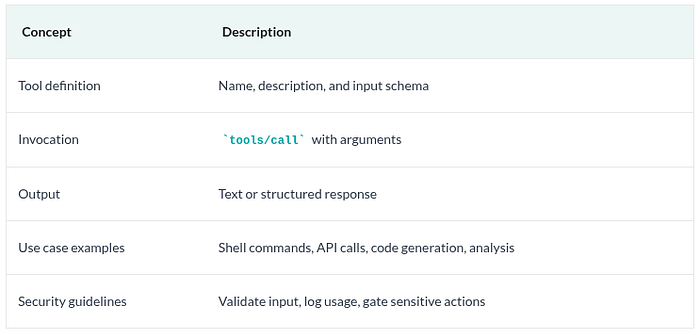
Each tool includes:
A name (unique identifier)
A description (for UI/model understanding)
An input schema (JSON schema describing expected parameters)
Tools allow models to interact with the world beyond natural language — under user oversight.
@mcp.tool()
async def get_weather(city: str) -> str:
    """Return current weather for a city."""
    data = await fetch_weather(city)
    return f"The temperature in {city} is {data['temp']}°C."
This tool will automatically appear in the tools/list response and can be invoked by the LLM or user.
Why Tools Matter for Agents
Agents aren’t just chatbots — they’re interactive systems. Tools give them the ability to:
Take real-world actions
Build dynamic workflows
Chain reasoning across multiple steps
Drive automation in safe, auditable ways
Combined with resources, prompts, and sampling, tools make LLMs feel like collaborative assistants, not just text predictors.
Tool Concepts Overview
Coming Up Next: Sampling and Prompts — Letting the Server Ask the Model for Help
In the final two posts of this series, we’ll explore:
Sampling — How servers can request completions from the LLM during workflows
Prompts — Reusable templates for user-driven or model-driven actions
Tools give LLMs the power to act. With proper controls and schemas, they become safe, composable building blocks for real-world automation.
Try Dremio Cloud free for 30 days
Deploy agentic analytics directly on Apache Iceberg data with no pipelines and no added overhead.
Intro to Dremio, Nessie, and Apache Iceberg on Your Laptop
Editor’s note, September 2026. This post was published in September 2023 and some product details have changed since. Nessie is still available and self-deployable under the Apache-2.0 licence, and it remains the clearest implementation of catalog-level branching. It is not an Apache Software Foundation project, and its development has slowed considerably. For how the current […]
Aug 16, 2023·Dremio Blog: News Highlights
5 Use Cases for the Dremio Lakehouse
With its capabilities in on-prem to cloud migration, data warehouse offload, data virtualization, upgrading data lakes and lakehouses, and building customer-facing analytics applications, Dremio provides the tools and functionalities to streamline operations and unlock the full potential of data assets.
Aug 24, 2026·Dremio Blog: Open Data Insights
Migrating to Apache Iceberg: Strategies for Every Source System
This is Part 15, the final article of a 15-part Apache Iceberg Masterclass. Part 14 covered hands-on Dremio Cloud. This article covers the three migration strategies and how to execute a zero-downtime migration using the view swap pattern. Most organizations do not start with Iceberg. They have years of data in Hive tables, data warehouses, CSV files, databases, […]