Dremio has just rolled out version 25.2, and it’s bringing a feature many users have been eagerly waiting for – full dark mode across the entire platform. Whether you’re working late into the night or simply prefer the aesthetics and reduced eye strain that dark mode offers, this update brings a refreshing new way to interact with your data in Dremio.
How to Enable Dark Mode
Enabling dark mode in Dremio 25.2 is straightforward. Here's how you do it:
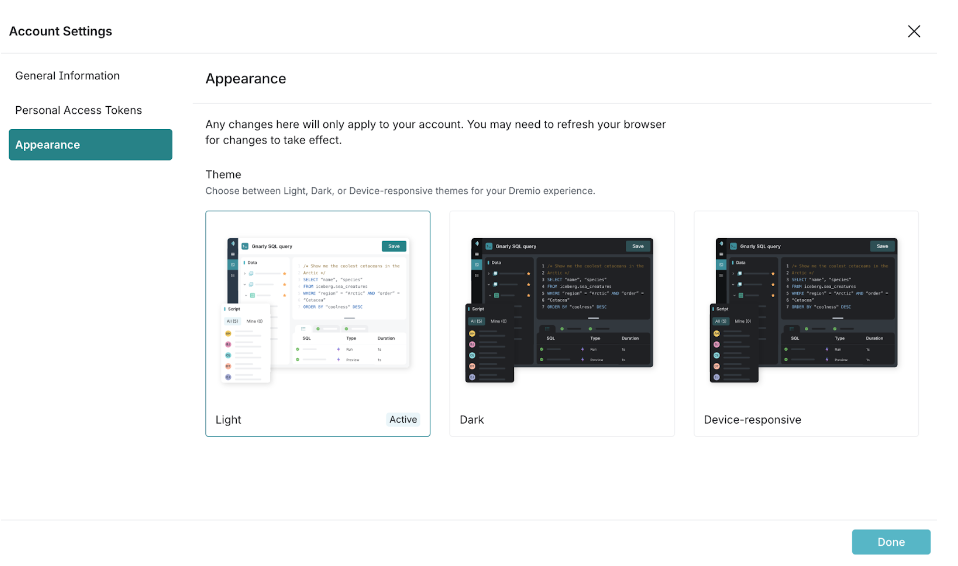
Click on your user icon located in the bottom left corner of the Dremio UI.
Select Account Settings from the dropdown menu.
You’ll find an option to choose between Light, Dark, or Device Responsive mode. Selecting Device-responsive will match your operating system's default appearance.
With this update, Dremio allows you to enjoy the entire UI in dark mode – not just the SQL editor, which previously offered this feature. Now, whether you’re navigating datasets, building queries, or managing your settings, you can experience a consistent dark theme across the platform.
Why Dark Mode Matters
Dark mode is more than just an aesthetic preference – it’s also about comfort and productivity. Many users find that dark mode reduces eye strain, especially in low-light environments. It’s easier on the eyes, allowing you to work for longer periods without discomfort. Additionally, for those working late into the night, dark mode can reduce the amount of blue light emitted from screens, which is linked to improved sleep patterns.
By offering a dark mode option across the full interface, Dremio is ensuring that users can work in an environment that is not only visually appealing but also ergonomically beneficial. This change is particularly helpful for developers, data engineers, and analysts who often spend long hours working within the platform.
A Step Towards Enhanced Customization
With the introduction of full dark mode, Dremio is continuing its trend toward offering users more customization and control over their experience. Whether you prefer a light, bright workspace or a darker, more subdued environment, Dremio now provides the flexibility to match your personal workflow and preferences.
Ingesting Data Into Apache Iceberg Tables with Dremio: A Unified Path to Iceberg
By unifying data from diverse sources, simplifying data operations, and providing powerful tools for data management, Dremio stands out as a comprehensive solution for modern data needs. Whether you are a data engineer, business analyst, or data scientist, harnessing the combined power of Dremio and Apache Iceberg will undoubtedly be a valuable asset in your data management toolkit.
Oct 12, 2023·Product Insights from the Dremio Blog
Table-Driven Access Policies Using Subqueries
This blog helps you learn about table-driven access policies in Dremio Cloud and Dremio Software v24.1+.
Aug 31, 2023·Dremio Blog: News Highlights
Dremio Arctic is Now Your Data Lakehouse Catalog in Dremio Cloud
Dremio Arctic bring new features to Dremio Cloud, including Apache Iceberg table optimization and Data as Code.