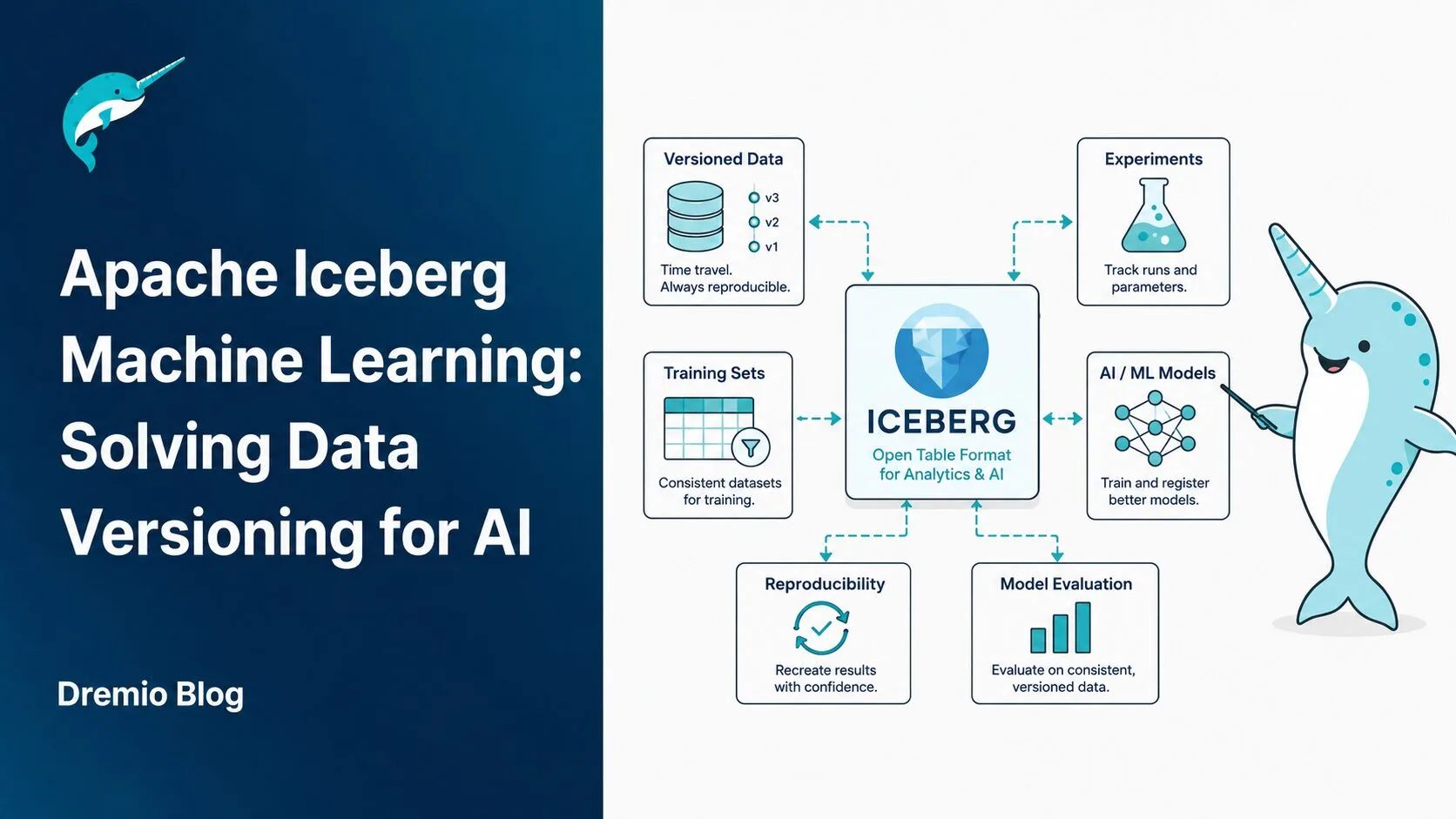
Your model's accuracy dropped 7 percentage points after last month's retraining. You need to reproduce the exact dataset it trained on three months ago. Your data lake has been through dozens of batch loads, partition rewrites, and schema updates since then. That dataset is gone.
This is the data versioning problem that Apache Iceberg machine learning workflows solve at the architecture level. Not with a workaround, not by copying data manually, but by making every state of your data queryable by default through immutable snapshot semantics.
Apache Iceberg is an open table format built for large analytical datasets on object storage. At its core, every write to an Iceberg table creates a new immutable snapshot. Those snapshots are the foundation that makes ML reproducibility tractable. You can query the exact state of a training dataset from six months ago without storing a separate copy of the data.
To understand how Iceberg structures metadata, manifests, and data files, the Apache Iceberg Architectural Guide is the right starting point. This post focuses specifically on what those mechanics mean for AI and ML workflows: reproducibility, feature versioning, branch-based experimentation, and feature extraction at scale.
The Data Versioning Problem ML Teams Actually Face
Why ML Reproducibility Breaks in Traditional Data Lakes
A machine learning model trained with a fixed random seed is deterministic given the same data. That's the deal. The same code, same hyperparameters, same data equals the same model. But in practice, "same data" is the hardest part.
Traditional data lakes store data in Parquet or ORC files on object storage. When data changes, those files get rewritten. Partitions get added when new date ranges appear. Old partitions get compacted when storage costs climb. Row-level updates, in most lake implementations, mean rewriting the affected file entirely without recording what the file looked like before.
The practical result: there is no reliable way to query what a table looked like on a specific date in the past. Engineering teams deal with this by copying entire datasets before each training run. A 500GB feature table copied for 10 experiments per month costs meaningful storage and transfer. At 1TB, the math gets worse. At 10TB, it becomes a serious budget discussion.
Even if you can afford the storage, manually copied datasets drift. Someone forgets to refresh one copy. A script fails silently. Two teams train on slightly different versions of what they both call "the Q3 dataset." You end up with model disagreements that are impossible to debug because neither team can prove what their model actually saw.
What "Reproducible ML" Actually Means
Reproducibility in ML has two requirements: same code and same data. Code versioning is solved. Git handles it well. Data versioning at the lake level has historically required building custom infrastructure.
What ML teams actually need is a system where, at any point in the future, they can answer: "What did table X look like on date Y at hour Z?" And the answer should be queryable in SQL, not reconstructed from a change log or archive.
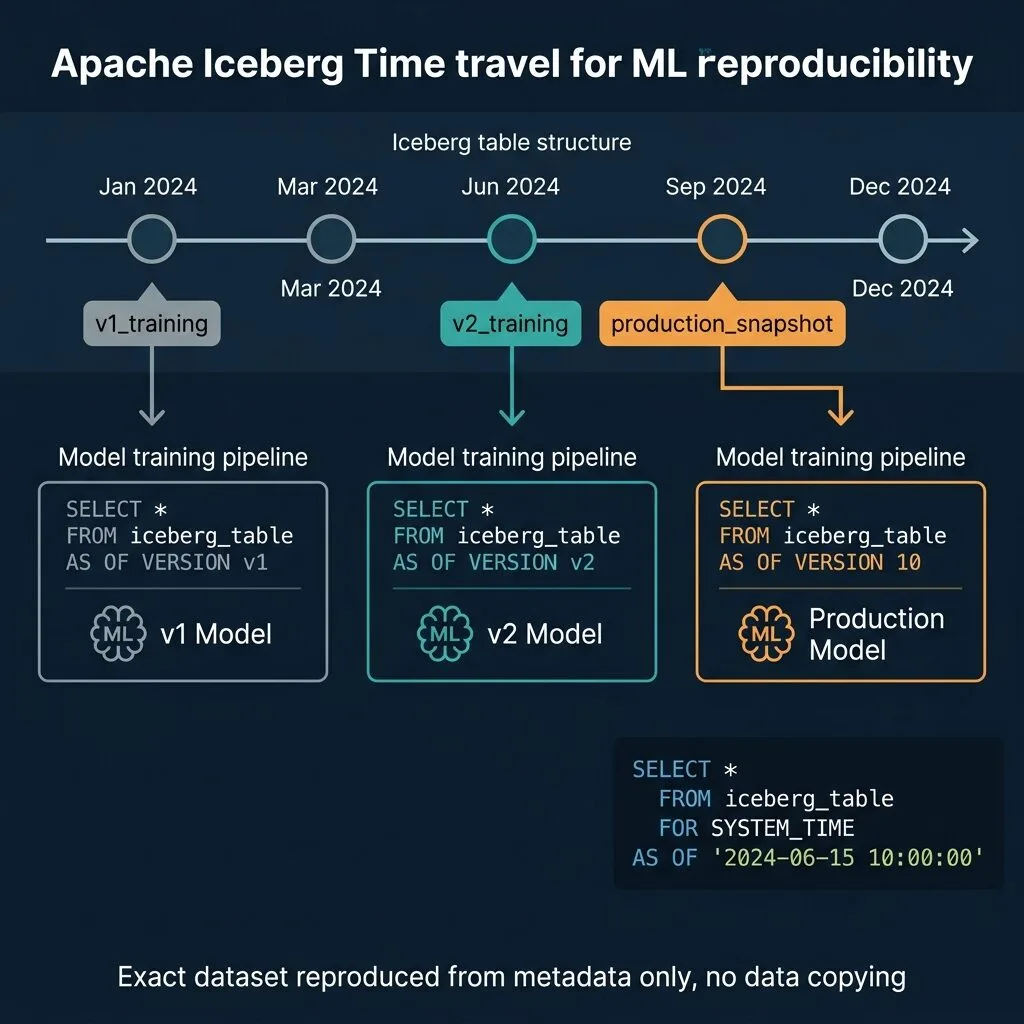
Iceberg provides this natively. Every INSERT, UPDATE, DELETE, or schema change creates a new snapshot. The snapshot records exactly which data files belong to the table at that point in time. To reproduce a training dataset, you query AS OF a specific timestamp or snapshot ID. No reconstruction. No copying.
How Apache Iceberg Time Travel Works for ML
Iceberg's time travel capability is built on its snapshot model. When a write operation completes on an Iceberg table, Iceberg creates:
A new manifest file listing the data files added or removed
A new manifest list (snapshot file) pointing to all current manifests
A new metadata file updating the table's current snapshot pointer
Each snapshot has a unique integer ID and a creation timestamp. The previous snapshot remains in place. The data files it pointed to are not deleted. Only the current snapshot pointer advances.
This means every snapshot is a complete, self-consistent view of the table at the time of that write. Querying AS OF a historical snapshot reads the exact same data files that the table exposed at that moment. No reconstruction. The data is there, exactly as it was.
-- Query the training dataset as it existed on June 1, 2024
SELECT * FROM my_catalog.ml.feature_store
AS OF TIMESTAMP '2024-06-01 00:00:00';

-- Query by exact snapshot ID for guaranteed reproducibility
SELECT * FROM my_catalog.ml.feature_store
AS OF VERSION 8395021456789;
The AS OF VERSION form is more reliable for ML reproducibility. Timestamps can have sub-second ambiguity if multiple snapshots were created in quick succession. The snapshot ID is an exact integer identifier with no ambiguity.
One important operational note: snapshots accumulate over time. Iceberg lets you configure snapshot expiration through expireSnapshots() or a VACUUM TABLE operation with a minimum retention period. If you expire snapshots aggressively (e.g., keep only the last 7 days), you lose the ability to query older states. For ML use cases, you typically want a longer retention period, or you tag specific snapshots before they are eligible for expiration, which is covered in the next section.
Tagging Snapshots for Model Version Control
Iceberg 1.x introduced named references: tags and branches. Tags are immutable named pointers to a specific snapshot. They are perfect for recording exactly which snapshot a model version was trained on.
-- Tag a snapshot as the training dataset for model v2
ALTER TABLE my_catalog.ml.feature_store
CREATE TAG model_v2_training_data
AS OF VERSION 8395021456789;

-- Later, query by tag name for the same reproducibility
SELECT * FROM my_catalog.ml.feature_store
FOR VERSION AS OF 'model_v2_training_data';
Tags survive snapshot expiration policies if you configure them correctly. Unlike unnamed snapshots, tagged snapshots can be protected from garbage collection. This means you can run aggressive VACUUM policies on your table while keeping specific training dataset snapshots alive indefinitely.
The workflow this enables looks like model versioning in code:
Traditional Dataset Versioning
Iceberg Snapshot Tagging
Copy full dataset to new S3 prefix
Create tag pointing to existing snapshot
Storage cost scales with dataset size
Storage cost is kilobytes (metadata only)
Manual sync required across systems
Tag queryable from any Iceberg-compatible engine
No link to compute history
Snapshot ID logged in MLflow alongside model
Drift possible between copies
Immutable: identical data on every query
The integration with MLflow is straightforward: after creating the training dataset, log the snapshot_id as a run parameter. When you need to reproduce the training data, read snapshot_id from MLflow and use AS OF VERSION to recover it exactly.
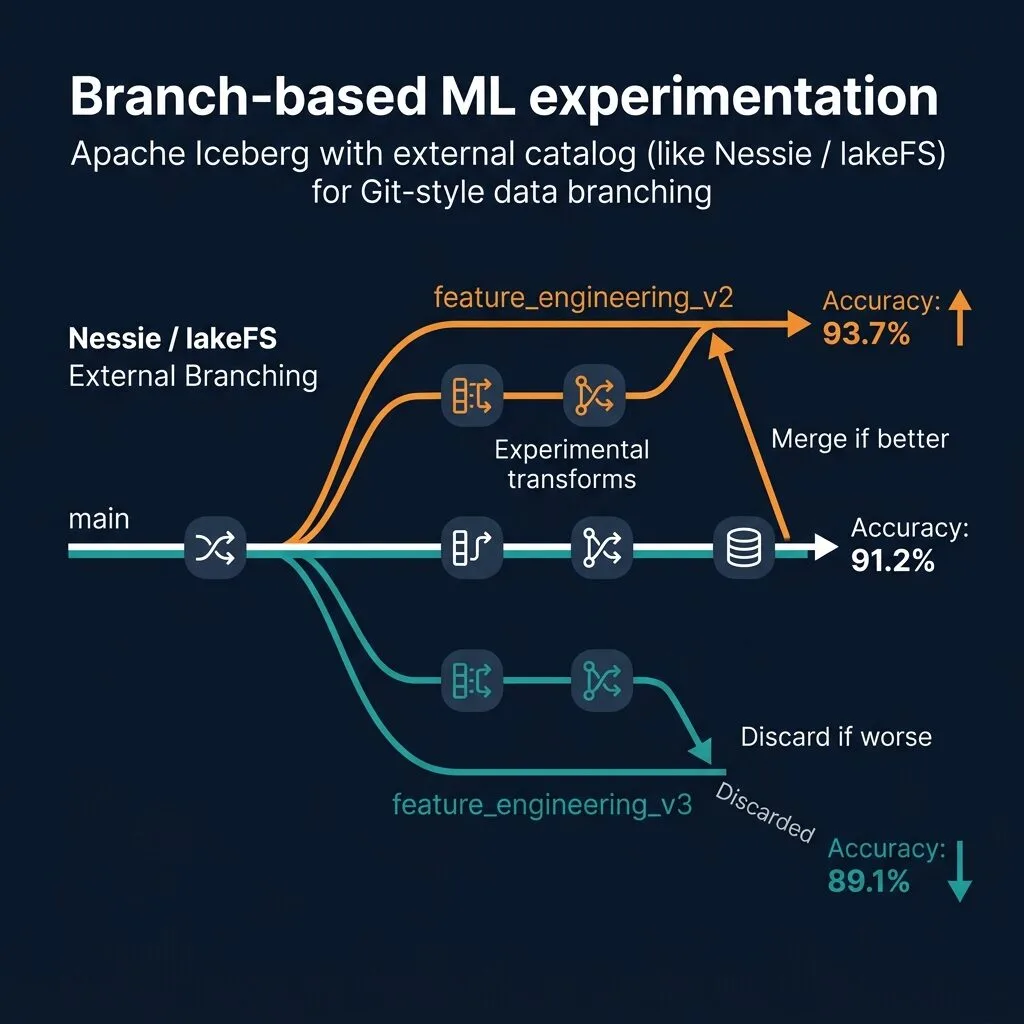
Branch-Based ML Experimentation with External Catalogs (Nessie and lakeFS)
Tags handle model reproducibility. Branches handle experimentation.
While the latest version of Dremio Cloud does not contain or promote native, built-in Nessie branching commands inside its SQL editor, you can still manage branches using external catalog tools like Project Nessie or lakeFS. By running your branch management operations externally, you keep your production environment completely isolated while using Dremio as the query engine to retrieve data from any active branch.
Dremio connects to these external services using its generic Iceberg REST Catalog connector. This design keeps the versioning tool out of the direct data read/write path. Dremio queries your data files directly on S3 or other object storage while the external catalog tracks the metadata and snapshots.
The ML experimentation workflow maps directly to Git:
Create an experiment branch from the main branch using the external catalog's CLI or API.
Run data transformations or feature engineering on the branch, committing changes to the branch.
Train a model on the isolated branch data and evaluate the performance.
If metrics improve, merge the branch back to the main branch using the catalog's CLI or UI.
If metrics do not improve, delete the branch.
Every write on the branch is isolated. Production tables on the main branch remain untouched throughout the run.
A Practical External Branching Workflow
Consider a scenario where you are testing two different feature engineering approaches: one using a 30-day rolling average for user activity, and another using a 7-day rolling average with recency weighting.
Instead of creating copies of the data, you perform all branch management externally. You query the branches in Dremio depending on the catalog technology you select:
Using lakeFS (Version-Aware Namespaces)
lakeFS handles versioning by exposing branches directly in the folder/table hierarchy. If you configure a lakeFS source using Dremio's Iceberg REST Catalog connector, the catalog resolves the repository and branch names directly inside your queries.
This allows you to query different branches simultaneously using version-aware namespaces:
-- Query the 30-day average experiment branch
SELECT * FROM lakefs.user_analytics.rolling_30d.ml.features;

-- Query the 7-day average experiment branch
SELECT * FROM lakefs.user_analytics.rolling_7d_weighted.ml.features;
In this syntax, lakefs is the Dremio source name, user_analytics is the lakeFS repository, rolling_30d is the branch name, and ml.features is the schema and table. You manage these branches (creating them, committing updates, and merging them back) externally via the lakeFS UI or the lakectl CLI:
# Create a new branch externally before running queries
lakectl branch create lakefs://user_analytics/rolling_30d --source lakefs://user_analytics/main
Using Project Nessie (Branch-Specific REST URIs)
Project Nessie also exposes an Iceberg REST Catalog interface. To query a specific Nessie branch in Dremio, you set up an Iceberg REST Catalog source and append the branch name directly to the catalog endpoint URI in Dremio's source configuration:
For our experiments, you would register two distinct REST Catalog sources in Dremio:
nessie_30d pointing to http://localhost:19120/iceberg/rolling_30d
nessie_7d pointing to http://localhost:19120/iceberg/rolling_7d_weighted
You can then run queries against the respective sources:
-- Query the first experiment branch
SELECT * FROM nessie_30d.ml.features;

-- Query the second experiment branch
SELECT * FROM nessie_7d.ml.features;
Creating and merging branches are done externally using the Nessie CLI or API:
# Create the branches externally
nessie branch create rolling_30d main
Connecting external catalogs to Dremio via the generic REST connector ensures that multi-engine architectures remain open. You can query the same Nessie or lakeFS branches with Dremio, Apache Spark, or Trino, all pointing to the same consistent view of the data lake.
One thing to keep in mind: if the same table is updated on both the main branch and an experiment branch during the experiment, merging the branches will create a conflict. You must resolve these conflicts externally using your catalog's command-line tools or APIs before completing the merge. For most ML workflows, experiment branches are short-lived, minimizing the chance of conflicting writes.
Schema Evolution Without Breaking ML Pipelines
ML pipelines are brittle when schemas change. A training script that reads a specific set of columns fails when a new column appears in the schema if the reader enforces strict schema validation. A downstream job breaks when a column is renamed. This is common enough to have a name in data engineering: schema drift.
Iceberg handles schema evolution at the metadata layer. Adding a column does not rewrite any data files. Renaming a column updates a mapping in the metadata. The physical files on disk are unchanged. Historical snapshots still read using the schema that was in effect when they were written.
For ML specifically, this means:
A new feature column appears in the feature table today
Your training script from three months ago, reading AS OF TIMESTAMP '2024-06-01', does not see the new column
Your new training script reads the current snapshot with the new column
Both queries succeed without any changes to the underlying data
What schema changes are safe in Iceberg:
Operation
Safe?
Notes
Add column
Yes
New column returns NULL in historical reads
Drop column
Yes
Data preserved in files, hidden from queries
Rename column
Yes
Metadata mapping updated
Widen type (int to long)
Yes
Safe numeric promotion
Narrow type (long to int)
No
Rejected by Iceberg
Change to incompatible type
No
Rejected by Iceberg
The strict rules on type changes prevent silent data corruption that would break downstream models without any error message.
Iceberg as a Lightweight Feature Store
Feature stores exist to solve a specific ML problem: ensuring that the features a model sees in training are the same features it sees in production, with correct point-in-time semantics that prevent future data from leaking into historical training examples.
Iceberg tables with time travel satisfy several feature store requirements without additional infrastructure:
Point-in-time correctness: Query features as of any timestamp, with no risk of future data leaking into the result. The snapshot boundary guarantees that only data that existed at that point in time appears in the query.
Feature versioning: Tag snapshots when feature definitions change. Different model versions can query different tagged snapshots.
Offline store for batch training: Iceberg over object storage is exactly the batch read pattern that training pipelines need. No additional store required.
Auditability: Every change to the feature table has a snapshot record. You can reconstruct exactly what each training run saw.
Where Iceberg falls short compared to a full feature store:
Capability
Iceberg Tables
Full Feature Store (Feast/Tecton)
Point-in-time training data
Yes
Yes
Feature versioning
Yes (snapshots/tags)
Yes
Offline batch reads
Yes
Yes
Online serving (low-latency)
No
Yes
Automatic freshness monitoring
No
Yes
Feature sharing registry
Manual
Built-in
Feature statistics tracking
Manual
Built-in
For teams that serve predictions in batch or near-real-time (not sub-10ms online inference), Iceberg tables cover most of what a feature store provides. For teams with strict online serving latency requirements, Iceberg handles the offline store half of a dual-store architecture and syncs to a low-latency store (Redis, DynamoDB) for online serving.
Dremio + Iceberg: Feature Engineering with AI SQL Functions
Feature engineering is where raw data becomes model-ready data. It typically involves transformations, aggregations, joins, and for unstructured data, feature extraction that requires an LLM or a specialized model.
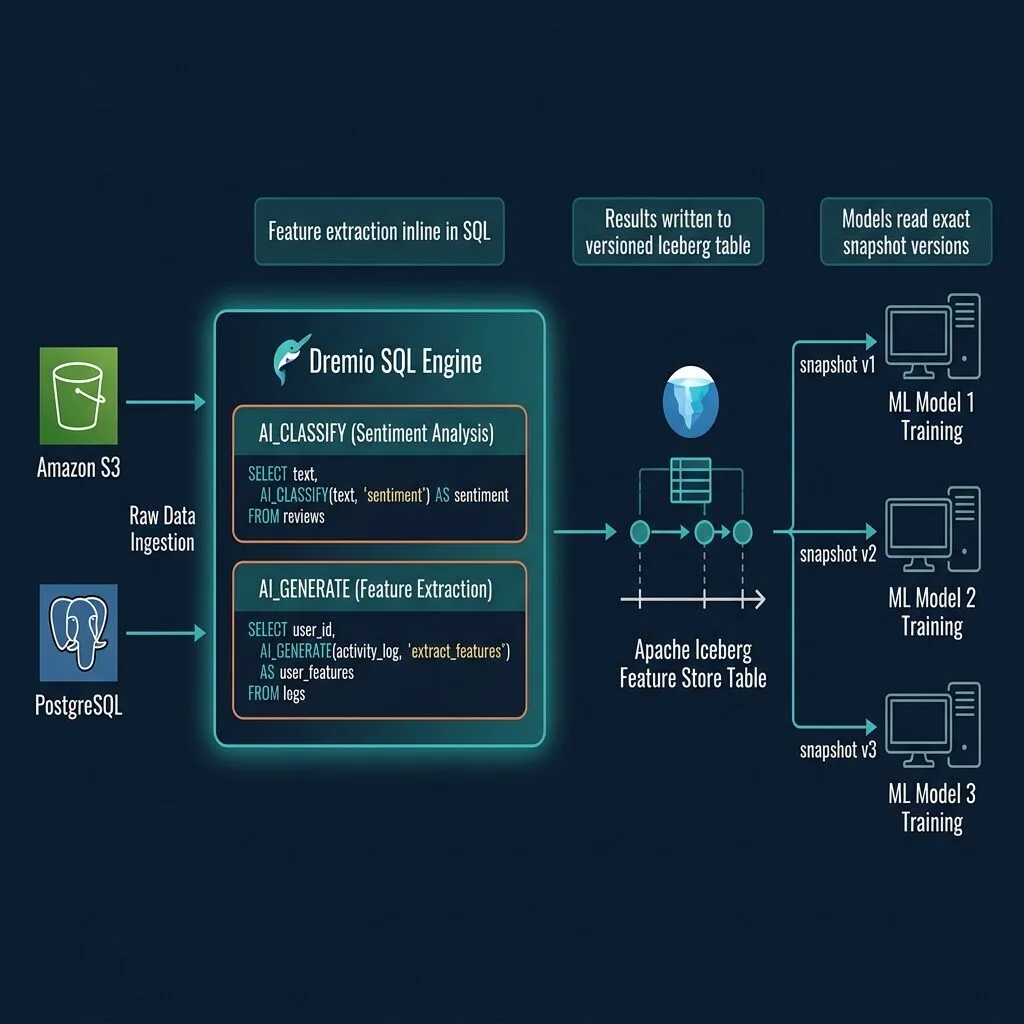
Dremio provides AI SQL functions that run LLM-based feature extraction directly inside SQL queries on Iceberg tables. This eliminates the need to export data to Python, run a Spark job, and re-import results. The extraction happens at query time, in the SQL engine, and results can be written directly to an Iceberg feature table.
-- Feature extraction from raw customer reviews
SELECT
  review_id,
  product_id,
  review_text,
  AI_CLASSIFY(review_text, 'positive, negative, neutral') AS sentiment,
  AI_GENERATE(review_text, 'Extract: product features mentioned') AS extracted_features
FROM my_catalog.ecommerce.customer_reviews
WHERE review_date >= '2024-01-01';
You can materialize those results directly into a versioned Iceberg feature table:
-- Write extracted features to the Iceberg feature store
CREATE TABLE my_catalog.ml.review_features AS
SELECT
  review_id,
  product_id,
  review_date,
  AI_CLASSIFY(review_text, 'positive, negative, neutral') AS sentiment,
  AI_GENERATE(review_text, 'Extract: product features mentioned') AS extracted_features,
  AI_COMPLETE(CONCAT('Rate product quality 1-5 based on: ', review_text)) AS quality_score
FROM my_catalog.ecommerce.customer_reviews
WHERE review_date >= '2024-01-01';

-- Tag the resulting snapshot for the training run
ALTER TABLE my_catalog.ml.review_features
CREATE TAG nlp_features_q1_2024
AS OF VERSION CURRENT_SNAPSHOT();
This pattern replaces what would typically require a Python preprocessing pipeline, a Spark cluster for scale, and an upload step back to the lake.
For teams running repeated feature queries on the same Iceberg data, Dremio's Autonomous Reflections can automatically materialize and maintain query results as pre-aggregated datasets. These are stored as Iceberg tables themselves, and Dremio's query optimizer routes matching queries to the Reflection transparently. The result is that your tenth training run's feature queries run orders of magnitude faster than your first, without any manual configuration. This is part of Dremio's Autonomous Performance capabilities.
For high-throughput feature data ingestion into ML training frameworks, Dremio supports Arrow Flight as a data transport. Training jobs reading from Dremio via Arrow Flight can achieve read throughputs significantly higher than JDBC or REST, which matters when you're loading hundreds of GB of feature data into a training run.
Dremio's platform, including the Agentic Lakehouse capabilities, connects these features into a single system where data engineers and ML engineers share the same Iceberg-backed infrastructure rather than maintaining separate stacks.
Model Debugging with Iceberg Time Travel
Production model degradation is one of the most time-consuming problems in MLOps. When a model's accuracy drops, the usual suspects are data drift, label shift, concept drift, or a data pipeline bug. Without Iceberg time travel, identifying which one requires reconstructing historical data from change logs, S3 versioning, or Kafka replay. That reconstruction is often incomplete and always slow.
With Iceberg time travel, the investigation is a set of SQL queries.
Scenario: A recommendation model's precision at 10 drops from 0.82 to 0.71 after a retraining on October 20th.
Step 1: Identify when the model was retrained and what training snapshot was used. If you've been logging snapshot IDs in MLflow (you should be), this is a lookup. If not, use the October 20th timestamp.
Step 2: Query the training data from before and after the suspected drift date.
-- Distribution of labels before the potential drift
SELECT label_category, COUNT(*) as count
FROM my_catalog.ml.training_data
AS OF TIMESTAMP '2024-10-10 00:00:00'
GROUP BY label_category
ORDER BY count DESC;

-- Distribution of labels after potential drift
SELECT label_category, COUNT(*) as count
FROM my_catalog.ml.training_data
AS OF TIMESTAMP '2024-10-22 00:00:00'
GROUP BY label_category
ORDER BY count DESC;
Step 3: Compare the distributions. Look for:
New label categories that didn't exist before
Category proportion shifts greater than 5-10%
Sudden spikes in NULL values in key feature columns
A single source contributing an outsized proportion of new data
Step 4: If you find data drift, retrain on the pre-drift snapshot and evaluate. If accuracy recovers, you've confirmed the source of the regression. Fix the upstream data issue, re-validate the new data, then retrain on the corrected dataset.
This workflow turns a multi-week investigation into a structured analysis. The entire process runs in SQL. No infrastructure changes needed. The Apache Iceberg branching and tagging documentation covers the full reference for snapshot operations if you need to go deeper on the mechanics.
A Practical End-to-End ML Versioning Workflow
Putting the pieces together, here is a repeatable workflow for teams building versioned ML pipelines on Iceberg:
Step 1: Ingest raw data to Iceberg source tables
Use Spark, Flink, Kafka connectors, or Dremio to land raw data into Iceberg tables. Each batch creates a snapshot automatically.
Step 2: Feature engineering in Dremio SQL
Run transformations, joins, and AI SQL functions against the Iceberg source tables. This may include AI_CLASSIFY, AI_GENERATE, rolling aggregations, and cross-source joins using Dremio's query federation.
Step 3: Write to the Iceberg feature table
Use a CTAS or INSERT INTO statement to write engineered features into a dedicated feature Iceberg table. Record the resulting snapshot ID.
Step 4: Log the snapshot ID in your model registry
In MLflow, log the feature_table_snapshot_id as a run parameter alongside hyperparameters and metrics. This is the only link you need to reproduce the training data.
ALTER TABLE my_catalog.ml.review_features
CREATE TAG model_v3_training_data
AS OF VERSION 8395021456789;
Step 6: At debugging or reproduction time
Read the snapshot ID from MLflow, query using AS OF VERSION, and you have the exact training data. No reconstruction. No guessing.
This workflow works with any ML framework. The Iceberg table is readable by Spark, Trino, DuckDB, and any other Iceberg-compatible engine. You're not locked into a specific execution environment for training.
Tradeoffs and Limitations to Know
Apache Iceberg time travel for ML is not a complete MLOps solution. It solves the data versioning problem specifically. A few limitations are worth being direct about.
It is not a model registry. Iceberg tracks data versions. MLflow, W&B, and similar tools track model weights, metrics, and code. You need both. Iceberg handles the data side; the model registry handles the rest.
Snapshot metadata accumulates. Every write to an Iceberg table adds entries to manifest files and snapshot metadata. A table with thousands of snapshots will have slower metadata operations than one with dozens. For ML feature tables that receive frequent writes, configure a snapshot expiration policy that retains the last N days plus any tagged snapshots.
-- Remove snapshots older than 90 days, but retain tagged ones
ALTER TABLE my_catalog.ml.feature_store
SET TBLPROPERTIES (
  'history.expire.min-snapshots-to-keep' = '1',
  'history.expire.max-snapshot-age-ms' = '7776000000'
);
External catalog branch merges require conflict resolution. If the same table is modified on both the main branch and an experiment branch during the experiment's lifetime, merging the branch via Nessie or lakeFS will fail with a conflict. You must resolve these conflicts externally using the catalog's CLI or API before Dremio can query the merged state. Keep experiment branches short-lived to minimize this risk.
Schema evolution has limits. You cannot change a column to an incompatible type (e.g., changing a string column to an integer column). If you need incompatible type changes, you typically add a new column with the new type and deprecate the old one.
Iceberg does not handle online inference serving. For real-time model inference, you still need an online store. Iceberg covers the offline training data layer.
Hidden partitioning can affect time travel performance. Iceberg's hidden partitioning is a significant performance advantage for queries, but when querying historical snapshots, the partition spec in effect at the time of the snapshot is used. If your partition spec has changed over time, older snapshots may not benefit from newer partition pruning strategies.
What Comes Next for AI-Driven Data Versioning
Apache Iceberg machine learning workflows are at an inflection point. As AI systems become more autonomous, the requirement to audit what data an AI model was trained on shifts from an engineering preference to a compliance requirement. Financial regulators, healthcare compliance frameworks, and emerging AI transparency mandates are moving toward requiring documentation of training data provenance.
Iceberg's snapshot model is the right architecture for this requirement. Every state of the training data is queryable. Every change is recorded. The lineage from raw data to tagged snapshot to model version is traceable end-to-end.
The combination of Iceberg time travel for data versioning, Dremio's AI SQL functions for feature extraction, Autonomous Reflections for query performance, and Arrow Flight for high-throughput reads forms a feature engineering platform that many teams currently build from four separate tools. Collapsing that into a single lakehouse layer reduces both infrastructure complexity and the attack surface for data drift and reproducibility failures.
Start simple: on your next model training run, log the Iceberg snapshot ID alongside your hyperparameters in MLflow. That one change gives you the foundation for reproducible training data at no additional infrastructure cost.
Try Dremio Cloud free for 30 days and run your first versioned ML feature pipeline on Iceberg without standing up any infrastructure.
Keep learning
For a deeper treatment of the topics in this post, download Apache Iceberg: The Definitive Guide by Tomer Shiran, Jason Hughes, and Alex Merced, free from Dremio.
Ingesting Data Into Apache Iceberg Tables with Dremio: A Unified Path to Iceberg
By unifying data from diverse sources, simplifying data operations, and providing powerful tools for data management, Dremio stands out as a comprehensive solution for modern data needs. Whether you are a data engineer, business analyst, or data scientist, harnessing the combined power of Dremio and Apache Iceberg will undoubtedly be a valuable asset in your data management toolkit.
Oct 12, 2023·Product Insights from the Dremio Blog
Table-Driven Access Policies Using Subqueries
This blog helps you learn about table-driven access policies in Dremio Cloud and Dremio Software v24.1+.
Aug 31, 2023·Dremio Blog: News Highlights
Dremio Arctic is Now Your Data Lakehouse Catalog in Dremio Cloud
Dremio Arctic bring new features to Dremio Cloud, including Apache Iceberg table optimization and Data as Code.