Why Dremio built a command-line tool designed to be introspected by machines.
When GitHub launched gh in 2020, they framed the problem as context switching: developers losing flow by bouncing between terminal and browser. When Stripe shipped their CLI, the pain was webhook testing. When Fly.io built flyctl, the argument was philosophical: web apps aren't reproducible or documentable, so the command line should be king.
Each solved a real problem. None of them imagined the agent.
The Dremio CLI starts from a different premise. The first user to interact with your data platform is increasingly not a person. It's an agent. An AI coding assistant exploring a schema. A pipeline agent running overnight queries. An autonomous research loop deciding which data source to connect to next.
The Dremio CLI was built for both audiences, but the agent’s needs shaped the architecture.
Dremio Cloud has a powerful REST API and rich system tables. For a human, the web app makes these accessible. For a developer scripting automation, curl commands with auth headers work, but the boilerplate adds up.
But an autonomous agent faces a different problem entirely. It doesn’t read documentation. It doesn’t browse a web app. It gets handed a token and has to figure out what’s possible, what’s safe, and what’s efficient. Programmatically, with no human watching.
The Dremio MCP server is built for exactly this kind of supervised session: the agent discovers tools, proposes actions, and a human approves. But pipelines, cron jobs, and overnight research loops don’t have a human in the loop. In those contexts, the agent needs a different interface, one optimized for structured output and minimal token overhead.
That’s the gap the CLI fills. Not “a CLI for Dremio.” An autonomous agent’s interface to the data platform.
The Design Decision That Matters Most
Every CLI ships with --help. Most ship with man pages or docs. The Dremio CLI ships with dremio describe.
dremio describe returns a full JSON schema for any command: parameter names, types, required/optional flags, enum values, even the API endpoints used. An agent doesn’t need to read documentation or parse --help output. It introspects the CLI at runtime, gets a machine-readable contract, and constructs valid commands from the schema alone.
Context Engineering is the practice of giving an AI the right information at the right moment rather than relying on what it already knows. The Dremio CLI applies this to tooling: instead of relying on what the agent may have seen during training, it describes itself at runtime. The agent never has to guess.The --fields flag extends this to output. Instead of dumping a full job profile into the agent’s context window, --fields job_id,job_state returns only what the agent needs, keeping context lean across an entire session.
What It Looks Like in Practice
Here’s what this looks like end to end in Claude. A sales team has a target accounts spreadsheet on their laptop. They want to know which prospects are already customers in the data lake and which are net new. They open Claude and type:
I have a target accounts list at ~/Downloads/target_accounts.csv. Upload it to Dremio and cross-reference with dremio_samples.customer360.customer. Which of my prospects are already customers, what tier are they, and which are net new?
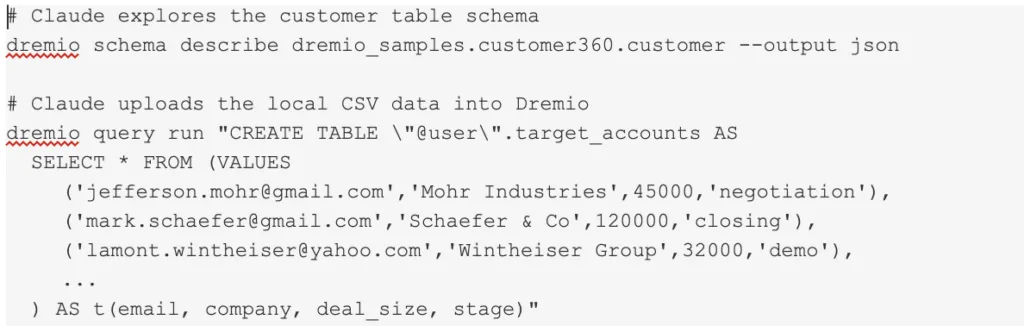
Claude reads the local CSV, then turns to the Dremio CLI. First it explores the target table’s schema, then uploads the spreadsheet data:
Now Claude needs to answer the question. It introspects the CLI to understand the query command, then constructs the SQL from the schemas it already knows:
Claude presents the result:
The user never wrote a line of SQL. They never opened the Dremio console. Claude read the local file, explored the cloud schema, uploaded the data, constructed the join, and delivered the answer. The Dremio CLI was the tool that made every step possible: structured JSON at each stage, self-describing commands via describe, and output the agent could parse and reason over.
This is what “build me a pipeline” looks like when the agent has the right tool. One natural-language request in, enriched business intelligence out.
The Two-Interface Model
The Dremio CLI doesn’t replace the Dremio MCP server. They serve different trust models.
MCP is for discovery: "Help me understand this data." A human is present, the interaction is conversational, and the rich context MCP provides is worth the token cost. This is how an agent gets introduced to Dremio.
CLI is for execution: pipelines, cron jobs, agent swarms. No human watching, structured JSON output, token cost proportional to actual usage. This is how an agent operates Dremio at scale.
Together they cover both trust models: supervised and autonomous.
What’s Next
The Dremio CLI is open source under Apache 2.0, available at github.com/dremio/cli. Install with pip install dremio-cli or uv tool install dremio-cli. It covers 50+ operations across 13 command groups: queries, schema, catalog, reflections, jobs, engines, users, roles, grants, projects, wikis, tags, and full-text search.
But the real shift isn’t about commands.
The question used to be “how good is your web app?” Then it became “how good is your API?” Now it’s becoming “how good is the experience for the agent your customer sends to operate your platform on their behalf?”
The CLI is our answer. Agents welcome.
Dremio’s Developer CLI Now Available
The Dremio CLI gives AI agents direct, programmatic access to your lakehouse. Self-describing commands mean agents can discover and operate Dremio's full capabilities.
Dremio’s Apache Iceberg Clustering: Technical Blog
Clustering is a data layout strategy that organizes rows based on the values of one or more columns, without physically splitting the dataset into separate partitions. Instead of creating distinct directory structures, like traditional partitioning does, clustering sorts and groups related rows together within the existing storage layout.
Mar 13, 2026·Engineering Blog
Accelerating Joins in Dremio with Runtime Filters
Runtime filters in Dremio are an opportunistic, runtime‑only optimization: they do not replace good data modeling, partitioning, or reflections, but they stack on top of those fundamentals to remove work that is provably useless for a specific query run.
Aug 18, 2025·Engineering Blog
Column Nullability Constraints in Dremio
Column nullability serves as a safeguard for reliable data systems. Apache Iceberg's capabilities in enforcing and evolving nullability rules are crucial for ensuring data quality. Understanding the null, along with the specifics of engine support, is essential for constructing dependable data systems.