This tutorial explains how to build a supply chain analytics pipeline on Dremio Cloud, integrating ERP, warehouse, and IoT data.
It covers the creation of Bronze, Silver, and Gold views for consistent data modeling and effective supplier performance evaluation.
Using Dremio's AI Agent, users can query and visualize supply chain metrics through natural language prompts.
Implementing Apache Iceberg enables efficient management of changing supply chain data with features like time travel and schema evolution.
Next steps include connecting real ERP systems, adding IoT data, and scaling through Autonomous Reflections for enhanced analytics.
Running this walkthrough: Dremio Cloud is no longer self-serve. To use it, contact the Dremio team about access. To follow along locally instead, run the open source edition from the dremio-oss Docker image.
Supply chain teams operate across ERP systems, warehouse management platforms, and IoT sensor networks. When a product manager asks "Which suppliers are causing the most delivery delays, and do we have enough safety stock to cover it?", answering requires data from all three systems. Most organizations can't answer that question without a week of manual Excel consolidation.
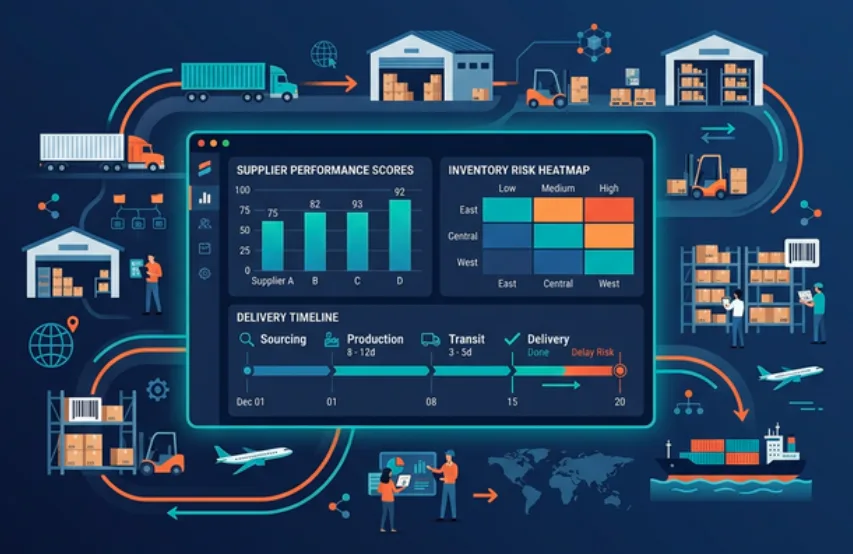
This tutorial shows you how to build a supply chain analytics pipeline on Dremio Cloud that unifies procurement, warehouse, and sensor data. You'll seed sample datasets, model them through Bronze, Silver, and Gold views, and use the AI Agent to evaluate supplier performance and inventory risk through natural language questions.
What You'll Build
Source tables simulating an ERP system (Oracle), warehouse management (PostgreSQL), and IoT sensors (S3)
Bronze views that standardize types and naming
Silver views that join supplier data with purchase orders and shipments
Gold views for supplier performance scoring and inventory risk assessment
AI-generated wikis and tags for operational context
Natural language supply chain analytics using Dremio's AI Agent
Step 1: Get Access to Dremio
Contact the Dremio team about Dremio Cloud access, or run the open source edition from the dremio-oss Docker image to follow along locally. Your trial includes a project with an Open Catalog and managed storage. Navigate to the SQL Runner from the left sidebar.
Step 2: Create Folders and Seed Data
Create folders to simulate the different operational systems:
CREATE FOLDER IF NOT EXISTS supplychainexp;
CREATE FOLDER IF NOT EXISTS supplychainexp.oracle;
CREATE FOLDER IF NOT EXISTS supplychainexp.postgres;
CREATE FOLDER IF NOT EXISTS supplychainexp.s3;
Note: Tables in the built-in Open Catalog use folder.subfolder.table_name without a catalog prefix. External sources use source_name.schema.table_name.
Supply chain data grows fast and changes constantly. Apache Iceberg is built for this.
Inventory Snapshots with Time Travel. Iceberg tracks every change to your tables as immutable snapshots. When your CFO asks "What was our inventory position at the end of Q2?", you query the table at that timestamp directly. No need to maintain separate snapshot tables or end-of-day batch jobs.
Schema Evolution for Changing Requirements. Supply chains add new data points constantly: new sensor types, new compliance fields, new supplier attributes. Iceberg lets you add columns without rewriting existing data, so historical records stay intact.
Automated Performance Management. Dremio automatically compacts small files, rewrites manifests, clusters data, and vacuums old snapshots on Iceberg tables in the Open Catalog. IoT sensor tables that receive thousands of inserts per day stay performant without DBA intervention.
Autonomous Reflections and Results Cache. Supply chain dashboards tend to run the same queries: inventory levels, supplier on-time delivery rates, daily shipment counts. Dremio detects these patterns and automatically creates pre-computed Reflections. Combined with the Results Cache for identical queries, your supply chain KPIs return in sub-second time.
Iceberg vs. Federated: When to Use Which
In this tutorial, all tables are Iceberg because they're in the Open Catalog. In production, the decision depends on how operational your data needs to be.
Keep data federated when you need real-time inventory or order status. Your ERP system updates purchase order statuses throughout the day. A warehouse management system tracks inventory movements as they happen. If you replicate this data to Iceberg on an hourly ETL schedule, your operations team could be making stocking decisions based on outdated inventory counts. By querying these systems directly through Dremio's federation, every query reflects the latest state. You can still create manual Reflections on federated views to accelerate dashboard queries, and you control the refresh cadence (every 5 minutes, every hour) to balance speed against freshness.
Migrate data to Iceberg when the data is historical or analytical. Completed purchase orders, historical shipment records, and past IoT sensor readings don't change. These datasets benefit from Dremio's automatic compaction, manifest optimization, clustering, vacuuming, and eligibility for Autonomous Reflections without any freshness trade-off.
The practical approach for supply chain: federate your live ERP and warehouse systems for real-time operational visibility. Migrate historical procurement data, completed shipment records, and aggregated quality metrics to Iceberg for automated optimization.
Step 3: Build Bronze Views
Bronze views create a consistent interface over the raw operational tables. Supply chain systems are notorious for inconsistent data models: your ERP stores dates one way, your warehouse system uses different column naming, and IoT platforms use yet another schema. The Bronze layer normalizes these differences so all downstream analysis works against a predictable schema.
Create the layer folders:
CREATE FOLDER IF NOT EXISTS supplychainexp.bronze;
CREATE FOLDER IF NOT EXISTS supplychainexp.silver;
CREATE FOLDER IF NOT EXISTS supplychainexp.gold;
This view passes through the supplier master data. The fields are already clean, so the Bronze view simply provides a consistent reference point that other views can join against.
CREATE VIEW supplychainexp.bronze.erp_suppliers AS
SELECT
  supplier_id,
  supplier_name,
  country,
  category,
  lead_time_days,
  contract_status,
  reliability_rating
FROM supplychainexp.oracle.suppliers;
The purchase orders view casts all three date fields (order, expected delivery, actual delivery) to timestamps. The actual_delivery can be NULL for orders that haven't arrived yet. We rename status to po_status to avoid naming conflicts when we join with shipments.
CREATE VIEW supplychainexp.bronze.erp_purchase_orders AS
SELECT
  po_id,
  supplier_id,
  CAST(order_date AS TIMESTAMP) AS order_timestamp,
  CAST(expected_delivery AS TIMESTAMP) AS expected_delivery_timestamp,
  CAST(actual_delivery AS TIMESTAMP) AS actual_delivery_timestamp,
  item_description,
  quantity,
  unit_price,
  status AS po_status
FROM supplychainexp.oracle.purchase_orders;
The inventory view brings in current stock levels with the reorder parameters. The last_counted date tells us how fresh the physical inventory count is, which matters for accuracy assessments.
CREATE VIEW supplychainexp.bronze.wh_inventory AS
SELECT
  sku,
  item_name,
  warehouse,
  quantity_on_hand,
  reorder_point,
  reorder_quantity,
  unit_cost,
  CAST(last_counted AS TIMESTAMP) AS last_counted_timestamp
FROM supplychainexp.postgres.inventory;
The shipments view casts dates and includes the quality metrics (items_received, items_damaged). Shipments with NULL values for received/damaged items are either in transit or pending, which we'll filter appropriately in downstream views.
CREATE VIEW supplychainexp.bronze.wh_shipments AS
SELECT
  shipment_id,
  po_id,
  CAST(ship_date AS TIMESTAMP) AS ship_timestamp,
  CAST(arrival_date AS TIMESTAMP) AS arrival_timestamp,
  carrier,
  tracking_status,
  items_received,
  items_damaged
FROM supplychainexp.postgres.shipments;
Step 4: Build Silver Views
Silver views join procurement and logistics data to create actionable supplier and quality metrics. Each Silver view answers a specific operational question that requires data from multiple systems.
Supplier Order Performance
This view answers: "How is each supplier actually performing vs. their contracted terms?" It joins suppliers with purchase orders to compute total order volume, total spend, late delivery count, and average actual lead time. The late delivery calculation compares actual_delivery_timestamp against expected_delivery_timestamp for completed orders. This is the core metric that procurement teams use during quarterly business reviews with suppliers.
CREATE VIEW supplychainexp.silver.supplier_orders AS
SELECT
  s.supplier_id,
  s.supplier_name,
  s.country,
  s.category,
  s.lead_time_days,
  s.reliability_rating,
  COUNT(po.po_id) AS total_orders,
  SUM(po.quantity * po.unit_price) AS total_order_value,
  SUM(CASE WHEN po.actual_delivery_timestamp IS NOT NULL
    AND po.actual_delivery_timestamp > po.expected_delivery_timestamp THEN 1 ELSE 0 END) AS late_deliveries,
  AVG(CASE WHEN po.actual_delivery_timestamp IS NOT NULL
    THEN TIMESTAMPDIFF(DAY, po.order_timestamp, po.actual_delivery_timestamp)
    ELSE NULL END) AS avg_actual_lead_days
FROM supplychainexp.bronze.erp_suppliers s
LEFT JOIN supplychainexp.bronze.erp_purchase_orders po ON s.supplier_id = po.supplier_id
GROUP BY s.supplier_id, s.supplier_name, s.country, s.category, s.lead_time_days, s.reliability_rating;
Shipment Quality
This view answers: "What is the incoming quality for each supplier's shipments?" It joins purchase orders with shipment inspection data to compute a damage_rate (items damaged divided by items received). This is filtered to only delivered shipments because in-transit and pending shipments haven't been inspected yet. A supplier might deliver on time but consistently ship damaged goods, which this view reveals.
CREATE VIEW supplychainexp.silver.shipment_quality AS
SELECT
  po.po_id,
  po.supplier_id,
  s.supplier_name,
  po.item_description,
  po.quantity AS ordered_quantity,
  sh.items_received,
  sh.items_damaged,
  sh.carrier,
  CASE
    WHEN sh.items_received IS NOT NULL AND sh.items_received > 0
    THEN CAST(sh.items_damaged AS DECIMAL(10,4)) / CAST(sh.items_received AS DECIMAL(10,4))
    ELSE 0
  END AS damage_rate
FROM supplychainexp.bronze.erp_purchase_orders po
JOIN supplychainexp.bronze.erp_suppliers s ON po.supplier_id = s.supplier_id
LEFT JOIN supplychainexp.bronze.wh_shipments sh ON po.po_id = sh.po_id
WHERE sh.tracking_status = 'delivered';
Step 5: Build Gold Views
Gold views are the final layer that procurement managers, warehouse supervisors, and the AI Agent query directly. Each Gold view pre-computes a specific business decision so the end user gets actionable intelligence.
Supplier Performance Scorecard
This is the primary view for procurement teams. It computes an on_time_rate (1 minus late deliveries divided by total orders) and a supplier_health classification. Suppliers with 2+ late deliveries and a reliability rating below 0.85 are flagged "At Risk," triggering a formal review process. Those with any late delivery or a rating below 0.90 are on "Watch." This enables proactive supplier management rather than reacting to disruptions after they've already hit the production line.
CREATE VIEW supplychainexp.gold.supplier_performance AS
SELECT
  so.supplier_id,
  so.supplier_name,
  so.country,
  so.category,
  so.total_orders,
  so.total_order_value,
  so.late_deliveries,
  so.avg_actual_lead_days,
  so.reliability_rating,
  CASE
    WHEN so.total_orders > 0
    THEN ROUND(1.0 - (CAST(so.late_deliveries AS DECIMAL(10,4)) / CAST(so.total_orders AS DECIMAL(10,4))), 2)
    ELSE 1.0
  END AS on_time_rate,
  CASE
    WHEN so.late_deliveries >= 2 AND so.reliability_rating < 0.85 THEN 'At Risk'
    WHEN so.late_deliveries >= 1 OR so.reliability_rating < 0.90 THEN 'Watch'
    ELSE 'Healthy'
  END AS supplier_health
FROM supplychainexp.silver.supplier_orders so;
Inventory Risk Assessment
This view translates raw inventory counts into actionable stock status classifications. It compares quantity_on_hand against the reorder_point to flag items that need immediate replenishment ("Below Reorder Point"), items approaching the threshold ("Low Stock" when within 20% of reorder point), and adequate stock levels. The recommended_action column maps directly to procurement workflows: "Order Now" means create a PO today, "Plan Reorder" means schedule it this week. The inventory_value calculation helps prioritize by financial impact since running out of a $92 carbon fiber sheet matters more than running low on $0.08 screws.
CREATE VIEW supplychainexp.gold.inventory_risk AS
SELECT
  inv.sku,
  inv.item_name,
  inv.warehouse,
  inv.quantity_on_hand,
  inv.reorder_point,
  inv.reorder_quantity,
  inv.unit_cost,
  inv.quantity_on_hand * inv.unit_cost AS inventory_value,
  CASE
    WHEN inv.quantity_on_hand <= 0 THEN 'Stock Out'
    WHEN inv.quantity_on_hand < inv.reorder_point THEN 'Below Reorder Point'
    WHEN inv.quantity_on_hand < inv.reorder_point * 1.2 THEN 'Low Stock'
    ELSE 'Adequate'
  END AS stock_status,
  CASE
    WHEN inv.quantity_on_hand < inv.reorder_point THEN 'Order Now'
    WHEN inv.quantity_on_hand < inv.reorder_point * 1.2 THEN 'Plan Reorder'
    ELSE 'No Action'
  END AS recommended_action
FROM supplychainexp.bronze.wh_inventory inv;
Step 6: Enable AI-Generated Wikis and Tags
Click Admin in the left sidebar, then go to Project Settings.
Select the Preferences tab.
Scroll to the AI section and enable Generate Wikis and Labels.
Go to the Catalog and navigate to your Gold views under supplychainexp.gold.
Click the Edit button (pencil icon) next to the desired view.
In the Details tab, find the Wiki section and click Generate Wiki. Do the same for the Tags section by clicking Generate Tags.
Repeat for each Gold view.
To enhance the generated wikis with operational context, copy the output into the AI Agent on the homepage and ask it to produce an improved version in a markdown code block. For example, add details like: "On-time rate below 0.90 triggers a supplier review meeting. Stock status of 'Below Reorder Point' means a purchase order should be created within 24 hours." Copy the refined output and paste it back into the wiki editor.
Step 7: Ask Questions with the AI Agent
Navigate to the Homepage and use the AI Agent:
"Which suppliers are At Risk?"
The Agent queries supplychainexp.gold.supplier_performance and returns suppliers with multiple late deliveries and low reliability ratings.
"Show me a chart of on-time delivery rate by supplier country."
The Agent generates a bar chart comparing supplier performance across geographies. This reveals whether certain regions consistently cause delays.
"What items are below their reorder point?"
The Agent queries supplychainexp.gold.inventory_risk and returns SKUs that need immediate replenishment, along with the recommended action.
"Create a chart showing inventory value by warehouse and stock status."
The Agent generates a stacked bar chart showing how much capital is tied up in each warehouse, broken down by risk category. This helps procurement teams prioritize where to allocate their budget.
Next Steps
Connect real ERP and warehouse systems. Replace the simulated folders with federated connections to SAP, Oracle, or your WMS.
Add IoT data. Connect your S3 bucket with sensor readings for real-time quality monitoring.
Use FGAC for supplier pricing. Mask unit prices and contract terms for users outside procurement.
Scale with Autonomous Reflections. As your supply chain KPI dashboard gets regular traffic, Dremio automatically accelerates the most common queries.
The supply chain analytics pipeline you built here connects procurement, warehousing, and quality data into a single governed analytics layer. Replace the sample data with real connections, and you have production-ready supply chain intelligence.
Ingesting Data Into Apache Iceberg Tables with Dremio: A Unified Path to Iceberg
By unifying data from diverse sources, simplifying data operations, and providing powerful tools for data management, Dremio stands out as a comprehensive solution for modern data needs. Whether you are a data engineer, business analyst, or data scientist, harnessing the combined power of Dremio and Apache Iceberg will undoubtedly be a valuable asset in your data management toolkit.
Oct 12, 2023·Product Insights from the Dremio Blog
Table-Driven Access Policies Using Subqueries
This blog helps you learn about table-driven access policies in Dremio Cloud and Dremio Software v24.1+.
Aug 31, 2023·Dremio Blog: News Highlights
Dremio Arctic is Now Your Data Lakehouse Catalog in Dremio Cloud
Dremio Arctic bring new features to Dremio Cloud, including Apache Iceberg table optimization and Data as Code.