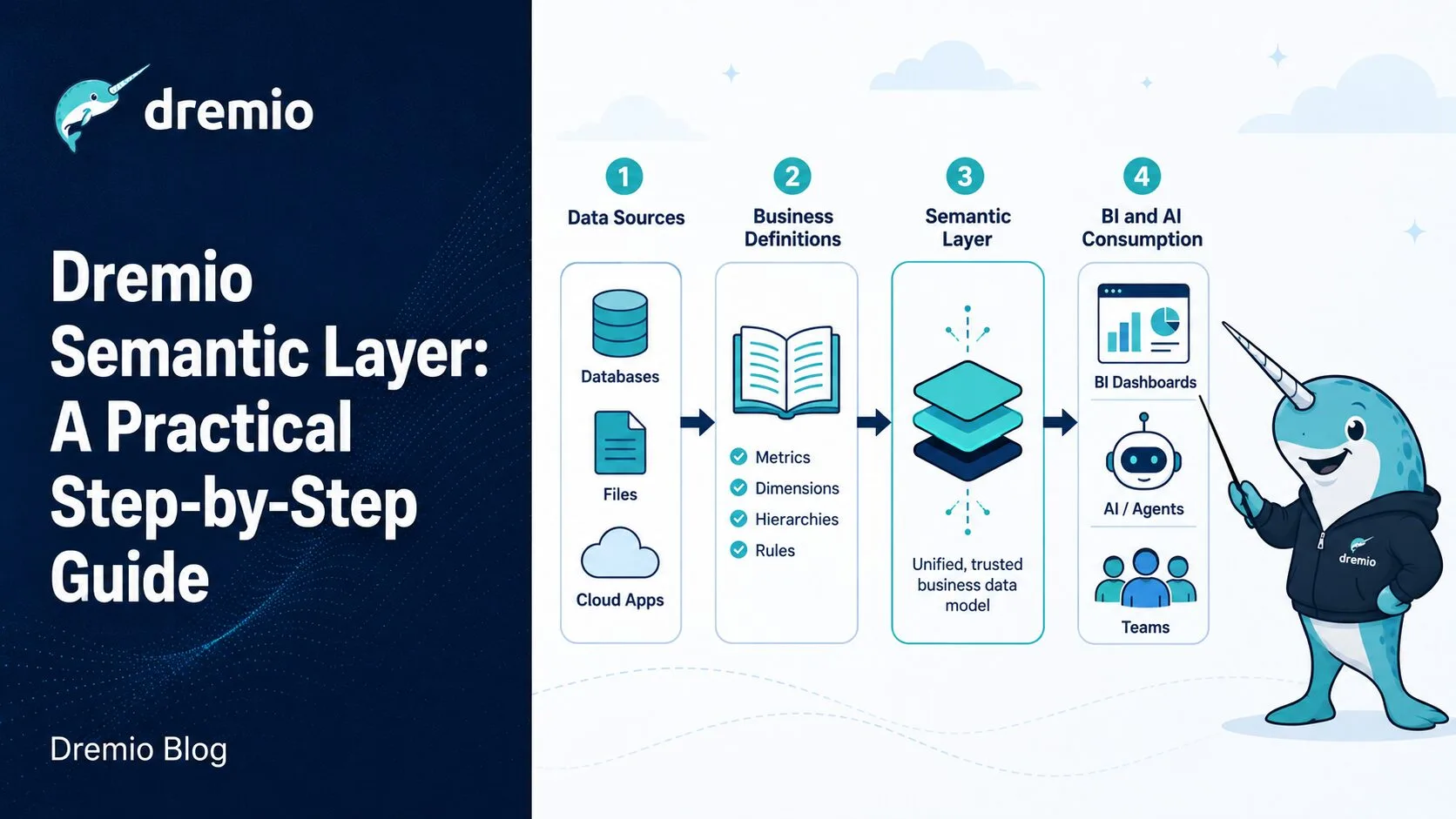
Most data teams using Dremio start the same way: analysts connect directly to raw source tables, write their own joins, and define their own filters. Within six months, "net revenue" means four different things depending on which dashboard you open. The Dremio semantic layer is the fix for this. It gives you a single governed layer of SQL views where business logic lives once and is shared everywhere.
This guide walks you through building a complete Dremio semantic layer for an e-commerce analytics use case from scratch. You will connect raw sources, build three tiers of views, add documentation, apply access control, and verify the whole thing works with Dremio's AI Agent. Every step includes working SQL. If you want conceptual background before diving in, the Dremio semantic layer overview and the complete semantic layer guide are solid starting points.
What You're Building
The use case is an e-commerce company with three raw data sources:
PostgreSQL orders database: transactional records with order ID, customer ID, amount in cents, status, timestamp, and region
Apache Iceberg tables on S3: clickstream event logs capturing user sessions, page views, and engagement signals
SaaS CRM data: customer profile data federated via a Dremio connector or pre-landed as an Iceberg table
The goal is to give three different consumer groups reliable, governed access to the same underlying data:
BI tools (Tableau, Power BI) querying monthly revenue and customer metrics
AI agents asking natural language questions about business performance
Executive dashboards showing pre-computed KPIs with no tolerance for inconsistency
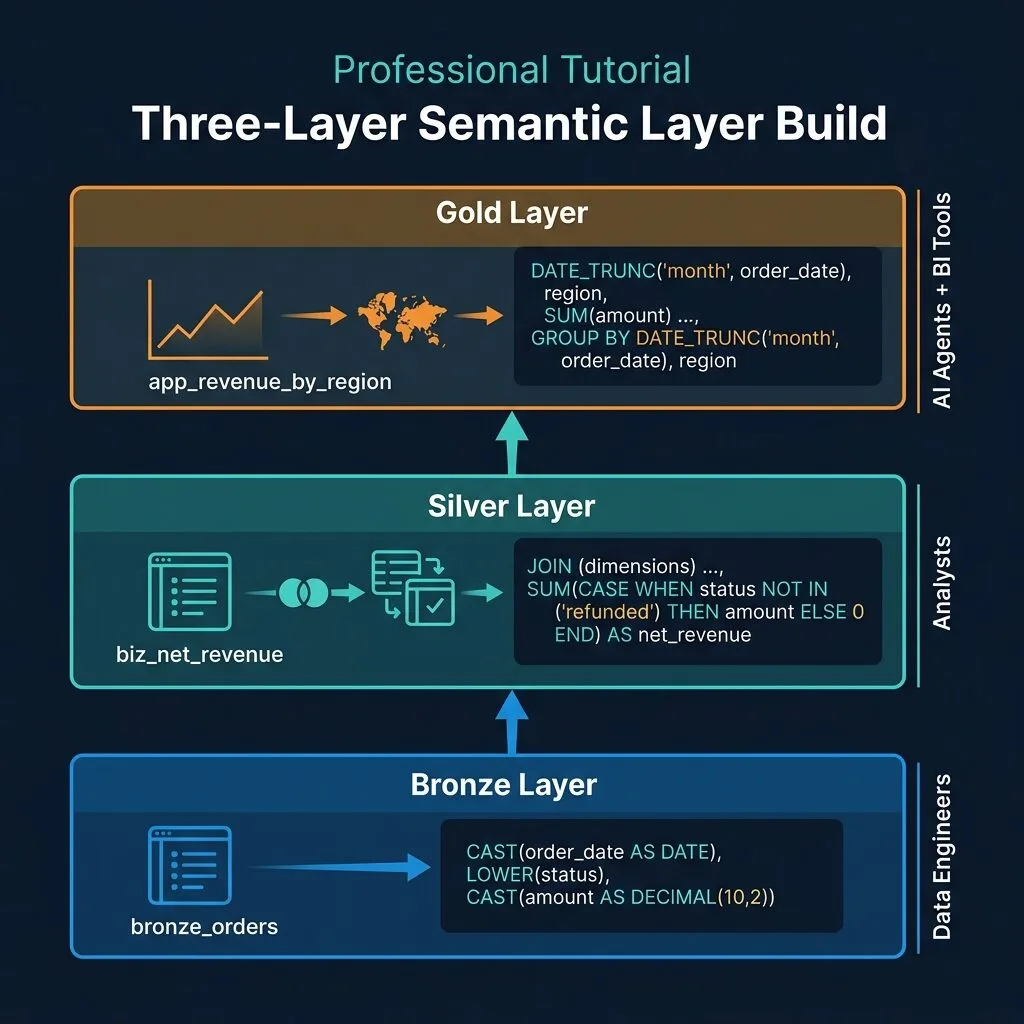
You will build this as a three-layer stack: a Bronze preparation layer, a Silver business logic layer, and a Gold application layer. Each layer has a naming convention and a clear purpose. The result is a Dremio semantic layer where business definitions are encoded once and consumed many times.
Organizing Your Semantic Layer in Dremio
Before writing a single line of SQL, set up the folder structure in Dremio. Dremio organizes virtual datasets in Spaces (think of these as namespaces for your catalog). Create three spaces:
semantic.bronze for preparation views
semantic.business for business logic views
semantic.application for application-ready views
You can create spaces from the Dremio UI under Catalog > New Space, or via the REST API. Once the spaces exist, all your SQL DDL can reference them directly with three-part names like semantic.bronze.prep_orders.
Adopt consistent naming prefixes from the start:
Layer
Prefix
Example
Bronze
prep_
prep_orders, prep_events
Silver
biz_
biz_net_revenue, biz_customer_tiers
Gold
app_
app_executive_revenue, app_marketing_funnel
This convention pays off when you use Dremio's lineage graph later. You can immediately see which layer a view belongs to just from its name.
Step 1: Connect Your Data Sources
Dremio's query federation means you connect to sources rather than copying data. No ETL pipeline. No staging environment. Dremio queries the source directly at runtime and translates your SQL into the native dialect or format of that source.
Adding a PostgreSQL Source
From the Dremio UI:
Navigate to Sources in the left sidebar
Click + Add Source
Select PostgreSQL
Fill in hostname, port, database name, username, and password
Click Save
Dremio reflects the PostgreSQL schema immediately. Your tables appear at raw_postgres.public.orders (or whatever schema name you configured). No data is moved. Every query against this source hits PostgreSQL at runtime.
Adding an Apache Iceberg Source on S3
For the clickstream event data stored as Iceberg tables on S3:
Navigate to Sources > + Add Source
Select Amazon S3 (or use Nessie if you have a catalog server)
Provide the S3 bucket, path prefix, and AWS credentials
Dremio discovers Iceberg metadata files and maps them to queryable datasets
If you use Dremio's Open Catalog (based on Apache Polaris), your Iceberg tables are registered there and Dremio federates them automatically. The benefit of Open Catalog is that multiple engines (Spark, Trino, Flink) can read the same Iceberg tables using the same catalog, while Dremio provides the semantic layer on top.
Once both sources are connected, you can write cross-source SQL immediately:
SELECT o.customer_id, COUNT(e.event_id) as event_count
FROM raw_postgres.public.orders o
JOIN iceberg_s3.events.clickstream e
  ON o.customer_id = e.user_id
WHERE o.created_at >= CURRENT_DATE - INTERVAL '30' DAY
GROUP BY 1;
This is Dremio query federation working. No data movement. No intermediate tables. The semantic layer you build on top of this is all virtual.
Step 2: Build the Bronze Preparation Layer
The Bronze layer does one thing: make raw data safe to use. It does not implement business logic. It casts types, renames cryptic columns, standardizes formats, and filters out records that have no business being in any analysis. Test accounts, nulls from bad ingestion runs, and malformed strings all go here.
The prep_ prefix signals to anyone reading the catalog that this view is a cleaned pass-through, not a metric definition.
prep_orders: Cleaning the Orders Table
-- Bronze Layer: Clean orders view
CREATE OR REPLACE VIEW semantic.bronze.prep_orders AS
SELECT
  order_id,
  customer_id,
  CAST(created_at AS TIMESTAMP) AS order_timestamp,
  CAST(amount_cents AS DECIMAL(10,2)) / 100 AS order_amount_usd,
  LOWER(TRIM(status)) AS order_status,
  LOWER(region) AS region
FROM raw_postgres.public.orders
WHERE customer_id NOT LIKE 'test%';
Walk through each transformation:
CAST(created_at AS TIMESTAMP): the source column is stored as a string in some PostgreSQL configurations. Cast it once here so downstream views do not repeat this work.
CAST(amount_cents AS DECIMAL(10,2)) / 100: store amounts in dollars from the start, not cents. This prevents the classic bug where a downstream view forgets to divide.
LOWER(TRIM(status)): status values in production databases are often inconsistent ('Refunded', ' refunded', 'REFUNDED'). Normalize to lowercase trimmed strings once.
LOWER(region): same principle for region values.
WHERE customer_id NOT LIKE 'test%': test accounts created during QA and development pollute every aggregate unless you exclude them here.
For the clickstream data, create a matching prep view:
-- Bronze Layer: Clean events view
CREATE OR REPLACE VIEW semantic.bronze.prep_events AS
SELECT
  event_id,
  user_id AS customer_id,
  CAST(event_timestamp AS TIMESTAMP) AS event_timestamp,
  LOWER(event_type) AS event_type,
  LOWER(page_name) AS page_name,
  session_id,
  LOWER(region) AS region
FROM iceberg_s3.events.clickstream
WHERE user_id IS NOT NULL
  AND user_id NOT LIKE 'test%';
The Bronze layer is your first line of defense. When the PostgreSQL team renames a column or changes a data type, you update one view. Not 40 downstream reports.
Step 3: Build the Silver Business Logic Layer
The Silver layer is where your organization's definitions live in code. "Net revenue" is not just a column name here. It is a specific formula your finance team has agreed on. "Active customer" has a specific time window your product team uses. These definitions go in biz_ views and they build on the Bronze layer, not raw sources.
If you are building your semantic layer alongside a dbt project, dbt's view materialization pattern maps directly to this approach. Your Silver models map to biz_ views in Dremio.
Defining Net Revenue
-- Silver Layer: Net Revenue business metric
CREATE OR REPLACE VIEW semantic.business.biz_net_revenue AS
SELECT
  DATE_TRUNC('month', order_timestamp) AS revenue_month,
  region,
  SUM(order_amount_usd) AS gross_revenue_usd,
  SUM(CASE WHEN order_status != 'refunded' THEN order_amount_usd ELSE 0 END) AS net_revenue_usd,
  COUNT(DISTINCT customer_id) AS paying_customers
FROM semantic.bronze.prep_orders
WHERE order_status != 'cancelled'
GROUP BY 1, 2;
Three business decisions are encoded here:
Exclude cancelled orders entirely from the base WHERE clause. A cancelled order never generated revenue.
Subtract refunds from net revenue using the CASE WHEN expression. Refunded orders are retained in the row set so you can track the gross figure, but they are excluded from the net calculation.
Monthly granularity via DATE_TRUNC. This is the standard reporting cadence your finance team agreed on.
Defining Customer Tiers
-- Silver Layer: Customer tier classification
CREATE OR REPLACE VIEW semantic.business.biz_customer_tiers AS
SELECT
  customer_id,
  SUM(order_amount_usd) AS lifetime_value_usd,
  CASE
    WHEN SUM(order_amount_usd) >= 10000 THEN 'Enterprise'
    WHEN SUM(order_amount_usd) >= 1000  THEN 'Growth'
    ELSE 'Starter'
  END AS customer_tier,
  MAX(order_timestamp) AS last_order_timestamp,
  CASE
    WHEN MAX(order_timestamp) >= CURRENT_TIMESTAMP - INTERVAL '90' DAY THEN true
    ELSE false
  END AS is_active
FROM semantic.bronze.prep_orders
WHERE order_status NOT IN ('cancelled', 'refunded')
GROUP BY 1;
The tier thresholds ($1,000 for Growth, $10,000 for Enterprise) are business decisions. When the sales team decides to change them, you update this one view. Every downstream report automatically reflects the change.
Step 4: Build the Gold Application Layer
Gold views are tailored for specific consumers. They pull from Silver views, select only the columns each consumer needs, apply final formatting (rounding, aliases), and give column names that make sense to the audience reading them. The app_ prefix marks them as consumer-ready.
Executive Revenue Dashboard View
-- Gold Layer: Executive Revenue Dashboard view
CREATE OR REPLACE VIEW semantic.application.app_executive_revenue AS
SELECT
  revenue_month,
  region,
  ROUND(net_revenue_usd, 2) AS net_revenue,
  paying_customers,
  ROUND(net_revenue_usd / NULLIF(paying_customers, 0), 2) AS arpu
FROM semantic.business.biz_net_revenue
ORDER BY revenue_month DESC;
NULLIF(paying_customers, 0) prevents division-by-zero errors. The column name arpu (Average Revenue Per User) is the term executives use, and it reads clearly in dashboard labels. The _usd suffix is dropped intentionally for brevity.
Marketing Analytics View
-- Gold Layer: Marketing analytics combining revenue + engagement
CREATE OR REPLACE VIEW semantic.application.app_marketing_analytics AS
SELECT
  r.revenue_month,
  r.region,
  r.net_revenue_usd,
  r.paying_customers,
  COUNT(DISTINCT e.session_id) AS total_sessions,
  COUNT(DISTINCT e.customer_id) AS engaged_users,
  ROUND(r.net_revenue_usd / NULLIF(COUNT(DISTINCT e.session_id), 0), 4) AS revenue_per_session
FROM semantic.business.biz_net_revenue r
LEFT JOIN (
  SELECT
    customer_id,
    session_id,
    region,
    DATE_TRUNC('month', event_timestamp) AS event_month
  FROM semantic.bronze.prep_events
  WHERE event_type = 'purchase_intent'
) e ON r.region = e.region AND r.revenue_month = e.event_month
GROUP BY 1, 2, 3, 4;
AI Agent-Specific View
-- Gold Layer: AI Agent optimized view (clean names, minimal columns)
CREATE OR REPLACE VIEW semantic.application.app_ai_revenue_summary AS
SELECT
  revenue_month AS month,
  region,
  net_revenue_usd AS net_revenue,
  paying_customers AS customer_count,
  ROUND(net_revenue_usd / NULLIF(paying_customers, 0), 2) AS revenue_per_customer
FROM semantic.business.biz_net_revenue;
The AI agent view strips away columns the agent does not need for common revenue questions. Fewer columns reduce ambiguity during SQL generation. Column names are full English words with no abbreviations, because the AI reads them to understand what each field represents. This is part of Dremio's Agentic Lakehouse architecture: the semantic layer is designed to be machine-readable, not just human-readable.
Step 5: Document Your Virtual Datasets
Documentation is what turns a set of SQL views into a real semantic layer. Without it, the views are just views. With it, they become a governed data contract that BI tools, data engineers, and AI agents can all use reliably.
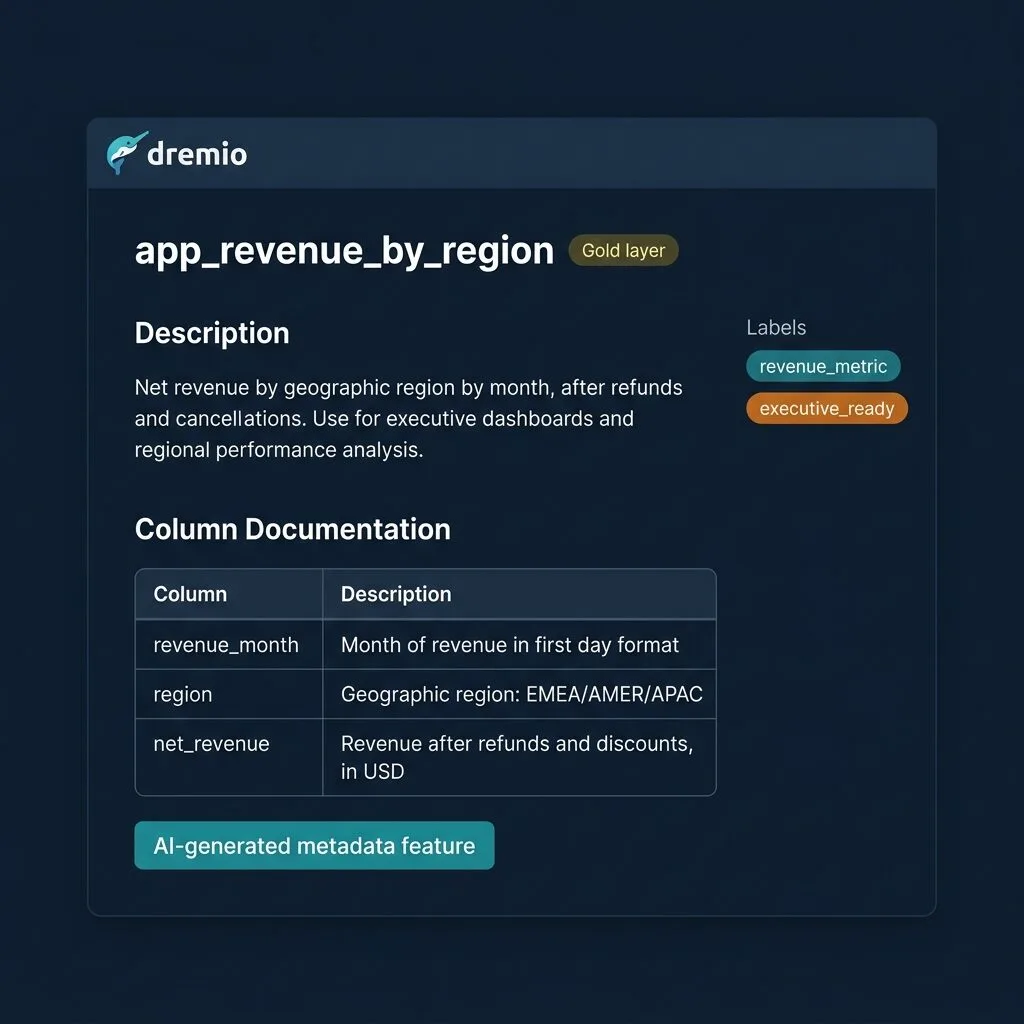
Adding a Wiki Description
In the Dremio UI, navigate to any virtual dataset, click the Wiki tab, and write a Markdown description. For biz_net_revenue, a good wiki entry looks like:
## Net Revenue (Monthly by Region)

Monthly net revenue aggregated by region, calculated as gross order revenue
minus refunded order amounts. Cancelled orders are excluded entirely.

**Source:** `semantic.bronze.prep_orders`
**Granularity:** Calendar month
**Refresh cadence:** Live (queries source at runtime)
**Business owner:** Finance team

### Metric definitions
- **gross_revenue_usd:** Sum of all order amounts including refunds
- **net_revenue_usd:** Sum of order amounts excluding refunded orders
- **paying_customers:** Count of distinct customer IDs with non-cancelled, non-refunded orders
You can also write this via the Dremio REST API, which lets you version-control your documentation alongside your SQL in git:
curl -X POST "https://<your-dremio>/api/v3/catalog/<dataset-id>/wiki" \
  -H "Authorization: Bearer <token>" \
  -H "Content-Type: application/json" \
  -d '{"text": "## Net Revenue (Monthly by Region)\n\nMonthly net revenue..."}'
Adding Labels
Labels in Dremio are tags you apply to datasets for classification. Apply them from the dataset detail page or via API. Useful labels for this semantic layer:
revenue_metric: marks this as an official revenue measure
financial: financial governance classification
ai_consumable: signals to the AI Agent that this view is safe and appropriate to query
pii_free: confirms the view does not expose personally identifiable information
AI-Generated Column Descriptions
Dremio can sample your dataset and auto-generate column-level descriptions using its AI capabilities. For a view like app_executive_revenue, Dremio can infer that arpu is a calculated ratio and suggest a description. You review and approve these, then they appear in the catalog for anyone querying the dataset.
The combination of wiki descriptions, column descriptions, and labels is what makes your Dremio data catalog genuinely useful, for human data consumers and for AI agents generating SQL on your behalf alike.
Step 6: Set Up Access Control
The semantic layer is only as trustworthy as its access controls. You want data engineers to maintain all three layers, analytics teams to query the Gold layer, and no one (except authorized roles) to query raw source tables directly.
Role-Based Access
Grant access at the Space level:
-- Grant analytics team access to Gold layer only
GRANT SELECT ON FOLDER "semantic"."application" TO ROLE analytics_team;

-- Grant data engineers access to all semantic layers
GRANT SELECT ON SPACE "semantic" TO ROLE data_engineering;

-- Explicitly deny raw source access for analytics users (Dremio RBAC)
-- Raw sources are not in the semantic space, so simply not granting access is sufficient
Dremio's role-based access control (RBAC) is additive. If analytics_team only has SELECT on semantic.application, they cannot access raw_postgres.public.orders unless you explicitly grant it. The architecture naturally enforces the access boundary.
Row-Level Security with FGAC
For regional data restrictions (where West region managers should only see West region data), use Dremio's Fine-Grained Access Control (FGAC) with a UDF:
-- FGAC: Row-level security function for regional access
CREATE FUNCTION enforce_region_access(region VARCHAR)
RETURNS BOOLEAN
RETURN region = SESSION_USER_ATTRIBUTE('user_region')
   OR SESSION_USER_ATTRIBUTE('user_region') = 'global';
Apply this function in your Gold layer view:
-- Gold Layer with row-level security applied
CREATE OR REPLACE VIEW semantic.application.app_executive_revenue AS
SELECT
  revenue_month,
  region,
  ROUND(net_revenue_usd, 2) AS net_revenue,
  paying_customers,
  ROUND(net_revenue_usd / NULLIF(paying_customers, 0), 2) AS arpu
FROM semantic.business.biz_net_revenue
WHERE enforce_region_access(region) = TRUE
ORDER BY revenue_month DESC;
SESSION_USER_ATTRIBUTE('user_region') reads the user_region attribute from the logged-in user's session, which you configure in Dremio's user management. A user with user_region = 'west' sees only West region rows. A user with user_region = 'global' (your finance director, your executive team) sees all regions.
This works transparently. The BI tool connecting to this view does not need to know about the regional restriction. The user queries the view normally; Dremio enforces the row filter at runtime.
Step 7: Test with the Dremio AI Agent
With your Gold layer documented and access-controlled, the Dremio AI Agent can now answer business questions using your semantic layer. This is where the documentation work pays off directly.
How the AI Agent Uses Your Semantic Layer
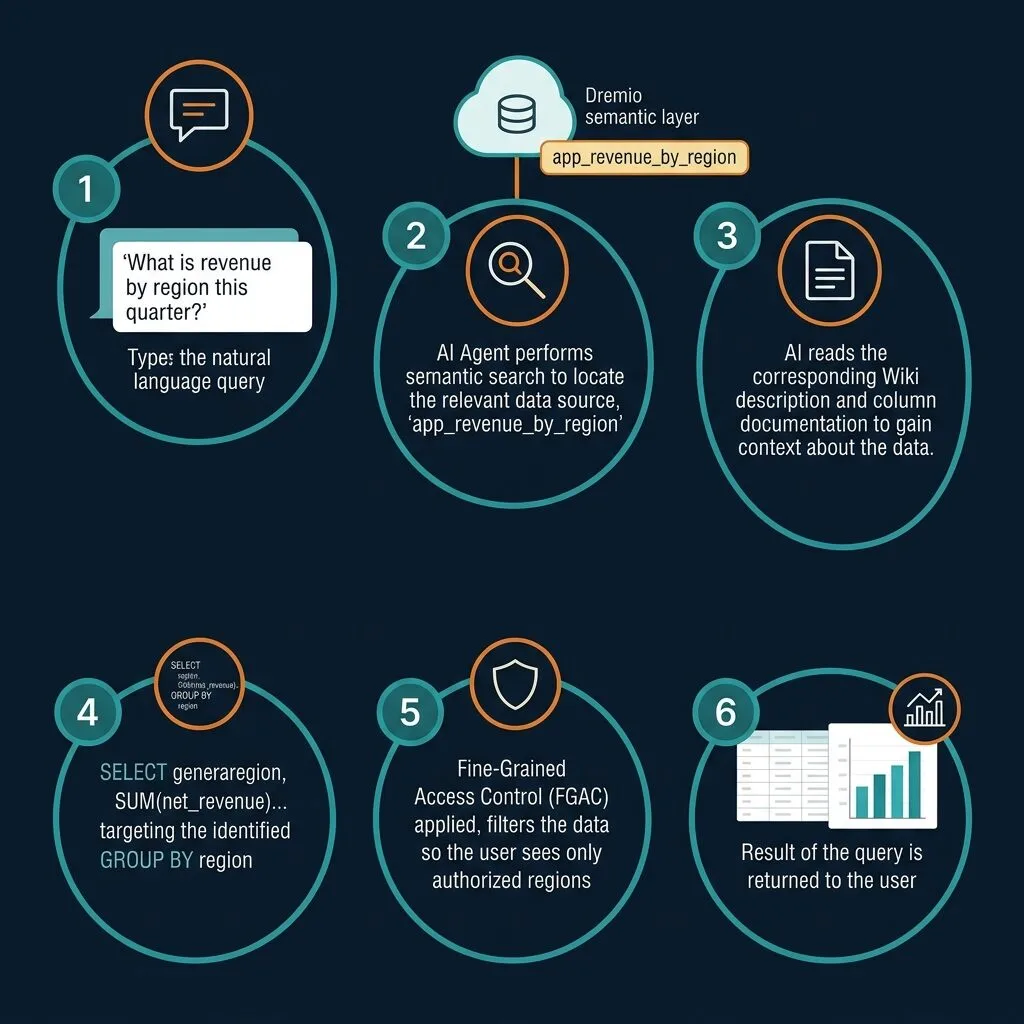
Open the Dremio AI Agent interface. Type:
"What was our net revenue in the West region last quarter?"
The agent processes this in several steps:
Schema discovery: the agent reads your catalog, finds datasets labeled ai_consumable or tagged as revenue metrics
Wiki reading: it reads the wiki description for app_ai_revenue_summary or app_executive_revenue, confirming that net_revenue is the correct column for this question
SQL generation: it generates a SQL query filtering region = 'west' and applying a date range for last quarter
FGAC enforcement: your enforce_region_access() UDF runs automatically; if the agent's service account has user_region = 'global', it can see all data, and the filter in the question narrows the result
Result delivery: the agent returns the answer with the underlying SQL visible for transparency
The key insight is that the agent chooses app_executive_revenue or app_ai_revenue_summary rather than querying raw_postgres.public.orders directly. This happens because your Gold layer views are documented, labeled, and have clean column names. The Silver and Bronze views are also accessible, but the Gold layer's documentation makes the intent unambiguous.
Why the Gold Layer Works Better for AI
Factor
Raw Source Table
Gold Layer View
Column names
amt_cts, cust_id, creat_dt
net_revenue, customer_count, month
Business logic applied
None
Net revenue excludes refunds, tier logic applied
Documentation
None
Wiki description, column descriptions, labels
Access control
Broad
Role-scoped, FGAC row filtering
Column count
40+ source columns
5-8 relevant columns
Fewer columns reduce the chance the AI picks the wrong field. Clear documentation removes ambiguity about what each metric means. This is why building a complete semantic layer (not just connecting data sources) is foundational to the Dremio Agentic Lakehouse architecture.
If you connect external AI agents or tools via the Dremio MCP Server, they access the same governed semantic layer. The MCP Server exposes Dremio's SQL interface via the Model Context Protocol, so agents built on LLM frameworks can query app_executive_revenue with the same access controls that apply to any other Dremio user.
Maintaining Your Semantic Layer Over Time
Building the layer is the first step. Keeping it accurate is the ongoing discipline.
Version Control Your View SQL
Treat your SQL DDL as code. Store each view's CREATE OR REPLACE VIEW statement in a git repository:
If you use dbt, your Silver views map naturally to dbt models with view materializations. dbt handles the CREATE OR REPLACE VIEW DDL and tracks lineage in its manifest. You can run dbt models against Dremio's JDBC/ODBC endpoint or Arrow Flight endpoint.
Track Business Definition Changes
When the finance team changes the definition of "net revenue" (say, they decide to also exclude orders with a discount greater than 80%), update biz_net_revenue.sql in git with a commit message that explains the business reason. Then update the wiki description in Dremio to match.
A semantic layer where the SQL disagrees with the documentation is worse than no semantic layer at all. The documentation is part of the contract.
Use Data Lineage for Impact Analysis
Before changing a Bronze view like prep_orders, check Dremio's Data Lineage graph. It shows you every Silver and Gold view that depends on prep_orders. If you change a column name or remove a filter, you can see exactly which downstream views will break before you make the change.
This is especially important for columns that AI agents reference. If an agent has been correctly answering questions using net_revenue and you rename the column, the agent's behavior changes. Lineage makes that impact visible.
Periodic Schema Drift Audits
PostgreSQL schemas change. New columns get added, old ones get deprecated, data types change. Run periodic checks to verify that your Bronze views still reflect the current source schema:
-- Check if source columns exist that prep_orders doesn't expose
SELECT column_name
FROM information_schema.columns
WHERE table_schema = 'public' AND table_name = 'orders'
  AND column_name NOT IN (
    SELECT column_name FROM information_schema.columns
    WHERE table_name = 'prep_orders'
  );
This kind of maintenance discipline is what separates a semantic layer that data teams trust from one they quietly bypass.
Tradeoffs to Know Before You Start
No architecture is free of tradeoffs. Here is what to weigh honestly.
View overhead is minimal but real. Each layer adds one query planning step. In practice this is sub-millisecond for most query patterns. For heavy aggregations running frequently, Dremio's Reflections (including Autonomous Reflections) can materialize the Silver or Gold layer results transparently. Queries hit the reflection rather than recomputing from Bronze on every run.
Maintenance is ongoing, not optional. A semantic layer is a living artifact. Business definitions change. Source schemas drift. New teams ask for new metrics. Plan for semantic layer maintenance as a recurring engineering activity, not a one-time project.
Layer proliferation is a real risk. Without discipline, you end up with 300 ad hoc views that nobody can navigate. Enforce the prep_/biz_/app_ naming convention. Archive views that are no longer used. Conduct quarterly catalog cleanups.
The layer must stay synchronized with business definitions. The most dangerous state is a semantic layer where the SQL is correct but the documentation is stale. Analysts trust the documentation, build on it, and then get wrong answers. Treat documentation updates as part of any code change.
FGAC adds complexity. Row-level security with UDFs is powerful but requires careful testing. Make sure you test both the "restricted user sees only their region" case and the "global user sees all regions" case before you put a FGAC view in production.
Build Once, Query Everywhere
After completing these seven steps, you have a Dremio semantic layer that is production-ready:
Three source connections (PostgreSQL, Iceberg/S3, SaaS) federated without ETL
A Bronze layer that cleans and standardizes raw data in 8 views
A Silver layer that encodes official business definitions for revenue, customer tiers, and engagement
A Gold layer tailored for three distinct consumers: BI tools, executives, and AI agents
Documentation (wiki, column descriptions, labels) that makes every view self-describing
FGAC row-level security so regional managers see only their data
A Dremio AI Agent that uses your documented Gold layer to answer business questions with governed SQL
What makes this approach durable is that it scales in both directions. As you add new sources, you add Bronze views. As business definitions evolve, you update Silver views in one place. As new consumer types emerge (more AI agents, more specialized dashboards), you add Gold views without touching the logic underneath.
The combination of Autonomous Reflections, documented virtual datasets, and the Dremio AI Agent is moving toward a semantic layer that partially manages itself. Today you build and maintain it manually. That ratio shifts over time.
Ingesting Data Into Apache Iceberg Tables with Dremio: A Unified Path to Iceberg
By unifying data from diverse sources, simplifying data operations, and providing powerful tools for data management, Dremio stands out as a comprehensive solution for modern data needs. Whether you are a data engineer, business analyst, or data scientist, harnessing the combined power of Dremio and Apache Iceberg will undoubtedly be a valuable asset in your data management toolkit.
Oct 12, 2023·Product Insights from the Dremio Blog
Table-Driven Access Policies Using Subqueries
This blog helps you learn about table-driven access policies in Dremio Cloud and Dremio Software v24.1+.
Aug 31, 2023·Dremio Blog: News Highlights
Dremio Arctic is Now Your Data Lakehouse Catalog in Dremio Cloud
Dremio Arctic bring new features to Dremio Cloud, including Apache Iceberg table optimization and Data as Code.