Dremio is a data lakehouse platform that enables high-performance analytics and AI-driven applications.
Python serves as the primary language for automating interactions with Dremio, crucial for advanced use cases.
The article introduces three community-developed libraries: dremio-simple-query for simple SQL execution, dremio-cli for CLI interactions, and dremioframe for advanced data engineering and operations.
Each library targets different use cases, enhancing the developer experience while integrating with Dremio.
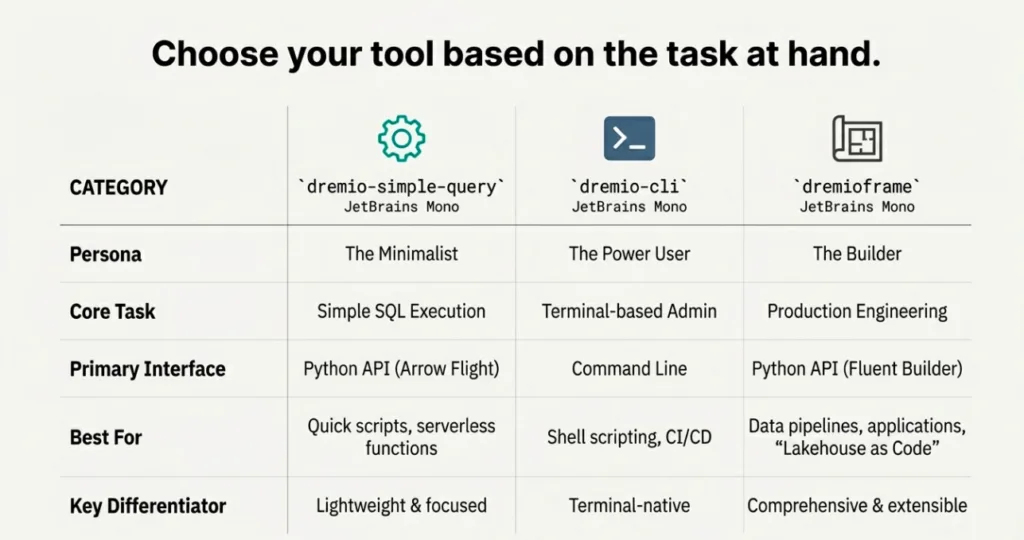
Choosing the right tool—dremio-simple-query, dremio-cli, or dremioframe—depends on the specific task at hand.
Dremio is a powerful data lakehouse platform designed to facilitate high-performance, self-service analytics and power AI-driven applications. It provides a unified semantic layer and seamless data access across diverse sources, making it a central hub for modern data workflows.
While Dremio's user interface is excellent for exploration and management, data engineers, data scientists, and developers often need to interact with the platform programmatically. Python, the lingua franca of data, is the natural choice for automating data pipelines, performing complex transformations, and building data-intensive applications on top of Dremio. These programmatic interactions are essential for advanced use cases, such as building AI agents with LangChain or automating data preparation for Dremio's native AI Functions in SQL.
This article introduces three community-developed Python libraries designed to meet this need: dremio-simple-query, dremio-cli, and dremioframe. Each tool is tailored for a different set of use cases, from simple scripting to the development of complex, production-grade data pipelines.
Dremio does not officially support these libraries. They are community-driven tools maintained by Alex Merced, Dremio's Head of DevRel, to enhance the Python developer experience.
Explore this interactive demo and see how Dremio's Intelligent Lakehouse enables Agentic AI
1. For the Minimalist: dremio-simple-query
Purpose
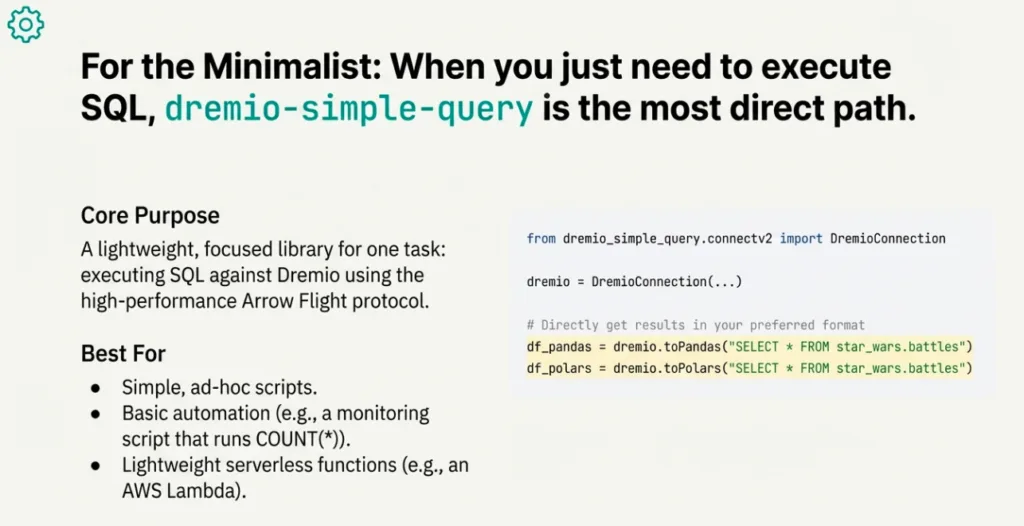
dremio-simple-query is a lightweight, focused library with a single primary function: executing SQL queries against Dremio using the high-performance Arrow Flight protocol.
When to Use It
This library is the ideal choice for simple, ad hoc scripts or basic automation where the only requirement is to run an SQL statement and retrieve the results. If you don't need catalog management, a DataFrame-style API, or other complex features, dremio-simple-query provides a direct and efficient solution. For instance, this is perfect for a lightweight Python function in an AWS Lambda that needs to trigger a Dremio job and retrieve a small result, or for a simple monitoring script that runs a COUNT(*) query.
Installation
pip install dremio-simple-query
Usage
from dremio_simple_query.connectv2 import DremioConnection

from os import getenv

from dotenv import load_dotenv

load_dotenv()

# Option 1: Authenticate with PAT (Personal Access Token)

dremio = DremioConnection(

    location=getenv("ARROW_ENDPOINT"), # e.g., grpc+tls://data.dremio.cloud:443

    token=getenv("DREMIO_TOKEN"),

    project_id=getenv("DREMIO_PROJECT_ID") # Optional: Specify Project ID context

)

# Option 2: Authenticate with Username/Password (Software Only)

# Performs automatic Arrow Flight Handshake

dremio_auth = DremioConnection(

    location="grpc+tls://dremio.company.com:32010",

    username="my_user",

    password="my_password"

)

# Query Data (Returns FlightStreamReader)

stream = dremio.toArrow("SELECT * FROM star_wars.battles")

# Convert to your favorite format

df_pandas = dremio.toPandas("SELECT * FROM star_wars.battles")

df_polars = dremio.toPolars("SELECT * FROM star_wars.battles")

duck_rel  = dremio.toDuckDB("SELECT * FROM star_wars.battles")
2. For the Terminal Power User: dremio-cli
Purpose
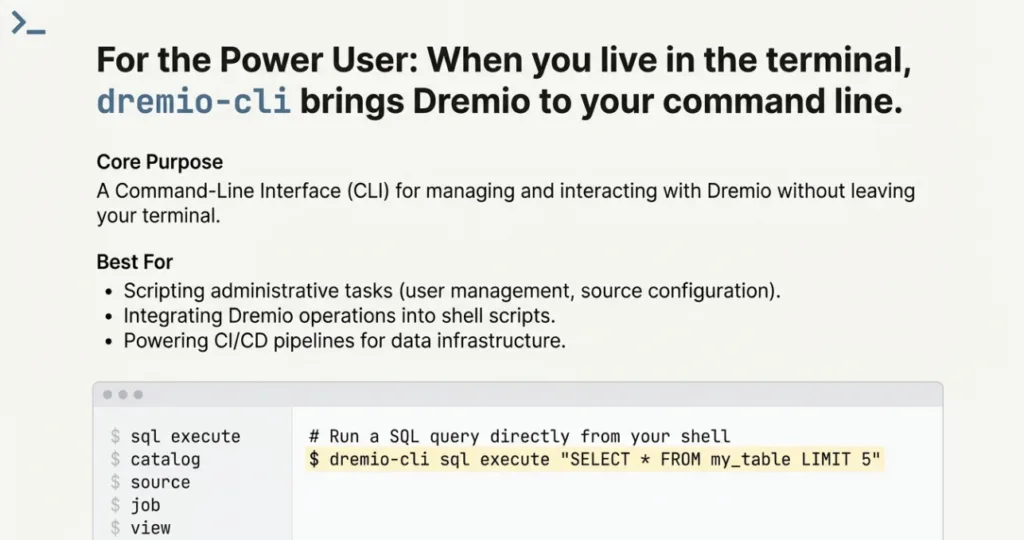
dremio-cli is a command-line interface (CLI) created for managing and interacting with Dremio directly from your terminal.
Key Features
This tool provides convenient commands for common Dremio operations, including:
Choose dremio-cli when you need to script administrative tasks, want to integrate Dremio operations into shell scripts and CI/CD pipelines, or prefer the power and speed of the command line for day-to-day interactions.
Installation
pip install dremio-cli
Basic Usage
To run a SQL query directly from your terminal, use the query command:
dremio-cli sql execute "SELECT * FROM my_table LIMIT 5"
3. For the Data Engineer & Scientist: dremioframe
Purpose
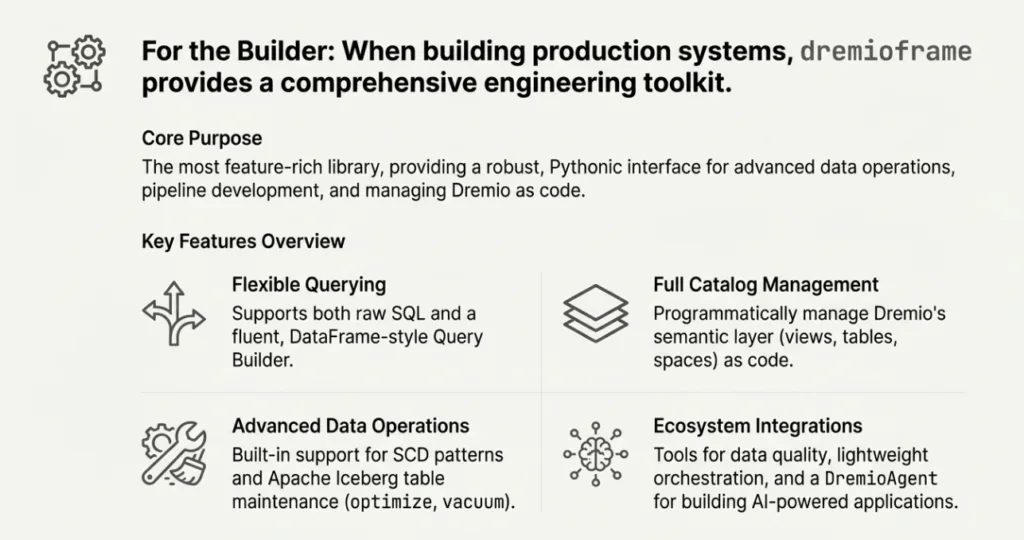
dremioframe is the most comprehensive and feature-rich library of the three. It provides a robust, Pythonic toolkit for advanced data operations, pipeline development, and managing Dremio as a part of your application stack.
Key Features
Flexible Querying: Supports both direct execution of raw SQL and a fluent, DataFrame-like Query Builder API for programmatic and dynamic query construction.
Full Catalog Management: Provides programmatic access to create, read, and manage Dremio catalog objects. This allows you to manage Dremio's semantic layer as code, enabling CI/CD for your data products like views, tables, and spaces.
Advanced Data Operations: Includes built-in support for complex patterns like Slowly Changing Dimensions (SCD) and essential Apache Iceberg table maintenance. With functions like optimize and vacuum, you can programmatically manage the health and performance of your lakehouse tables.
Ecosystem Integrations: Offers a suite of tools for data quality (DQ) testing and a lightweight orchestration engine for building data pipelines directly in Python. Crucially, it includes the DremioAgent, which lets you build applications that leverage Dremio's AI capabilities for tasks like code generation and natural language interaction.
When to Use It
dremioframe is your go-to toolkit for larger scale development on Dremio. Opt for it when building production-grade data pipelines, developing complex data transformations, conducting data science experiments, and managing the Dremio lakehouse as code. Its extensive feature set is designed to support the full data engineering and data science lifecycle.
Installation
pip install dremioframe
Basic Usage Examples
Querying with SQL
Dremio frame can execute SQL statements.

# Return as Pandas DataFrame (default)

df = client.query('SELECT * FROM finance.bronze.transactions LIMIT 10')

# Return as Arrow Table

arrow_table = client.query('SELECT * FROM finance.bronze.transactions LIMIT 10', format="arrow")

# Return as Polars DataFrame

polars_df = client.query('SELECT * FROM finance.bronze.transactions LIMIT 10', format="polars")
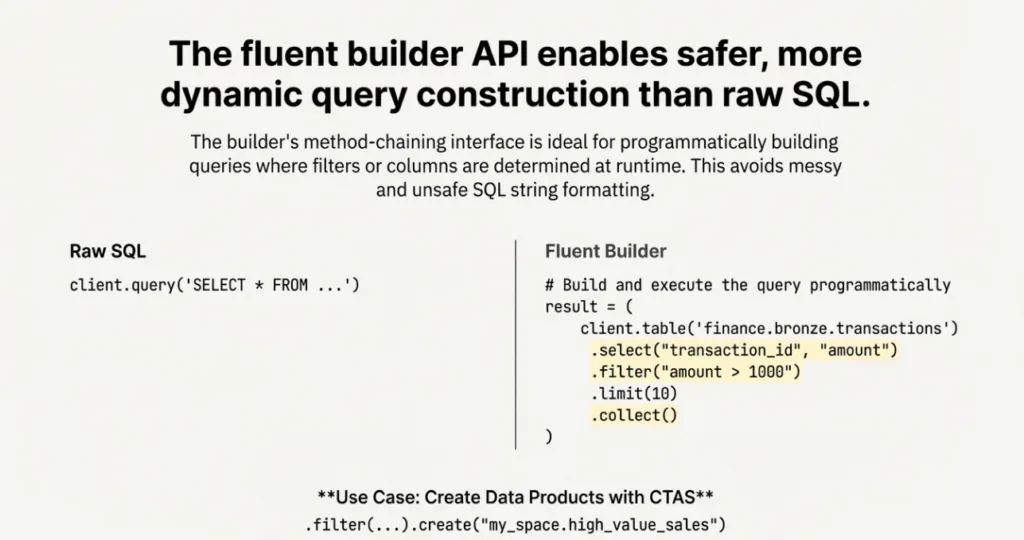
Querying with the Fluent Builder API
The builder provides a fluent, method-chaining interface that feels native to Python developers. This approach is compelling for building queries programmatically, where parts of the query, such as filter conditions or selected columns, are determined at runtime based on user input or other logic—a much safer and cleaner method than string-formatted raw SQL.
from dremioframe.client import DremioClient

client = DremioClient()

# Get a builder object for a specific table

df_builder = client.table('finance.bronze.transactions')

# Build and execute the query

result = (

    df_builder.select("transaction_id", "customer_id", "amount")

              .filter("amount > 1000")

              .limit(10)

              .collect()

)

print(result)
Creating Data Products with CTAS
You can also use the builder to execute Create Table As Select (CTAS) statements, a powerful pattern for materializing transformed data as a new data product in your lakehouse.
client = DremioClient()

# Create a new table from a filtered query result

(

    client.table("sales.transactions")

          .filter("amount > 1000")

          .create("my_space.high_value_sales")

)client = DremioClient()

# Create a new table from a filtered query result

(

    client.table("sales.transactions")

          .filter("amount > 1000")

          .create("my_space.high_value_sales")

)
from dremioframe.client import DremioClient
Conclusion: Choose the Right Tool for the Job
Dremio's power can be fully leveraged within the Python ecosystem thanks to these versatile community-driven libraries. By understanding their distinct strengths, you can select the perfect tool for your specific task:
dremio-simple-query: For quick, simple scripts that just need to run SQL.
dremio-cli: For terminal-based administration, exploration, and shell scripting.
dremioframe: For comprehensive data engineering, data science, and application development.
These tools provide powerful and flexible options for Python developers to integrate Dremio seamlessly into any workflow, from simple automation to sophisticated applications that manage the lakehouse as code and integrate directly with Dremio's AI capabilities.
Which of these tools best fits your Dremio workflow, and what will you build with it?
Ingesting Data Into Apache Iceberg Tables with Dremio: A Unified Path to Iceberg
By unifying data from diverse sources, simplifying data operations, and providing powerful tools for data management, Dremio stands out as a comprehensive solution for modern data needs. Whether you are a data engineer, business analyst, or data scientist, harnessing the combined power of Dremio and Apache Iceberg will undoubtedly be a valuable asset in your data management toolkit.
Oct 12, 2023·Product Insights from the Dremio Blog
Table-Driven Access Policies Using Subqueries
This blog helps you learn about table-driven access policies in Dremio Cloud and Dremio Software v24.1+.
Aug 31, 2023·Dremio Blog: News Highlights
Dremio Arctic is Now Your Data Lakehouse Catalog in Dremio Cloud
Dremio Arctic bring new features to Dremio Cloud, including Apache Iceberg table optimization and Data as Code.